Online retailers face a persistent challenge: shoppers struggle to determine the fit and look when ordering online, leading to increased returns and decreased purchase confidence. The cost? Lost revenue, operational overhead, and customer frustration. Meanwhile, consumers increasingly expect immersive, interactive shopping experiences that bridge the gap between online and in-store retail. Retailers implementing virtual try-on technology can improve purchase confidence and reduce return rates, translating directly to improved profitability and customer satisfaction. This post demonstrates how to build a virtual try-on and recommendation solution on AWS using Amazon Nova Canvas, Amazon Rekognition and Amazon OpenSearch Serverless. Whether you’re an AWS Partner developing retail solutions or a retailer exploring generative AI transformation, you’ll learn the architecture, implementation approach, and key considerations for deploying this solution.
You can find the code base to deploy the solution in your AWS account in the GitHub repo.
Solution overview
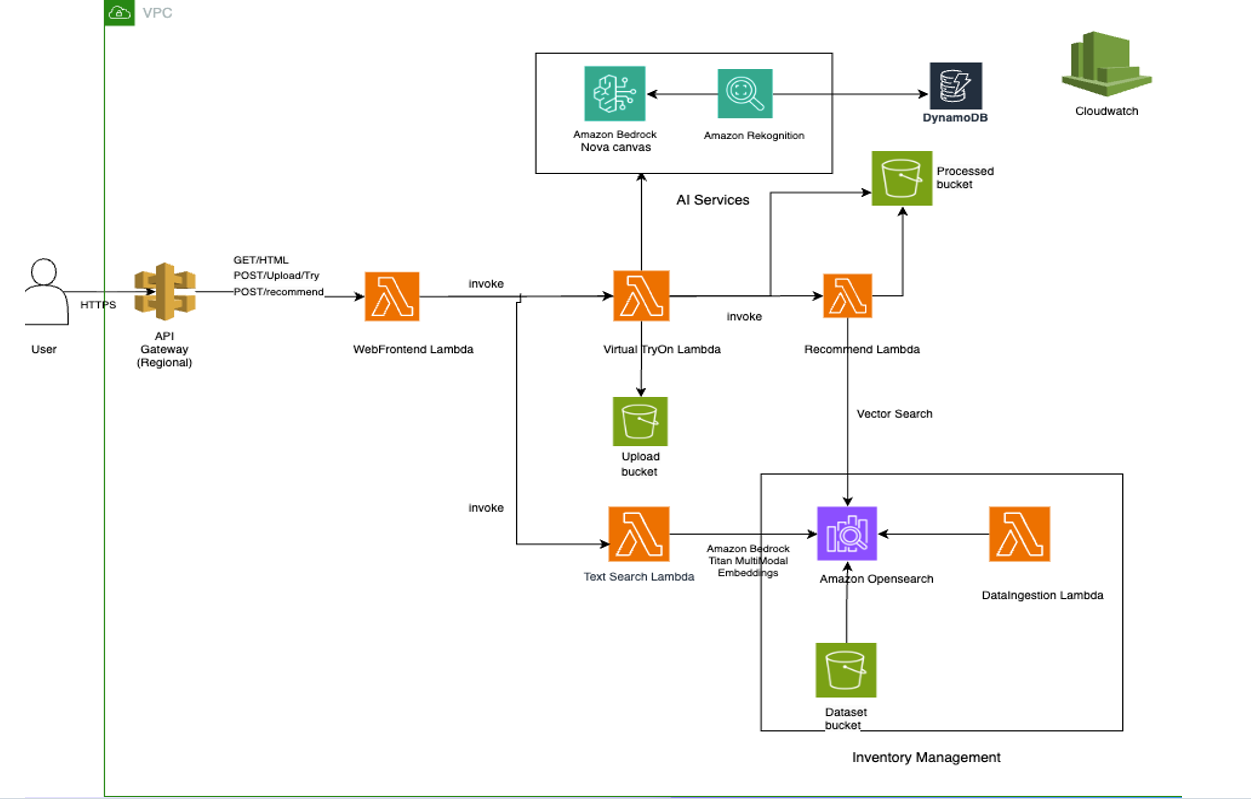
This solution demonstrates how to build an AI-powered, serverless retail solution. The service delivers four integrated capabilities:
- Virtual try-on: Generates realistic visualizations of customers wearing or using products through Amazon Nova Canvas and Amazon Rekognition
- Smart recommendations: Provides visually aware product suggestions using Amazon Titan Multimodal Embeddings to understand style relationships and visual similarity
- Smart search: Enables natural language product discovery with goal-oriented intelligence that understands customer intent. Uses OpenSearch Serverless for vector similarity matching
- Analytics and insights: Tracks customer interactions, preferences, and trends using Amazon DynamoDB to optimize inventory and merchandising decisions
The architecture uses serverless AWS services for scalability and uses a modular design, allowing you to implement individual capabilities or the complete solution.
Pre-built architecture components
The solution runs on AWS serverless infrastructure with five specialized AWS Lambda functions, each optimized for specific tasks: web front-end (chatbot interface), virtual try-on processing, recommendation generation, dataset ingestion, and intelligent search. The architecture uses S3 buckets for secure storage, Amazon OpenSearch Serverless for vector similarity search, and DynamoDB for real-time analytics tracking.
Scalability and deployment
Built using AWS Serverless Application Model (AWS SAM), the entire solution deploys with a single command and automatically scales based on demand. Reserved concurrency limits help prevent resource contention, while Amazon API Gateway caching and presigned URLs optimize performance. The microservices approach allows independent scaling and updates of each component.
Integration flexibility for partners and customers
The modular design allows implementation of individual capabilities or the complete solution. Documentation, sample test images, and utility scripts for dataset management make it straightforward for developers to customize and extend the solution for specific retail needs.
Prerequisites
Before beginning the deployment process, verify you have the following prerequisites configured:
AWS account setup
- An active AWS account with administrative privileges
- AWS Command Line Interface (AWS CLI) installed and configured with appropriate credentials
- This solution requires Amazon Nova Canvas, Amazon Titan Multimodal Embeddings, Amazon Rekognition, and Amazon OpenSearch Serverless in the same Region. Deploy in US East (N. Virginia) – us-east-1 (recommended).
Regional availability for Amazon Bedrock models changes over time. Before deploying in a Region other than us-east-1, confirm that all required models are supported by checking the Amazon Bedrock model support by Region page and the AWS Regional Services List.
Amazon Bedrock model access
Amazon Bedrock foundation models are now automatically enabled when first invoked in your account across all AWS commercial regions. The models required for this solution (Amazon Nova Canvas and Amazon Titan Embeddings) will be automatically activated when the application first calls them – no manual enablement required.
Note: For first-time Amazon Bedrock users, the initial model invocation might take a few extra seconds as the service provisions access.
AWS service permissions
The IAM role that you use to deploy the SAM template must have these permissions:
- Creating and managing Lambda functions
- S3 bucket creation and object management
- Amazon OpenSearch Serverless collection creation
- DynamoDB table creation and data access
- Amazon Bedrock model invocation (Nova Canvas and Titan)
- Amazon Rekognition service access
- AWS CloudFormation stack management
- API Gateway creation and configuration
Development environment
- AWS SAM CLI version 1.50.0 or higher installed
- Python 3.9 or higher with pip package manager
- Git for repository cloning and version control
- A text editor or IDE for configuration file editing
Deploying the SAM template
The deployment process uses AWS SAM to define and deploy all infrastructure components. Follow these steps to build and deploy the application.
Step 1: Repository setup
Begin by cloning the repository and navigating to the project directory:
git clone https://github.com/aws-samples/sample-genai-virtual-tryon.git

cd VirtualTryOne-GenAI
Examine the project structure to understand the code base organization:
template.yaml: SAM template defining all AWS resourcesrequirements.txt: Python dependencies for Lambda functions- Lambda function source files (*.py)
- Fashion dataset and sample images
Step 2: Dependency installation
pip install -r requirements.txtThis installs packages needed for image processing, AWS SDK interactions, OpenSearch connectivity, and other core functionalities.
Step 3: SAM build process
Build the SAM application, which packages Lambda functions and prepares deployment artifacts:
sam buildThe build process:
- Creates deployment packages for each Lambda function
- Resolves dependencies and creates layer packages
- Validates the SAM template syntax
- Prepares CloudFormation templates for deployment
Step 4: Guided deployment
For first-time deployment, use the guided deployment option:
sam deploy --guidedThe guided deployment will prompt you for:
- Stack name (choose a unique name)
- AWS Region for deployment
- Parameter values for customization
- Confirmation for resource creation
- IAM role creation permissions
This process creates a samconfig.toml file storing your deployment preferences for future deployments.
Step 5: Subsequent deployments
After initial setup, use the simplified deployment command:
sam deployThis uses the saved configuration from samconfig.toml for consistent deployments.
SECURITY WARNING: The base deployment has no authentication on API Gateway endpoints. We do not recommend deploying this to production without implementing authentication (e.g., Amazon Cognito or API Gateway authorizers).
Additionally, implement image validation and content moderation for all user-uploaded images before processing. Use Amazon Rekognition Content Moderation to detect inappropriate or unsafe content, and validate file type, size, and dimensions at the API Gateway or Lambda layer. Reject images that fail moderation checks before they reach S3 storage or the Nova Canvas pipeline. This helps prevent malicious files and inappropriate content from being processed, stored, or returned to other users.
Step 6: Finding your stack name and function ID
After running sam deploy, you need to find the correct values for YourStackName and ID to invoke Lambda functions.
Method 1: Check SAM deploy output
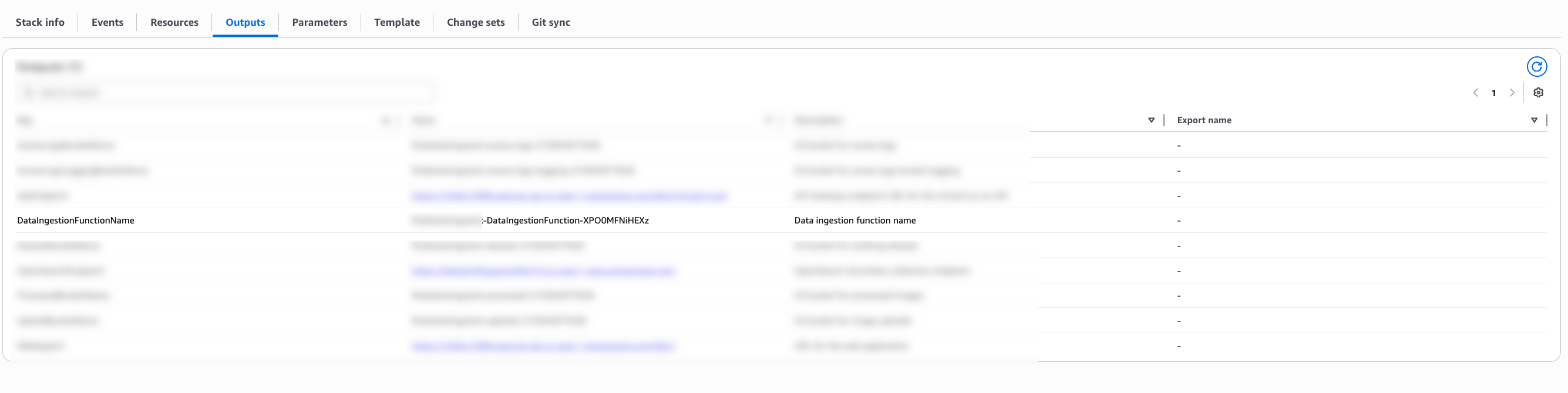
The quickest way is to look at the output from your sam deploy command. The DataIngestionFunctionName output shows the complete function name:
DataIngestionFunctionName: my-fashion-stack-DataIngestionFunction-abc123xyz
Method 2: Check CloudFormation outputs
Retrieve the function name from CloudFormation:
# Replace ‘my-fashion-stack’ with your stack name
aws cloudformation describe-stacks
--stack-name my-fashion-stack
--query 'Stacks[0].Outputs[?OutputKey==`DataIngestionFunctionName`].OutputValue'
--output text;
Method 3: Check samconfig.toml
Your stack name is saved in samconfig.toml after running
sam deploy --guidedcat samconfig.toml | grep stack_name# Output: stack_name = "my-fashion-stack
Method 4: Check the AWS Management Console
- Go to AWS CloudFormation in the AWS Management Console.
- Select your stack (for example, my-fashion-stack).
- Click the Outputs tab.
- Find DataIngestionFunctionName. This is the complete function name to use.
Step 7: Fashion dataset setup
Upload the fashion dataset to enable search and recommendation features: python mini_dataset_uploader.py
This script uploads 60+ fashion items with metadata to the designated S3 bucket.
Step 8: Vector index creation
Build the searchable vector index by invoking the data ingestion function:
aws lambda invoke
  --function-name <YourStackName>-DataIngestionFunction-<ID>
  --payload '{}'
  response.json
Replace <YourStackName> and <ID> with values from your SAM deployment output. This process:
- Processes the fashion images using Titan embeddings
- Creates vector representations for similarity search
- Indexes data in Amazon OpenSearch Serverless
- Enables recommendation and search functionality
Application usage guide
After you deploy the application, your virtual try-on application provides several features for end users.
Accessing the application
Retrieve your application URL from the SAM deployment output: WebAppUrl: https://{api-id}.execute-api.{region}.amazonaws.com/dev/
Core AI-Powered Functionalities
Virtual try-on process
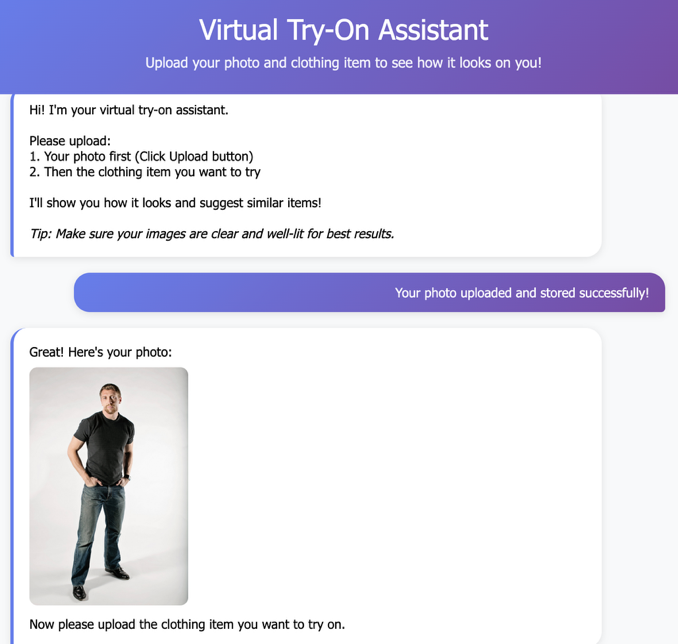
The virtual try-on feature represents the core functionality of our application, using Amazon Nova Canvas to create photorealistic images of users wearing selected clothing items. The process begins when users upload their photo through a drag-and-drop interface that supports common image formats including JPEG, PNG, and JPG with maximum file size of 6 MB. The solution uses Amazon Nova Canvas, a multimodal content generation model, integrated with Amazon Rekognition to generate photorealistic product visualizations. The virtual try-on process uses a payload structure with taskType: “VIRTUAL_TRY_ON” that combines a source image (customer photo) and reference image (clothing item) with intelligent masking. The system employs maskType: “GARMENT” with garment-based masking that automatically identifies and replaces clothing regions based on detected garment classes. The system automatically validates and preprocesses uploaded images, with optimal results achieved using well-lit, front-facing photos that clearly show the user’s body. For production deployments, validate and moderate all user-uploaded images before processing to help prevent malicious or inappropriate content from being stored and processed. See the Security Warning section below for implementation guidance. Once the user photo is processed, clothing selection occurs through two primary methods:
- Upload personal clothing images for custom try-on experiences
- Browse and search the curated fashion dataset containing 60+ professionally photographed items
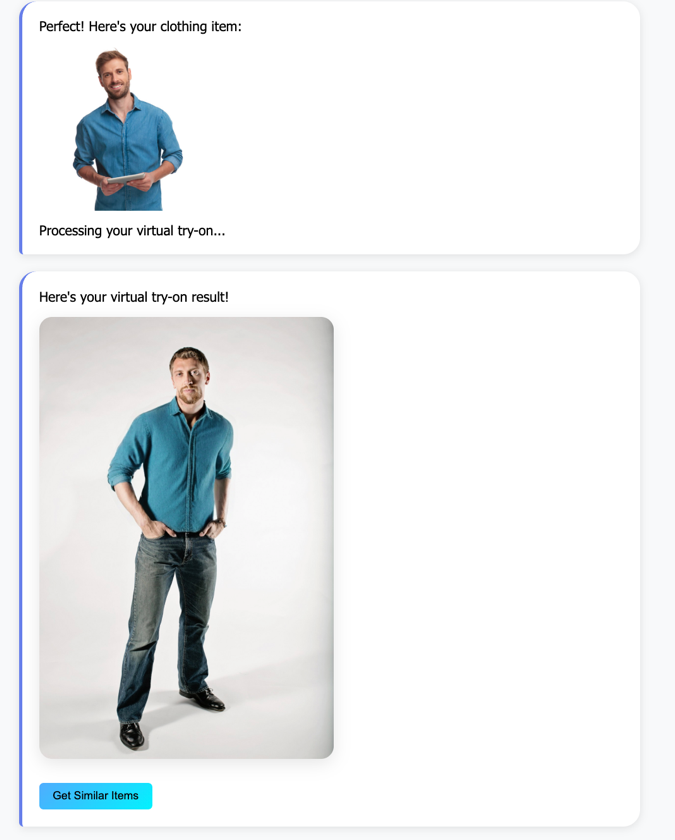
The AI processing phase involves computer vision and generative AI technologies. Amazon Rekognition first analyzes both the user photo and clothing item to detect garment types, body regions, and user gender for personalized matching. Nova Canvas then generates photorealistic try-on images that realistically apply the selected clothing to the user’s photo, with processing typically completing within 15 seconds. Users can then interact with their generated try-on results through several options:
- Download high-quality images for personal use
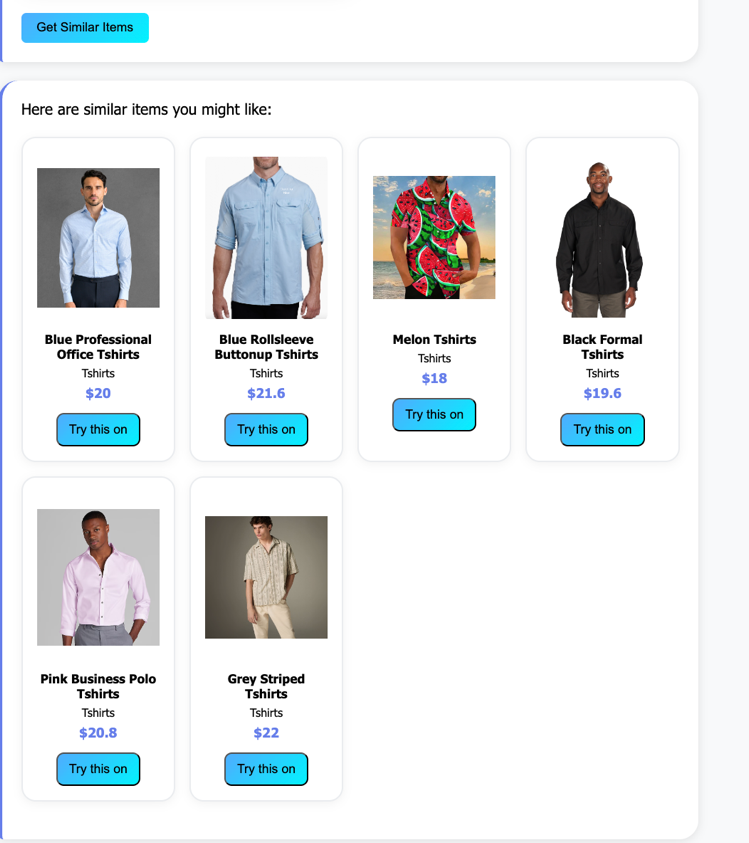
- Request similar item recommendations based on the tried-on piece
- Save favorites for future reference
Personalized recommendations
The recommendation engine represents one of the most advanced aspects of our application, using multimodal AI embeddings to understand both visual and textual fashion preferences. The recommendation engine uses Amazon Titan Multimodal Embeddings to convert clothing images and text into 1024-dimensional vector representations. These embeddings are indexed in Amazon OpenSearch Serverless with k-nearest neighbors (kNN) search for sub-second similarity matching. The system analyzes user behavior, photo characteristics, and interaction patterns to generate personalized clothing suggestions that align with individual style preferences and practical needs. Key factors influencing recommendations include:
- Visual similarity analysis using Amazon Titan multimodal embeddings to find items with similar colors, patterns, and styles
- Detected user gender and inferred style preferences based on photo analysis and search history
- Category matching that helps ensure recommendations align with user’s preferred clothing types (upper body, lower body, full body, footwear)
Smart fashion search
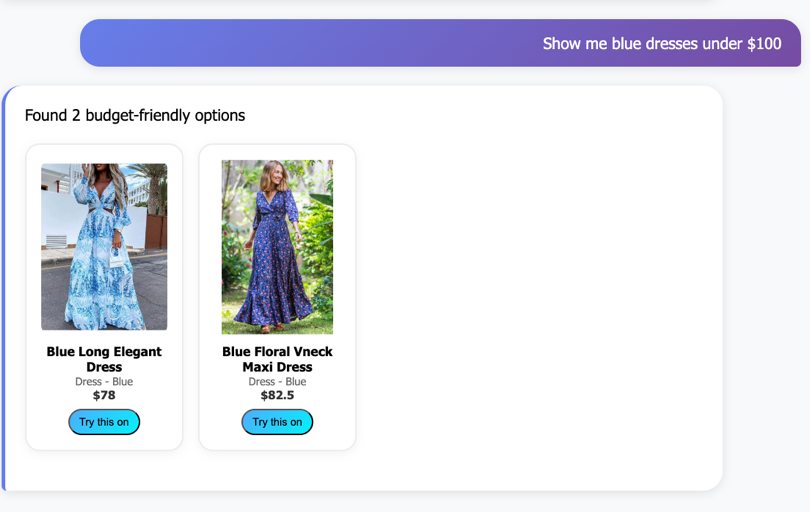
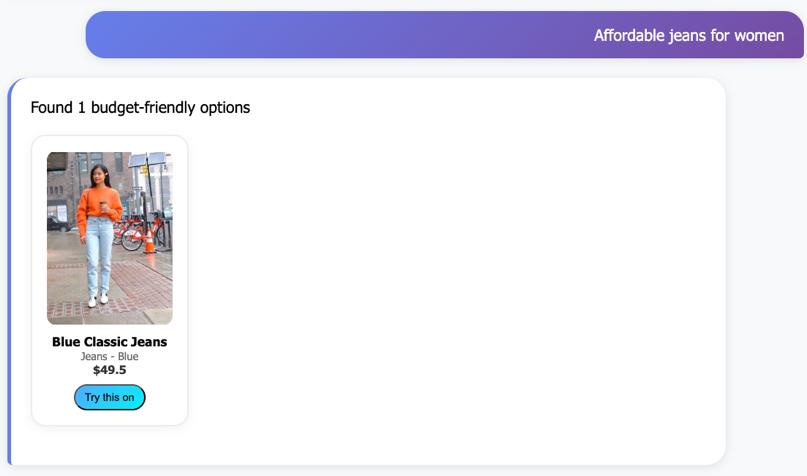
Our intelligent search system goes beyond traditional keyword matching by understanding natural language queries and user intent. The fashion search agent automatically categorizes user searches into three primary intents: outfit planning (finding coordinating pieces), price hunting (budget-conscious shopping), and style discovery (exploring new fashion trends).Users can search using conversational phrases such as:
- “Show me blue dresses under $100” for price-filtered results
- “Show me casual tshirt” for color and style preferences
- “Affordable jeans for women” for gender and budget-specific searches
The search engine incorporates several advanced features to improve the search experience:
- Automatic typo correction for common misspellings
- Goal-oriented result ranking that prioritizes items based on detected user intent
- Multi-criteria filtering supporting color, price range, category, and gender preferences
- Fuzzy matching that handles clothing type variations and synonyms
Analytics and monitoring
Built on DynamoDB, the system captures user behavior patterns, popular item analytics, and engagement metrics. The analytics engine provides gender-aware insights, clothing category breakdowns, and usage patterns, enabling retailers to optimize inventory decisions in real-time. You can monitor application usage with the built-in analytics dashboard:
python quick_analytics.py
Analytics insights:
- Total try-on sessions and unique users
- Most popular clothing categories and items
- Upload vs. dataset usage patterns
- Daily activity trends
- User engagement metrics
Testing with sample images
The repository includes sample images in the sample-images/ folder:
- Person photos: Well-lit examples for optimal try-on results
- Clothing items: Clean product shots for testing recommendations
Use these samples to understand image quality requirements and test functionality without personal photos.
Sample workload assumptions
The following estimates are based on a typical workshop scenario:
– Dataset: 60 fashion items indexed
– Daily Usage: 50 virtual try-ons, 100 searches, 75 recommendations
– Storage: ~500MB images, ~100MB processed results
– Duration: Running for one month
Cost breakdown
AI and machine learning services
- Amazon Bedrock – Nova Canvas: $60.00/month
- 1,500 virtual try-on images @ $0.04 per image
This is the largest cost driver
- Amazon Bedrock – Titan Embeddings: $0.50 – $1.00/month
- 60 items indexed + ~100 search queries/day
Infrastructure services
- OpenSearch Serverless: $7.00 – $12.00/month
- Minimum 2 OpenSearch Compute Units (OCUs) for indexing and search operations
- NAT Gateway: $3.50 – $5.00/month
- ~5GB data processed for Lambda internet access
- AWS Key Management Service (AWS KMS) encryption: $3.00/month
- 3 keys with automatic rotation enabled
Compute and storage
- Lambda: Free tier
- ~50,000 invocations covered by free tier
- S3 Storage: $0.02 – $0.05/month
- ~600MB for images and processed results
- DynamoDB: $0.50 – $1.00/month
- 5,000 read/write operations for analytics
Networking and monitoring
- API Gateway + Amazon CloudWatch + SQS: $1.00 – $1.50/month: Covers API requests, logging, and dead letter queues
Note: The following cost estimates are based on AWS pricing as of the time of publishing and are provided for informational purposes only. Actual costs might vary. For the most current pricing, refer to the AWS Pricing page. Costs vary by region and actual usage. Use the AWS Pricing Calculator for detailed estimates based on your specific requirements.
Monitoring and troubleshooting
Amazon CloudWatch Logs
Monitor application performance through CloudWatch log groups:
/aws/lambda/{stack-name}-WebFrontendFunction-{id}/aws/lambda/{stack-name}-VirtualTryOnFunction-{id}/aws/lambda/{stack-name}-RecommendFunction-{id}/aws/lambda/{stack-name}-DataIngestionFunction-{id}/aws/lambda/{stack-name}-TextSearchFunction-{id}
Common issues and solutions
Amazon Bedrock model access errors:
- Verify model access is enabled in the Amazon Bedrock console
- Check IAM permissions for the Amazon Bedrock service
- Verify correct model IDs in function code
OpenSearch connection issues:
- Verify Amazon OpenSearch Serverless collection is active
- Check network policies and access permissions
- Validate index creation and data ingestion
Image processing failures:
- Verify images meet size and format requirements
- Check S3 bucket permissions and cross-origin resource sharing (CORS) configuration
- Verify Amazon Rekognition service limits and quotas
Performance optimization:
- Monitor Lambda function duration and memory usage
- Implement caching for frequently accessed data
- Consider provisioned concurrency for high-traffic scenarios
Clean up resources
To avoid ongoing AWS charges, properly clean up all deployed resources when the application is no longer needed:
Step 1: Delete CloudFormation stack
Remove all AWS resources created by SAM:
This command:
- Deletes the Lambda functions and associated resources
- Removes API Gateway endpoints
- Deletes DynamoDB tables (data will be lost)
- Removes IAM roles and policies created by the template
Step 2: Manual resource cleanup
Some resources may require manual deletion: S3 buckets:# Empty and delete S3 buckets
aws s3 rm s3://<upload-bucket-name> --recursive
aws s3 rm s3://<processed-bucket-name> --recursive
aws s3 rm s3://<dataset-bucket-name> --recursive
aws s3 rb s3://<upload-bucket-name>
aws s3 rb s3://<processed-bucket-name>
aws s3 rb s3://<dataset-bucket-name>
Amazon OpenSearch Serverless collection:
# Delete OpenSearch collection
aws opensearchserverless delete-collection --id <collection-id>Step 3: Verify cleanup
Confirm all resources are deleted:
- Check CloudFormation console for stack deletion completion
- Verify S3 buckets are removed
- Confirm OpenSearch collections are deleted
- Review billing dashboard for any remaining charges
Step 4: Clean local environment
Remove local deployment artifacts:# Remove SAM build artifacts
rm -rf .aws-sam/
rm samconfig.toml
rm response.json
Cost optimization tips
To help minimize costs while running the application:
- Use appropriate Lambda memory settings based on actual usage patterns
- Implement request caching to reduce redundant AI model invocations
- Set up CloudWatch alarms for cost monitoring and usage alerts
- Use S3 lifecycle policies to automatically archive old images
- Monitor Amazon Bedrock usage and implement request throttling if needed
- Consider reserved capacity for predictable high-traffic scenarios
Conclusion
In this post, we showed you how to build a production-ready AI-powered virtual try-on application using AWS serverless technologies. The solution demonstrates how AI services such as Amazon Bedrock can be integrated with traditional cloud services to create customer experiences. The application showcases several concepts:
- Serverless microservices architecture
- AI and machine learning (ML) integration with business logic
- Vector similarity search for recommendations
- Natural language processing for search
- Real-time analytics and monitoring
By following this guide, you’ve created a scalable, cost-effective solution that can handle varying traffic loads while providing AI capabilities. The modular architecture allows for straightforward extension and customization based on specific business requirements. For production deployments, consider implementing additional features such as user authentication, caching strategies, multi-Region deployment, and monitoring dashboards. If you have feedback about this post, submit comments in the Comments section.
Additional resources
- AWS SAM Documentation: https://docs.aws.amazon.com/serverless-application-model/
- Amazon Bedrock User Guide: https://docs.aws.amazon.com/bedrock/
- Amazon OpenSearch Serverless Documentation: https://docs.aws.amazon.com/opensearch-service/latest/developerguide/serverless.html
- AWS Lambda Best Practices: https://docs.aws.amazon.com/lambda/latest/dg/best-practices.html
- Amazon Rekognition Developer Guide: https://docs.aws.amazon.com/rekognition/