Integrating Amazon Bedrock AgentCore with Slack brings AI agents directly into your workspace. Your teams can interact with agents without jumping between applications, losing conversation history, or re-authenticating. The integration handles three technical requirements: validating Slack event requests for security, maintaining conversation context across threads, and managing responses that exceed Slack’s timeout limits.
Developers typically spend time building custom webhook handlers for Slack integrations. AgentCore helps remove this work by providing built-in conversation memory, secure access to agents and their tools, and identity management that tracks agent usage, all from within Slack.
In this post, we demonstrate how to build a Slack integration using AWS Cloud Development Kit (AWS CDK). You will learn how to deploy the infrastructure with three specialized AWS Lambda functions, configure event subscriptions properly to handle Slack’s security requirements, and implement conversation management patterns that work for many agent use cases. We’re using a weather agent as our example, but the integration layer that you’re building is completely reusable. You can customize the runtime and tools for your specific business needs without changing how Slack communicates with your agent.
Solution overview
This solution consists of two main components: The Slack integration infrastructure and the Amazon AgentCore Runtime with tools. The integration infrastructure routes and manages communication between Slack and the agent, as the runtime processes and responds to queries.
The integration infrastructure in this solution uses Amazon API Gateway, AWS Lambda, AWS Secrets Manager, and Amazon Simple Queue Service (Amazon SQS) for serverless integration.
The agent has been containerized and hosted to run in AgentCore Runtime. It’s built with the Strands Agents SDK that integrates with Amazon Bedrock AgentCore Gateway for tool access and AgentCore Memory for conversation history. The runtime maintains context throughout conversations and uses the Model Context Protocol (MCP), a standardized protocol for tool execution and communication, to invoke tools.
With these components in place, the following section examines how they work together in the architecture.
Architecture diagram
The following diagram represents the solution architecture, which contains three key sections:
Section A – Image Build Infrastructure – First, WeatherAgentImageStack CDK deploys the container image build pipeline (Amazon Simple Storage Service (Amazon S3) bucket, AWS CodeBuild project, and Amazon Elastic Container Registry (Amazon ECR) repository). This uses CodeBuild to create AWS Graviton (ARM64) container images that are stored in the ECR repository for use by the AgentCore Runtime.
Section B – AgentCore Components – Next, WeatherAgentCoreStack CDK deploys the AgentCore Runtime, Gateway, Memory, and AWS Lambda function. The Runtime uses the Strands Agents Framework an Open Source AI Agents SDK to orchestrate model invocations, tool calls, and conversation memory.
Section C – Slack Integration Infrastructure – Lastly, WeatherAgentSlackStack deploys the integration infrastructure (API Gateway, Secrets Manager, Lambda functions, and SQS). This handles webhook verification, Amazon Simple Queue Service (Amazon SQS) queuing, and message processing through three Lambda functions. This layer is reusable for AgentCore use cases.
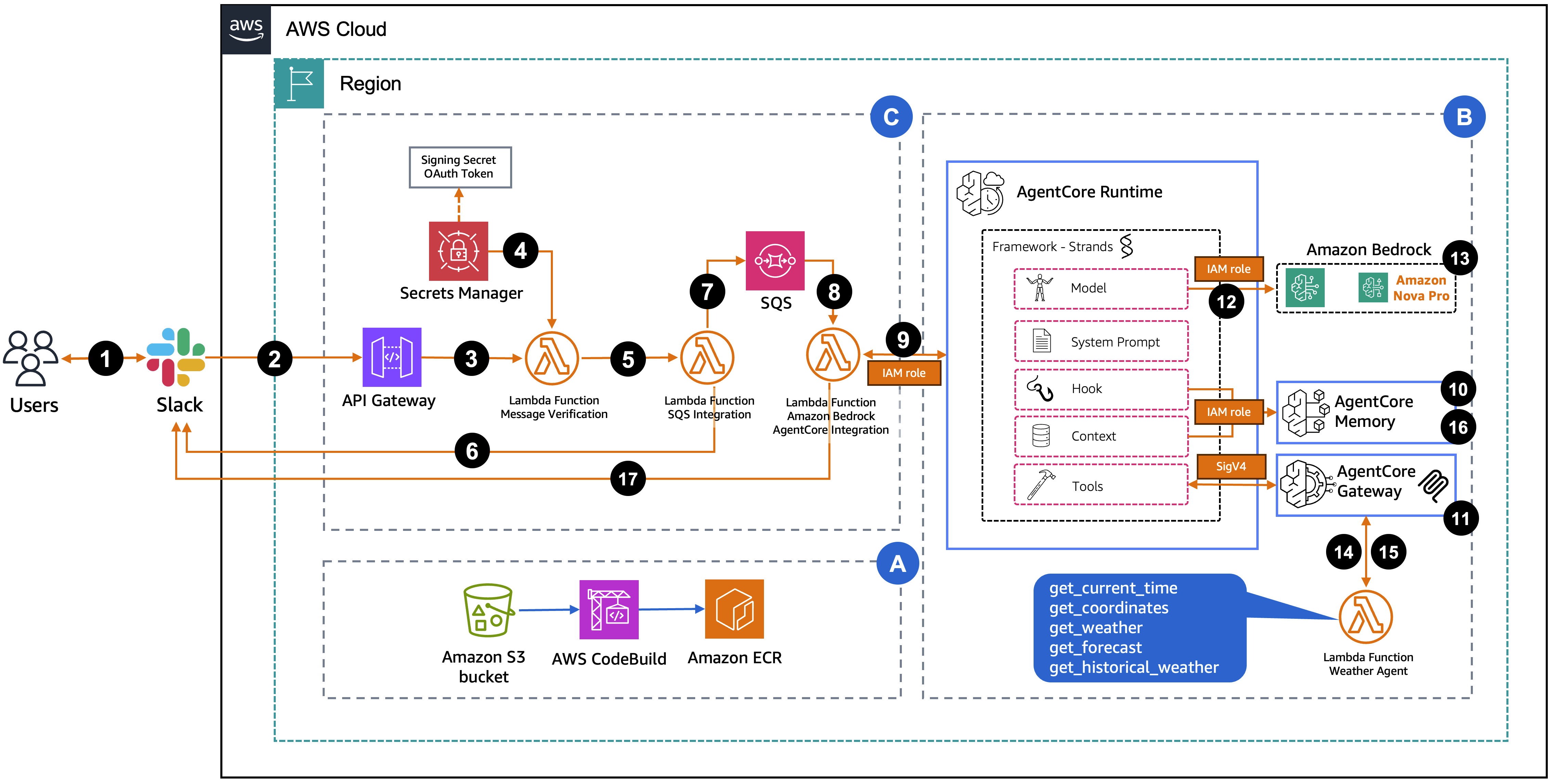
The request flow consists of the following steps:
- A user sends a message in Slack through direct message or
@appnamein a channel. - Slack sends a webhook POST request to API Gateway.
- The request is forwarded to the verification Lambda function.
- The Lambda retrieves the Slack signing secret and bot token from Secrets Manager to verify authenticity.
- After verification, the Lambda asynchronously invokes the SQS integration Lambda.
- The SQS integration Lambda sends a “Processing your request…” message to the user in a Slack thread.
- The SQS integration Lambda sends the message to the SQS FIFO queue.
- The queue triggers the Agent Integration Lambda.
- The Lambda invokes AgentCore Runtime with the user’s query and a session ID from the Slack thread timestamp.
AgentCoreMemorySessionManagerretrieves conversation history from AgentCore Memory using the session ID (thread timestamp) and actor ID (user ID).- The Strands Framework retrieves tools from AgentCore Gateway using the MCP protocol.
- The Strands Framework invokes the Amazon Bedrock model (Nova Pro) with the message, context, and tools.
- The model determines which tools to invoke and generates requests.
- The Gateway routes tool invocations to the MCP server on Lambda, which executes weather tools.
- Tool results return to the Strands Framework, which can invoke the model again if needed.
- The Strands Framework stores the conversation turn in AgentCore Memory.
- The Agent Integration Lambda updates the “Processing your request…” message with the agent’s response.
Prerequisites
This solution requires the following prerequisites:
- AWS account with permissions for:
- Amazon Bedrock AgentCore, Lambda, API Gateway, SQS, ECR, CodeBuild, AWS Identity and Access Management (IAM), Secrets Manager, Amazon Bedrock
- AWS Command Line Interface (AWS CLI) (v2.x) configured with credentials
- Node.js (v18 or later) and npm installed
- AWS CDK installed and bootstrapped in your AWS account
- Install:
npm install -g aws-cdk - Bootstrap:
cdk bootstrap aws://ACCOUNT-NUMBER/REGION
- Install:
- Slack account (two options):
- For company Slack accounts, work with your administrator to create and publish the integration application, or you can use a sandbox organization
- Alternatively, create your own Slack account and workspace for testing and experimentation
Step 1: Create a Slack App
Creating applications in Slack requires specific permissions that vary by organization. If the necessary access is unavailable, contact your Slack administrator. The screenshots in this walkthrough are from a personal Slack account and are intended to demonstrate the implementation process that can be followed for this solution.
- Go to Slack API and choose Create New App.

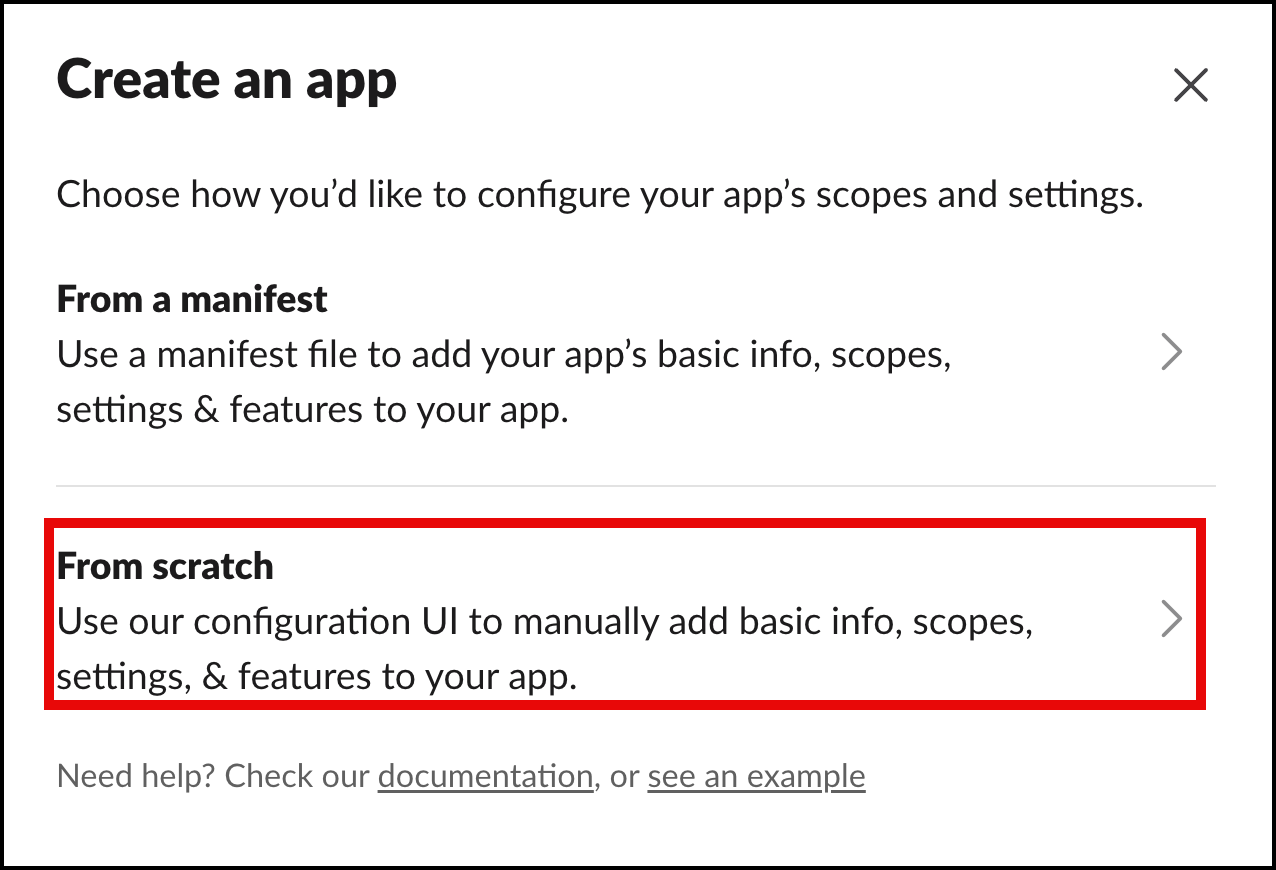
- In the Create an app pop-up, choose From scratch.
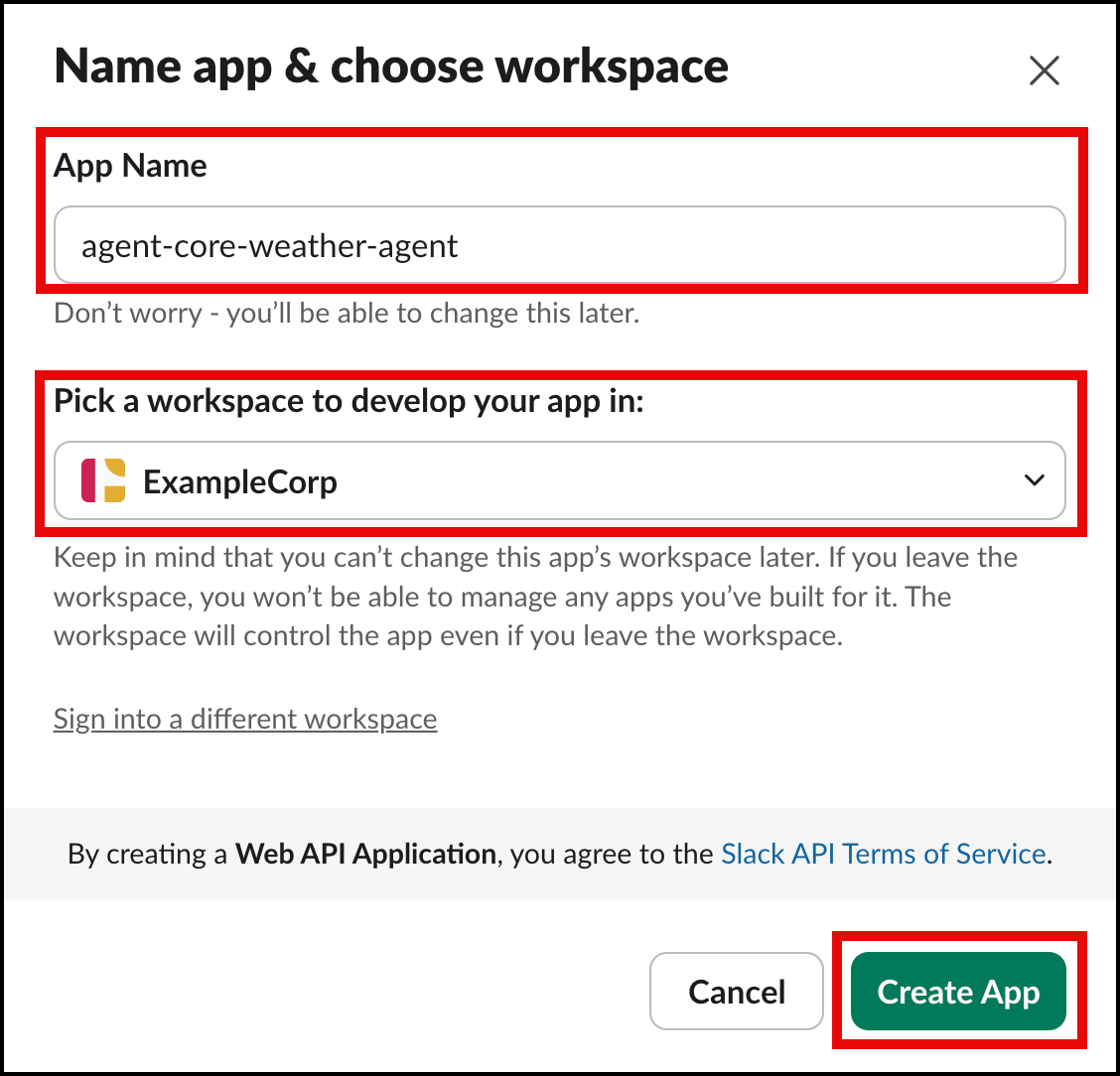
- For App Name, enter
agent-core-weather-agent. - For Pick a workspace to develop your app in, choose the workspace where you want to use this application.
- Choose Create App.
After the application is created, you will be taken to the Basic Information page.
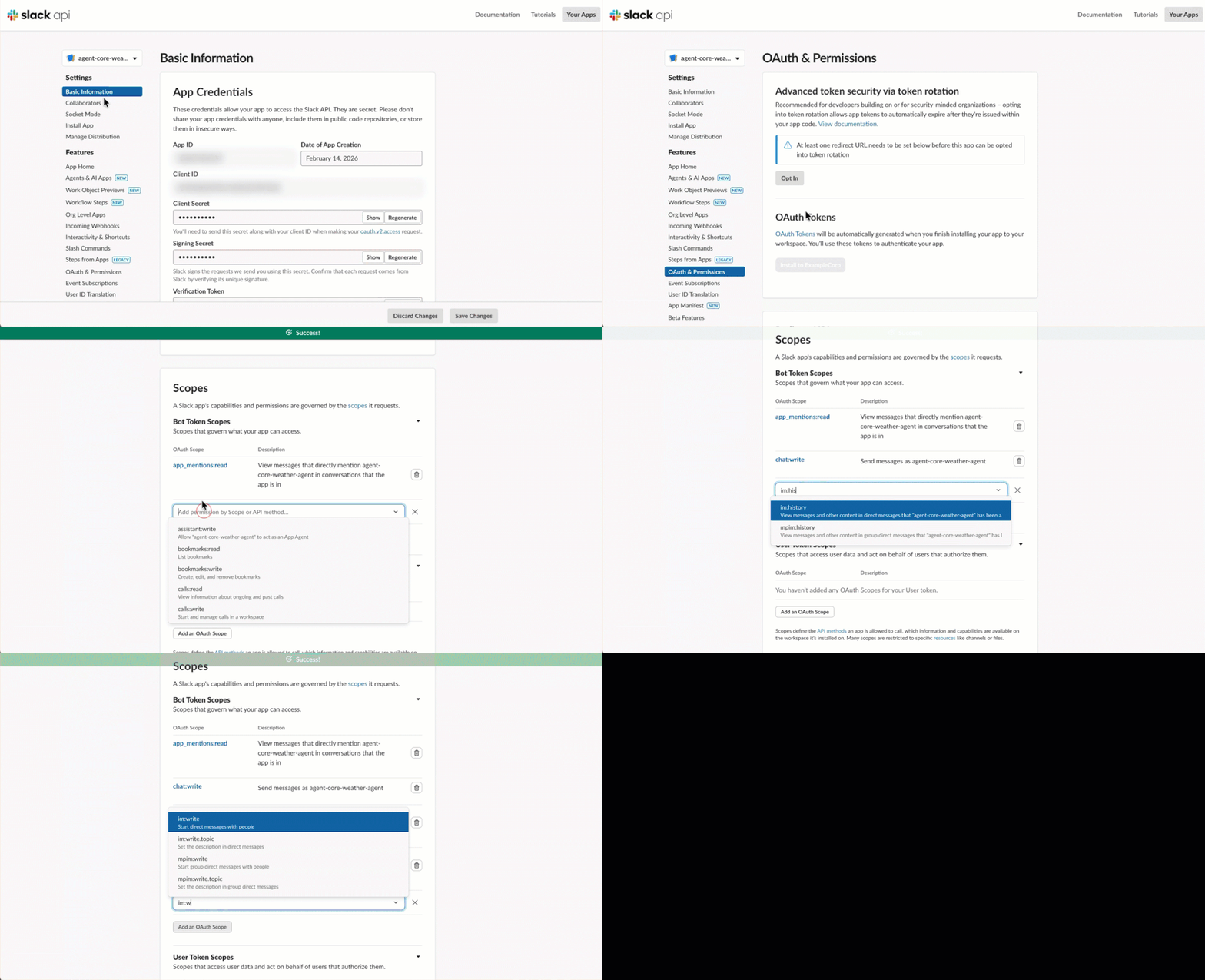
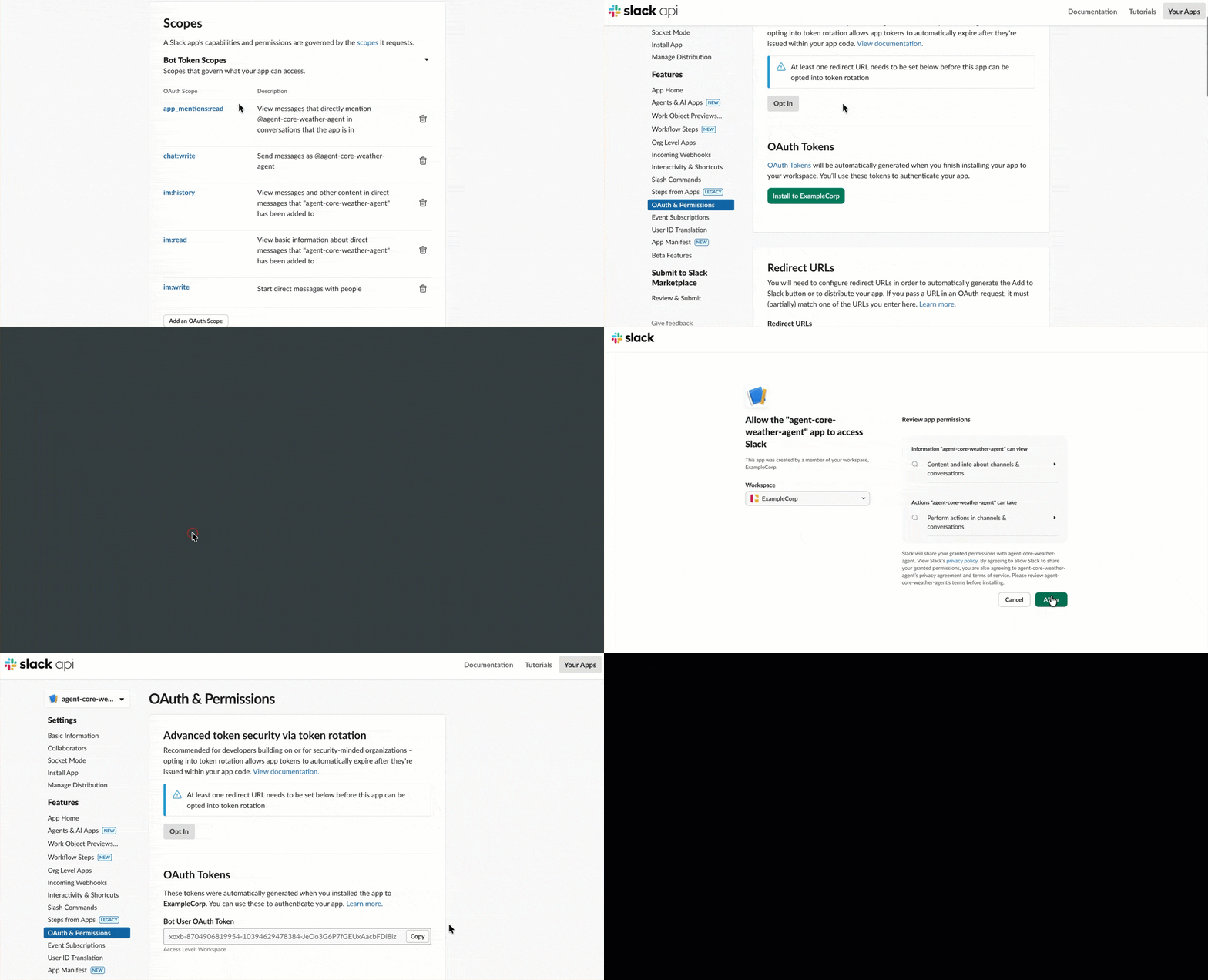
- In the navigation pane under Features, choose OAuth & Permissions.
- Navigate to the Scopes section and under Bot Token Scopes, add the following scopes by choosing Add an OAuth Scope and entering:
app_mentions:readchat:writeim:historyim:readim:write
- On the OAuth & Permissions page, navigate to the OAuth Tokens section and choose Install to ExampleCorp.
- On the following page, choose Allow to complete the process.
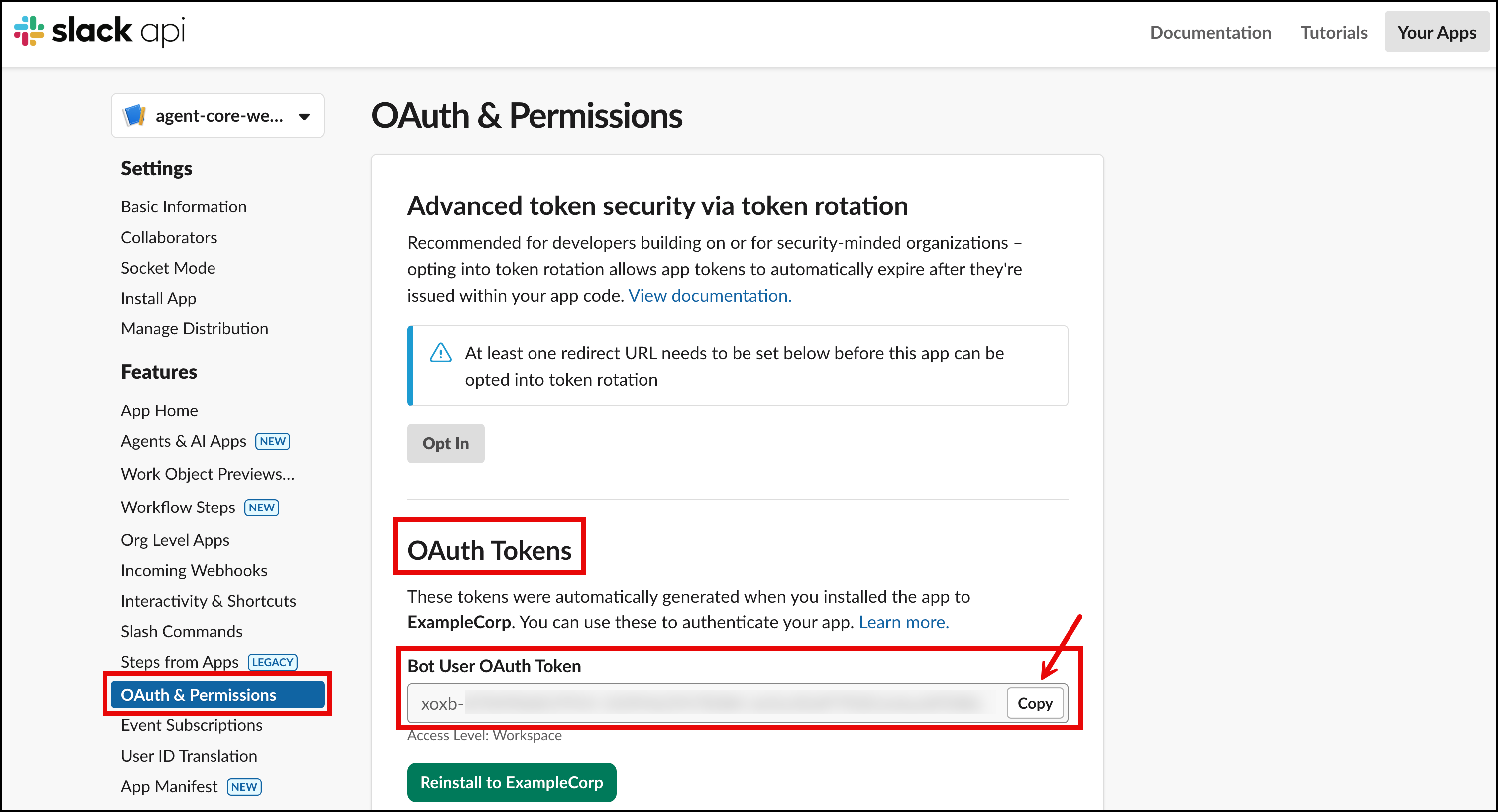
- On the OAuth & Permissions page, navigate to OAuth Tokens and copy the value for the Bot User OAuth Token that has been created. Save this in a notepad to use later when you’re deploying the infrastructure.
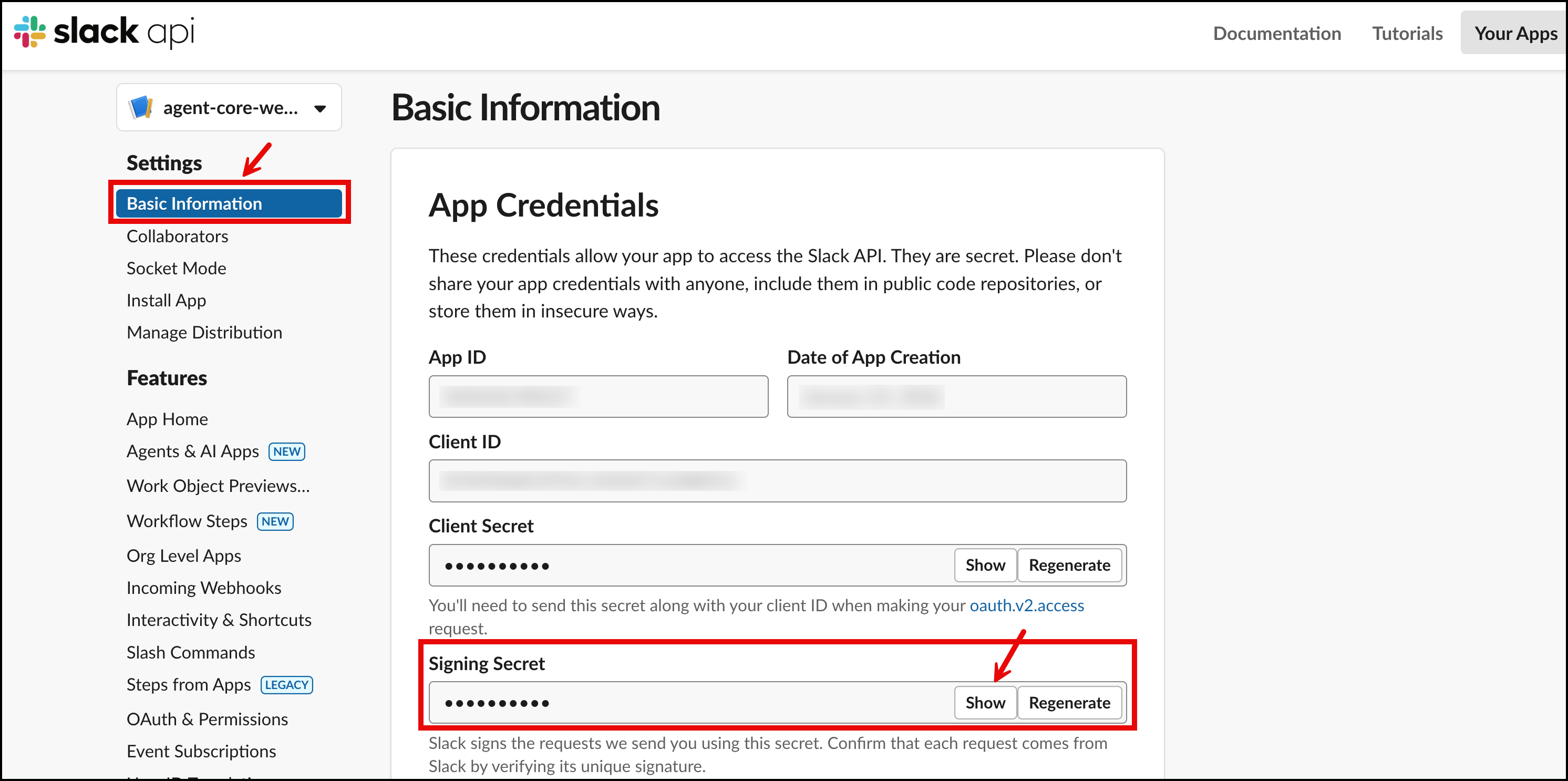
- In the navigation pane under Settings, choose Basic Information.
- Navigate to Signing Secret and choose
- Copy and save this value to your notepad to use later when you’re deploying the infrastructure.
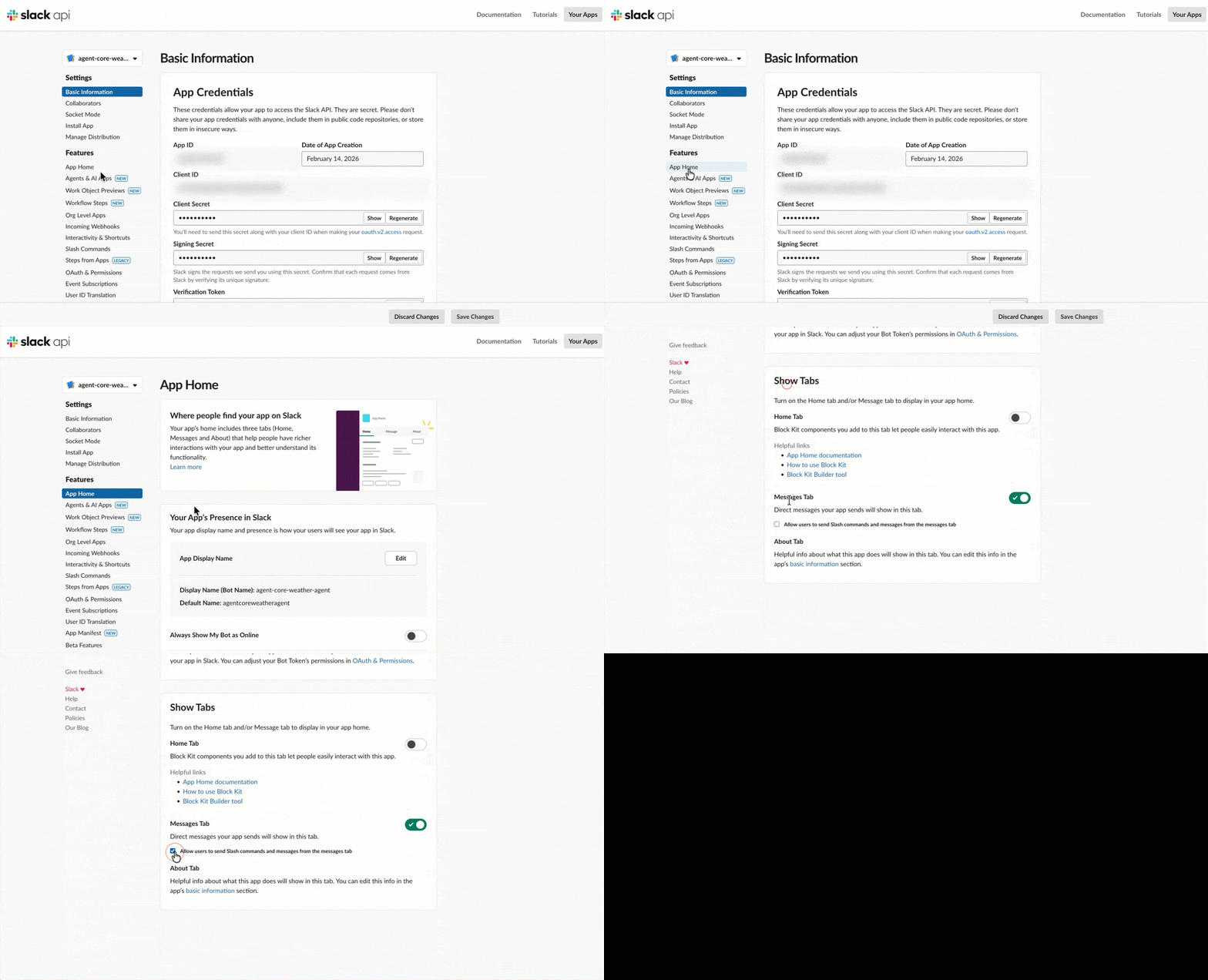
- To allow direct messaging with the app within Slack, navigate to App Home in the navigation pane under
- In the Show Tabs section, enable Allow users to send Slash commands and messages from the messages tab.
Note: You will complete the Event Subscriptions configuration in Step 3 after deploying the infrastructure and obtaining the Webhook URL.
Step 2: Deploy the infrastructure
Clone the GitHub repository and navigate to the project directory:
The deployment requires setting Slack credentials as environment variables and running the deployment script.
The deployment takes approximately 10–15 minutes and creates three CDK stacks: an Image Stack for the container build, an Agent Stack with Runtime, Gateway, and Memory, and a Slack Stack with API Gateway and Lambda functions. The deployment output provides the Webhook URL for the next step.
Step 3: Configure Slack event subscriptions
After deploying the infrastructure and obtaining the Webhook URL, the Slack app configuration can be completed.
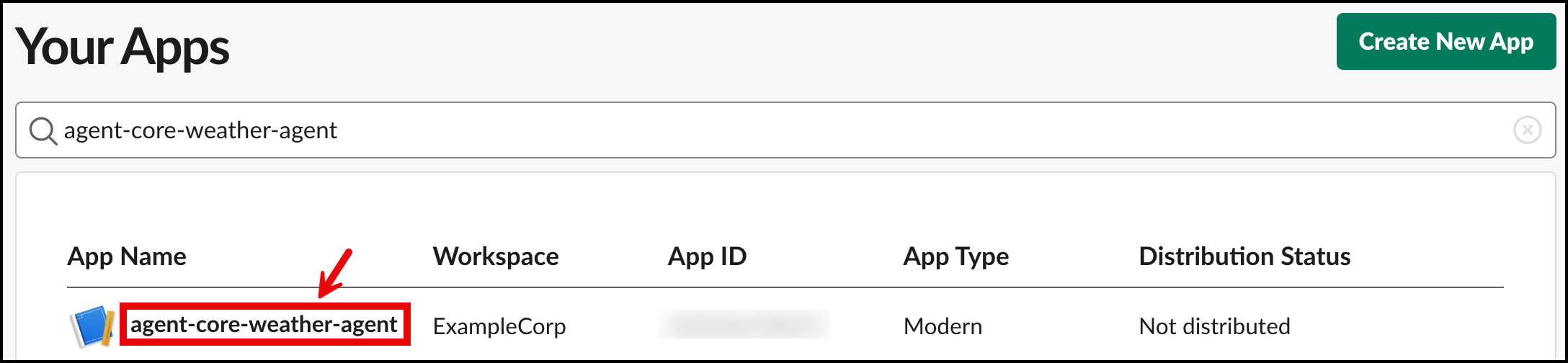
- The configuration requires returning to the Slack app at Slack API and selecting the
agent-core-weather-agent
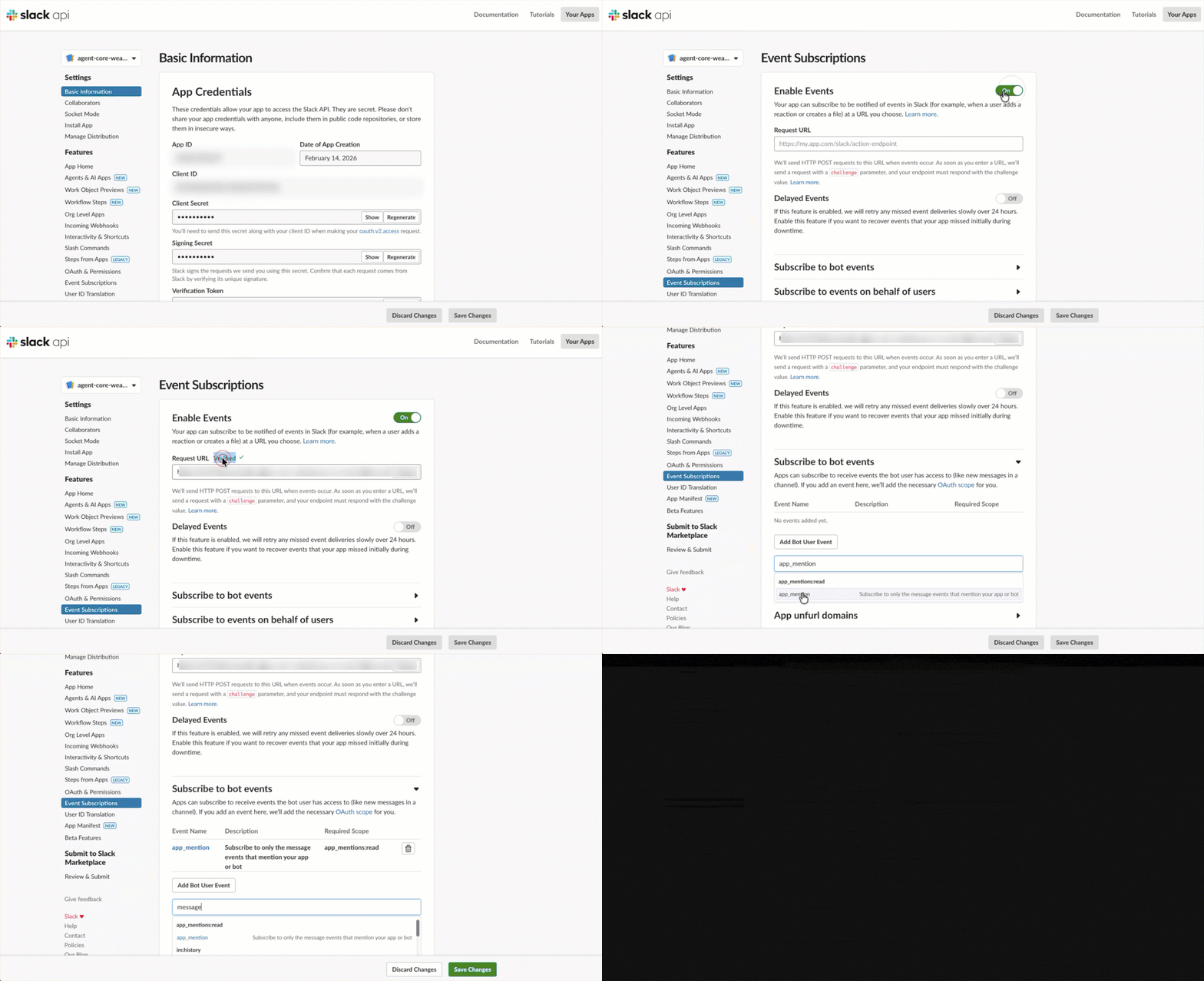
- In the navigation pane under Features, choose Event Subscriptions.
- Toggle Enable Events to
- In the Request URL field, paste the Webhook URL from the deployment output.
- After the URL is verified (indicated by a green checkmark with ‘Verified’), navigate to the Subscribe to bot events
- Choose Add Bot User Event and add the following events:
app_mentionim
- Choose Save Changes at the bottom of the page.
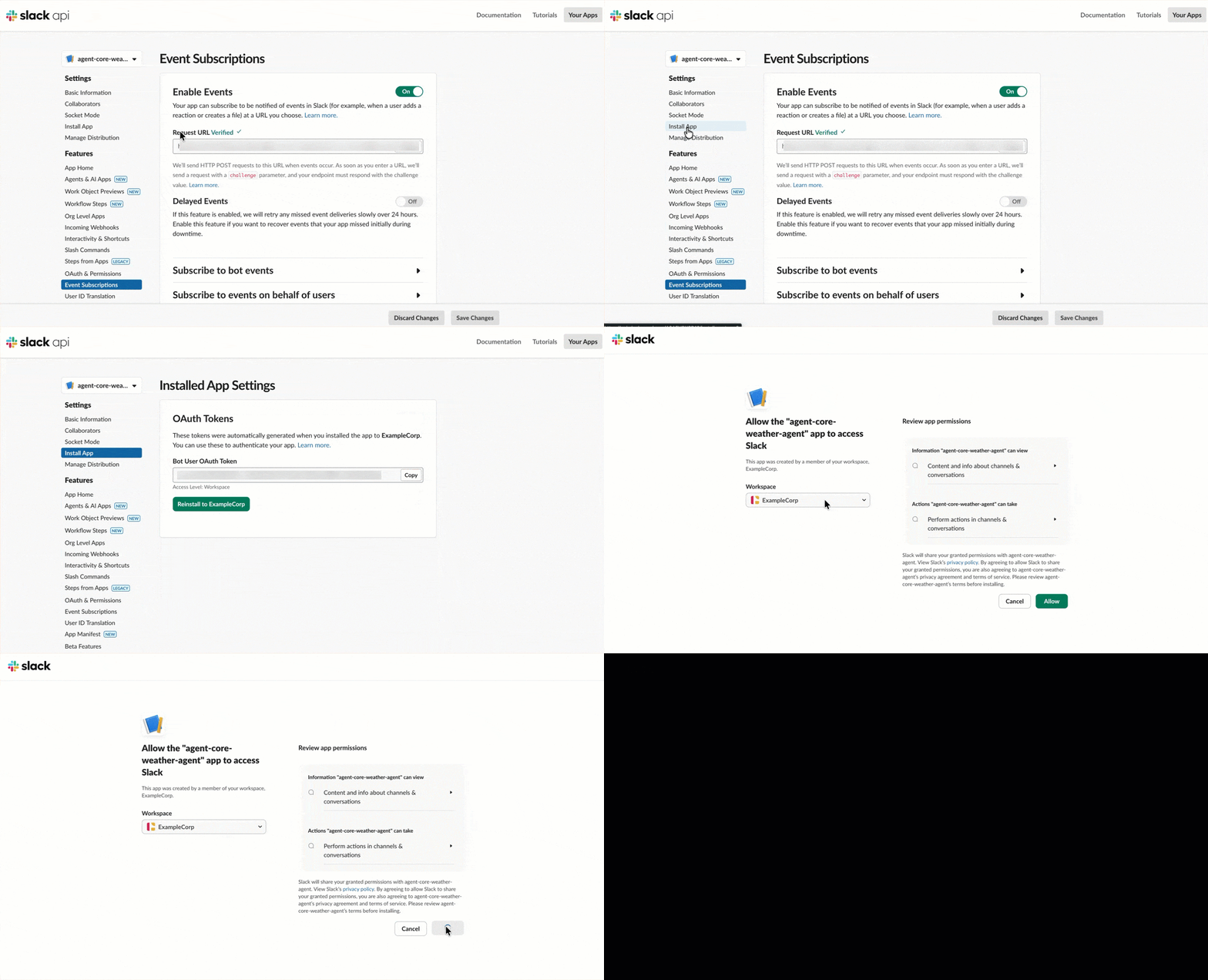
- Under Settings, navigate to Install App and select Reinstall to ExampleCorp. When the pop-up screen appears, select Allow.
Step 4: Test the integration of AgentCore in Slack
Testing requires locating agent-core-weather-agent in the Apps section of Slack. You can invite the APP to an existing channel by typing in /invite @agent-core-weather-agent. After adding this application to a channel, users can interact with the AgentCore Agent by using @agent-core-weather-agent to get weather information, or you can also chat directly with the agent by going to the App directly.
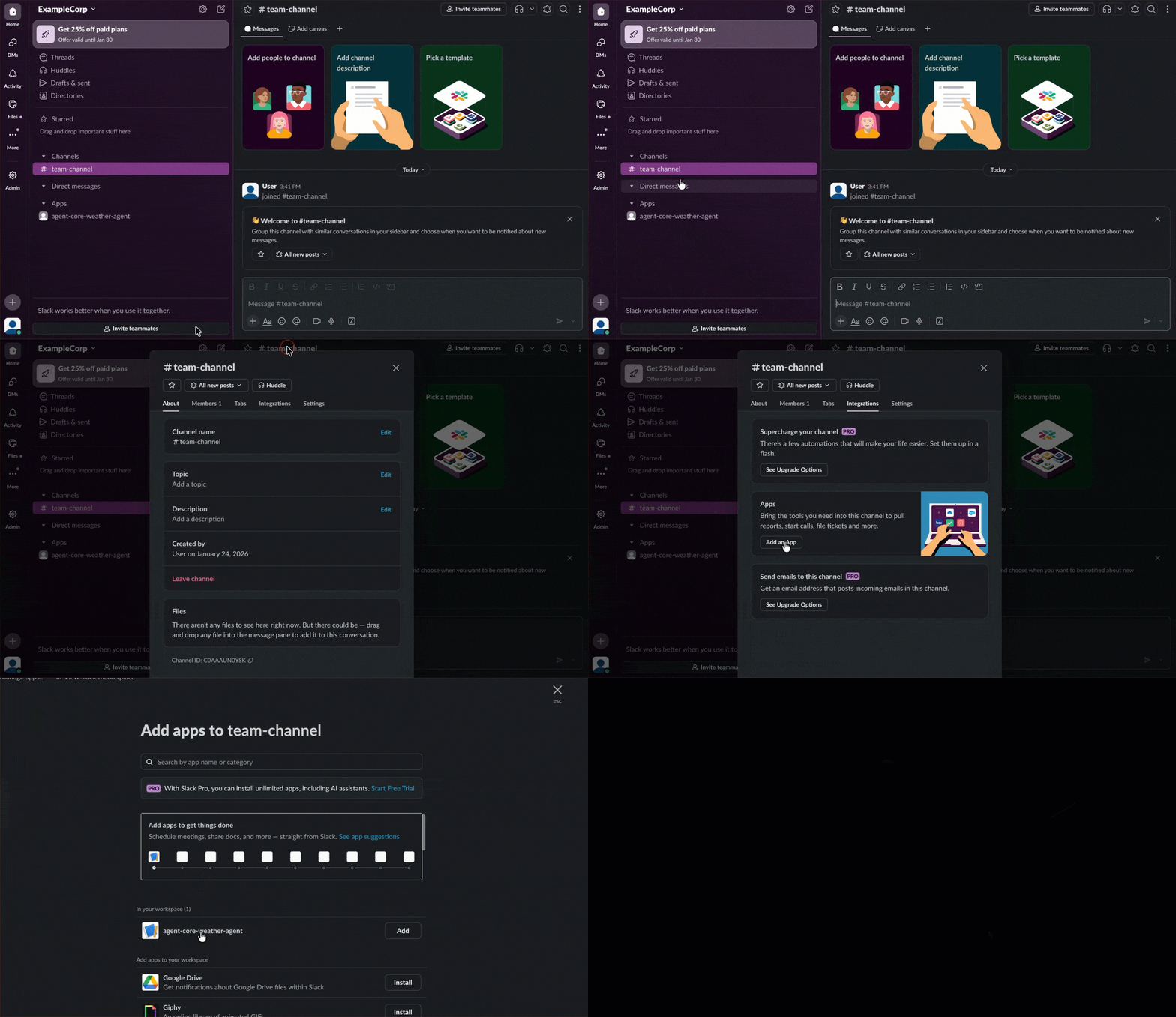
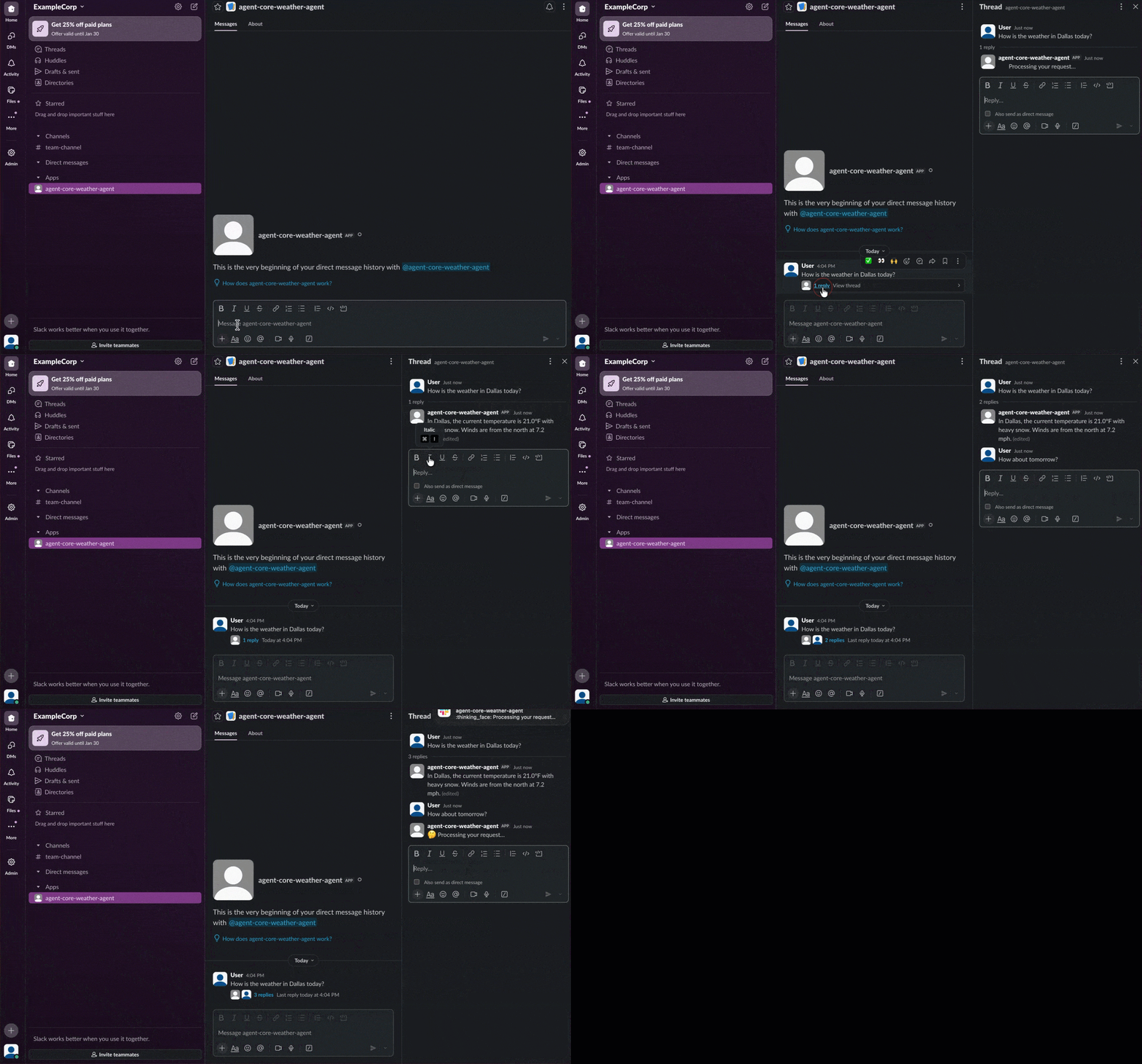
Direct messaging: Users can go directly to the app in the Apps section and chat with it one-on-one.
An example query is, “What’s the weather in Dallas today”. The application first sends a “Processing your request…” message as an initial response. After the AgentCore Agent completes its analysis, this temporary message is replaced with the actual weather information. Users can continue to converse without repeating due to the integration of AgentCore Memory.
Channel integration: The app can be added to a Slack channel, which users can use to invoke it from within the channel by mentioning @agent-core-weather-agent as shown in the following image.
Understanding the integration architecture
Session management
Slack organizes conversations into threads identified by timestamps. AgentCore uses session IDs to maintain conversation context. The solution derives session IDs directly from Slack thread timestamps, making sure initial messages and replies in a thread share the same session ID. This approach doesn’t require external state management and automatically isolates different threads into separate sessions.
Asynchronous processing
AgentCore invocations can take longer than Slack’s 3-second webhook timeout, especially when loading conversation history, making multiple tool calls, or processing complex reasoning. The architecture uses three Lambda functions:
- Verification Lambda – Validates the Slack signature and returns a 200 status code immediately
- SQS Integration Lambda – Filters events (ignoring bot messages to help prevent loops) and sends to the queue
- Agent Integration Lambda – Processes messages from the queue, invokes AgentCore, and posts responses to Slack
This gives Slack immediate acknowledgment as the agent processes requests in the background.
Conversation memory
The agent maintains conversation context across messages using AgentCore Memory with the AgentCoreMemorySessionManager from the Strands framework. This integration maps Slack’s threading model to the AgentCore session management.
Slack threading to memory sessions
Each Slack conversation thread maps to a unique memory session:
- Session ID: Derived from Slack’s thread timestamp (for example,
1737849234.123456) - Actor ID: The Slack user ID (for example,
U01XXXXXXXX)
When a user starts a conversation in Slack, either through a direct message or by mentioning the bot in a channel, Slack assigns a unique thread timestamp. The subsequent replies in that thread share the same timestamp, creating a natural conversation boundary. The agent runtime uses this thread timestamp as the session_id and the Slack user ID as the actor_id to configure memory for that specific conversation.
Tool access
AgentCore Gateway provides a standardized interface for tool access with AWS Signature Version 4 (SigV4) authentication and MCP streaming format support. The runtime uses a custom SigV4-signed HTTP client to communicate with the Gateway.
Alternatively, you can authorize an AgentCore runtime to call a specific tool by prompting the Slack user to authenticate to their IdP. While this architecture doesn’t cover that implementation, AgentCore supports user-specific authorization flows for scenarios requiring individual user credentials.
Reusable patterns
The Slack integration stack works unchanged for AgentCore use cases. To adapt this solution, replace the weather tools with your business logic in the AgentCore stack and keep the memory integration and Gateway communication patterns. For user-specific agents, enable AgentCore Identity to pass user tokens from Slack to the runtime.
Cleanup
Running ./cleanup.sh removes CDK stacks and associated resources.
Conclusion
This post demonstrates integrating Amazon Bedrock AgentCore with Slack. Key patterns include deriving session IDs from Slack thread timestamps, using SQS to handle Slack’s response timeout, persisting conversation history for context continuity, and securing tool communication with SigV4.
The architecture is modular. The Slack integration layer works unchanged for AgentCore use cases, as the runtime and tools can be customized for your business needs. This means that you can deploy new AI capabilities faster and reduce maintenance overhead as your agent portfolio grows. Your teams can get AI assistance without leaving their workspace, which helps increase agent adoption and reduce time spent switching between tools.
Clone the complete solution from the GitHub repository to get started.
Additional resources
- Get started with Amazon Bedrock AgentCore
- Make agents a reality with Amazon Bedrock AgentCore: Now generally available
About the authors

Salman Ahmed
Salman is a Senior Technical Account Manager at AWS. He specializes in guiding customers through the design, implementation, and support of AWS solutions. Combining his networking expertise with a drive to explore new technologies, he helps organizations successfully navigate their cloud journey. Outside of work, he enjoys photography, traveling, and watching his favorite sports teams.

Ravi Kumar
Ravi is a Senior Technical Account Manager in AWS Enterprise Support who helps customers in the travel and hospitality industry to streamline their cloud operations on AWS. He is a results-driven IT professional with over 20 years of experience. Ravi is passionate about generative AI and actively explores its applications in cloud computing. In his free time, Ravi enjoys creative activities like painting. He also likes playing cricket and traveling to new places.

Sergio Barraza
Sergio is a Senior Technical Account Manager at AWS, helping customers on designing and optimizing cloud solutions. With more than 25 years in software development, he guides customers through AWS services adoption. Outside of work, Sergio is a multi-instrument musician playing guitar, piano, and drums, and he also practices Wing Chun Kung Fu.