Introduction
Building a voice-enabled ordering system that works across mobile apps, websites, and voice interfaces (an omnichannel approach) presents real challenges. You need to process bidirectional audio streams, maintain conversation context across multiple turns, integrate backend services without tight coupling, and scale to handle peak traffic.
In this post, we’ll show you how to build a complete omnichannel ordering system using Amazon Bedrock AgentCore, an agentic platform, to build, deploy, and operate highly effective AI agents securely at scale using any framework and foundation model and Amazon Nova 2 Sonic. You’ll deploy infrastructure that handles authentication, processes orders, and provides location-based recommendations. The system uses managed services that scale automatically, reducing the operational overhead of building voice AI applications. By the end, you’ll have a working system that processes voice orders across multiple customer touchpoints. The AI orchestration layer connects to a sample backend architecture with sample menu data, giving you a head start while implementing a project of this nature. This project was divided into modules giving you flexibility if you are looking to reuse components for integrating with your existing backend APIs.
In this post, you’ll learn how to:
- Deploy a multi-channel Voice AI ordering infrastructure using AWS Cloud Development Kit (AWS CDK)
- Implement an agent using Strands with Amazon Nova 2 Sonic for real-time speech processing hosted on AgentCore Runtime
- Connect your AI agent to backend services using Model Context Protocol (MCP) through AgentCore Gateway
- Test your system with realistic ordering scenarios including route-based pickup recommendations
Amazon Nova 2 Sonic is a speech-to-speech foundation model available through Amazon Bedrock that you can use for real-time voice interactions. When combined with Amazon Bedrock AgentCore, you get natural voice ordering across all customer touchpoints.
Solution overview
This solution architecture separates your frontend, AI agent, and backend services into distinct components. This separation allows you to develop and scale each component independently. The MCP is an open standard for connecting AI applications to external data sources, tools, and workflows. It provides standardized communication between your agent and backend services.
The solution will deploy:
- Amazon Cognito – Handles user authentication and provides temporary AWS credentials for secure API access. You can change this to your IDP of your choice as long as it is OAuth 2.0 compliant.
- Amazon Bedrock AgentCore Runtime – Hosts your AI agent with microVM isolation. Each user session runs in an isolated virtual machine, which keeps your customer sessions secure and performant even under high load. It prevents one customer’s session from affecting another’s performance or accessing their data.
- Amazon Bedrock AgentCore Gateway – Provides a secure way for developers to build, deploy, discover, and connect to tools at scale, which provides standardized communication between the agent and your business logic without tight coupling, so that you can modify backends or add new tools without rewriting integration code
- Amazon API Gateway – Exposes your backend services through Representational State Transfer (REST) endpoints with AWS Identity and Access Management (IAM) based authorization
- AWS Lambda – Executes your business logic for menu retrieval, order processing, and location services
- Amazon DynamoDB – Stores customer profiles, orders, menu items, and shopping carts with single-digit millisecond latency
- AWS Location Services – Provides location-based features for pickup recommendations
- AWS Amplify – Hosts the frontend application
Architecture diagram
The following diagram represents the solution architecture, which contains three key sections:
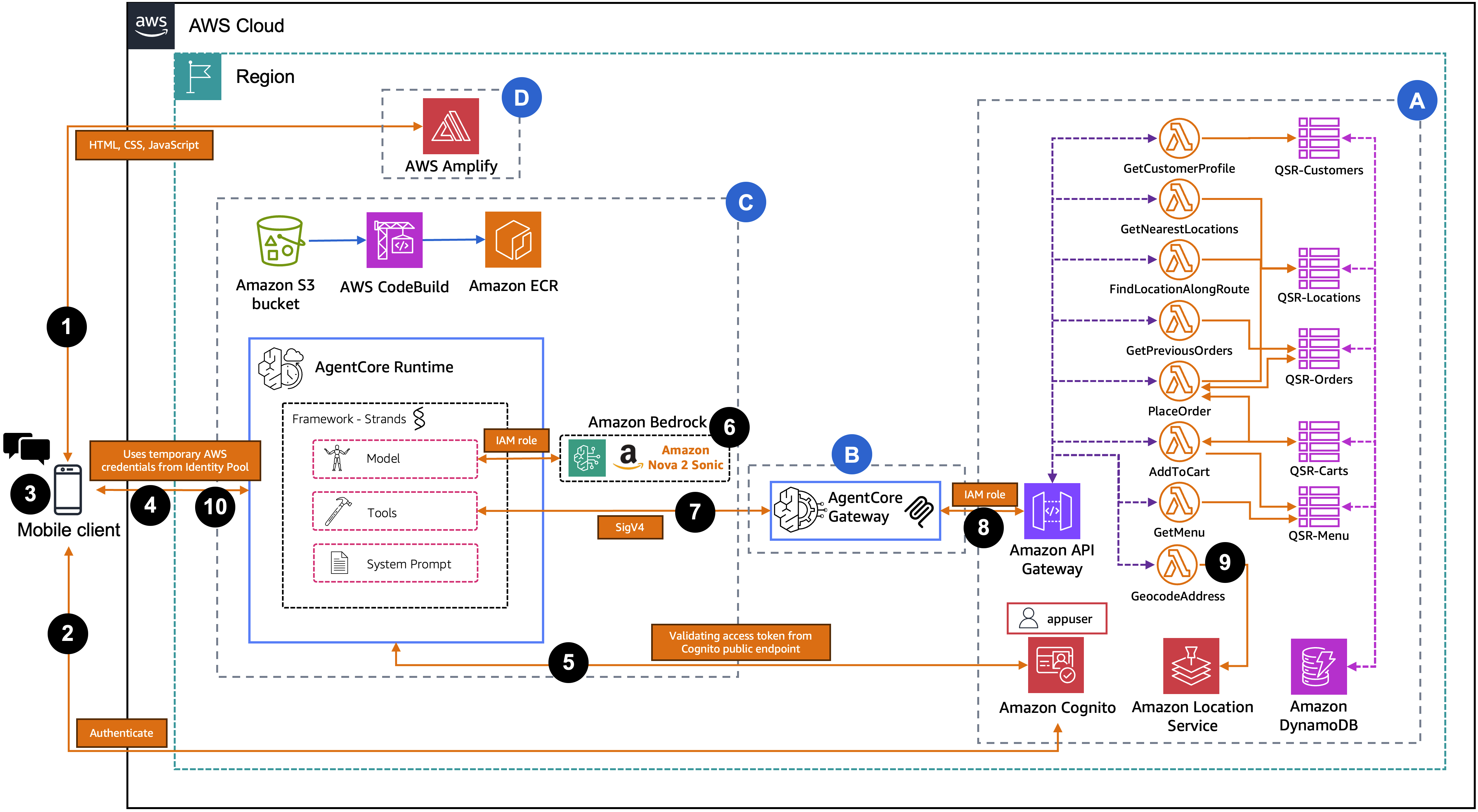
Section A: Backend infrastructure
This section deploys a sample restaurant architecture as backend services using infrastructure as code. It provisions data storage for customer information, orders, menus, carts, and locations. It also sets up location-based services for address handling and mapping, Lambda functions for business logic, an API layer for external access, and user authentication and authorization services. Resources are deployed in the appropriate dependency sequence.
Section B: AgentCore Gateway
This section deploys the AgentCore Gateway infrastructure. It provisions the necessary IAM service permissions, creates the AgentCore Gateway service, and configures API integration to expose backend endpoints as agent-accessible tools.
Section C: AgentCore Runtime and ECR image
This section deploys the AgentCore Runtime environment. It provisions Amazon ECR for container storage, Amazon S3 for source uploads, AWS CodeBuild for build automation, and required IAM permissions. The AgentCore Runtime service is configured with WebSocket protocol.
Section D: AWS Amplify
This section deploys the frontend application using AWS Amplify. It provisions the Amplify hosting service with deployment configuration and generates the necessary frontend configuration from backend outputs. The built web application is deployed and becomes accessible via the Amplify URL upon completion.
User request flow:
- The user accesses the web application hosted on AWS Amplify from their browser or mobile device.
- The user authenticates with Amazon Cognito using their username and password and receives JWT tokens (Access Token and ID Token).
- The frontend exchanges the ID Token with the Cognito Identity Pool for temporary AWS credentials (Access Key, Secret Key, Session Token).
- The frontend opens a SigV4-signed WebSocket connection to AgentCore Runtime and sends the Access Token as the first message for identity verification.
- The agent hosted in AgentCore Runtime validates the Access Token by calling the Cognito GetUser API and extracts the customer’s verified name, email, and customerId.
- AgentCore Runtime initializes the Nova 2 Sonic model on Amazon Bedrock and builds a personalized system prompt with the verified customer context.
- AgentCore Runtime connects to AgentCore Gateway as an MCP client using SigV4 authentication and discovers the available tools.
- The user speaks their order. The agent processes the voice input through Nova 2 Sonic and invokes tools asynchronously through the AgentCore Gateway using MCP.
- AgentCore Gateway exposes the backend REST APIs as MCP tools, so that the agent can discover and invoke them by name. When the agent calls a tool, AgentCore Gateway forwards the request as a REST API call to the API Gateway, which routes it to the appropriate Lambda function. Lambda functions query DynamoDB tables and AWS Location Services.
- Nova 2 Sonic generates a contextual voice response incorporating the tool results and streams it back to the user over the WebSocket connection.
Prerequisites
Before you begin, verify you have the following in place:
- An AWS account
- Foundation model (FM) access in Amazon Bedrock for Amazon Nova 2 Sonic in the same AWS Region where you will deploy this solution
- Node.js 20.x or later (required for AWS CDK deployment)
- Python 3.13 or later (required for agent runtime and deployment scripts)
- AWS Command Line Interface (AWS CLI) 2.x configured with credentials
- AWS CDK CLI 2.x:
npm install -g aws-cdk(required for infrastructure deployment) - CDK bootstrapped in your target account/region:
npx cdk bootstrap - Boto3 1.38.0 or later (required for
bedrock-agentcore-controlservice support). Install usingpython3 -m pip install --upgrade boto3 botocore --break-system-packages - Additional Python packages:
python3 -m pip install email-validator pyyaml --break-system-packages - The accompanying code downloaded from the aws-samples GitHub repo
Deploy solution resources using AWS CDK
Clone the GitHub repository and navigate into the project directory.
Run the deployment script. Both parameters are required. The email address will receive a temporary password for the initial Cognito test user.
The script first runs preflight checks to validate that Node.js, Python, AWS CLI, CDK, credentials, CDK bootstrap, and Bedrock Nova 2 Sonic model access are all in place. If any check fails, it will report what’s missing and offer to auto-install what it can.
After preflight passes, the script runs five steps. Steps 1 through 3 are fully automated. Step 4 (Synthetic Data) will prompt you for a location such as a city, zip code, or address to use as the center point for searching nearby restaurants, a food type to search for (e.g., pizza, burgers, coffee shop, sandwich, tacos), whether to reuse the same address as the customer home, and a confirmation before writing the generated data into DynamoDB. Step 5 (Password Setup) will prompt you to optionally change the temporary Cognito password that was emailed to you. If you choose yes, you will enter the temporary password from the email and set a new permanent password that meets the Cognito policy (8+ characters, uppercase, lowercase, digit, symbol).
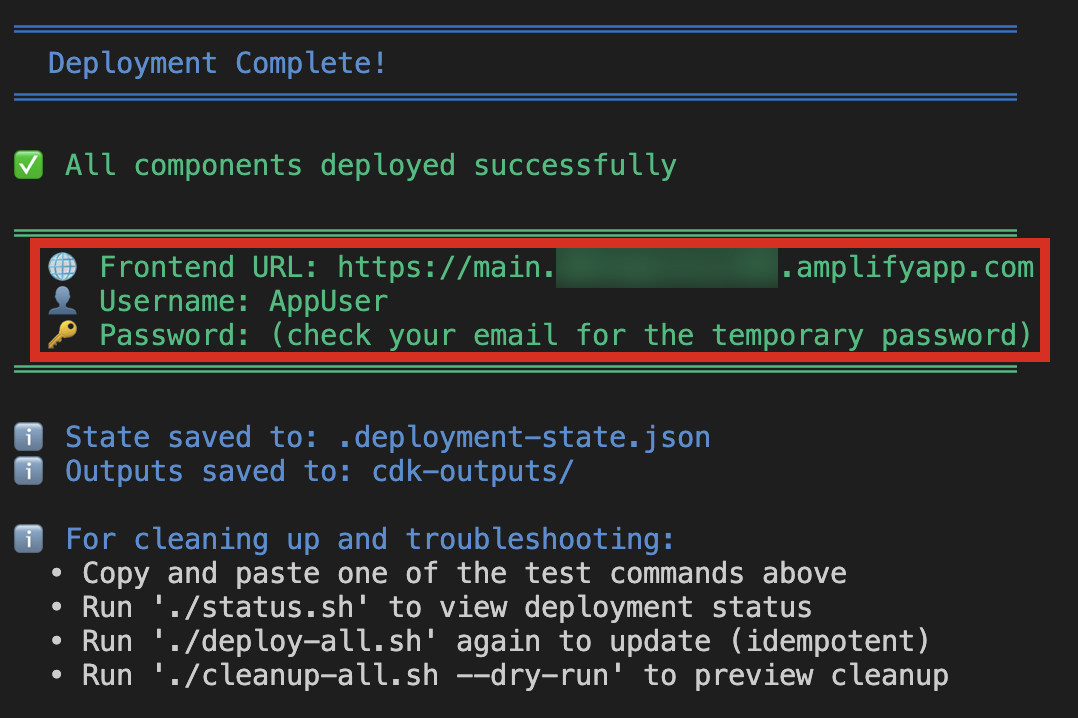
After completion, the script outputs the front-end URL (e.g., https://main.<app-id>.amplifyapp.com) that you will use to access the application.
Understanding serverless data management
API Gateway creates a REST API that connects your frontend to backend services with eight IAM-authenticated endpoints and Lambda integration.
Your backend uses five DynamoDB tables supporting the complete ordering workflow. The Customers Table stores profiles (name, email, phone, loyalty tier, points) for personalized recommendations. The Orders Table stores order history with location data and uses a Global Secondary Index to query by location for identifying popular items. The Menu Table stores location-specific items with pricing and availability that varies by restaurant. The Carts Table stores temporary shopping carts with 24-hour TTL for automatic cleanup. The Locations Table stores restaurant data (coordinates, hours, tax rates) for order calculations and recommendations. DynamoDB on-demand capacity scales automatically with traffic.
Understanding location-based services
Location Services provides location-based features that help customers find convenient pickup locations. The system deploys three resources: a Place Index (Esri) for geocoding and address search, a Route Calculator (Esri) for calculating driving routes and detour times, and a Map (VectorEsriNavigation style) for interactive visualization optimized for driving.
Lambda functions provide three capabilities: Nearest Location Search finds the closest restaurants sorted by distance using GPS coordinates and the haversine formula. Route-Based Search identifies restaurants within a specified detour time (default 10 minutes) using actual driving times rather than straight-line distances. Address Geocoding converts street addresses to coordinates when GPS isn’t available.
These features enable context-aware recommendations like “I found a location 2 minutes from your route” or “Your usual location is 5 miles away.”
Understanding voice AI processing with Amazon Bedrock AgentCore
Your AI agent processes voice interactions through Amazon Bedrock AgentCore. Each user session runs in an isolated microVM, which keeps customer sessions secure and performant even under high load. It prevents one customer’s session from affecting another’s performance or accessing their data. AgentCore provides automatic scaling, built-in monitoring, and WebSocket support for real-time voice.
The agent uses the Strands framework to define system prompts, tools, and conversation flow. Nova 2 Sonic provides:
- Speech recognition across accents with background noise tolerance
- Speech response adaptation to user tone and sentiment
- Bidirectional streaming with low latency response times
- Asynchronous tool calling that fetches data in parallel without blocking conversation
- Interruption handling for natural turn-taking
- Context awareness across multiple conversation turns
The voice processing flow: Audio streams from the frontend (16 kHz PCM) via WebSocket to AgentCore Runtime. Nova 2 Sonic transcribes speech, the agent determines intent and selects tools, invokes them asynchronously via MCP, and the AgentCore Gateway translates MCP calls to REST API calls. Lambda functions execute business logic and return results, which the agent incorporates into its response. Nova 2 Sonic generates voice output that streams back to the frontend.
This architecture minimizes latency for conversational ordering.
User authentication
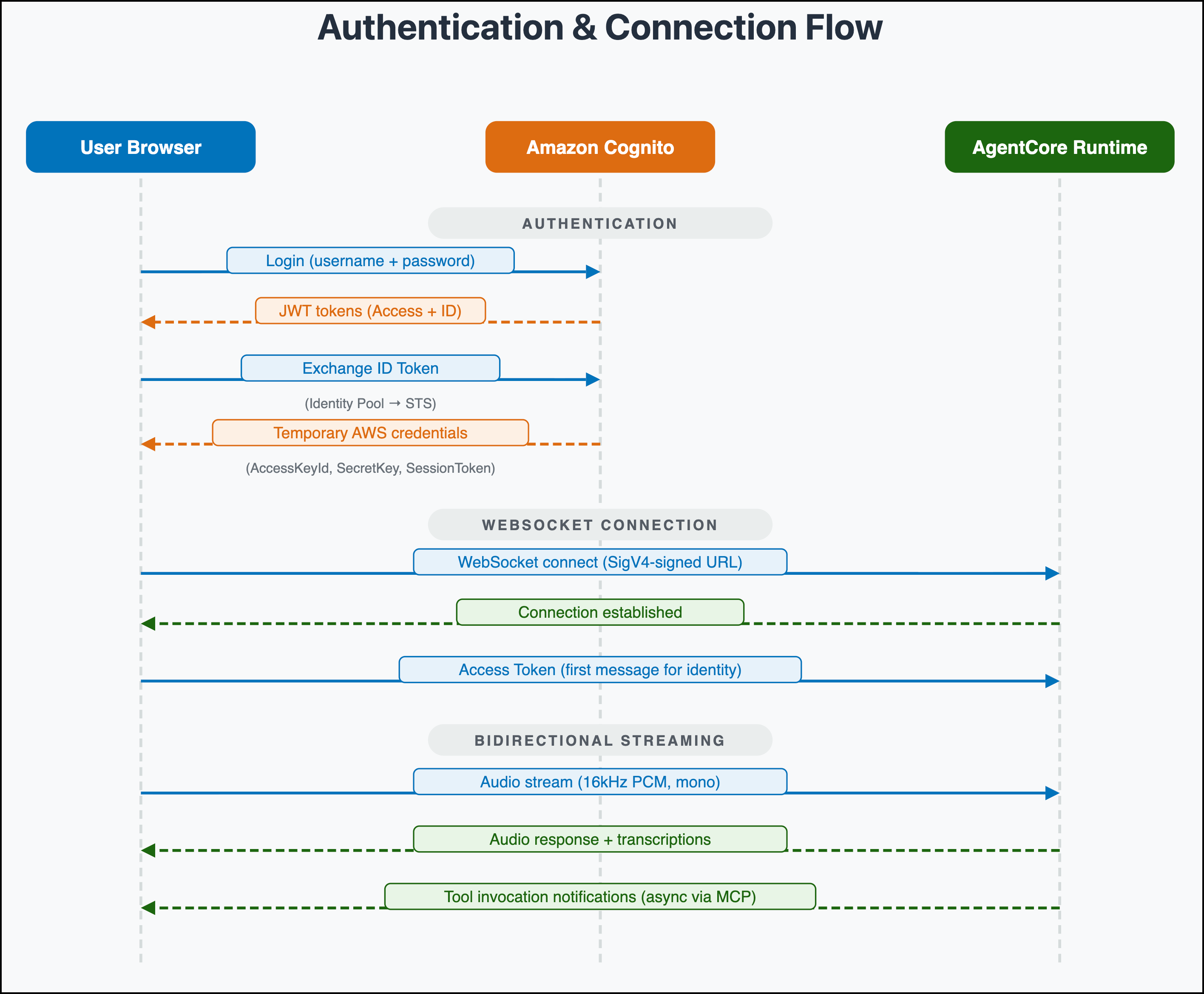
The solution uses Amazon Cognito user pools and identity pools for secure, role-based access control. User pools manage authentication and groups. Identity pools provide temporary AWS credentials linked to IAM roles. Users log in with their username and password to the Cognito User Pool, receiving JSON Web Token (JWT) tokens (Access Token and ID Token). The frontend exchanges the ID Token with the Cognito Identity Pool for temporary AWS credentials (Access Key, Secret Key, Session Token). These credentials sign the WebSocket connection to AgentCore Runtime and API Gateway requests using Signature Version 4 (SigV4). This architecture ensures that only authenticated users can access the application and ordering APIs.
WebSocket connection flow
The following sequence diagram illustrates how the authentication credentials from the previous section establish a direct browser-to-AgentCore connection. Using the temporary AWS credentials, the frontend opens a SigV4-signed WebSocket connection to AgentCore Runtime and sends the Access Token for identity verification. The browser then streams 16kHz PCM audio and receives voice responses, transcriptions, and tool invocation notifications over the same connection. This avoids the need for a server-side proxy.
Voice interaction and dynamic ordering
The following sequence diagram illustrates the flow of a customer’s order query, demonstrating how natural language requests are processed to deliver synchronized responses:
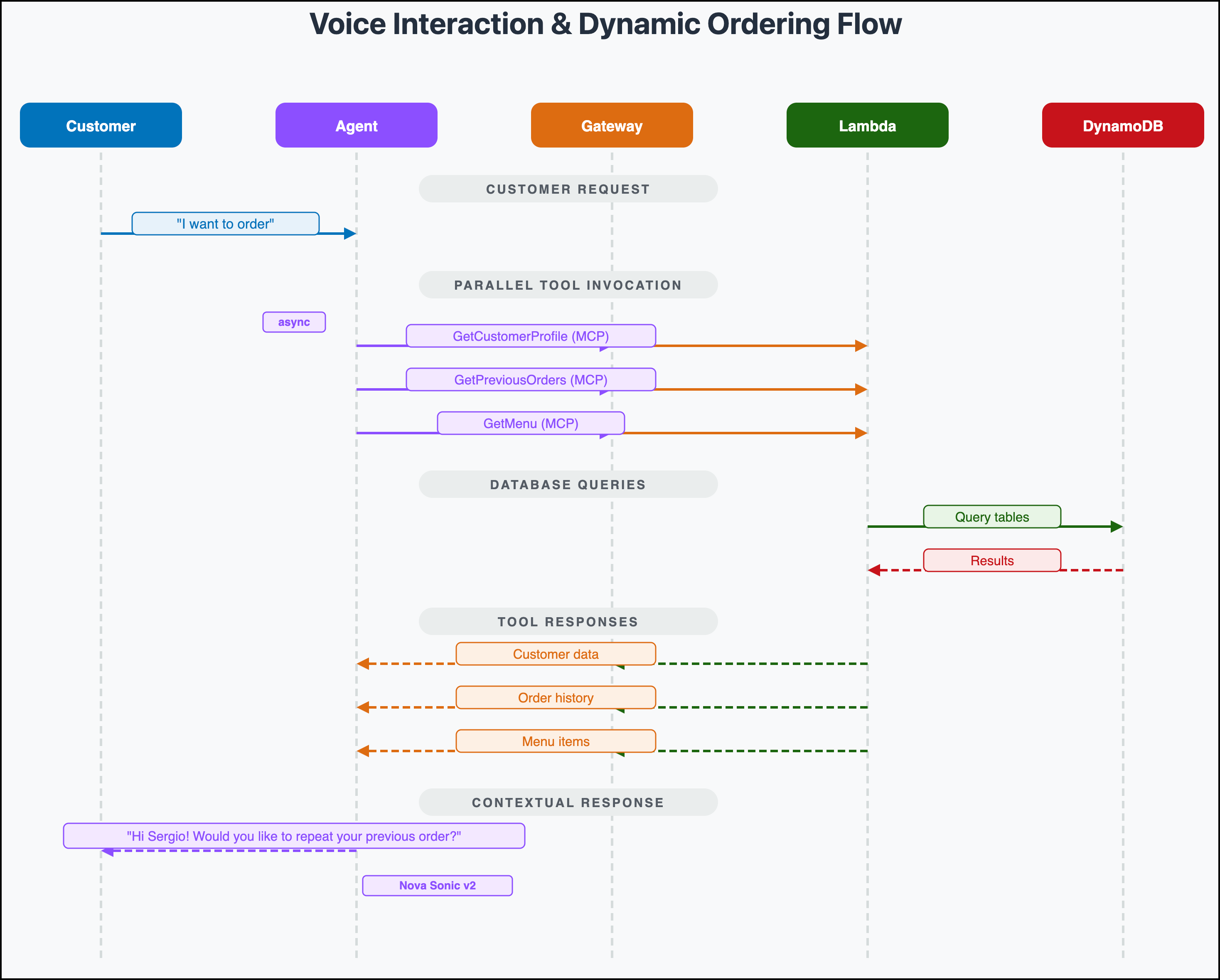
The diagram shows a customer query (“I want to order”) which is handled through asynchronous tool calling. The agent invokes multiple tools in parallel (GetCustomerProfile, GetPreviousOrders, GetMenu) through the AgentCore Gateway, which translates them into API Gateway REST calls. Lambda functions query DynamoDB and return the results back through the gateway. Nova 2 Sonic then generates a contextual response incorporating all the tool results, creating a personalized customer experience throughout the conversation.
Ordering walkthrough
Open the frontend URL in your browser and sign in with the AppUser credentials. After you authenticate, choose the microphone button to start a voice conversation with the ordering agent. The agent greets you by name, gets your location from the browser, and pulls up your previous orders in the background. You can speak naturally. Ask to repeat a past order, browse the menu, find nearby pickup locations along your route, or build a new order from scratch. The agent responds with voice in real time, handles menu questions, adds items to your cart, and confirms your order with a total and estimated pickup time. The entire conversation happens hands-free over a single WebSocket connection. The agent calls backend tools asynchronously, so there are no pauses while data is being fetched. The following video demonstrates a complete ordering session from greeting to order confirmation.
Clean up
If you decide to discontinue using the solution, you can follow these steps to remove it and its associated resources:
Delete the stacks:
./cleanup-all.sh
Conclusion
In this post, we showed you how to build an omnichannel ordering system using Amazon Cognito for authentication, Amazon Bedrock AgentCore for agent hosting, API Gateway for data communication, DynamoDB for storage, and Location Services for route optimization. The three-layer architecture separates frontend, agent, and backend components for independent development and scaling. The system supports menu management, cart functionality, loyalty programs, order processing, and location-based services through MCP integration. Amazon Nova 2 Sonic provides voice interactions with low latency, asynchronous tool calling, and interruption handling. Parallel tool calling reduces wait times, voice recognition works across accents, personalized recommendations use order history, and route-optimized pickup locations help customers find convenient stops. The pay-per-use pricing model and automated scaling control costs as usage grows, while with MCP integration, you can adapt the solution by adding new Lambda functions without modifying agent code. To get started, visit the solution repository on GitHub and customize the solution for your ordering platforms. For more information, see the Amazon Bedrock documentation and Introducing Amazon Nova 2 Sonic.
Additional resources
To learn more about Amazon Bedrock AgentCore, Amazon Nova Sonic, and additional solutions, refer to the following resources:
- Introducing Amazon Nova 2 Sonic: Our new speech-to-speech model for conversational AI
- Getting started with Amazon Bedrock AgentCore
- Model Context Protocol specification
- AWS Location Services documentation
- AgentCore CLI – While our solution uses CDK, you can also use AgentCore CLI which offers a command-line tool for creating, configuring, deploying, and managing agents on Amazon Bedrock AgentCore.