This post is cowritten with Abdullahi Olaoye, Curtice Lockhart, Nirmal Kumar Juluru from NVIDIA.
We are excited to announce that NVIDIA’s Nemotron 3 Nano is now available as a fully managed and serverless model in Amazon Bedrock. This follows our earlier announcement at AWS re:Invent supporting NVIDIA Nemotron 2 Nano 9B and NVIDIA Nemotron 2 Nano VL 12B models.
With NVIDIA Nemotron open models on Amazon Bedrock, you can accelerate innovation and deliver tangible business value without having to manage infrastructure complexities. You can power your generative AI applications with Nemotron’s capabilities through the inference capabilities of Amazon Bedrock and harness the benefit of its extensive features and tooling.
This post explores the technical characteristics of the NVIDIA Nemotron 3 Nano model and discusses potential application use cases. Additionally, it provides technical guidance to help you get started using this model for your generative AI applications within the Amazon Bedrock environment.
About Nemotron 3 Nano
NVIDIA Nemotron 3 Nano is a small language model (SLM) with a hybrid Mixture-of-Experts (MoE) architecture that delivers high compute efficiency and accuracy that developers can use to build specialized agentic AI systems. The model is fully open with open-weights, datasets, and recipes facilitating transparency and confidence for developers and enterprises. Compared to other similar sized models, Nemotron 3 Nano excels in coding and reasoning tasks, taking the lead on benchmarks such as SWE Bench Verified, AIME 2025, Arena Hard v2, and IFBench.
Model overview:
- Architecture:
- Mixture-of-Experts (MoE) with Hybrid Transformer-Mamba Architecture
- Supports Token Budget for providing accuracy while avoiding overthinking
- Accuracy:
- Leading accuracy on coding, scientific reasoning, math, tool calling, instruction following, and chat
- Nemotron 3 Nano leads on benchmarks such as SWE Bench, AIME 2025, Humanity Last Exam, IFBench, RULER, and Arena Hard (compared to other open language models with 30 billion or fewer MoE)
- Model size: 30 B with 3 B active parameters
- Context length: 256K
- Model input: Text
- Model output: Text
Nemotron 3 Nano combines Mamba, Transformer, and Mixture-of-Experts layers into a single backbone to help balance efficiency, reasoning accuracy, and scale. Mamba enables long-range sequence modeling with low memory overhead, while Transformer layers help add precise attention for structured reasoning tasks like code, math, and planning. MoE routing further boosts scalability by activating only a subset of experts per token, helping to improve latency and throughput. This makes Nemotron 3 Nano especially well-suited for agent clusters running many concurrent, lightweight workflows.
To learn more about Nemotron 3 Nano’s architecture and how it is trained, see Inside NVIDIA Nemotron 3: Techniques, Tools, and Data That Make It Efficient and Accurate.
Model benchmarks
The following image shows that Nemotron 3 Nano leads in the most attractive quadrant in Artificial Analysis Openness Index vs. Intelligence Index. Why openness matters: It builds trust through transparency. Developers and enterprises can confidently build on Nemotron with clear visibility into the model, data pipeline, and data characteristics, enabling straightforward auditing and governance.
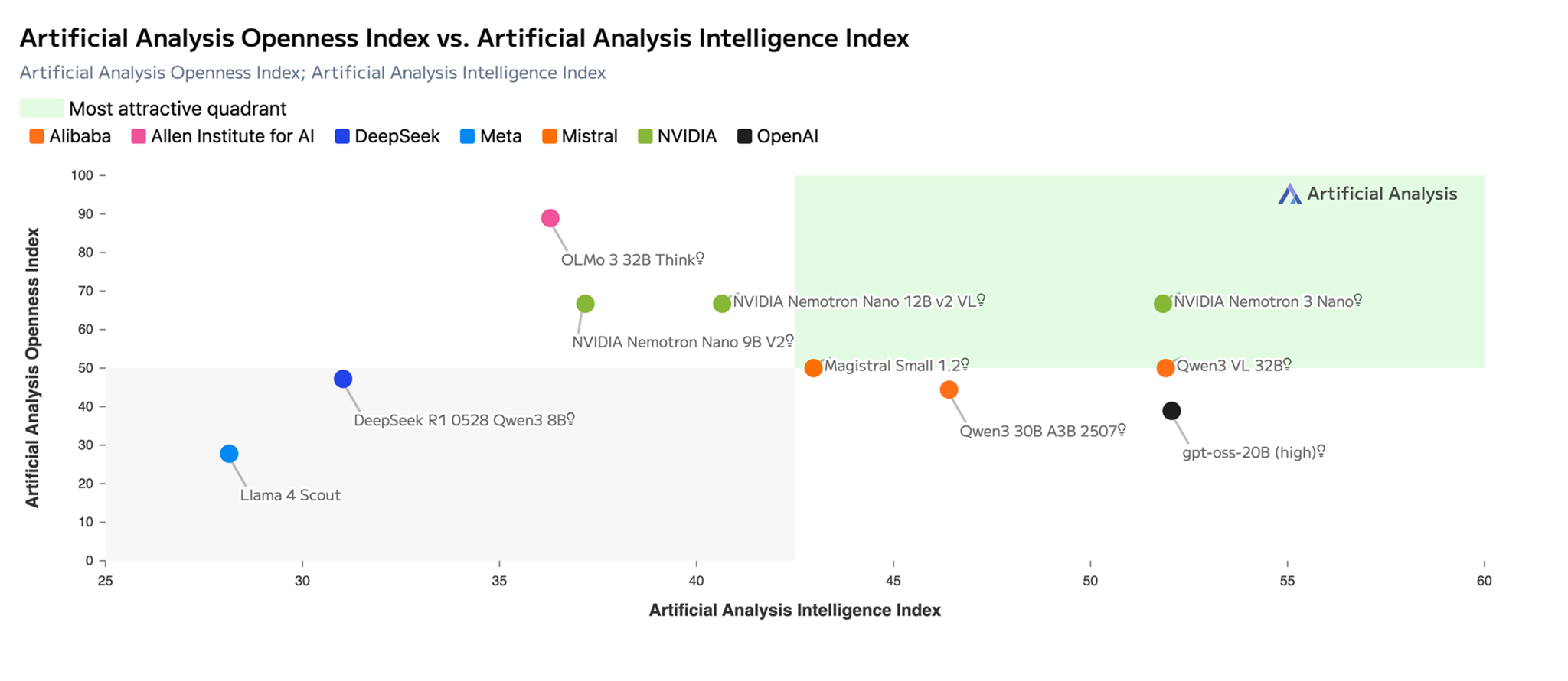
Title: Chart showing Nemotron 3 Nano in the most attractive quadrant in Artificial Analysis Openness vs Intelligence Index (Source: Artificial Analysis)
As shown in the following image, Nemotron 3 Nano provides leading accuracy with the highest efficiency among the open models and scores an impressive 52 points, a significant jump over the previous Nemotron 2 Nano model. Token demand is increasing due to agentic AI, so the ability to ‘think fast’ (arrive at the correct answer quickly while using fewer tokens) is critical. Nemotron 3 Nano delivers high throughput with its efficient Hybrid Transformer-Mamba and MoE architecture.
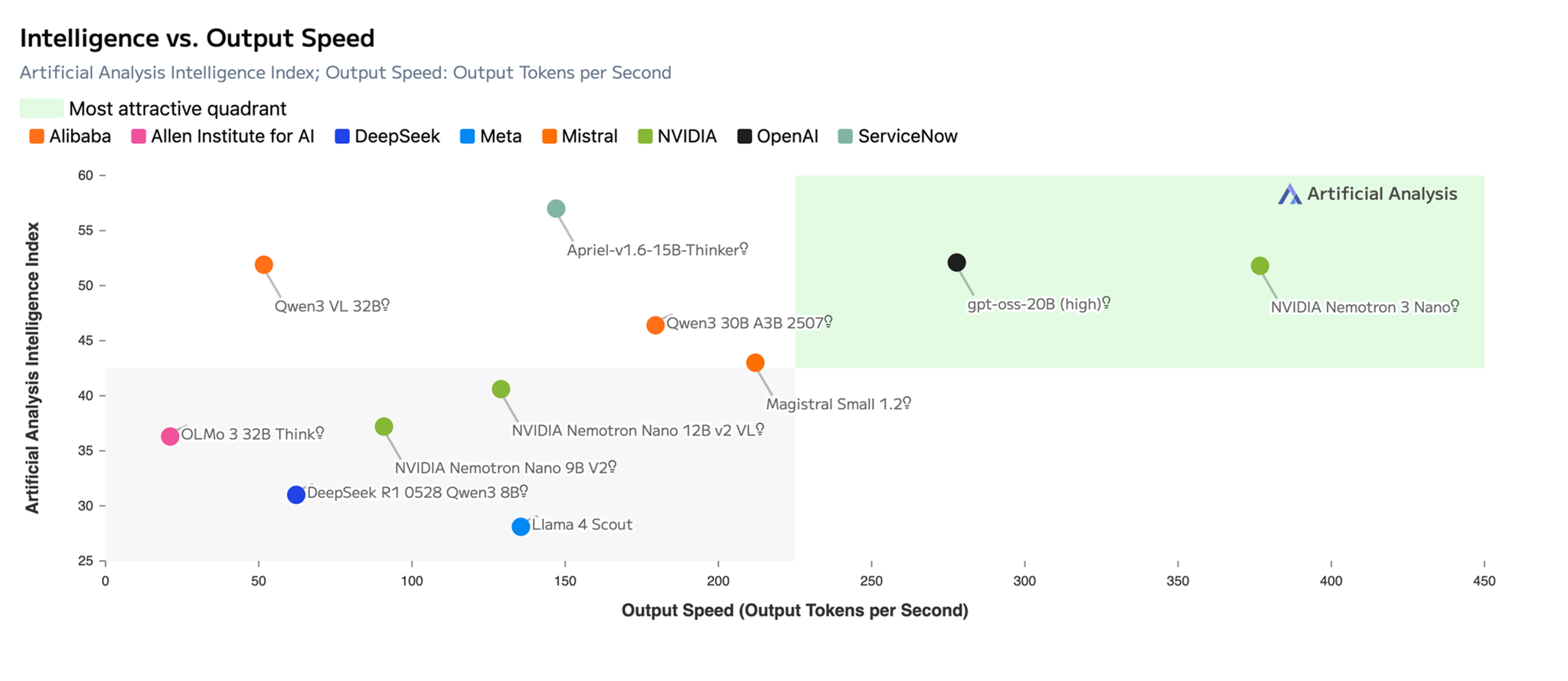
Title: NVIDIA Nemotron 3 Nano provides highest efficiency with leading accuracy among open models with an impressive 52 points score on Artificial Analysis Intelligence vs. Output Speed Index. (Source: Artificial Analysis)
NVIDIA Nemotron 3 Nano use cases
Nemotron 3 Nano helps power various use cases for different industries. Some of the use cases include
- Finance – Accelerate loan processing by extracting data, analyzing income patterns, detecting fraudulent operations, reducing cycle times, and risk.
- Cybersecurity – Automatically triage vulnerabilities, perform in-depth malware analysis, and proactively hunt for security threats.
- Software development – Assist with tasks like code summarization.
- Retail – Optimize inventory management and help enhance in-store service with real-time, personalized product recommendations and support.
Get started with NVIDIA Nemotron 3 Nano in Amazon Bedrock
To test NVIDIA Nemotron 3 Nano in Amazon Bedrock, complete the following steps:
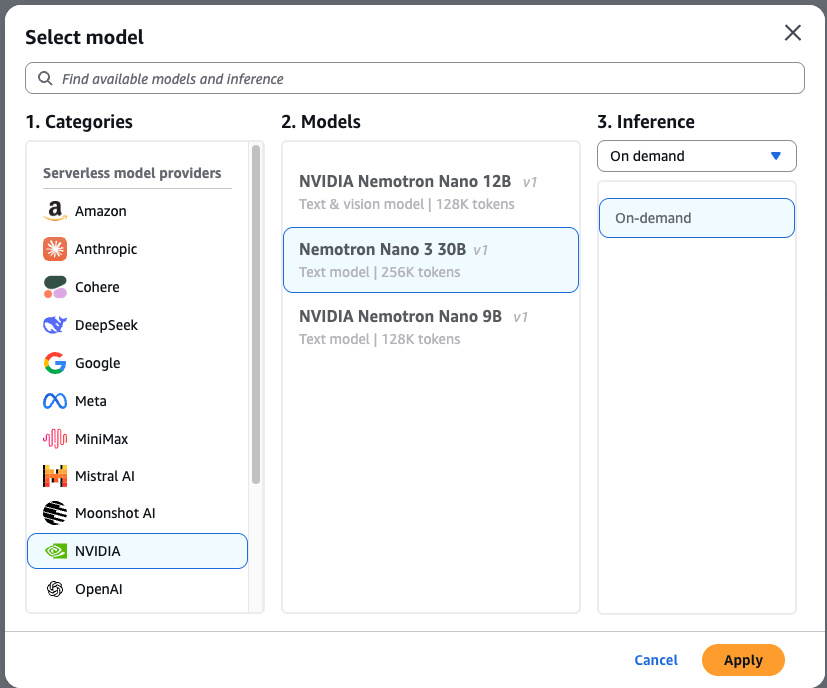
- Navigate to the Amazon Bedrock console and select Chat/Text playground from the left menu (under the Test section).
- Choose Select model in the upper-left corner of the playground.
- Choose NVIDIA from the category list, then select NVIDIA Nemotron 3 Nano.
- Choose Apply to load the model.
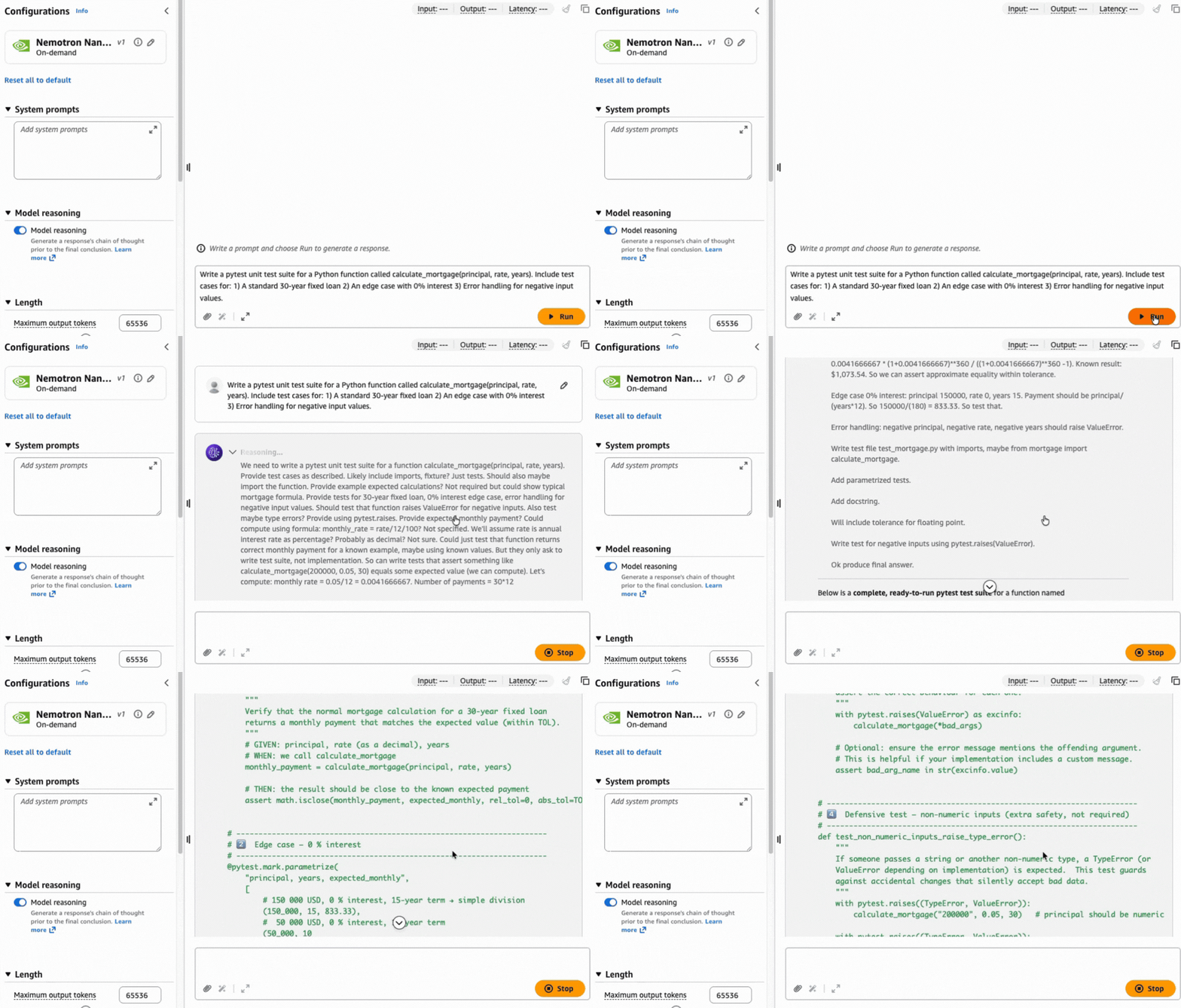
After selection, you can test the model immediately. Let’s use the following prompt to generate a unit test in Python code using the pytest framework:
Write a pytest unit test suite for a Python function called calculate_mortgage(principal, rate, years). Include test cases for: 1) A standard 30-year fixed loan 2) An edge case with 0% interest 3) Error handling for negative input values.
Complex tasks like this prompt can benefit from a chain of thought approach to help produce a precise result based on the reasoning capabilities built natively into the model.
Using the AWS CLI and SDKs
You can access the model programmatically using the model ID nvidia.nemotron-nano-3-30b. The model supports both the InvokeModel and Converse APIs through the AWS Command Line Interface (AWS CLI) and AWS SDK with nvidia.nemotron-nano-3-30b as the model ID. Further, it supports the Amazon Bedrock OpenAI SDK compatible API.
Run the following command to invoke the model directly from your terminal using the AWS Command Line Interface (AWS CLI) and the InvokeModel API:
To invoke the model through the AWS SDK for Python (boto3), use the following script to send a prompt to the model, in this case by using the Converse API:
To invoke the model through the Amazon Bedrock OpenAI-compatible ChatCompletions endpoint, you can do so by using the OpenAI SDK:
Use NVIDIA Nemotron 3 Nano with Amazon Bedrock features
You can enhance your generative AI applications by combining Nemotron 3 Nano with the Amazon Bedrock managed tools. Use Amazon Bedrock Guardrails to implement safeguards and Amazon Knowledge Bases to create robust Retrieval Augmented Generation (RAG) workflows.
Amazon Bedrock guardrails
Guardrails is a managed safety layer that helps enforce responsible AI by filtering harmful content, redacting sensitive information (PII), and blocking specific topics across prompts and responses. It works across multiple models to help detect prompt injection attacks and hallucinations.
Example use case: If you’re building a mortgage assistant, you can help prevent it from offering general investment advice. By configuring a filter for the word “stocks”, user prompts containing that term can be immediately blocked and receive a custom message.
To set up a guardrail, complete the following steps:
- In the Amazon Bedrock console, navigate to the Build section on the left and select Guardrails.
- Create a new guardrail and configure the necessary filters for your use case.
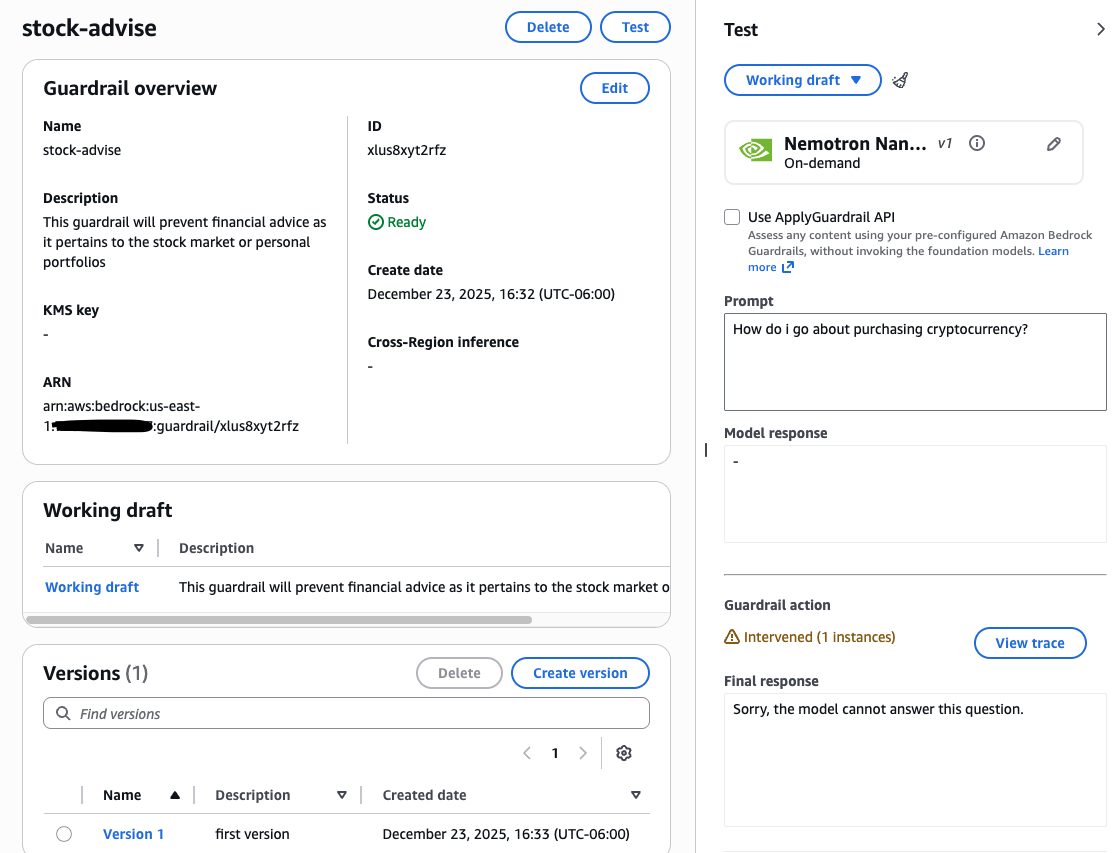
After configured, test the guardrail with various prompts to verify its performance. You can then fine-tune settings, such as denied topics, word filters, and PII redaction, to match your specific safety requirements. For a deep dive, see Create your guardrail.
Amazon Bedrock Knowledge Bases
Amazon Bedrock Knowledge Bases automates the complete RAG workflow. It handles ingesting content from your data sources, chunking it into searchable segments, converting them into vector embeddings, and storing them in a vector database. Then, when a user submits a query, the system matches the input against stored vectors to find semantically similar content, which is then used to augment the prompt sent to the foundation model.
For this example, we uploaded PDFs (for example, Buying a New Home, Home Loan Toolkit, Shopping for a Mortgage) to Amazon Simple Storage Service (Amazon S3) and selected Amazon OpenSearch Serverless as the vector store. The following code demonstrates how to query this knowledge base using the RetrieveAndGenerate API, while automatically facilitating safety compliance alignment through a specific Guardrail ID.
It directs the NVIDIA Nemotron 3 Nano model to synthesize the retrieved documents into a clear, grounded answer using your custom prompt template. To set up your own pipeline, review the full walkthrough in the Amazon Bedrock User Guide.
Conclusion
In this post, we showed you how to get started with NVIDIA Nemotron 3 Nano on Amazon Bedrock for fully managed serverless inference. We also showed you how to use the model with Amazon Bedrock Knowledge Bases and Amazon Bedrock Guardrails. The model is now available in the US East (N. Virginia), US East (Ohio), US West (Oregon), Asia Pacific (Tokyo), Asia Pacific (Mumbai), South America (Sao Paulo), Europe (London), and Europe (Milan) AWS Regions. Check the full Region list for future updates. To learn more, check out NVIDIA Nemotron and give NVIDIA Nemotron 3 Nano a try in the Amazon Bedrock console today.