This post is cowritten by Jeff Boudier, Simon Pagezy, and Florent Gbelidji from Hugging Face.
Agentic AI systems represent an evolution from conversational AI to autonomous agents capable of complex reasoning, tool usage, and code execution. Enterprise applications benefit from strategic deployment approaches tailored to specific needs. These needs include managed endpoints, which deliver auto-scaling capabilities, foundation model APIs to support complex reasoning, and containerized deployment options that support custom integration requirements.
Hugging Face smolagents is an open source Python library designed to make it straightforward to build and run agents using a few lines of code. We will show you how to build an agentic AI solution by integrating Hugging Face smolagents with Amazon Web Services (AWS) managed services. You’ll learn how to deploy a healthcare AI agent that demonstrates multi-model deployment options, vector-enhanced knowledge retrieval, and clinical decision support capabilities.
While we use healthcare as an example, this architecture applies to multiple industries where domain-specific intelligence and reliability are critical. The solution uses the model-agnostic, modality-agnostic, and tool-agnostic design of smolagents to orchestrate across Amazon SageMaker AI endpoints, Amazon Bedrock APIs, and containerized model servers.
Solution overview
Many AI systems face limitations with single-model approaches that can’t adapt to diverse enterprise needs. These systems often have rigid deployment options, inconsistent APIs across different AI services, and lack multi-model deployment options for optimal model selection.
This solution demonstrates how organizations can build AI systems that address these limitations. The solution allows deployment selection based on operational needs and provides consistent request and response formats across different AI backends and deployment methods. It generates contextual responses through medical knowledge integration and vector search, supporting deployment from development to production environments through containerized architecture.
This healthcare use case illustrates how the AI agent can process complex medical queries for six medications with clinical decision support and AWS security and compliance capabilities.
Architecture
The solution consists of the following services and features to deliver the agentic AI capabilities:
- SageMaker AI with BioM-ELECTRA-Large-SQuAD2 model for specialized medical queries and managed auto-scaling.
- Amazon Bedrock with Claude 3.5 Sonnet V2 by Anthropic for complex reasoning and foundation model access.
- Amazon OpenSearch Service for vector similarity matching and contextual knowledge retrieval with medical knowledge indexing.
- Amazon Elastic Container Service (Amazon ECS), with AWS Fargate, for serverless container orchestration and scalable deployment of the Python application that uses the smolagents library.
- AWS Identity and Access Management (IAM) for security and access control.
- Containerized model server with BioM-ELECTRA-Large-SQuAD2 for self-hosted model deployment.
The following diagram illustrates the solution architecture.
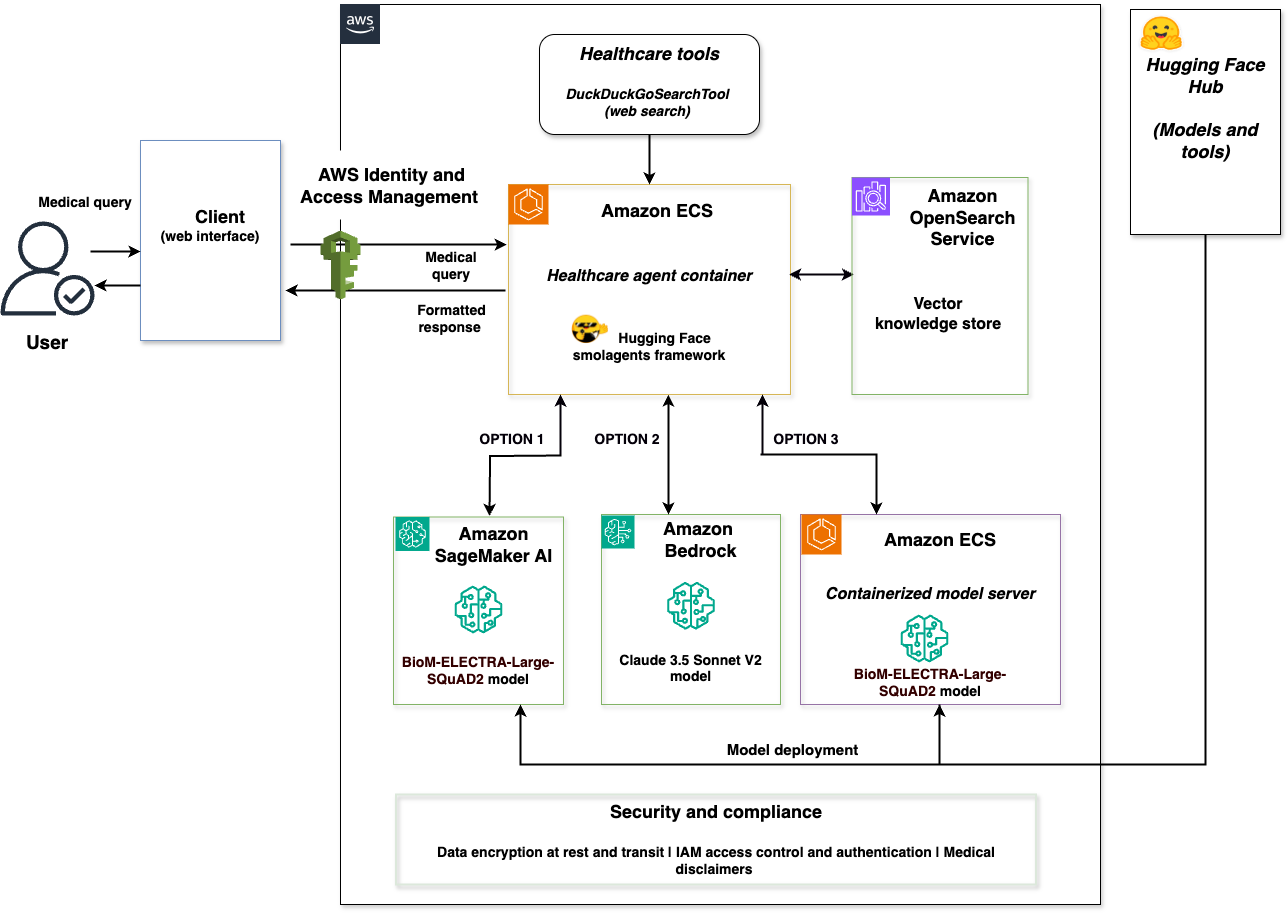
The architecture is a complete integration of the Hugging Face smolagents framework with AWS services. A client web interface connects to a healthcare agent container that orchestrates across three model backends: SageMaker AI with BioM-ELECTRA, Amazon Bedrock with Claude 3.5 Sonnet V2, and a containerized model server with BioM-ELECTRA. The solution includes a vector store powered by OpenSearch Service and a security layer with data encryption at rest and in transit. The security layer also handles IAM access control and authentication, and any medical disclaimers for regulatory compliance.
This solution supports deployment options through smolagents with each backend optimized for different scenarios:
- SageMaker AI for managed endpoints with auto-scaling and production workloads using Hugging Face Hub models.
- Amazon Bedrock for serverless access to foundation models and complex reasoning through AWS APIs.
- A containerized model server for self-hosted model deployment and tool integration from Hugging Face Hub.
The three backends implement Hugging Face Messages API compatibility, confirming consistent request and response formats regardless of the selected model service. Users select the appropriate backend based on their requirements—the solution provides deployment options rather than automatic routing.
The complete implementation is available in the sample-healthcare-agent-with-smolagents-on-aws GitHub repository.
Key benefits
The integration of Hugging Face smolagents with AWS managed services offers significant advantages for enterprise agentic AI deployments.
Deployment choice
Organizations can choose the optimal deployment for each use case: Amazon Bedrock for serverless access to foundation models and self-hosted containerized deployment for custom tool integration or SageMaker AI for specialized domain models. These options help to match specific workload requirements, rather than a one-size-fits-all approach.
Multi-model deployment options
Organizations can optimize their infrastructure choices without changing their agent logic. You can switch between containerized model server, SageMaker AI, and Amazon Bedrock without modifying your application code. This provides deployment options, while maintaining consistent agent behavior.
Code generation capabilities
The CodeAgent approach of smolagents streamlines multi-step operations through direct Python code generation and processing. The following comparison illustrates the multi-step operations of smolagents:
Multi-step JSON-based approach:
smolagents CodeAgent:
The smolagents CodeAgent supports single code blocks to handle multi-step operations, reducing large language model (LLM) calls while streamlining agent development. It provides full control of agent logic across AWS service deployments.
Scalable architecture
By deploying the application on AWS, you gain access to security features and auto-scaling capabilities that help you meet organizational security requirements and maintain regulatory compliance. Running containerized workloads with Amazon ECS and Fargate helps you achieve reliable operations and optimize costs through automated resource scaling.
Let’s walk through implementing this solution.
Prerequisites
Before you deploy the solution, you need the following:
- An AWS account with appropriate permissions to create IAM roles, Amazon ECS clusters, and Amazon OpenSearch Service domains.
- AWS Command Line Interface (AWS CLI) version 2.0 or later installed and configured.
- Python 3.10 or later for running deployment scripts.
- Docker installed and running (required for production environments to provide secure code execution sandbox).
- Access to Amazon Bedrock, SageMaker AI, and OpenSearch Service in your AWS Region with appropriate IAM permissions to create and manage resources.
- For this implementation, we’re using Python 3.10+, smolagents framework, transformers 4.28.1+, PyTorch 2.0.0+, and boto3.
Run the following command to install the required Python packages:
Configure environment variables
Set the required environment variables for your AWS Region and resource names before deploying the infrastructure.
- Set the following environment variables in your terminal:
- Verify the variables are set:
These environment variables are used throughout the deployment and testing processes. Verify that they’re set before proceeding to the next step.
Set up AWS infrastructure
Start by creating the foundational AWS infrastructure components using the SampleAWSInfrastructureManager class from the Smolagents_SageMaker_Bedrock_Opensearch.py implementation.
Deploy complete infrastructure (automated approach)
For automated deployment of the AWS infrastructure components, you can use the enhanced main function.
- Start the enhanced main function:
- The deployment automatically creates an Amazon ECS cluster, IAM roles, and an OpenSearch Service domain.
- Wait for deployment to complete (approximately 15–20 minutes).
Create individual AWS components (alternative approach)
If you prefer to create components individually, you can set up an OpenSearch Service domain for vector-enhanced knowledge retrieval and an Amazon ECS cluster for containerized deployment.
Both the OpenSearch Service domain and Amazon ECS cluster are automatically created as part of the complete AWS infrastructure deployment (Option 1 in enhanced_main). If you’ve already deployed the complete infrastructure, both components are ready and you can skip to the Deploy the Amazon SageMaker AI endpoint section.
Deploy the Amazon SageMaker AI endpoint
Deploy the BioM-ELECTRA-Large-SQuAD2 model to SageMaker AI for specialized medical query processing. An automated method (for deployment through the enhanced main) and a manual method (for deployment through the SageMaker AI endpoint) are provided.
To deploy using enhanced main (automated method)
To deploy the SageMaker AI endpoint (manual method)
- Verify your SageMaker environment variables are set (from the Configure environment variables section):
- Run the Amazon SageMaker deployment function:
- The deployment uses the HuggingFaceModel with transformers 4.28.1, PyTorch 2.0.0, and ml.m5.xlarge instance type.
- Wait for the endpoint deployment to complete (approximately 5–10 minutes).
- Verify the endpoint deployment:
- The endpoint is configured for question-answering tasks with
MAX_LENGTH=512andTEMPERATURE=0.1.
Configure the multi-model backends
Configure the two additional backend options using the SampleTripleHealthcareAgent class for model selection based on operational needs.
Option 1 – Set up Amazon Bedrock access
Configure access to Amazon Bedrock for foundation model integration with Claude 3.5 Sonnet V2.
- Verify your Amazon Bedrock model configuration is set (from the Configure environment variables section):
- Access to Claude 3.5 Sonnet V2 is automatically available for your AWS account.
- You can verify model availability in the Amazon Bedrock console under Model catalog.
Initialize the medical knowledge base
Set up the medical knowledge database with six medications and vector embeddings in OpenSearch Service. You can use the enhanced_main() function, which provides an interactive menu for deployment tasks, or initialize manually using the SampleOpenSearchManager class.
To initialize using enhanced main (Automated method)
To initialize the medical knowledge base (Manual method)
- Initialize the
SampleOpenSearchManager:
- The system creates the medical knowledge index with mappings for
drug_name,content, andcontent_typefields. - Medical knowledge for Metformin, Lisinopril, Atorvastatin, Amlodipine, Omeprazole, and Simvastatin is automatically indexed.
- Each medication includes side effects, monitoring requirements, and drug class information.
- The vector store supports similarity search with content type filtering for targeted queries.
- Verify the indexing completed successfully:
Option 2 – Deploy the containerized model server
After setting up the core infrastructure, deploy a containerized model server that provides self-hosted model deployment capabilities.
Deploy the containerized model server using the LocalContainerizedModelServer class with BioM-ELECTRA-Large-SQuAD2 for model deployment.
To deploy containers to Amazon ECS (automated method)
For automated deployment, use the containerized Amazon ECS deployment:
To deploy the containerized model server (manual method)
- Verify your containerized model configuration is set (from the Configure environment variables step):
- Initialize the containerized model server:
The containerized model server uses Docker sandboxing for secure code execution.
- Verify that the containerized model server is running:
- The containerized model server includes fallback mechanisms with medical knowledge database integration.
- The containerized model server supports deployment with Amazon ECS service discovery.
Implement the healthcare agent
Deploy the core healthcare agent using the SampleTripleHealthcareAgent class that demonstrates smolagents integration with deployment capabilities across the three backends.
Initialize the triple healthcare agent
Set up the main healthcare agent that orchestrates across SageMaker AI, Amazon Bedrock, and containerized model server with smolagents framework integration.
- Create the vector store instance:
- Initialize the triple healthcare agent:
- The agent initializes three model backends:
SampleSageMakerEndpointModelwith BioM-ELECTRA integrationSampleBedrockClaudeModelwith Claude 3.5 Sonnet V2 APISampleContainerizedModelwith fallback mechanisms
- Each backend is wrapped with
SampleHealthcareCodeAgentfor smolagents integration. - The agents are configured with
max_steps=3andDuckDuckGoSearchToolintegration.
Configure deployment options
The system demonstrates three deployment options based on operational needs.
To understand the deployment options:
- SageMaker AI deployment: Specialized medical queries about drug information, side effects, and monitoring requirements.
- Amazon Bedrock deployment: Complex reasoning tasks requiring detailed medical analysis and multi-step reasoning.
- Containerized deployment: Custom model integration with specialized tools and self-hosted model access.
Each backend includes database fallback with medical knowledge for six medications and Amazon OpenSearch Service provides contextual information across the model backends with similarity matching.
Test the interactive system
Use the sample_interactive_healthcare_assistant function to test the multi-model deployment.
- Start the interactive healthcare assistant:
- The system provides commands for model switching:
- 1 for SageMaker Endpoint
- 2 for containerized model server
- 3 for Amazon Bedrock Claude API
- compare <question> to view the three responses
- Test queries are limited to 100 characters for optimal performance.
- Responses include vector context when available and database fallback information.
Run and test the solution
You can now run and test the multi-model healthcare agent to observe the multi-backend deployment capabilities of smolagents using the actual medical knowledge database with six medications.
Run the application
The solution provides multiple ways to interact with the healthcare AI agent based on your preferred development environment.
Streamlit web interface
For an interactive web-based experience:
Jupyter Notebook
For interactive development and experimentation:
Direct Python
For command-line execution:
These methods provide access to the same multi-model healthcare agent functionality with different user interfaces.
Test the deployment options
Use the enhanced_main function to access testing utilities and validate the multi-model deployment.
Interactive healthcare demo
Experience the healthcare assistant’s conversational interface with near real-time model switching capabilities.
- Start the enhanced main function:
- Choose option 5 for Interactive 3-model demo to launch the conversational interface.
- The system provides commands for model switching:
- 1 for SageMaker Endpoint
- 2 for containerized model server
- 3 for Amazon Bedrock Claude API
- compare <question> to see the three responses
- Test queries are limited to 100 characters for optimal performance.
- Responses include vector context when available and database fallback information.
Compare model responses
Use the enhanced_main function to compare the three deployment options across different
query types.
To run interactive tests
- Start the enhanced main function:
Choose option 7 for Compare the 3 models to test deployment options.
- Test a medical query using SageMaker AI:
- Test a complex reasoning query using Amazon Bedrock:
- Test a query that uses the containerized model server:
Actual responses include vector context from OpenSearch Service when available, showing similarity matching results alongside the model responses.
Verify deployment status
Use the built-in testing utilities to verify healthcare agent deployment and component status.
- Run the component test (option 6 in
enhanced_main):
Expected output:
- OpenSearch: Connected
- SageMaker endpoint: Active
- Bedrock: Available
- Containerized model server: Started
- ECS cluster: Active
- Monitor the agent status using
get_container_status():
Expected output:
- Healthcare agent container: Active
- smolagents framework: Active
- Messages API: Compatible
- Drug database: 6 medications loaded
- Vector store: OpenSearch integrated
- Test containerized model server functionality (option 10) to validate the containerized model server independently:
Expected output:
- Containerized model server: Started successfully
- BioM-ELECTRA model: Loaded
- Medical knowledge: Available
- Fallback mechanisms: Active
- Test OpenSearch Service vector similarity (option 9) to observe how the system matches queries (such as metformin side effects and lisinopril monitoring) with vector similarity scores and content matching.
Clean up resources
To avoid incurring future charges, delete the resources you created using the cleanup utilities provided in the implementation.
- Delete the Amazon OpenSearch Service domain:
- Delete the Amazon ECS cluster and healthcare agent service:
- Clean up the Amazon SageMaker AI endpoint and containerized model server. Choose either of the following methods:
- Method 1: Use the enhanced_main menu
- Run the enhanced main function:
- Select option 8 for SageMaker cleanup when prompted.
- Method 2: Use direct cleanup functions
- Use the direct cleanup functions:
- If the containerized server is running, stop it:
- Method 1: Use the enhanced_main menu
- Remove the IAM role:
Additional considerations
For production deployments, implementing observability is essential for monitoring agent performance, tracking execution traces, and verifying reliability. Amazon Bedrock AgentCore Runtime provides observability with automatic instrumentation. It captures session metrics, performance data, error tracking, and complete execution traces (including tool invocations). Read more about implementing observability in Build trustworthy AI agents with Amazon Bedrock AgentCore observability.
Use cases
While we demonstrated a healthcare implementation, this solution applies to multiple industries requiring domain-specific intelligence and reliability. With multi-model deployment, organizations can choose the optimal backend for each use case. This includes managed endpoints for production workloads, foundation models for complex reasoning, or self-hosted deployment for custom integration.
Financial services
Financial institutions can deploy agents for regulatory compliance, risk assessment, and fraud detection while meeting strict security and audit requirements. This deployment approach supports specialized fraud detection models, complex regulatory analysis, and custom financial tools integration.
Manufacturing and industrial operations
Manufacturing organizations can implement intelligent agents for predictive maintenance, quality control, and supply chain optimization. Multi-model deployment allows equipment monitoring, with domain-specific models and complex supply chain reasoning with foundation models.
Energy and utilities
Energy companies can deploy agents for grid operations, regulatory compliance, and infrastructure management. This approach supports near real-time demand forecasting with specialized models and complex environmental impact analysis with foundation models.
Conclusion
We showed how to build an agentic AI solution by integrating Hugging Face smolagents with AWS managed services. The solution demonstrates multi-model deployment options, vector-enhanced knowledge retrieval, and deployment capabilities so organizations can deploy domain-specific AI agents with AWS security features and compliance controls.
The healthcare use case illustrates how the model-agnostic design of smolagents supports deployment orchestration across Amazon SageMaker AI, Amazon Bedrock, and a containerized model server. Key technical innovations include the messages API compatibility across the backends, smolagents framework integration, and containerized deployment with AWS Fargate.
This solution architecture is extensible to financial services, manufacturing, energy, and other industries where domain-specific intelligence and reliability are critical.
Discuss a project and requirements to find the right help for your business needs with Hugging Face. Or if there are questions about getting started with AWS, speak with an AWS generative AI Specialist to learn how we can help accelerate your business today.
Further reading
- Agentic AI on AWS – Build, deploy, and scale AI agents with AWS
- Getting started with Amazon SageMaker AI
- Vector search in Amazon OpenSearch Service
- Deploying Hugging Face models on Amazon SageMaker
About the authors
 Sanhita Sarkar, PhD, Global Partner Solutions, AI/ML, and generative AI at AWS. She drives AI/ML and generative AI partner solutions at AWS, with extensive leadership experience across edge, cloud, and data center environments. She holds several patents, has published research papers, and serves as chair for technical conferences.
 Jeff Boudier, Head of Products at Hugging Face. Jeff was also a co-founder of Stupeflix, acquired by GoPro, where he served as director of product management, product marketing, business development, and corporate development.
 Simon Pagezy, Partner Success Manager at Hugging Face. He leads partnerships at Hugging Face with major cloud and hardware companies. He works to make the Hugging Face offerings broadly accessible across diverse deployment environments.
 Florent Gbelidji, Cloud Partnership Tech Lead for the AWS account, driving integrations between the Hugging Face offerings and AWS services. He has also been an ML Engineer in the Expert Acceleration Program where he helped companies build solutions with open-source AI.