Predictive maintenance is a strategy that uses data from equipment sensors and advanced analytics to predict when a machine is likely to fail, ensuring maintenance can be performed proactively to prevent breakdowns. This enables industries to reduce unexpected failures, improve operational efficiency, and extend the lifespan of critical equipment. It is applicable across a wide range of components, including motors, fans, gearboxes, bearings, conveyors, actuators, and more.
In this post, we demonstrate how to implement a predictive maintenance solution using Foundation Models (FMs) on Amazon Bedrock, with a case study of Amazon’s manufacturing equipment within their fulfillment centers. The solution is highly adaptable and can be customized for other industries, including oil and gas, logistics, manufacturing, and healthcare.
Predictive maintenance overview
Predictive maintenance can be broken down into two key phases: sensor alarm generation and root cause diagnosis. Together, these phases form a comprehensive approach to predictive maintenance, enabling timely and effective interventions that minimize downtime and maximize equipment performance. After a brief overview of each phase, we detail how users can make the second phase more efficient by using generative AI, allowing maintenance teams to address equipment issues faster.
Phase 1: Sensor alarm generation
This phase focuses on monitoring equipment conditions—such as temperature and vibration—through sensors that trigger alarms when unusual patterns are detected.
At Amazon, this is accomplished using Amazon Monitron sensors that continuously monitor equipment conditions. These sensors are an end-to-end, machine learning (ML) powered equipment monitoring solution that covers the initial steps of the process:
 Step 1: Monitron sensors capture vibration and temperature data
Step 2: Sensor data is automatically transferred to Amazon Web Services (AWS)
Step 3: Monitron analyzes sensor data using ML and vibration ISO standards
Step 4: Monitron app sends notifications on abnormal equipment conditions
Phase 2: Root Cause Diagnosis
This phase uses the sensor data to identify the root cause of the detected issues, guiding maintenance teams in performing repairs or adjustments to help prevent failures. It encompasses the remaining steps of the process.
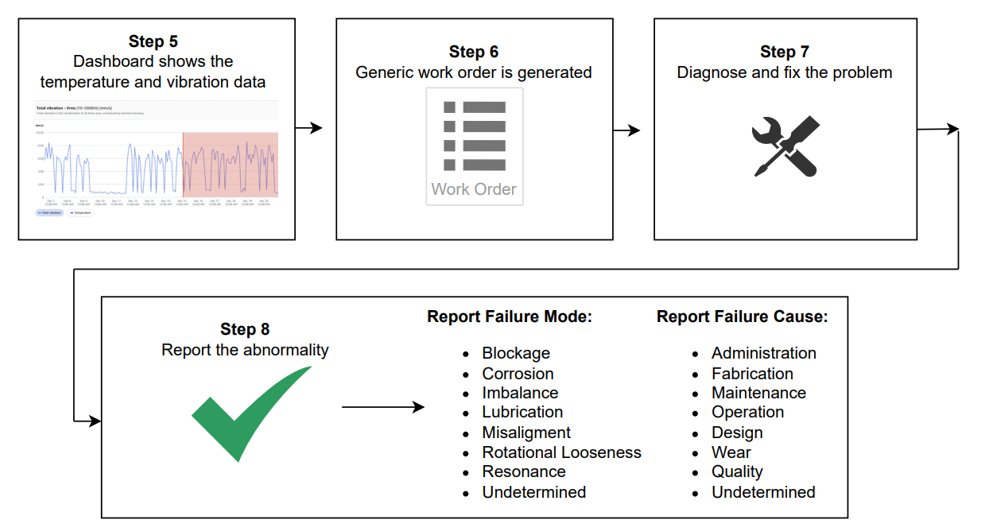
Step 5: Dashboard shows the temperature and vibration data
Step 6: Generic work order is generated
Step 7: Diagnose and fix the problem
Step 8: Report the abnormality
During this phase, technicians face two challenges: receiving generic work orders with limited guidance and having to find relevant information among 40+ repair manuals, each with hundreds of pages. When equipment issues are in their early stages and not yet showing clear signs of malfunction, it becomes difficult and time-consuming for technicians to pinpoint the root cause, leading to delays in diagnosis and repair. This results in prolonged equipment downtime, reduced operational efficiency, and increased maintenance costs.
Solution overview
In the Root Cause Diagnosis and Problem Resolution phase, more than 50% of work orders generated after an alarm is triggered remain labeled as “Undetermined” in terms of root cause. To tackle this challenge, we have developed a chatbot aimed at enhancing predictive maintenance diagnostics, making it simpler for technicians to detect faults and pinpoint issues within the equipment. This solution significantly reduces downtime while improving overall operational efficiency.
The key features of the solution include:
- Time series data analysis and diagnostics – The assistant processes and analyzes sensor data to deliver precise diagnostics, identifying patterns and anomalies to support accurate, data-driven troubleshooting.
- Guided troubleshooting with proactive multi-turn conversations – The assistant retains conversation history for seamless, context-aware interactions. It is goal-oriented, focused on finding the root cause of equipment issues through a proactive, multi-turn dialogue where the system prompts the user with targeted questions to gather essential information for efficient troubleshooting.
- Multimodal capabilities – Users can upload various formats—manuals, images, videos, and audio—to the assistant’s knowledge base, which it can both understand and respond to across these modalities. This is accomplished using Claude 3 Haiku and Claude 3 Sonnet, powerful multimodal models available through Amazon Bedrock.
- Advanced multimodal RAG with reciprocal rank fusion – Multimodal Retrieval Augmented Generation (RAG) enables the assistant to provide responses that incorporate both images and text from repair manuals. Reciprocal rank fusion makes sure that the retrieved information is both relevant and semantically aligned with the user’s query.
- Guardrails for safety and compliance – The assistant employs Amazon Bedrock Guardrails to help maintain safety, accuracy, and conformance throughout the diagnostic process. These guardrails incorporate filters for sensitive information and harmful content, blockage of inappropriate content, and validation steps to help prevent erroneous recommendations.
In the following sections, we outline the key prerequisites for implementing this solution and provide a comprehensive overview of each of these key features, examining their functionality, implementation, and how they contribute to faster diagnosis, reduced downtime, and overall operational efficiency.
Prerequisites
To successfully build and integrate this predictive maintenance solution, certain foundational requirements must be in place. These prerequisites are necessary to make sure that the solution can be effectively deployed and achieve its intended impact:
- Identify critical assets for predictive maintenance – Start by determining which assets are most essential to your operations and could cause significant disruption if they failed unexpectedly. Prioritize equipment with a history of high repair costs, frequent breakdowns, or a critical role in the production process.
- Collect and log actionable data – Set up a system to continuously monitor vibration and temperature at 1-minute intervals. Set up automated data transfer to the AWS Cloud for more secure storage and efficient analysis, allowing the solution to generate accurate insights for each asset.
- Gather equipment repair manuals – Obtain Original Equipment Manufacturer (OEM) manuals that detail maintenance requirements, recommended service intervals, and safe procedures for each asset. Also add institutional knowledge from principal machinists. This information is vital in aligning predictive insights with actual maintenance needs.
- Maintain Historical Maintenance Records (optional but strongly encouraged) – Keep accurate records of previous maintenance activities and work orders. While optional, having historical data helps refine the predictive models and improves the system’s accuracy in forecasting potential failures.
With these foundations in place, the next sections explore the different functionalities available in the chatbot to deliver faster, smarter and more reliable root cause diagnosis.
Time series analysis and guided troubleshooting conversation
The time series analysis and guided conversation are broken down into six key steps, as shown in the following figure.
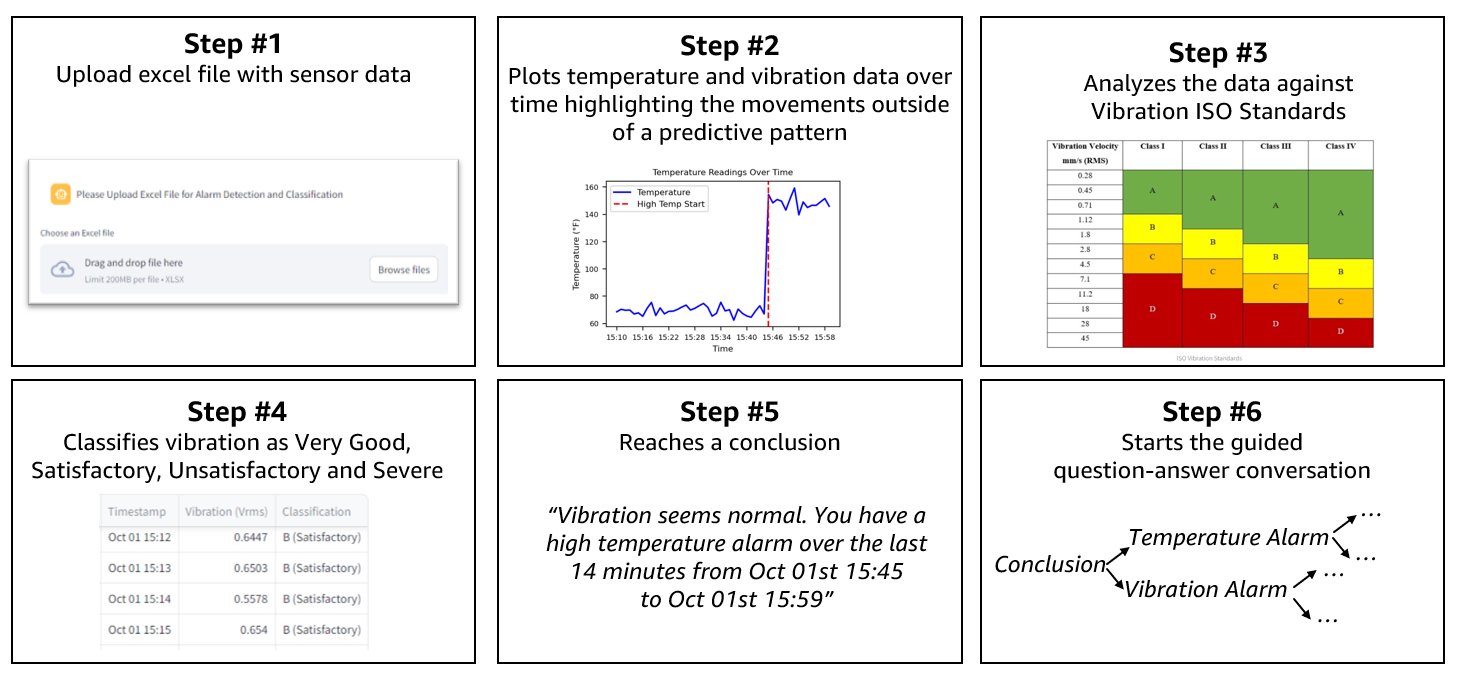
The steps are as follows:
- The user uploads an Excel file containing sensor data (both vibration and temperature data) in the Streamlit app. The data is extracted using Python-based helper scripts for data manipulation, setting the foundation for further analysis.
- The system plots the temperature and vibration data over time using Matplotlib, highlighting deviations from normal patterns that indicate a potential issue with a red vertical line. This visualization step makes sure that abnormalities are clearly identifiable.
- The system evaluates the vibration data by comparing it to ISO vibration standards (ISO 20816-1), which set international benchmarks for vibration levels based on the equipment’s class. These benchmarks, known as evaluation zones, establish fixed thresholds for vibration measured as Velocity Root Mean Square (VRMS). VRMS represents the average intensity of vibration over time, helping to accurately determine whether an asset is operating normally or experiencing abnormal vibrations.
- Warning is created when the asset moves from Zone B to C.
- Alarm is created when the asset moves from zone C to D.
- Based on the sensor data, the system classifies the vibration levels for each timestamp as Very Good, Satisfactory, Unsatisfactory, or Severe, providing insights into the equipment’s health.
- A conclusion is drawn from the analysis, for instance, identifying that the vibration is normal but a high-temperature alarm has been triggered within a particular time frame.
- A guided troubleshooting conversation is initiated using Python to frame initial diagnostic questions based on the analysis. The process transitions to a generative AI-powered large language model (LLM), which acts a virtual technician, engaging in a multi-turn dialogue to further refine the diagnostic process. The LLM adapts to user responses, similar to a consultation with a medical professional, offering targeted guidance toward resolving the issue. With memory retention of previous responses, the LLM provides more accurate and tailored troubleshooting throughout the interaction. Additionally, guardrails are implemented to keep the conversation focused, providing safety, appropriateness, and relevance, which ultimately enhances the quality and reliability of the diagnostic guidance provided.
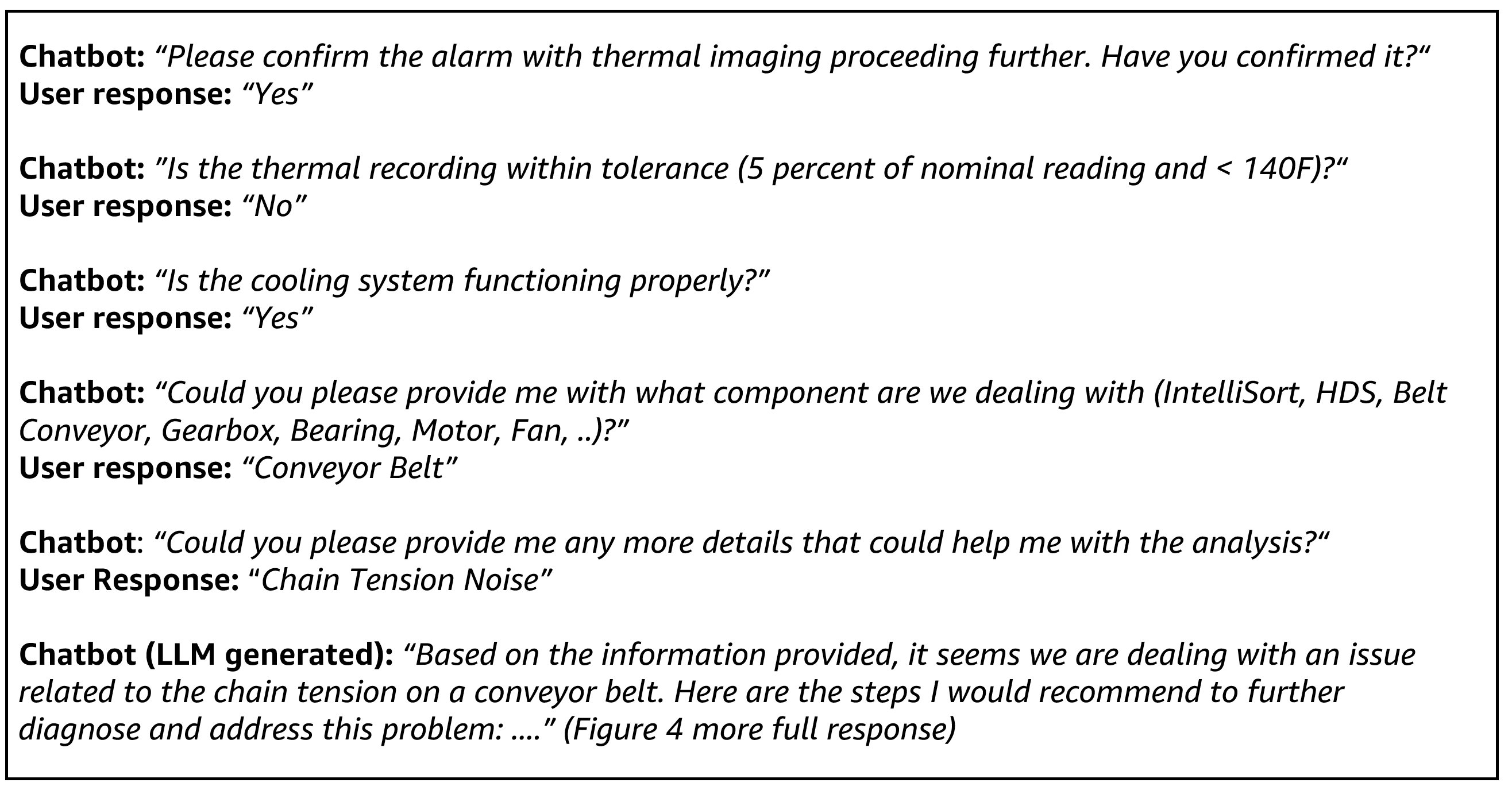
The following screenshot shows an example of a guided conversation initiation after detecting a high temperature alarm. Note that the user did not provide a prompt; the conversation was entirely initiated by the system based on the uploaded sensor data.
The following screenshot shows the UI of this assistant with the LLM-generated response after the conversation from the previous example.
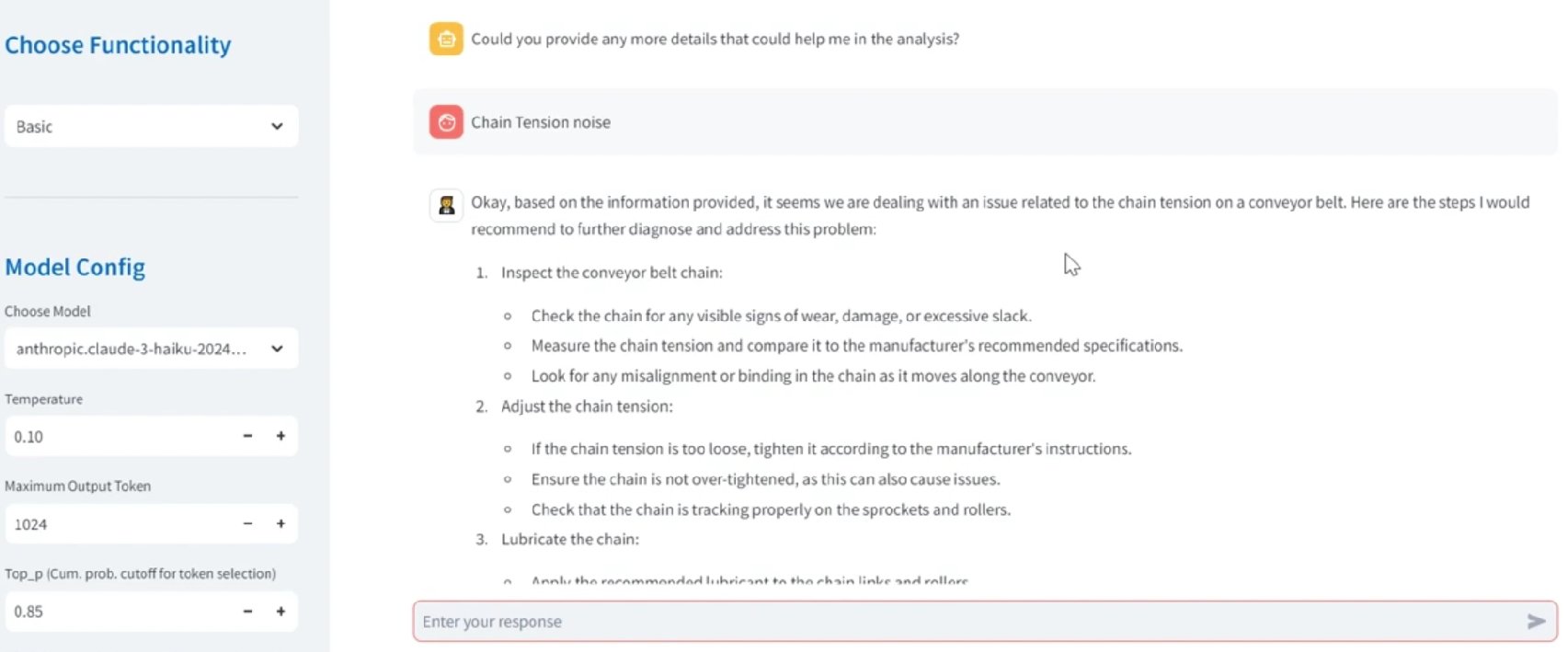
As seen in the screenshot, the previous responses are stored, allowing the system to build upon each response to create a more accurate, personalized diagnosis. This memory-driven approach makes sure that the troubleshooting conversation remains highly relevant and targeted, enhancing the assistant’s effectiveness as a virtual assistant for root cause diagnosis.
Multimodal capabilities
To enhance diagnostic capabilities and provide comprehensive support, the system allows users to interact through multiple input modalities. This flexibility makes sure that technicians can communicate using the most suitable format for their needs, whether that be an image, audio, or video. By using generative AI, the system can analyze and integrate information from the three modalities, offering deeper insights and more effective troubleshooting solutions.
The system supports the following multimodal inputs:
- Image – Upload images of equipment or specific components for visual analysis and fault detection
- Audio – Record and upload audio descriptions or machine sounds, allowing the system to transcribe and analyze verbal inputs or unusual noises
- Video – Provide videos capturing equipment operation or failures, enabling frame-by-frame analysis and integrated audio-video diagnostics
In the following sections, we explore how each of these inputs is processed and integrated into the system’s diagnostic workflow to deliver a holistic maintenance solution.
Image analysis for diagnostic assessment
The assistant uses multimodal capabilities to analyze images, which can be particularly useful when technicians need to upload a photo of a degraded or malfunctioning component. Using a multimodal LLM such as Anthropic’s Claude Sonnet 3.5 on Amazon Bedrock, the system processes the image, generating a detailed description that aids in understanding the state of the equipment. For instance, an operator might upload an image of a worn-out bearing, and the assistant could provide a textual summary of visible wear patterns, such as discoloration or cracks, helping to pinpoint the issue without manual interpretation.
The workflow consists of the following steps:
- The user uploads an image — for example, a photo of a worn component — through the assistant interface.
- The image is resized or processed to meet the model’s input constraints, making sure that it adheres to file size and resolution limits.
- The image is converted into base64 format, which allows it to be transmitted in a standardized way as part of the input payload for the multimodal LLM.
- A predefined prompt is used to instruct the model to describe the image, for example, “Describe any visible defects or abnormalities in the component shown in this image.”
- The model generates a text-based description of the image. For example, if the uploaded image shows a bearing with surface cracks and discoloration, the model might output something like: “The component shows signs of wear with visible surface cracks and heat-related discoloration.”
The ability to analyze images provides technicians with an intuitive way to diagnose problems beyond sensor data alone. This visual context, combined with the assistant’s knowledge base, allows for more accurate and efficient maintenance actions, reducing downtime and improving overall operational efficiency.
Audio inputs for real-time voice processing
In addition to image and text modalities, the chatbot also supports audio inputs, enabling technicians to record their observations, notes, or ask questions in real-time using voice. This is particularly useful in scenarios where technicians might not have the time or ability to type, such as when they are on-site or working hands-on with equipment.
The following diagram illustrates how audio processing works.
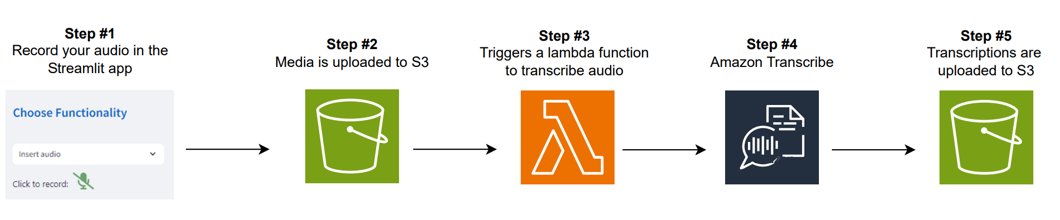
The workflow consists of the following steps:
- The technician can record an audio clip, such as a voice note describing the current condition of the equipment or a question about a particular maintenance issue. The system supports quick audio recordings directly within the assistant interface.
- After the audio is recorded, it is processed through an Automatic Speech Recognition (ASR) system (Amazon Transcribe), which transcribes the spoken words into text. The transcription provides an accurate representation of the spoken content, which is used as input for further analysis or conversation.
- After transcription, the text is presented to the technician, allowing them to review the transcription and make sure it correctly captures their intent.
- When the transcription is available, the conversation is initiated and guided by LLMs, allowing the technician to ask follow-up questions or request additional analysis. For example, they might ask, “Based on this audio, can you recommend the next steps for resolving the issue?” The transcribed text is passed to the LLM along with the user’s question, where responses are generated with Amazon Bedrock guardrails. These guardrails make sure that answers remain relevant, appropriate, and safe, delivering focused and reliable insights or guidance throughout the interaction.
- The system also retains the context of the conversation, enabling multi-turn interactions. This means that further questions the technician asks are framed within the context of the initial audio recording and transcription, allowing for more accurate responses and continued troubleshooting.
The following Python code demonstrates a utility function for transcribing audio files using Amazon Transcribe. This function uploads an audio file to an Amazon Simple Storage Service (Amazon S3) bucket, triggers a transcription through a custom Amazon API Gateway endpoint, and retrieves the transcription result:
The following is an AWS Lambda function designed to process audio transcription jobs. This function uses Amazon Transcribe to handle audio files provided through S3 uniform resource identifiers (URIs), monitors the transcription job status, and returns the resulting transcription URI. The function is optimized for asynchronous transcription tasks and robust error handling:
This code captures an audio file from an S3 URI, transcribes it using Amazon Transcribe, and returns the transcription result. The transcription can now be used for assistant interactions, allowing technicians to document their observations verbally and receive instant feedback or guidance. It streamlines the troubleshooting process, especially in environments where hands-free interaction is beneficial.
Video data processing with multimodal analysis
In addition to supporting image and audio inputs, the system can also process video data, which is highly beneficial when technicians need visual guidance or want to provide detailed evidence of equipment behavior. For instance, technicians might upload videos showcasing abnormal machine operation, enabling the assistant to analyze the footage for diagnostic purposes. Additionally, technicians could upload training videos and quickly get the most relevant information, being able to ask questions about how certain procedures are performed.
To support this functionality, we developed a custom video processing workflow that extracts both audio and visual components for multimodal analysis. While this approach was necessary at the time of development, more recent advancements, such as the native video understanding capabilities of Amazon Nova in Amazon Bedrock, now offer a streamlined and scalable alternative for organizations looking to integrate similar functionality.
The following figure showcases the video processing workflow.
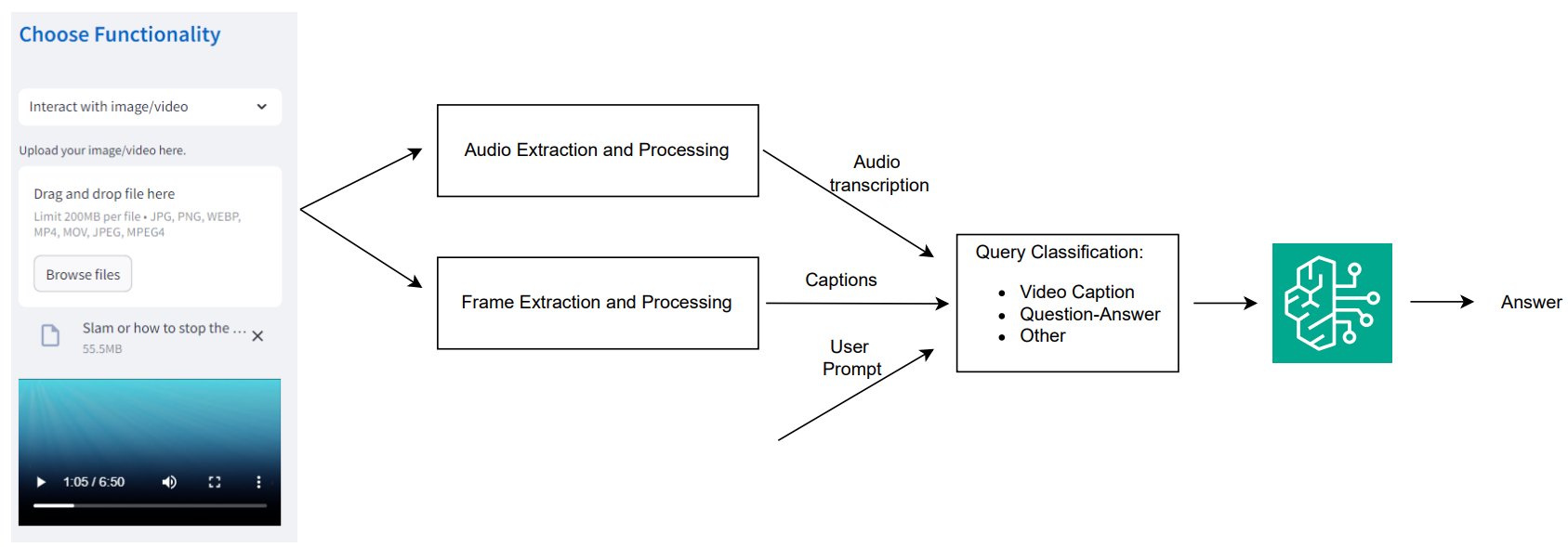
The workflow consists of the following key steps:
- The technician uploads a video through the Streamlit application interface.
- If the video contains voice instructions, the audio is extracted and its transcription is obtained using the same ASR method mentioned earlier, making sure that the audio data is used for diagnostic purposes.
- The system extracts individual video frames at regular intervals (for example, every three seconds) and converts them into base64-encoded frames. This provides efficient processing and analysis of the video content. Each extracted frame is passed through a multimodal LLM, which generates captions for the frames. This helps in summarizing the visual content of the video, focusing on key aspects such as equipment conditions, wear and tear, or abnormal movements. To maintain alignment between video frames and spoken content, the system uses the frame extraction timestamps and maps them to the corresponding time ranges in the transcribed audio. This facilitates coherent multimodal interpretation across visual and auditory inputs.
- The system acts as an LLM-based router, which means it is responsible for directing queries to the appropriate processing path based on their classification. A router determines the type of query and routes it accordingly to provide an accurate and efficient response. In this context, the system classifies the technician’s query based on their interaction with the video. Queries can fall into different categories, such as:
- Video caption – If the technician requests a summary or description of the video content.
- Question-Answer – If the technician asks specific questions based on the video (for example, “What is the issue with this component based on the video?”).
- Other – If the query doesn’t fit into the standard categories but still requires processing (for example, more general requests).
- When the query and captions are ready, the system uses the LLM to generate answers based on the processed video and audio content. This allows the assistant to provide accurate, context-aware responses regarding the equipment’s state or the next steps for resolution. The generated responses guide technicians through troubleshooting steps, with detailed instructions on resolving the detected issue based on both the visual and audio inputs. The answers include built-in guardrails to help maintain quality, safety, and relevance in guidance.
After extracting captions and audio from the video, they can be seamlessly processed using the same methods outlined for the image and audio modalities discussed earlier in this post.
The ability to upload training or inspection videos, have the system analyze and summarize them, and respond to technician queries makes the chatbot an invaluable tool for predictive maintenance. By combining multiple data types (video, audio, and images), the chatbot provides comprehensive diagnostic support, significantly reducing downtime and improving efficiency.
Multimodal RAG for comprehensive resolution determination
Multimodal RAG allows technicians to interact with the database of manual documents and previous training files or diagnostics. By allowing for multimodality, technicians can access not only the text from manuals but also relevant diagrams or images that help them diagnose and resolve issues. The following screenshot showcases an example of this functionality.
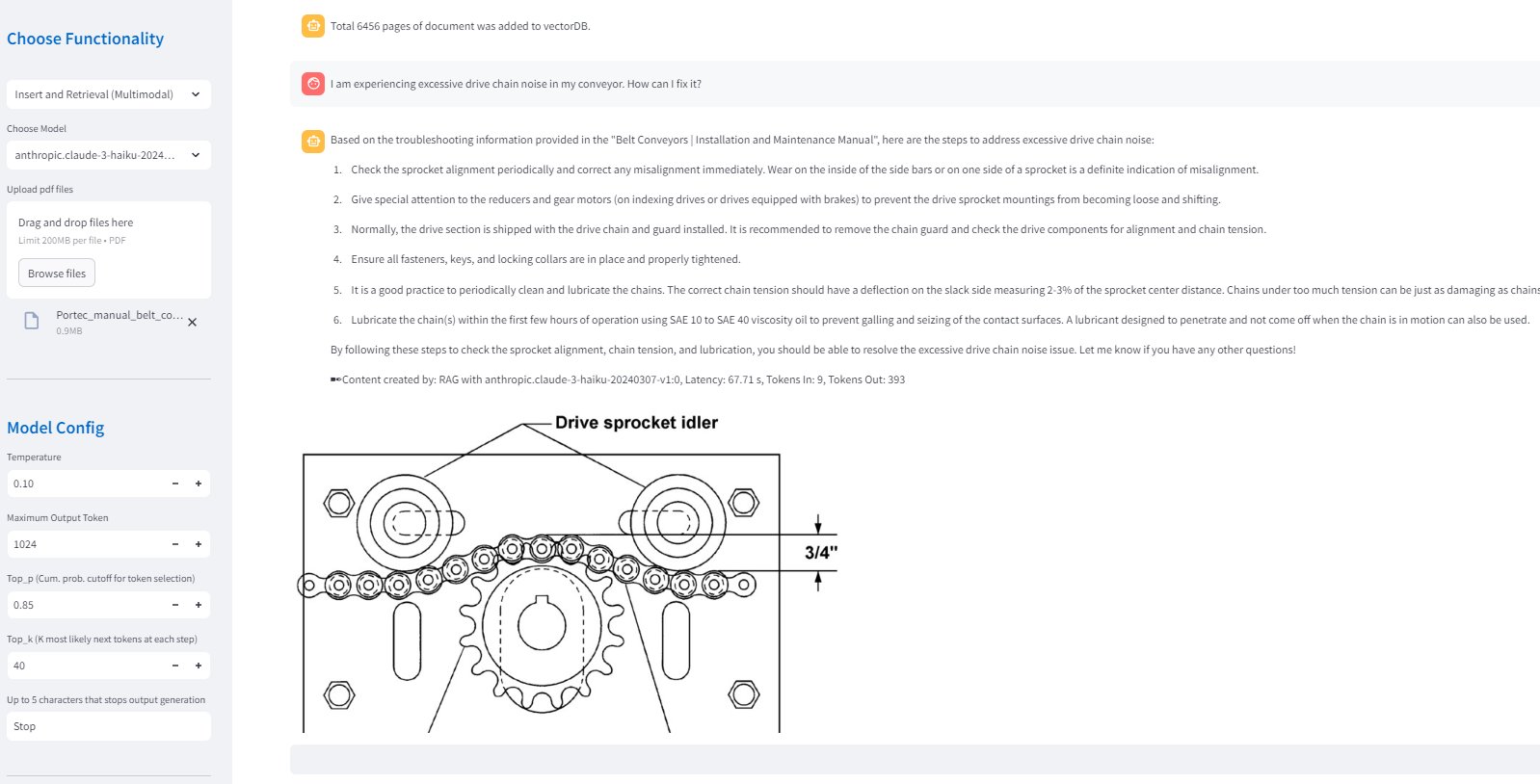
The following steps outline step by step how the system processes both text and image data to facilitate comprehensive retrieval and response generation:
Create document embeddings
The first step involves extracting both text and images from documents like PDF manuals to generate embeddings, which help in retrieving relevant information later. The following diagram showcases how this process works.
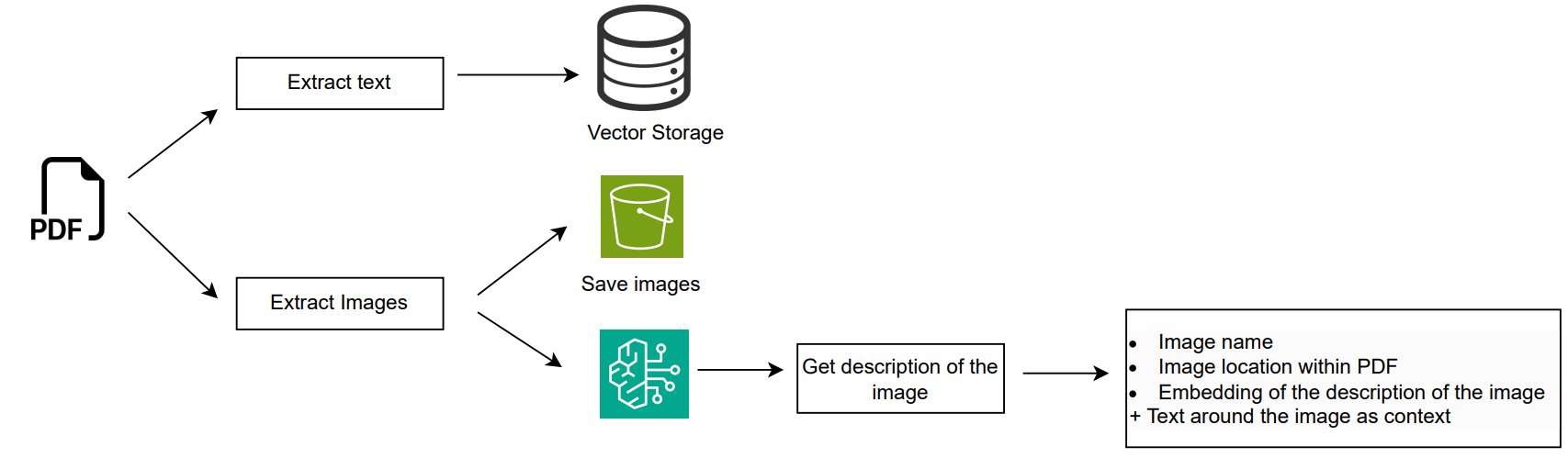
The workflow consists of the following steps:
- Text data is extracted from each page of the PDF using the PyMuPDF library. This allows the solution to capture both structured data (like tables) and unstructured content for embedding. Each extracted text segment is converted into embeddings using the Amazon Titan v2 model, and stored into Amazon Bedrock Knowledge Bases for efficient retrieval.
- Images are also extracted from each page of the PDF in a similar fashion, with filtering to remove small or irrelevant images. Each image is processed by a multimodal LLM such as Anthropic’s Claude Sonnet 3.5 on Amazon Bedrock to generate a detailed description, which includes both visible elements and context from the surrounding text on the page. The system saves these images and generates embeddings based on the descriptions. The image metadata collected includes:
- Image name
- Image location within the PDF
- Embedding of the image description
- Contextual text around the image in the document
By capturing not only the image description but also the surrounding contextual text, the system gains a more comprehensive understanding of the image’s relevance and meaning. This approach enhances retrieval accuracy and makes sure that the images are interpreted correctly within their broader document context.
Retrieval and generation
For retrieval and generation, the system differentiates between text and image retrieval to make sure that both semantic text context and visual information are effectively incorporated into the final response. This approach allows technicians to receive a more holistic answer that uses both written insights and visual aids, enhancing the overall troubleshooting process.
Text retrieval and generation
Starting with the text, we use reciprocal rank fusion, a method that makes sure the retrieved results are relevant and also semantically aligned with the user’s query. Reciprocal rank fusion operates by transforming a single user query into multiple related queries generated by an LLM, each retrieving a diverse set of documents. These documents are reranked using the reciprocal rank fusion algorithm, making sure that the most important information is prioritized. The following diagram illustrates this process.

The workflow consists of the following steps:
- The user inputs a question or query. For example, “Why is my conveyor motor vibrating abnormally?”
- The query is sent to an LLM along with a prompt to generate multiple related search queries. By generating these related queries, the system provides comprehensive retrieval of information. As an example, the initial user query can be divided into:
- Query 1: “What are possible causes of abnormal vibrations in conveyor belts?”
- Query 2: “What are some steps for conveyor motor troubleshooting for high vibration levels?”
- Query 3: “What are the vibration thresholds and alarm settings for conveyor systems?”
- Query 4: “What is the maintenance history of conveyor motors with vibration issues?”
- The generated queries are sent to a semantic search retriever to find the relevant document from the vector database. For each query, the retriever produces a ranked list of relevant documents based on embedding’s similarity.
- The ranked results are reranked using the reciprocal rank fusion (RRF) formula (see the following figure). For every query q in the set Q, the formula evaluates how well a document d ranks for that specific query (represented as rq(d)). The addition of the constant k helps control the impact of individual queries on the overall score, because it helps prevent a single query from having a disproportionately large influence on the final ranking, providing a more balanced contribution from the related queries. The scores are added up. This means that if a document d ranks highly across multiple related queries, it receives a higher RRF score.

- The generative model uses the top-ranked documents to produce the final answer, providing guidance on diagnosing the root cause of abnormal vibrations in the conveyor belt.
Image retrieval and generation
The system follows a separate retrieval process for image-based queries, making sure that visual information is also incorporated into the response. The following figure shows how this process works.

The workflow consists of the following steps:
- When the user inputs a query, the system first converts this query into an embedding, which is a numerical representation that captures the semantic meaning of the query. This embedding serves as a reference point to identify related image descriptions.
- The system calculates the cosine similarity between the prompt embedding (created in the previous step) and the embeddings of image descriptions stored in the database to retrieve the most relevant images. For this example, a query about conveyor motor vibrations, relevant images might include diagrams of motor components, visual representations of vibration patterns, or images depicting equipment misalignment.
- After calculating the similarity scores, the system filters the results to retain only images that have a sufficiently high score. The threshold for this filtering is set empirically to 0.4 to make sure that only the most relevant images, which are closely aligned with the user’s query, are considered for further analysis. This step helps prevent the inclusion of irrelevant or marginally related images, maintaining the accuracy of the response.
The steps described above are implemented in the following code snippet, which demonstrates how to process image-based queries for retrieval and relevance scoring:
- The final step involves using the filtered set of images to contribute to the answer generation. In the case of diagnosing abnormal vibrations in a conveyor motor, the system might include diagrams of potential failure modes or visual guides for troubleshooting steps alongside the textual explanation.
Conclusion
The implementation of a generative AI-powered assistant for predictive maintenance is expected to improve diagnostics by offering mechanics clear, actionable guidance when an alarm is triggered, significantly reducing the incidence of undetermined root causes. This improvement can help mechanics more confidently and accurately address equipment issues, enhancing their ability to act promptly and effectively.
By streamlining diagnostics and providing targeted troubleshooting recommendations, this solution can not only minimize operational delays but also promote greater equipment reliability and reduce downtime at Amazon’s fulfillment centers. Furthermore, the assistant’s adaptable design makes it suitable for broader predictive maintenance applications across various industries, from manufacturing to logistics and healthcare. Though initially developed for Amazon’s fulfillment centers, the solution has the potential to scale beyond the Amazon environment, offering a versatile, AI-driven approach to enhancing equipment reliability and performance.
Future improvements could further extend the solution’s impact, including expanding retrieval capabilities to encompass videos alongside images, training an intelligent agent to recommend optimal next steps based on successful past diagnoses, and implementing automated task assignment features that dynamically generate work orders, specify resources, and assign tasks based on diagnostic results. Enhancing the solution’s intelligence to support a broader range of predictive maintenance scenarios could make it more versatile and impactful across diverse industries.
Take the first step toward transforming your maintenance operations by exploring these advanced capabilities – contact us today to learn how these innovations can drive efficiency and reliability in your organization.
About the authors
 Carla Lorente is a Senior Gen AI Lead at AWS, helping internal teams transform complex processes into efficient, AI-powered workflows. With dual degrees from MIT—a MS in Computer Science and an MBA—Carla operates at the intersection of engineering and strategy, translating cutting-edge AI into scalable solutions that drive measurable impact across AWS.
 Yingwei Yu is an Applied Science Manager at Generative AI Innovation Center, AWS, where he leverages machine learning and generative AI to drive innovation across industries. With a PhD in Computer Science from Texas A&M University and years of working experience, Yingwei brings extensive expertise in applying cutting-edge technologies to real-world applications.
 Parth Patwa is a Data Scientist in the Generative AI Innovation Center at Amazon Web Services. He has co-authored research papers at top AI/ML venues and has 1500+ citations.
 Aude Genevay is a Senior Applied Scientist at the Generative AI Innovation Center, where she helps customers tackle critical business challenges and create value using generative AI. She holds a PhD in theoretical machine learning and enjoys turning cutting-edge research into real-world solutions.