Deploying machine learning (ML) models into production can often be a complex and resource-intensive task, especially for customers without deep ML and DevOps expertise. Amazon SageMaker Canvas simplifies model building by offering a no-code interface, so you can create highly accurate ML models using your existing data sources and without writing a single line of code. But building a model is only half the journey; deploying it efficiently and cost-effectively is just as crucial. Amazon SageMaker Serverless Inference is designed for workloads with variable traffic patterns and idle periods. It automatically provisions and scales infrastructure based on demand, alleviating the need to manage servers or pre-configure capacity.
In this post, we walk through how to take an ML model built in SageMaker Canvas and deploy it using SageMaker Serverless Inference. This solution can help you go from model creation to production-ready predictions quickly, efficiently, and without managing any infrastructure.
Solution overview
To demonstrate serverless endpoint creation for a SageMaker Canvas trained model, let’s explore an example workflow:
- Add the trained model to the Amazon SageMaker Model Registry.
- Create a new SageMaker model with the correct configuration.
- Create a serverless endpoint configuration.
- Deploy the serverless endpoint with the created model and endpoint configuration.
You can also automate the process, as illustrated in the following diagram.
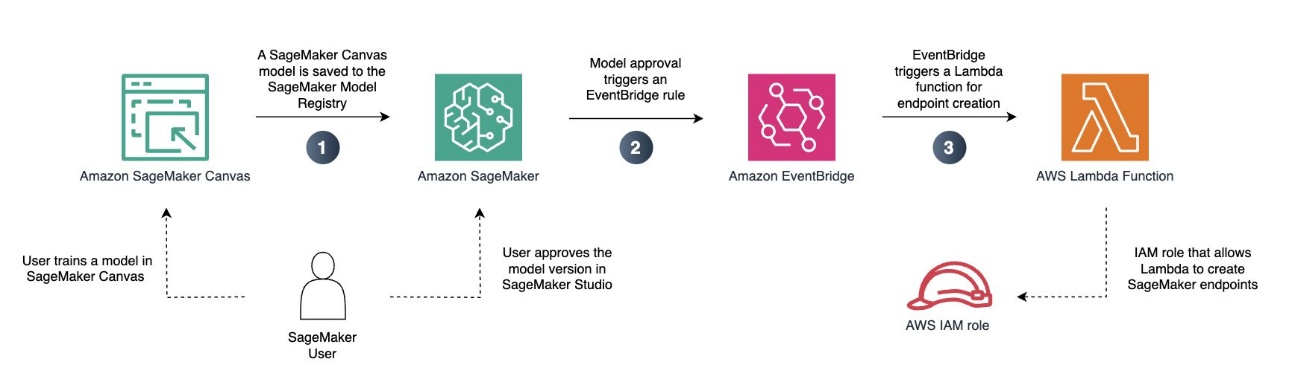
In this example, we deploy a pre-trained regression model to a serverless SageMaker endpoint. This way, we can use our model for variable workloads that don’t require real-time inference.
Prerequisites
As a prerequisite, you must have access to Amazon Simple Storage Service (Amazon S3) and Amazon SageMaker AI. If you don’t already have a SageMaker AI domain configured in your account, you also need permissions to create a SageMaker AI domain.
You must also have a regression or classification model that you have trained. You can train your SageMaker Canvas model as you normally would. This includes creating the Amazon SageMaker Data Wrangler flow, performing necessary data transformations, and choosing the model training configuration. If you don’t already have a trained model, you can follow one of the labs in the Amazon SageMaker Canvas Immersion Day to create one before continuing. For this example, we use a classification model that was trained on the canvas-sample-shipping-logs.csv sample dataset.
Save your model to the SageMaker Model Registry
Complete the following steps to save your model to the SageMaker Model Registry:
- On the SageMaker AI console, choose Studio to launch Amazon SageMaker Studio.
- In the SageMaker Studio interface, launch SageMaker Canvas, which will open in a new tab.
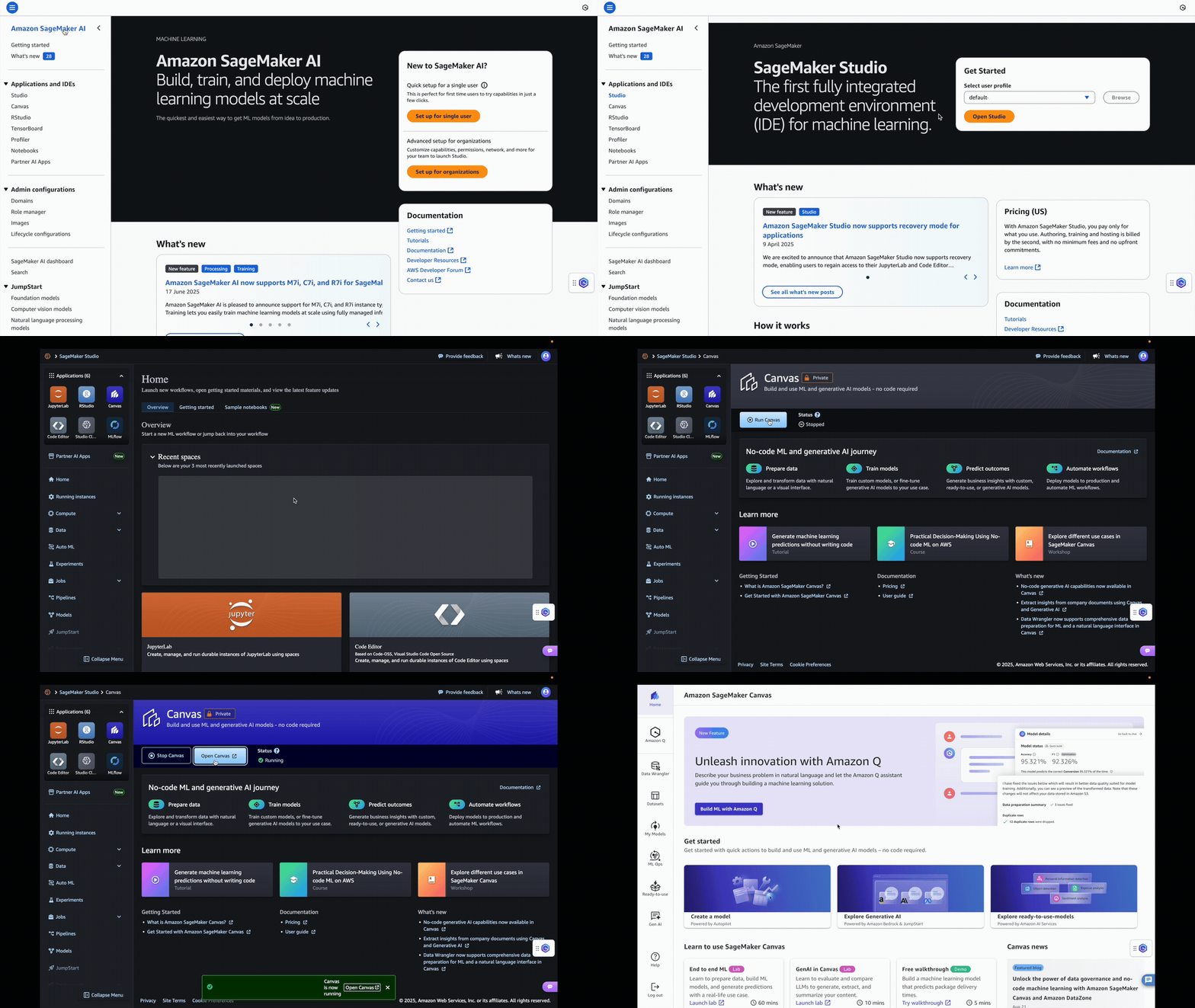
- Locate the model and model version that you want to deploy to your serverless endpoint.
- On the options menu (three vertical dots), choose Add to Model Registry.
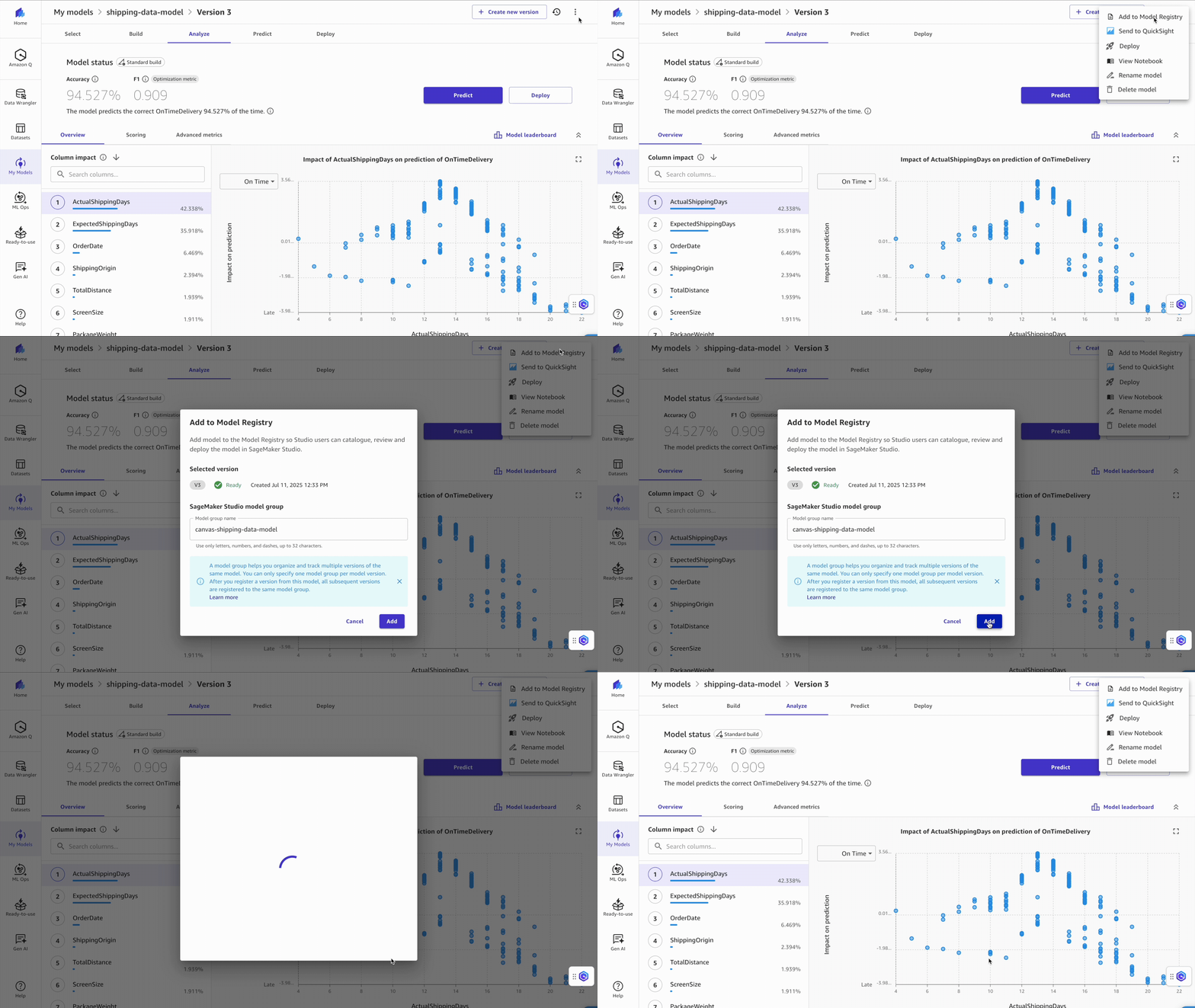
You can now exit SageMaker Canvas by logging out. To manage costs and prevent additional workspace charges, you can also configure SageMaker Canvas to automatically shut down when idle.
Approve your model for deployment
After you have added your model to the Model Registry, complete the following steps:
- In the SageMaker Studio UI, choose Models in the navigation pane.
The model you just exported from SageMaker Canvas should be added with a deployment status of Pending manual approval.
- Choose the model version you want to deploy and update the status to Approved by choosing the deployment status.
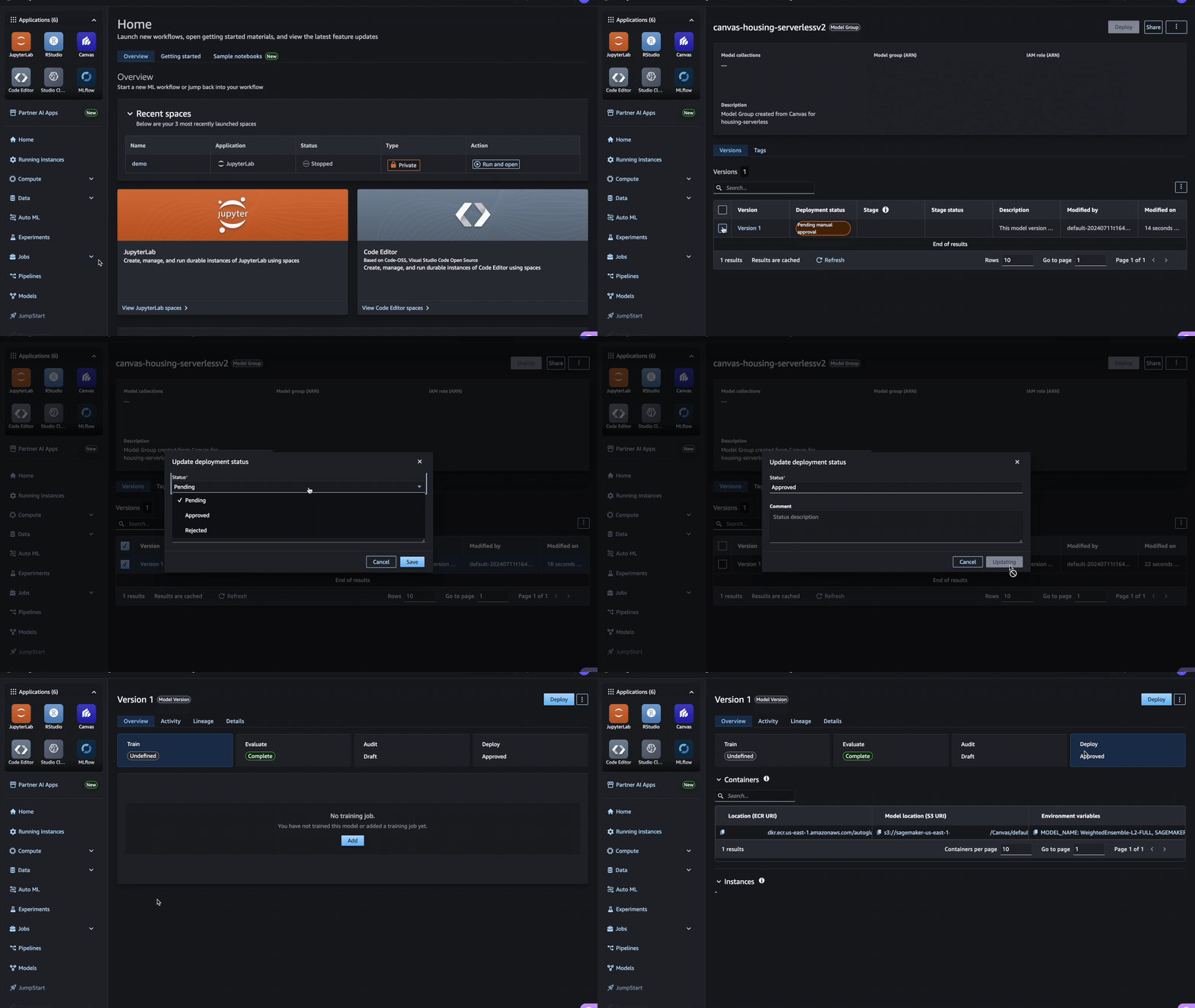
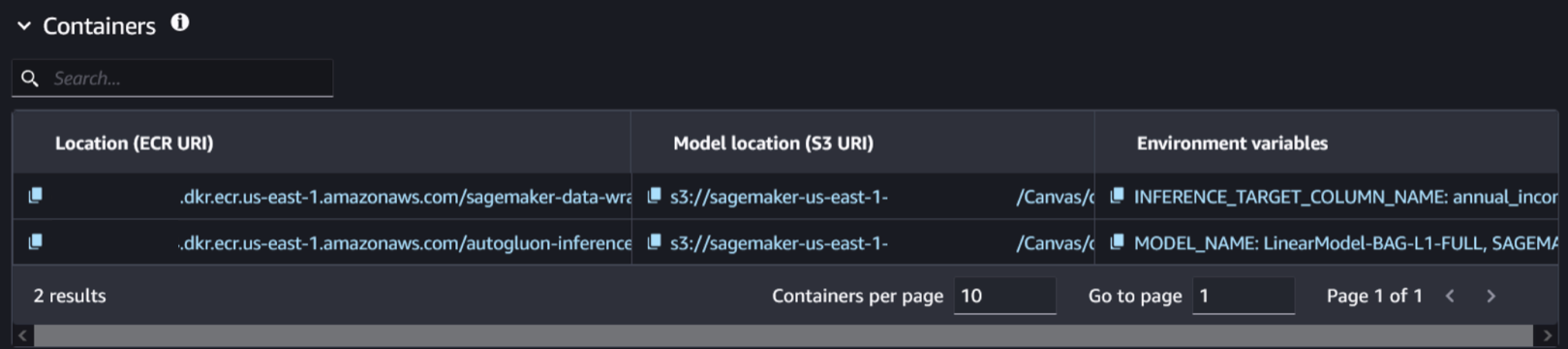
- Choose the model version and navigate to the Deploy tab. This is where you will find the information related to the model and associated container.
- Select the container and model location related to the trained model. You can identify it by checking the presence of the environment variable
SAGEMAKER_DEFAULT_INVOCATIONS_ACCEPT.
Create a new model
Complete the following steps to create a new model:
- Without closing the SageMaker Studio tab, open a new tab and open the SageMaker AI console.
- Choose Models in the Inference section and choose Create model.
- Name your model.
- Leave the container input option as Provide model artifacts and inference image location and used the
CompressedModel type.
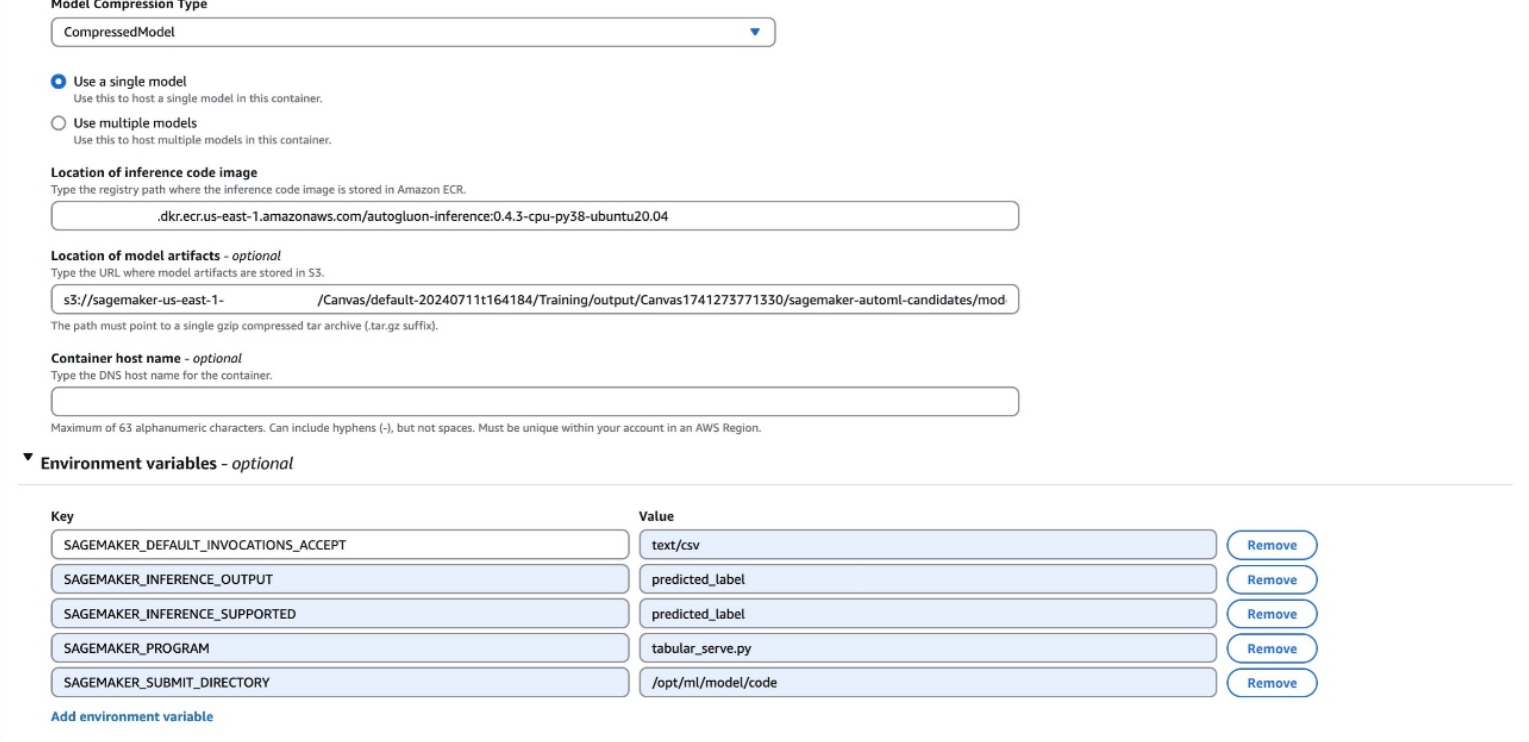
- Enter the Amazon Elastic Container Registry (Amazon ECR) URI, Amazon S3 URI, and environment variables that you located in the previous step.
The environment variables will be shown as a single line in SageMaker Studio, with the following format:
SAGEMAKER_DEFAULT_INVOCATIONS_ACCEPT: text/csv, SAGEMAKER_INFERENCE_OUTPUT: predicted_label, SAGEMAKER_INFERENCE_SUPPORTED: predicted_label, SAGEMAKER_PROGRAM: tabular_serve.py, SAGEMAKER_SUBMIT_DIRECTORY: /opt/ml/model/code
You might have different variables than those in the preceding example. All variables from your environment variables should be added to your model. Make sure that each environment variable is on its own line when creating you new model.
- Choose Create model.
Create an endpoint configuration
Complete the following steps to create an endpoint configuration:
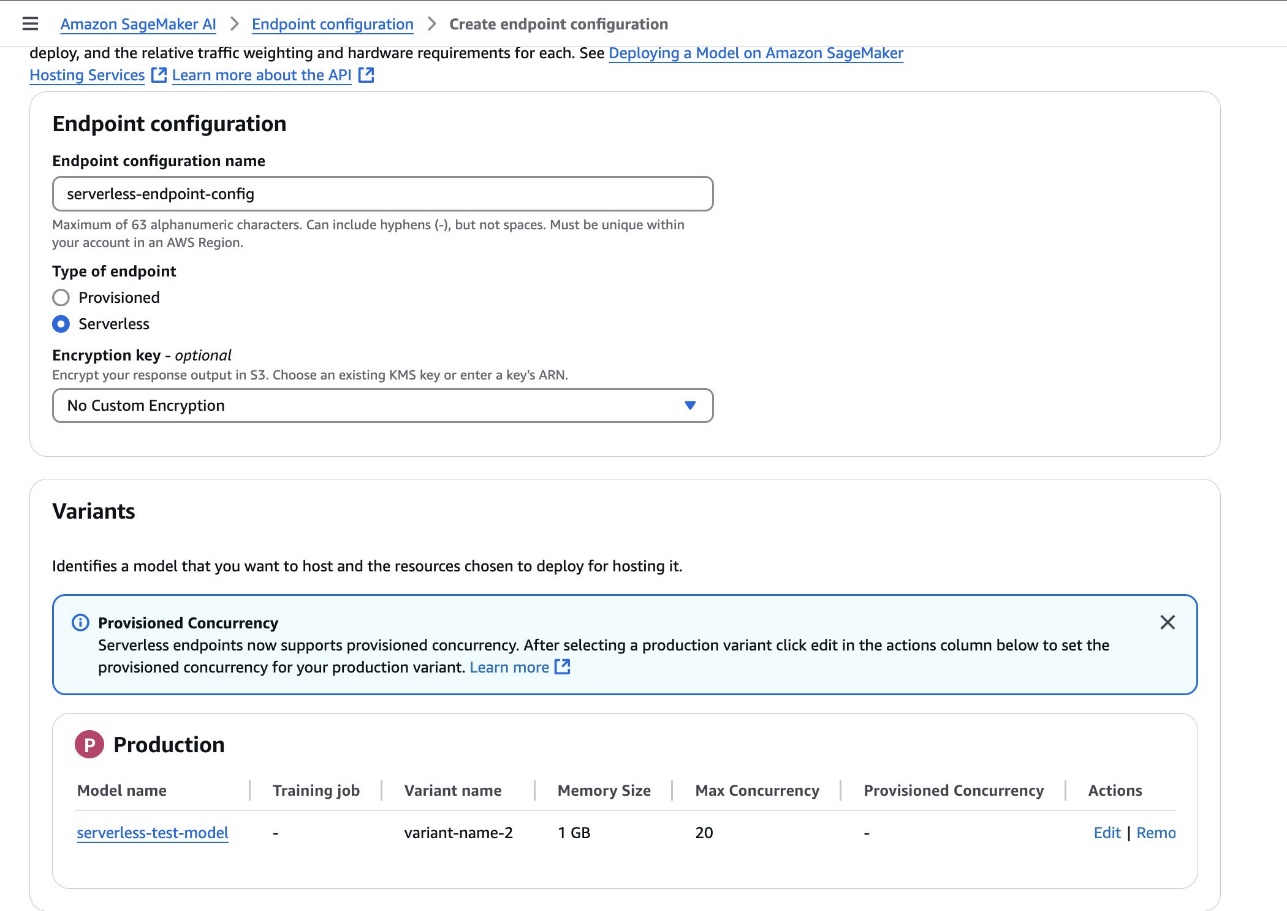
- On the SageMaker AI console, choose Endpoint configurations to create a new model endpoint configuration.
- Set the type of endpoint to Serverless and set the model variant to the model created in the previous step.
- Choose Create endpoint configuration.
Create an endpoint
Complete the following steps to create an endpoint:
- On the SageMaker AI console, choose Endpoints in the navigation pane and create a new endpoint.
- Name the endpoint.
- Select the endpoint configuration created in the previous step and choose Select endpoint configuration.
- Choose Create endpoint.
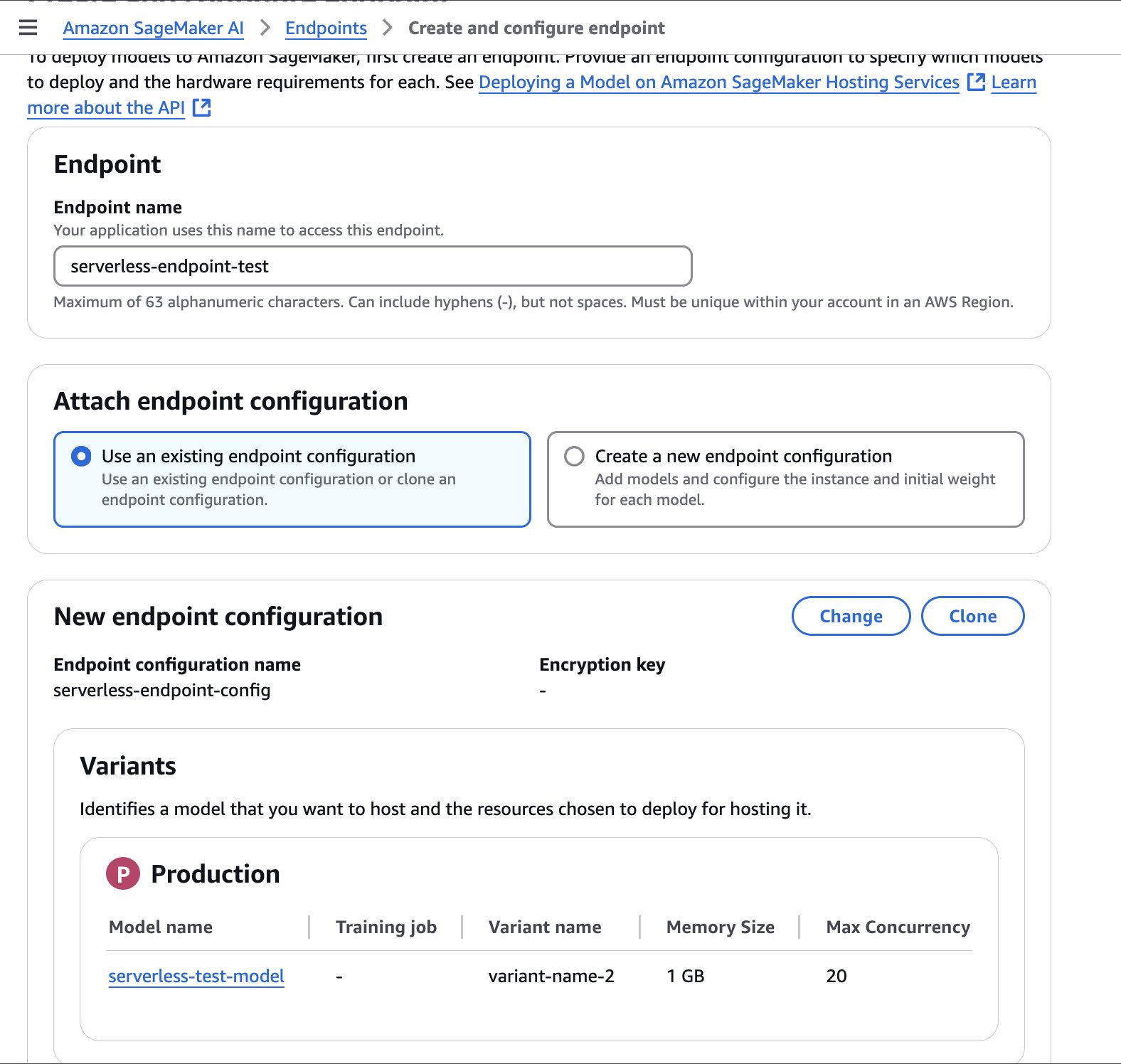
The endpoint might take a few minutes to be created. When the status is updated to InService, you can begin calling the endpoint.
The following sample code demonstrates how you can call an endpoint from a Jupyter notebook located in your SageMaker Studio environment:
import boto3
import csv
from io import StringIO
import time

def invoke_shipping_prediction(features):
    sagemaker_client = boto3.client('sagemaker-runtime')

    # Convert to CSV string format
    output = StringIO()
    csv.writer(output).writerow(features)
    payload = output.getvalue()

    response = sagemaker_client.invoke_endpoint(
        EndpointName='canvas-shipping-data-model-1-serverless-endpoint',
        ContentType='text/csv',
        Accept='text/csv',
        Body=payload
    )

    response_body = response['Body'].read().decode()
    reader = csv.reader(StringIO(response_body))
    result = list(reader)[0]  # Get first row

    # Parse the response into a more usable format
    prediction = {
        'predicted_label': result[0],
        'confidence': float(result[1]),
        'class_probabilities': eval(result[2]),
        'possible_labels': eval(result[3])
    }

    return prediction

# Features for inference
features_set_1 = [
    "Bell",
    "Base",
    14,
    6,
    11,
    11,
    "GlobalFreight",
    "Bulk Order",
    "Atlanta",
    "2020-09-11 00:00:00",
    "Express",
    109.25199890136719
]

features_set_2 = [
    "Bell",
    "Base",
    14,
    6,
    15,
    15,
    "MicroCarrier",
    "Single Order",
    "Seattle",
    "2021-06-22 00:00:00",
    "Standard",
    155.0483856201172
]

# Invoke the SageMaker endpoint for feature set 1
start_time = time.time()
result = invoke_shipping_prediction(features_set_1)

# Print Output and Timing
end_time = time.time()
total_time = end_time - start_time

print(f"Total response time with endpoint cold start: {total_time:.3f} seconds")
print(f"Prediction for feature set 1: {result['predicted_label']}")
print(f"Confidence for feature set 1: {result['confidence']*100:.2f}%")
print("nProbabilities for feature set 1:")
for label, prob in zip(result['possible_labels'], result['class_probabilities']):
    print(f"{label}: {prob*100:.2f}%")


print("---------------------------------------------------------")

# Invoke the SageMaker endpoint for feature set 2
start_time = time.time()
result = invoke_shipping_prediction(features_set_2)

# Print Output and Timing
end_time = time.time()
total_time = end_time - start_time

print(f"Total response time with warm endpoint: {total_time:.3f} seconds")
print(f"Prediction for feature set 2: {result['predicted_label']}")
print(f"Confidence for feature set 2: {result['confidence']*100:.2f}%")
print("nProbabilities for feature set 2:")
for label, prob in zip(result['possible_labels'], result['class_probabilities']):
    print(f"{label}: {prob*100:.2f}%")
Automate the process
To automatically create serverless endpoints each time a new model is approved, you can use the following YAML file with AWS CloudFormation. This file will automate the creation of SageMaker endpoints with the configuration you specify.
This sample CloudFormation template is provided solely for inspirational purposes and is not intended for direct production use. Developers should thoroughly test this template according to their organization’s security guidelines before deployment.
AWSTemplateFormatVersion: "2010-09-09"
Description: Template for creating Lambda function to handle SageMaker model
  package state changes and create serverless endpoints

Parameters:
  MemorySizeInMB:
    Type: Number
    Default: 1024
    Description: Memory size in MB for the serverless endpoint (between 1024 and 6144)
    MinValue: 1024
    MaxValue: 6144

  MaxConcurrency:
    Type: Number
    Default: 20
    Description: Maximum number of concurrent invocations for the serverless endpoint
    MinValue: 1
    MaxValue: 200

  AllowedRegion:
    Type: String
    Default: "us-east-1"
    Description: AWS region where SageMaker resources can be created

  AllowedDomainId:
    Type: String
    Description: SageMaker Studio domain ID that can trigger deployments
    NoEcho: true

  AllowedDomainIdParameterName:
    Type: String
    Default: "/sagemaker/serverless-deployment/allowed-domain-id"
    Description: SSM Parameter name containing the SageMaker Studio domain ID that can trigger deployments

Resources:
  AllowedDomainIdParameter:
    Type: AWS::SSM::Parameter
    Properties:
      Name: !Ref AllowedDomainIdParameterName
      Type: String
      Value: !Ref AllowedDomainId
      Description: SageMaker Studio domain ID that can trigger deployments

  SageMakerAccessPolicy:
    Type: AWS::IAM::ManagedPolicy
    Properties:
      Description: Managed policy for SageMaker serverless endpoint creation
      PolicyDocument:
        Version: "2012-10-17"
        Statement:
          - Effect: Allow
            Action:
              - sagemaker:CreateModel
              - sagemaker:CreateEndpointConfig
              - sagemaker:CreateEndpoint
              - sagemaker:DescribeModel
              - sagemaker:DescribeEndpointConfig
              - sagemaker:DescribeEndpoint
              - sagemaker:DeleteModel
              - sagemaker:DeleteEndpointConfig
              - sagemaker:DeleteEndpoint
            Resource: !Sub "arn:aws:sagemaker:${AllowedRegion}:${AWS::AccountId}:*"
          - Effect: Allow
            Action:
              - sagemaker:DescribeModelPackage
            Resource: !Sub "arn:aws:sagemaker:${AllowedRegion}:${AWS::AccountId}:model-package/*/*"
          - Effect: Allow
            Action:
              - iam:PassRole
            Resource: !Sub "arn:aws:iam::${AWS::AccountId}:role/service-role/AmazonSageMaker-ExecutionRole-*"
            Condition:
              StringEquals:
                "iam:PassedToService": "sagemaker.amazonaws.com"
          - Effect: Allow
            Action:
              - ssm:GetParameter
            Resource: !Sub "arn:aws:ssm:${AllowedRegion}:${AWS::AccountId}:parameter${AllowedDomainIdParameterName}"

  LambdaExecutionRole:
    Type: AWS::IAM::Role
    Properties:
      AssumeRolePolicyDocument:
        Version: "2012-10-17"
        Statement:
          - Effect: Allow
            Principal:
              Service: lambda.amazonaws.com
            Action: sts:AssumeRole
      ManagedPolicyArns:
        - arn:aws:iam::aws:policy/service-role/AWSLambdaBasicExecutionRole
        - !Ref SageMakerAccessPolicy

  ModelDeploymentFunction:
    Type: AWS::Lambda::Function
    Properties:
      Handler: index.handler
      Role: !GetAtt LambdaExecutionRole.Arn
      Code:
        ZipFile: |
          import os
          import json
          import boto3

          sagemaker_client = boto3.client('sagemaker')
          ssm_client = boto3.client('ssm')

          def handler(event, context):
              print(f"Received event: {json.dumps(event, indent=2)}")
              try:
                  # Get details directly from the event
                  detail = event['detail']
                  print(f'detail: {detail}')

                  # Get allowed domain ID from SSM Parameter Store
                  parameter_name = os.environ.get('ALLOWED_DOMAIN_ID_PARAMETER_NAME')
                  try:
                      response = ssm_client.get_parameter(Name=parameter_name)
                      allowed_domain = response['Parameter']['Value']
                  except Exception as e:
                      print(f"Error retrieving parameter {parameter_name}: {str(e)}")
                      allowed_domain = '*'  # Default fallback

                  # Check if domain ID is allowed
                  if allowed_domain != '*':
                      created_by_domain = detail.get('CreatedBy', {}).get('DomainId')
                      if created_by_domain != allowed_domain:
                          print(f"Domain {created_by_domain} not allowed. Allowed: {allowed_domain}")
                          return {'statusCode': 403, 'body': 'Domain not authorized'}

                  # Get the model package ARN from the event resources
                  model_package_arn = event['resources'][0]

                  # Get the model package details from SageMaker
                  model_package_response = sagemaker_client.describe_model_package(
                      ModelPackageName=model_package_arn
                  )

                  # Parse model name and version from ModelPackageName
                  model_name, version = detail['ModelPackageName'].split('/')
                  serverless_model_name = f"{model_name}-{version}-serverless"

                  # Get all container details directly from the event
                  container_defs = detail['InferenceSpecification']['Containers']

                  # Get the execution role from the event and convert to proper IAM role ARN format
                  assumed_role_arn = detail['CreatedBy']['IamIdentity']['Arn']
                  execution_role_arn = assumed_role_arn.replace(':sts:', ':iam:')
                                                   .replace('assumed-role', 'role/service-role')
                                                   .rsplit('/', 1)[0]

                  # Prepare containers configuration for the model
                  containers = []
                  for i, container_def in enumerate(container_defs):
                      # Get environment variables from the model package for this container
                      environment_vars = model_package_response['InferenceSpecification']['Containers'][i].get('Environment', {}) or {}

                      containers.append({
                          'Image': container_def['Image'],
                          'ModelDataUrl': container_def['ModelDataUrl'],
                          'Environment': environment_vars
                      })

                  # Create model with all containers
                  if len(containers) == 1:
                      # Use PrimaryContainer if there's only one container
                      create_model_response = sagemaker_client.create_model(
                          ModelName=serverless_model_name,
                          PrimaryContainer=containers[0],
                          ExecutionRoleArn=execution_role_arn
                      )
                  else:
                      # Use Containers parameter for multiple containers
                      create_model_response = sagemaker_client.create_model(
                          ModelName=serverless_model_name,
                          Containers=containers,
                          ExecutionRoleArn=execution_role_arn
                      )

                  # Create endpoint config
                  endpoint_config_name = f"{serverless_model_name}-config"
                  create_endpoint_config_response = sagemaker_client.create_endpoint_config(
                      EndpointConfigName=endpoint_config_name,
                      ProductionVariants=[{
                          'VariantName': 'AllTraffic',
                          'ModelName': serverless_model_name,
                          'ServerlessConfig': {
                              'MemorySizeInMB': int(os.environ.get('MEMORY_SIZE_IN_MB')),
                              'MaxConcurrency': int(os.environ.get('MAX_CONCURRENT_INVOCATIONS'))
                          }
                      }]
                  )

                  # Create endpoint
                  endpoint_name = f"{serverless_model_name}-endpoint"
                  create_endpoint_response = sagemaker_client.create_endpoint(
                      EndpointName=endpoint_name,
                      EndpointConfigName=endpoint_config_name
                  )

                  return {
                      'statusCode': 200,
                      'body': json.dumps({
                          'message': 'Serverless endpoint deployment initiated',
                          'endpointName': endpoint_name
                      })
                  }

              except Exception as e:
                  print(f"Error: {str(e)}")
                  raise
      Runtime: python3.12
      Timeout: 300
      MemorySize: 128
      Environment:
        Variables:
          MEMORY_SIZE_IN_MB: !Ref MemorySizeInMB
          MAX_CONCURRENT_INVOCATIONS: !Ref MaxConcurrency
          ALLOWED_DOMAIN_ID_PARAMETER_NAME: !Ref AllowedDomainIdParameterName

  EventRule:
    Type: AWS::Events::Rule
    Properties:
      Description: Rule to trigger Lambda when SageMaker Model Package state changes
      EventPattern:
        source:
          - aws.sagemaker
        detail-type:
          - SageMaker Model Package State Change
        detail:
          ModelApprovalStatus:
            - Approved
          UpdatedModelPackageFields:
            - ModelApprovalStatus
      State: ENABLED
      Targets:
        - Arn: !GetAtt ModelDeploymentFunction.Arn
          Id: ModelDeploymentFunction

  LambdaInvokePermission:
    Type: AWS::Lambda::Permission
    Properties:
      FunctionName: !Ref ModelDeploymentFunction
      Action: lambda:InvokeFunction
      Principal: events.amazonaws.com
      SourceArn: !GetAtt EventRule.Arn

Outputs:
  LambdaFunctionArn:
    Description: ARN of the Lambda function
    Value: !GetAtt ModelDeploymentFunction.Arn
  EventRuleArn:
    Description: ARN of the EventBridge rule
    Value: !GetAtt EventRule.Arn
This stack will limit automated serverless endpoint creation to a specific AWS Region and domain. You can find your domain ID when accessing SageMaker Studio from the SageMaker AI console, or by running the following command: aws sagemaker list-domains —region [your-region]
Clean up
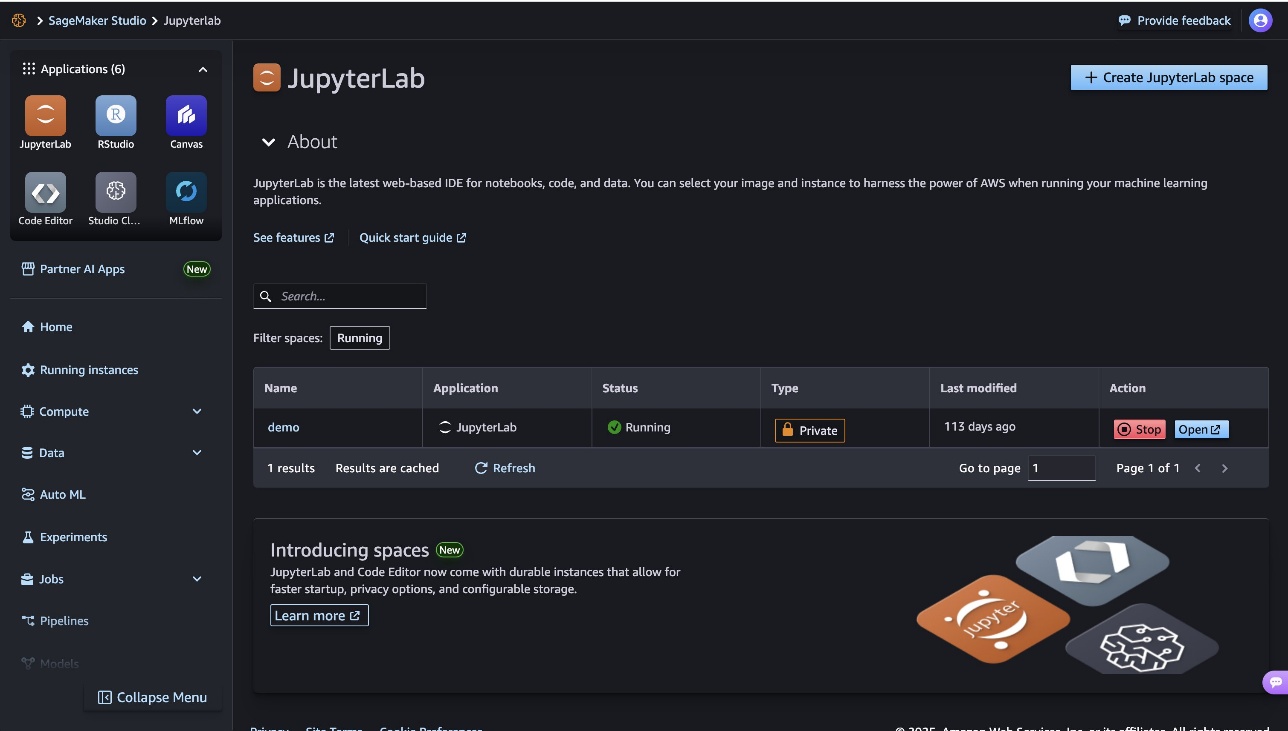
To manage costs and prevent additional workspace charges, make sure that you have logged out of SageMaker Canvas. If you tested your endpoint using a Jupyter notebook, you can shut down your JupyterLab instance by choosing Stop or configuring automated shutdown for JupyterLab.
In this post, we showed how to deploy a SageMaker Canvas model to a serverless endpoint using SageMaker Serverless Inference. By using this serverless approach, you can quickly and efficiently serve predictions from your SageMaker Canvas models without needing to manage the underlying infrastructure.
This seamless deployment experience is just one example of how AWS services like SageMaker Canvas and SageMaker Serverless Inference simplify the ML journey, helping businesses of different sizes and technical proficiencies unlock the value of AI and ML. As you continue exploring the SageMaker ecosystem, be sure to check out how you can unlock data governance for no-code ML with Amazon DataZone, and seamlessly transition between no-code and code-first model development using SageMaker Canvas and SageMaker Studio.
About the authors
 Nadhya Polanco is a Solutions Architect at AWS based in Brussels, Belgium. In this role, she supports organizations looking to incorporate AI and Machine Learning into their workloads. In her free time, Nadhya enjoys indulging in her passion for coffee and traveling.
 Brajendra Singh is a Principal Solutions Architect at Amazon Web Services, where he partners with enterprise customers to design and implement innovative solutions. With a strong background in software development, he brings deep expertise in Data Analytics, Machine Learning, and Generative AI.