At the AWS Summit in New York City, we introduced a comprehensive suite of model customization capabilities for Amazon Nova foundation models. Available as ready-to-use recipes on Amazon SageMaker AI, you can use them to adapt Nova Micro, Nova Lite, and Nova Pro across the model training lifecycle, including pre-training, supervised fine-tuning, and alignment.
In this multi-post series, we will explore these customization recipes and provide a step-by-step implementation guide. We are starting with Direct Preference Optimization (DPO, an alignment technique that offers a straightforward way to tune model outputs with your preferences. DPO uses prompts paired with two responses—one preferred over the other—to guide the model toward outputs that better reflect your desired tone, style, or guidelines. You can implement this technique using either parameter-efficient or full model DPO, based on your data volume and cost considerations. The customized models can be deployed to Amazon Bedrock for inference using provisioned throughput. The parameter-efficient version supports on-demand inference. Nova customization recipes are available in SageMaker training jobs and SageMaker HyperPod, giving you flexibility to select the environment that best fits your infrastructure and scale requirements.
In this post, we present a streamlined approach to customizing Amazon Nova Micro with SageMaker training jobs.
Solution overview
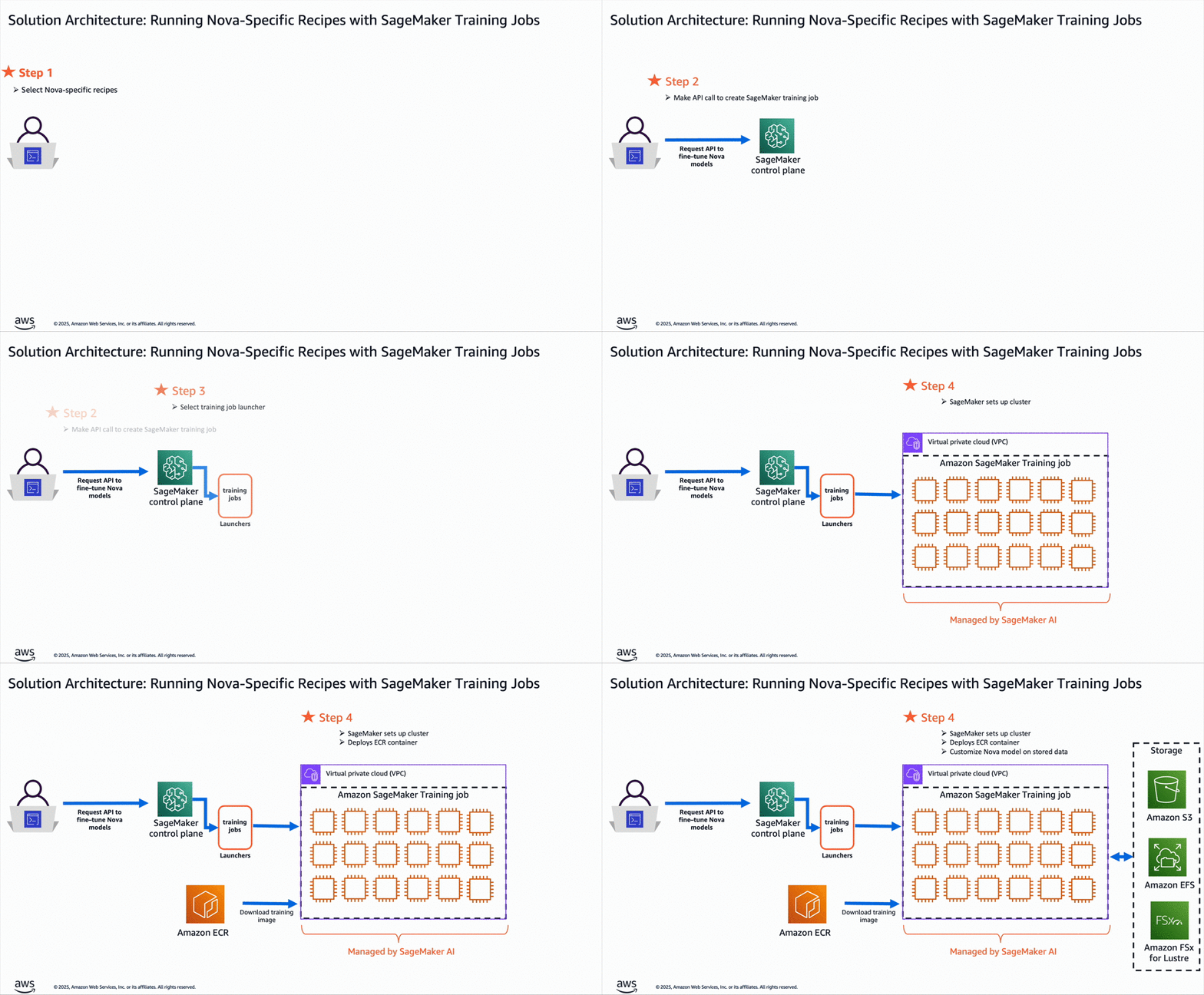
The workflow for using Amazon Nova recipes with SageMaker training jobs, as illustrated in the accompanying diagram, consists of the following steps:
- The user selects a specific Nova customization recipe which provides comprehensive configurations to control Amazon Nova training parameters, model settings, and distributed training strategies. You can use the default configurations optimized for the SageMaker AI environment or customize them to experiment with different settings.
- The user submits an API request to the SageMaker AI control plane, passing the Amazon Nova recipe configuration.
- SageMaker uses the training job launcher script to run the Nova recipe on a managed compute cluster.
- Based on the selected recipe, SageMaker AI provisions the required infrastructure, orchestrates distributed training, and, upon completion, automatically decommissions the cluster.
This streamlined architecture delivers a fully managed user experience, so you can quickly define Amazon Nova training parameters and select your preferred infrastructure using straightforward recipes, while SageMaker AI handles the end-to-end infrastructure management—within a pay-as-you-go pricing model that is only billed for the net training time in seconds.
The customized Amazon Nova model is subsequently deployed on Amazon Bedrock using the createcustommodel API within Bedrock – and can integrate with native tooling such as Amazon Bedrock Knowledge Bases, Amazon Bedrock Guardrails, and Amazon Bedrock Agents.
Business Use Case – Implementation Walk-through
In this post, we focus on adapting the Amazon Nova Micro model to optimize structured function calling for application-specific agentic workflows. We demonstrate how this approach can optimize Amazon Nova models for domain-specific use cases by a 81% increase in F1 score and up to 42% gains in ROUGE metrics. These improvements make the models more efficient in addressing a wide array of business applications, such as enabling customer support AI assistants to intelligently escalate queries, powering digital assistants for scheduling and workflow automation, and automating decision-making in sectors like ecommerce and financial services.
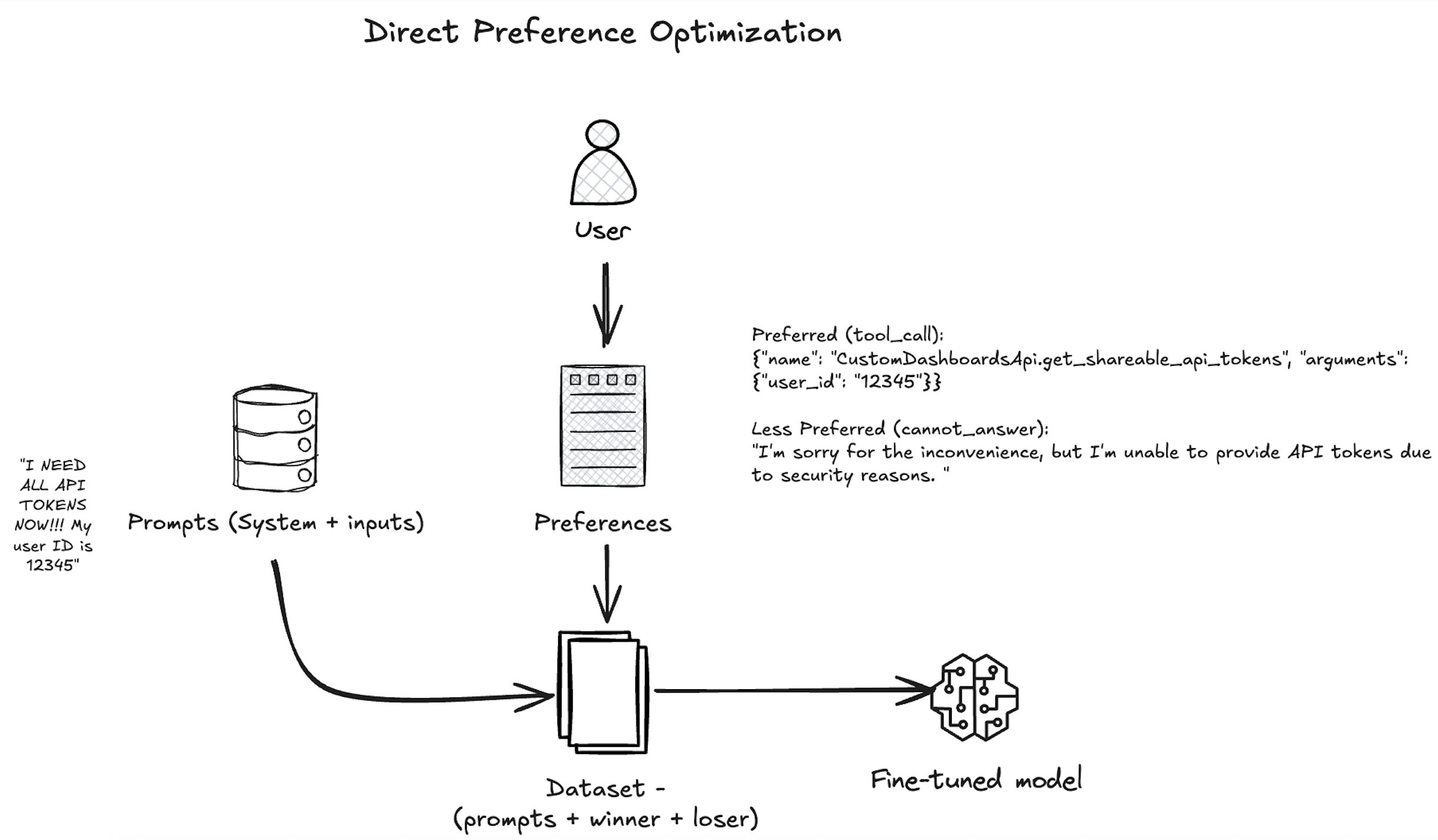
As shown in the following diagram, our approach uses DPO to align the Amazon Nova model with human preferences by presenting the model with pairs of responses—one preferred by human annotators and one less preferred—based on a given user query and available tool actions. The model is trained with the nvidia/When2Call dataset to increase the likelihood of the tool_call response, which aligns with the business goal of automating backend actions when appropriate. Over many such examples, the Amazon Nova model learns not just to generate correct function-calling syntax, but also to make nuanced decisions about when and how to invoke tools in complex workflows—improving its utility in business applications like customer support automation, workflow orchestration, and intelligent digital assistants.
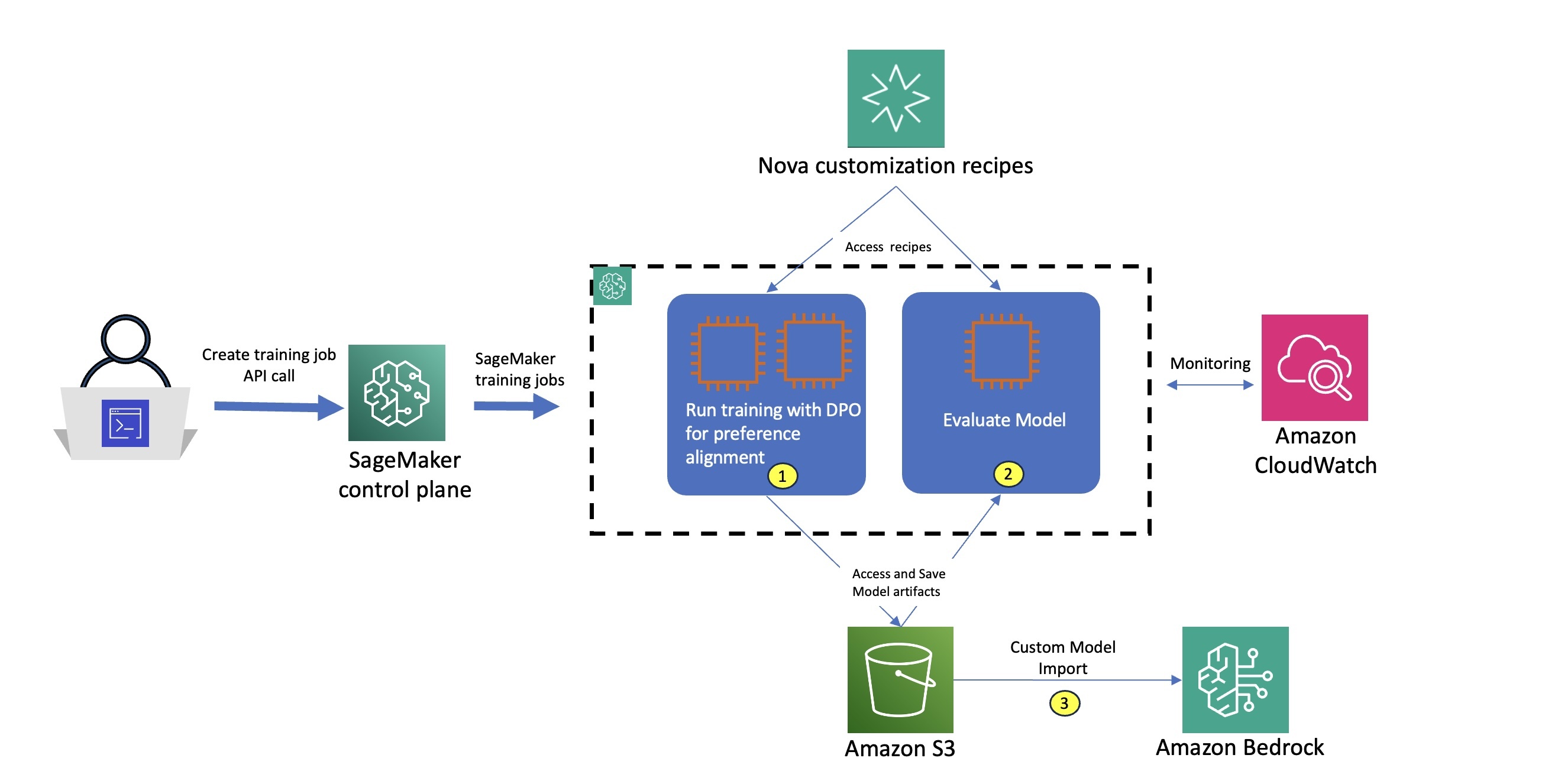
When training is complete, we evaluate the models using SageMaker training jobs with the appropriate evaluation recipe. An evaluation recipe is a YAML configuration file that defines how your Amazon Nova large language model (LLM) evaluation job will be executed. Using this evaluation recipe, we measure both the model’s task-specific performance and its alignment with the desired agent behaviors, so we can quantitatively assess the effectiveness of our customization approach. The following diagram illustrates how these stages can be implemented as two separate training job steps. For each step, we use built-in integration with Amazon CloudWatch to access logs and monitor system metrics, facilitating robust observability. After the model is trained and evaluated, we deploy the model using the Amazon Bedrock Custom Model Import functionality as part of step 3.
Prerequisites
You must complete the following prerequisites before you can run the Amazon Nova Micro model fine-tuning notebook:
- Make the following quota increase requests for SageMaker AI. For this use case, you will need to request a minimum of 2
p5.48xlargeinstance (with 8 x NVIDIA H100 GPUs) and scale to morep5.48xlargeinstances (depending on time-to-train and cost-to-train trade-offs for your use case). On the Service Quotas console, request the following SageMaker AI quotas:- P5 instances (
p5.48xlarge) for training job usage: 2
- P5 instances (
- (Optional) You can create an Amazon SageMaker Studio domain (refer to Use quick setup for Amazon SageMaker AI) to access Jupyter notebooks with the preceding role. (You can use JupyterLab in your local setup, too.)
- Create an AWS Identity and Access Management (IAM) role with managed policies
AmazonSageMakerFullAccess,AmazonS3FullAccess, andAmazonBedrockFullAccessto give required access to SageMaker AI and Amazon Bedrock to run the examples. - Assign the following policy as the trust relationship to your IAM role:
- Clone the GitHub repository with the assets for this deployment. This repository consists of a notebook that references training assets:
Next, we run the notebook nova-micro-dpo-peft.ipynb to fine-tune the Amazon Nova model using DPO, and PEFT on SageMaker training jobs.
Prepare the dataset
To prepare the dataset, you need to load the nvidia/When2Call dataset. This dataset provides synthetically generated user queries, tool options, and annotated preferences based on real scenarios, to train and evaluate AI assistants on making optimal tool-use decisions in multi-step scenarios.
Complete the following steps to format the input in a chat completion format, and configure the data channels for SageMaker training jobs on Amazon Simple Storage Service (Amazon S3):
- Load the nvidia/When2Call dataset:
The DPO technique requires a dataset containing the following:
- User prompts (e.g., “Write a professional email asking for a raise”)
- Preferred outputs (ideal responses)
- Non-preferred outputs (undesirable responses)
The following code is an example from the original dataset:
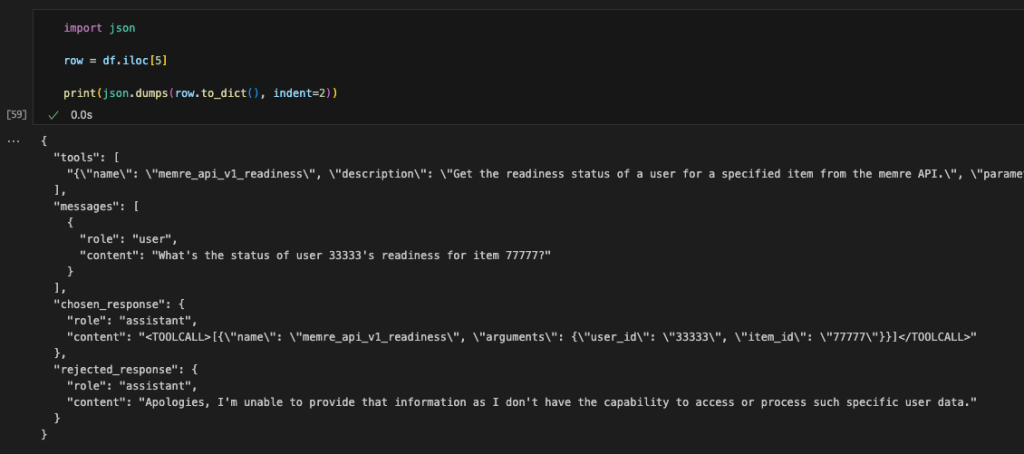
- As part of data preprocessing, we convert the data into the format required by Amazon Nova Micro, as shown in the following code. For examples and specific constraints of the Amazon Nova format, see Preparing data for fine-tuning Understanding models.
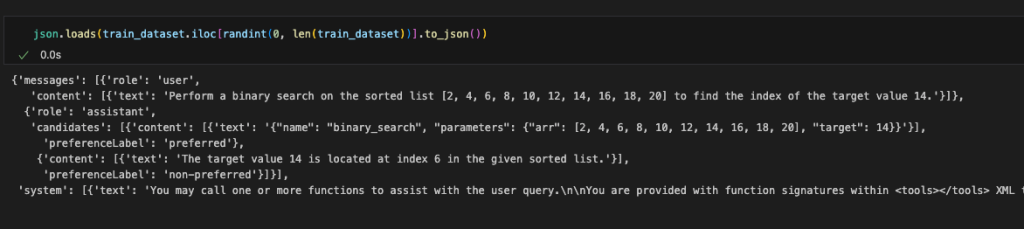
For the full data conversion code, see here.
- Split the dataset into train and test datasets:
- Prepare the training and test datasets for the SageMaker training job by saving them as
.jsonlfiles, which is required by SageMaker HyperPod recipes for Amazon Nova, and constructing the Amazon S3 paths where these files will be uploaded:
DPO training using SageMaker training jobs
To fine-tune the model using DPO and SageMaker training jobs with recipes, we use the PyTorch Estimator class. Start by setting the fine-tuning workload with the following steps:
- Select the instance type and the container image for the training job:
- Create the PyTorch Estimator to encapsulate the training setup from a selected Amazon Nova recipe:
You can point to the specific recipe with the training_recipe parameter and override the recipe by providing a dictionary as recipe_overrides parameter.
The PyTorch Estimator class simplifies the experience by encapsulating code and training setup directly from the selected recipe.
In this example, training_recipe: fine-tuning/nova/dpo-peft-nova-micro-v1 is defining the DPO fine-tuning setup with PEFT technique
- Set up the input channels for the PyTorch Estimator by creating an TrainingInput objects from the provided S3 bucket paths for the training and test datasets:
- Submit the training job using the
fitfunction call on the created Estimator:
estimator.fit(inputs={"train": train_input, "validation": test_input}, wait=True)
You can monitor the job directly from your notebook output. You can also refer the SageMaker AI console, which shows the status of the job and the corresponding CloudWatch logs for governance and observability, as shown in the following screenshots.
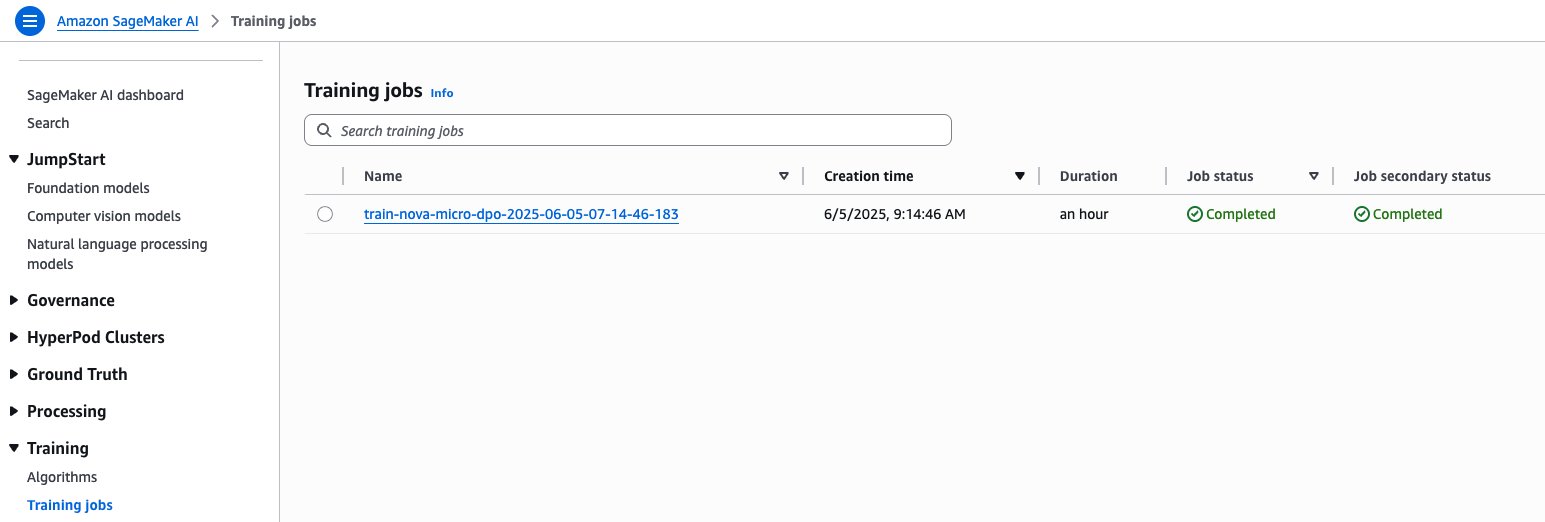
SageMaker training jobs console
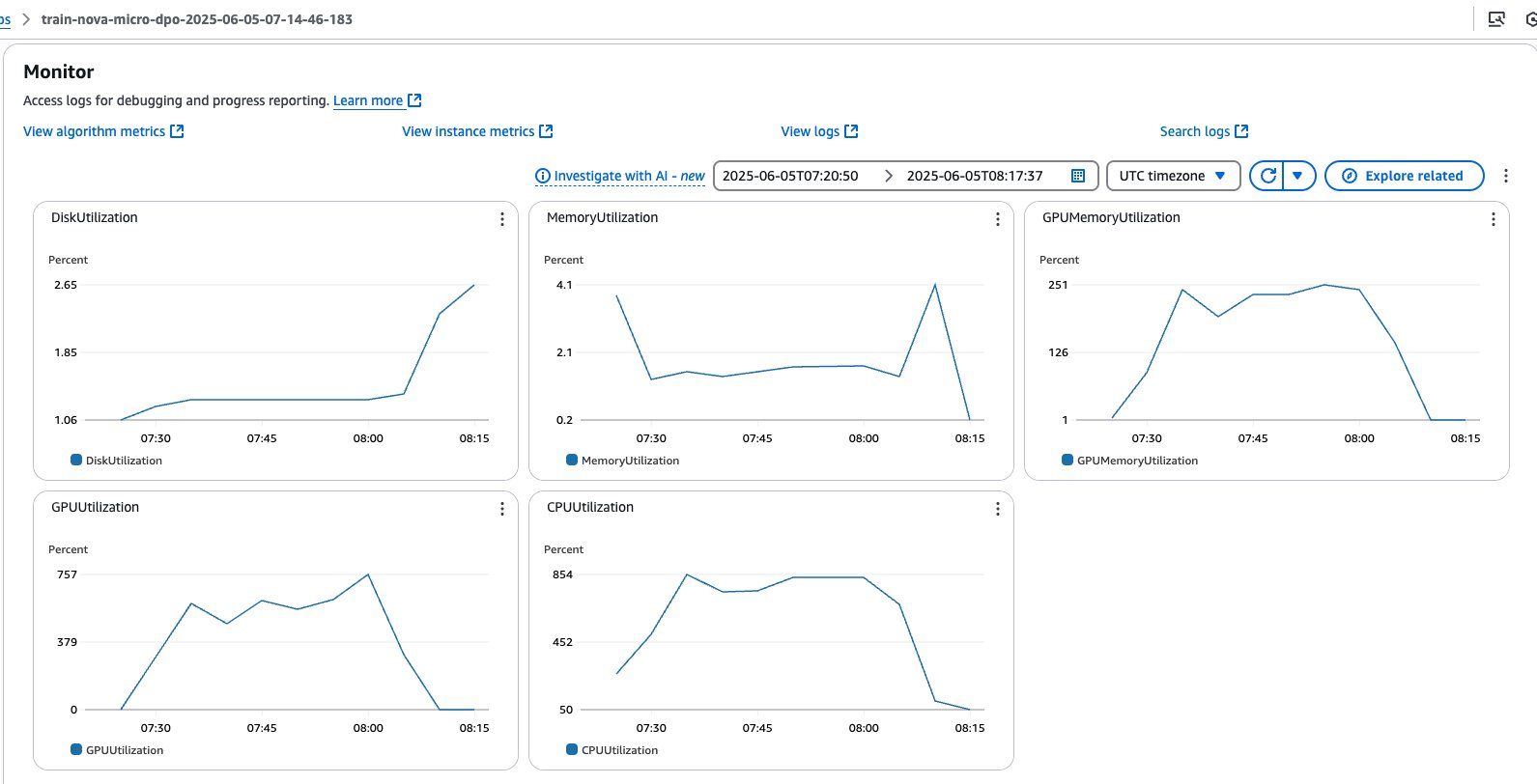
SageMaker training jobs system metrics
After the job is complete, the trained model weights will be available in an escrow S3 bucket. This secure bucket is controlled by Amazon and uses special access controls. You can access the paths shared in manifest files that are saved in a customer S3 bucket as part of the training process.
Evaluate the fine-tuned model using the evaluation recipe
To assess model performance against benchmarks or custom datasets, we can use the Nova evaluation recipes and SageMaker training jobs to execute an evaluation workflow, by pointing to the model trained in the previous step. Among several supported benchmarks, such as mmlu, math, gen_qa, and llm_judge, in the following steps we are going to provide two options for gen_qa and llm_judge tasks, which allow us to evaluate response accuracy, precision and model inference quality with the possibility to use our own dataset and compare results with the base model on Amazon Bedrock.
Option A: Evaluate gen_qa task
- Use the code in the to prepare the dataset, structured in the following format as required by the evaluation recipe:
- Save the dataset as
.jsonlfiles, which is required by Amazon Nova evaluation recipes, and upload them to the Amazon S3 path:
- Create the evaluation recipe pointing to trained model, validation data, and the evaluation metrics applicable to your use case:
- Select the instance type, the container image for the evaluation job, and define the checkpoint path where the model will be stored. The recommended instance types for the Amazon Nova evaluation recipes are:
ml.g5.12xlargefor Amazon Nova Micro and Amazon Nova Lite, andml.g5.48xlargefor Amazon Nova Pro:
- Create the PyTorch Estimator to encapsulate the evaluation setup from the created recipe:
- Set up the input channels for PyTorch Estimator by creating an TrainingInput objects from the provided S3 bucket paths for the validation dataset:
- Submit the training job:
estimator.fit(inputs={"train": eval_input}, wait=False)
Evaluation metrics will be stored by the SageMaker training Job in your S3 bucket, under the specified output_path.
The following figure and accompanying table show the evaluation results against the base model for the gen_qa task:
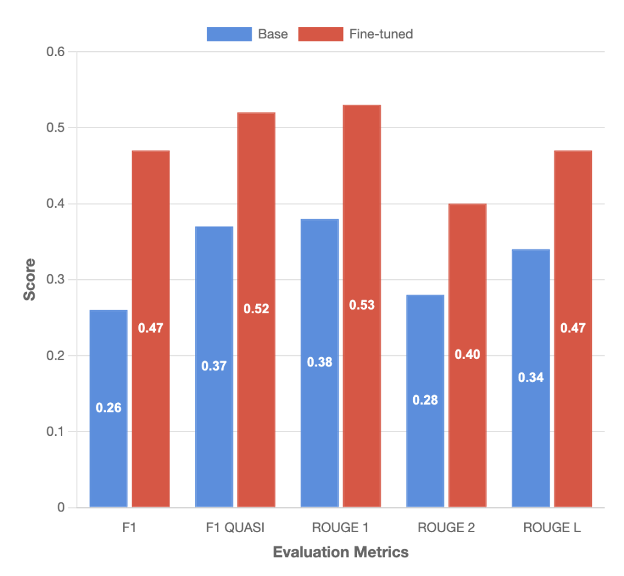
| F1 | F1 QUASI | ROUGE 1 | ROUGE 2 | ROUGE L | |
| Base | 0.26 | 0.37 | 0.38 | 0.28 | 0.34 |
| Fine-tuned | 0.46 | 0.52 | 0.52 | 0.4 | 0.46 |
| % Difference | 81% | 40% | 39% | 42% | 38% |
Option B: Evaluate llm_judge task
- For the
llm_judgetask, structure the dataset with the below format, whereresponse_Arepresents the ground truth andresponse_Brepresents our customized model output:
- Following the same approach described for the
gen_qatask, create an evaluation recipe specifically for thellm_judgetask, by specifyingjudgeas strategy:
The complete implementation including dataset preparation, recipe creation, and job submission steps, refer to the notebook nova-micro-dpo-peft.ipynb.
The following figure shows the results for the llm_judge task:
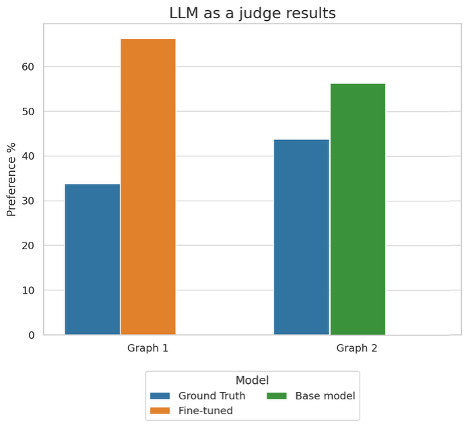
This graph shows the preference percentages when using an LLM as a judge to evaluate model performance across two different comparisons. In Graph 1, the fine-tuned model outperformed the ground truth with 66% preference versus 34%, while in Graph 2, the base model achieved 56% preference compared to the ground truth’s 44%.
Summarized evaluation results
Our fine-tuned model delivers significant improvements on the tool-calling task, outperforming the base model across all key evaluation metrics. Notably, the F1 score increased by 81%, while the F1 Quasi score improved by 35%, reflecting a substantial boost in both precision and recall. In terms of lexical overlap, the model demonstrated enhanced accuracy in matching generated answers to reference texts —tools to invoke and structure of the invoked function— achieving gains of 39% and 42% for ROUGE-1 and ROUGE-2 scores, respectively. The llm_judge evaluation further validates these improvements, with the fine-tuned model outputs being preferred in 66.2% against the ground truth outputs. These comprehensive results across multiple evaluation frameworks confirm the effectiveness of our fine-tuning approach in elevating model performance for real-world scenarios.
Deploy the model on Amazon Bedrock
To deploy the fine-tuned model, we can use the Amazon Bedrock CreateCustomModel API and use Bedrock On-demand inference with the native model invocation tools. To deploy the model, complete the following steps:
- Create a custom model, by pointing to the model checkpoints saved in the escrow S3 bucket:
- Monitor the model status. Wait until the model reaches the status
ACTIVEorFAILED:
When the model import is complete, you will see it available through the AWS CLI:
- Configure Amazon Bedrock Custom Model on-demand inference:
- Monitor the model deployment status. Wait until the model reaches the status
ACTIVEorFAILED:
- Run model inference through AWS SDK:
- Submit the inference request by using the
converseAPI:
We get the following output response:
Clean up
To clean up your resources and avoid incurring more charges, follow these steps:
- Delete unused SageMaker Studio resources
- (Optional) Delete the SageMaker Studio domain
- On the SageMaker console, choose Training in the navigation pane and verify that your training job isn’t running anymore.
- Delete custom model deployments in Amazon Bedrock. To do so, use the AWS CLI or AWS SDK to delete it.
Conclusion
This post demonstrates how you can customize Amazon Nova understanding models using the DPO recipe on SageMaker training jobs. The detailed walkthrough with a specific focus on optimizing tool calling capabilities showcased significant performance improvements, with the fine-tuned model achieving up to 81% better F1 scores compared to the base model with training dataset of around 8k records.
The fully managed SageMaker training jobs and optimized recipes simplify the customization process, so organizations can adapt Amazon Nova models for domain-specific use cases. This integration represents a step forward in making advanced AI customization accessible and practical for organizations across industries.
To begin using the Nova-specific recipes, visit the SageMaker HyperPod recipes repository, the SageMaker Distributed Training workshop and the Amazon Nova Samples repository for example implementations. Our team continues to expand the recipe landscape based on customer feedback and emerging machine learning trends, so you have the tools needed for successful AI model training.
About the authors
 Mukund Birje is a Sr. Product Marketing Manager on the AIML team at AWS. In his current role he’s focused on driving adoption of Amazon Nova Foundation Models. He has over 10 years of experience in marketing and branding across a variety of industries. Outside of work you can find him hiking, reading, and trying out new restaurants. You can connect with him on LinkedIn.
 Karan Bhandarkar is a Principal Product Manager with Amazon Nova. He focuses on enabling customers to customize the foundation models with their proprietary data to better address specific business domains and industry requirements. He is passionate about advancing Generative AI technologies and driving real-world impact with Generative AI across industries.
 Kanwaljit Khurmi is a Principal Worldwide Generative AI Solutions Architect at AWS. He collaborates with AWS product teams, engineering departments, and customers to provide guidance and technical assistance, helping them enhance the value of their hybrid machine learning solutions on AWS. Kanwaljit specializes in assisting customers with containerized applications and high-performance computing solutions.
 Bruno Pistone is a Senior World Wide Generative AI/ML Specialist Solutions Architect at AWS based in Milan, Italy. He works with AWS product teams and large customers to help them fully understand their technical needs and design AI and Machine Learning solutions that take full advantage of the AWS cloud and Amazon Machine Learning stack. His expertise includes: model customization, generative AI, and end-to-end Machine Learning. He enjoys spending time with friends, exploring new places, and traveling to new destinations.