When using generative AI, achieving high performance with low latency models that are cost-efficient is often a challenge, because these goals can clash with each other. With the newly launched Amazon Bedrock Model Distillation feature, you can use smaller, faster, and cost-efficient models that deliver use-case specific accuracy that is comparable to the largest and most capable models in Amazon Bedrock for those specific use cases.
Model distillation is the process of transferring knowledge from a more capable advanced model (teacher) to a smaller model (student), which is faster and more cost efficient to make the student model as performant as the teacher for a specific use-case. To transfer knowledge, your use-case specific prompts are used to first generate responses from the teacher model, and then the teacher responses are used to fine-tune the student model.
Amazon Bedrock is a fully managed service that offers a choice of high-performing foundation models (FMs) along with a broad set of capabilities to build generative AI applications, simplifying development with security, privacy, and responsible AI. With Amazon Bedrock Model Distillation, you can now customize models for your use case using synthetic data generated by highly capable models. At preview, Amazon Bedrock Model Distillation offers support for three model providers: Amazon, Anthropic, and Meta. The teacher and student models should be from the same model provider.
This post introduces the workflow of Amazon Bedrock Model Distillation. We first introduce the general concept of model distillation in Amazon Bedrock, and then focus on the important steps in model distillation, including setting up permissions, selecting the models, providing input dataset, commencing the model distillation jobs, and conducting evaluation and deployment of the student models after model distillation.
Key benefits of Amazon Bedrock Model Distillation
- Efficiency: Distilled models provide high use-case specific accuracy comparable to the most capable models while being as fast as some of the smallest models.
- Cost optimization: Inference from distilled models is less expensive compared to larger advanced models.
- Advanced customization: Amazon Bedrock Model Distillation removes the need to create a labeled dataset for fine-tuning. Amazon Bedrock automates the complex process of generating high-quality teacher responses to create a diverse and high-volume training dataset to use for fine-tuning the student model, by adding data synthesis (up to 15 thousand prompt-response pairs) and augmentation techniques behind the scenes that automatically adapt to your use case, optimizing the distilled model’s performance.
- Ease of use: Amazon Bedrock Model Distillation offers a single workflow that automates the generation of teacher responses, adds data synthesis to improve teacher responses, and fine-tunes the student model with optimized hyperparameter tuning.
Use cases for Amazon Bedrock Model Distillation
By distilling knowledge from larger models into smaller, more agile ones, organizations are empowered to develop optimized AI solutions to achieve a higher return on their investments. Here are some applications where a distilled model can make a significant impact:
- Retrieval Augmented Generation (RAG): Enable enterprise wide search and knowledge retrieval systems that can handle thousands of concurrent queries at a fraction of the cost of larger models, making widespread deployment more feasible.
- Document summarization: Process vast amounts of business content in real time, such as summarizing thousands of customer call transcripts daily, enabling insights at a scale previously limited by latency constraints.
- Chatbot deployments: Power customer service chatbots that can handle thousands of concurrent real-time conversations with consistently low latency, delivering the quality of a larger model but at significantly lower operational costs.
- Text classification: Build faster models for categorizing high volumes of concurrent support tickets, emails, or customer feedback at scale; or for efficiently routing requests to larger models when necessary. This approach can significantly reduce processing costs while maintaining classification accuracy, enabling real-time responsiveness to customer needs.
Amazon Bedrock Model Distillation workflow
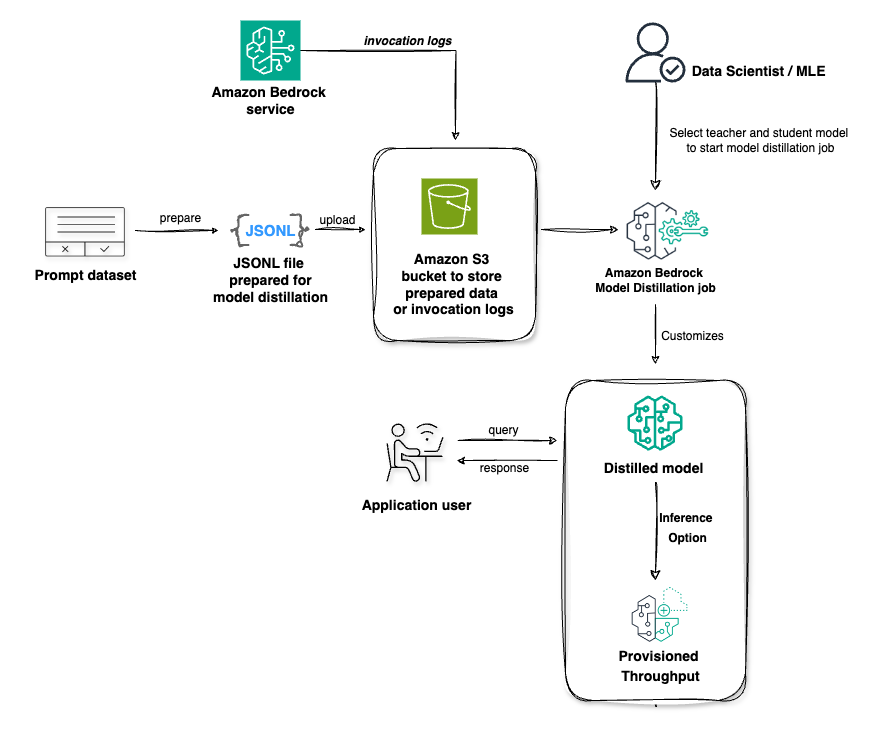
Amazon Bedrock offers two options for using Amazon Bedrock Model Distillation. In the first option, you can create a distilled model by providing your production data using historical invocation logs from your previous interactions within Amazon Bedrock. In a production environment, you continue to use the existing Amazon Bedrock Inference APIs, such as the InvokeModel or Converse API, and turn on invocation logs that store model input data (prompts) and model output data (responses). You can optionally add request metadata to these inference requests to filter your invocation logs for specific use cases. By default, Amazon Bedrock reads only the prompts from the invocation logs and will generate responses from the teacher model selected in your distillation job. In this scenario, Amazon Bedrock might apply proprietary data synthesis techniques to generate diverse and high-quality responses from the teacher model to augment the fine-tuning dataset, potentially improving the performance of the distilled student model. The student model is then fine-tuned using the prompt and teacher response pairs. Optionally, you can configure Amazon Bedrock to extract both the prompt and response from the invocation logs. In this scenario, the teacher model selected in the distillation job must match the teacher model in the invocation log. No data synthesis techniques are applied. The prompt-response pairs are taken as is from the invocation logs and the student model is fine-tuned.
In the second option, you can upload your use-case specific prompts by directly uploading a JSONL file to Amazon Simple Storage Service (Amazon S3) containing your use-case specific prompts or labelled prompt-completion pairs. Amazon Bedrock generates responses from the teacher model for the provided prompts. If you provide a human-generated labeled dataset representing the ground truth, Amazon Bedrock can use these prompt-response pairs as golden examples to generate better teacher responses. The student model is then fine-tuned using the prompt-response pairs generated by the teacher model.
Prerequisites
To use the model distillation feature, make sure that you have satisfied the following requirements:
- An active AWS account.
- Selected teacher and student models enabled in Amazon Bedrock. You can confirm that the models are enabled on the Model access page of the Amazon Bedrock console.
- Confirm the AWS Regions where the model is available and quotas.
- To create a model distillation job using Amazon Bedrock, you need to create an AWS Identity and Access Management (IAM) role with the following permissions:
- A trust relationship that allows Amazon Bedrock to assume the role
- Permissions to access input data and historical invocation logs in Amazon S3
- Permissions to write output data to Amazon S3
- Optionally, permissions to decrypt an AWS Key Management Service (AWS KMS) key if you have encrypted resources with a KMS key
- An S3 bucket where your distillation job output metrics are stored.
- If you provide an input dataset for distillation, use Amazon S3 to store your input data
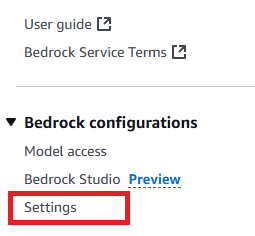
- Alternatively, if you use a historical invocation log for model distillation, make sure to enable the invocation log in the AWS Management Console and that the historical invocation logging is stored in an S3 location. To do so, go to the Amazon Bedrock console and choose Settings at the bottom of left corner, as shown in the screenshot:
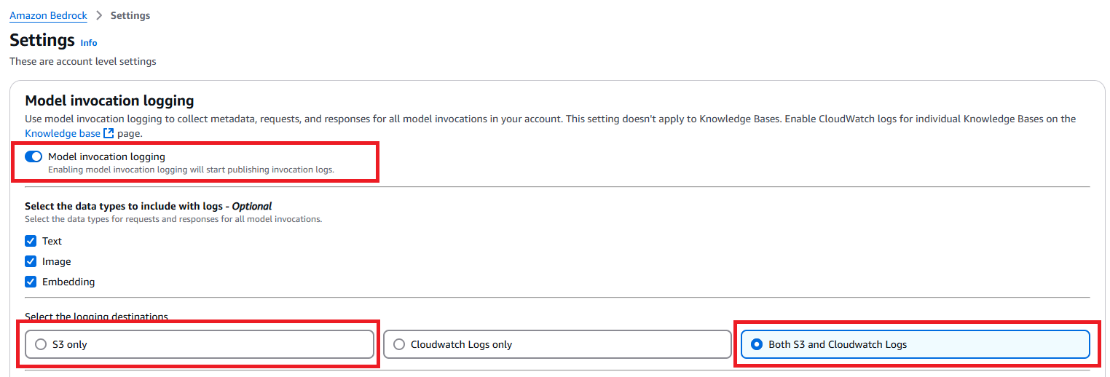
- On the next page, make sure that Model invocation logging is enabled and select S3 only as the logging destination. (Optionally, you can select Both S3 and CloudWatch Logs as the destination.)
- Alternatively, if you use a historical invocation log for model distillation, make sure to enable the invocation log in the AWS Management Console and that the historical invocation logging is stored in an S3 location. To do so, go to the Amazon Bedrock console and choose Settings at the bottom of left corner, as shown in the screenshot:
- Ensure that you have sufficient quota for running a Provisioned Throughput during inference. Go to the AWS Service Quotas console, and check the following quotas:
- Model units no-commitment Provisioned Throughputs across custom models
- Model units per provisioned model for [student model name]
Both of these fields need to have enough quota to support your Provisioned Throughput model unit. Request a quota increase if necessary to accommodate your expected inference workload.
Model selection
Currently, Amazon Bedrock Model Distillation supports student-teacher combinations within the same model providers (for example, Amazon, Anthropic, or Meta).
Selecting the right models for distillation is crucial. The process involves choosing a teacher model for synthetic data generation and a student model to learn from the teacher’s output. The teacher model is typically larger and more capable, while the student model is smaller, faster, and more cost-efficient.
When selecting models, consider three key dimensions: performance, latency and cost. These factors are interconnected and adjusting one can affect the others.
- Performance: Establish clear performance targets for your use case, such as accuracy, consistency, or harmlessness. Select a teacher model that meets or exceeds your desired performance level. The expectation from distillation is to increase the student model’s performance to approach that of the teacher model.
- Latency: Choose a student model that meets your latency requirements. The final distilled model will have the same latency profile as the student model that you select.
- Cost: Consider the total cost of ownership (TCO) across the model’s lifecycle, including teacher model inference for synthetic data generation, student model fine-tuning, inference cost for the distilled model, and custom model storage.
Distillation input dataset
There are two main ways to prepare use-case specific input data for distillation in Amazon Bedrock:
- Uploading a JSONL file to Amazon S3
- Using historical invocation logs
Uploading a JSONL file to S3
If you have a dataset in the JSON Lines (JSONL) format, you can upload it to an S3 bucket. Each record in this JSONL file use the following structure:
Specifically, each record has a mandatory field, schemaVersion, that must have the value bedrock-conversation-2024 at this launch. The record can optionally include a system prompt that indicates the role assigned to the model. In the messages field, the user role is required, containing the input prompt provided to the model, while the assistant role, containing the desired response, is optional.
At preview, Anthropic and Meta models only accept single-turn conversation prompts, meaning you can only have one user prompt. The Amazon (Nova) models support multi-turn conversations, allowing you to provide multiple user and assistant exchanges within one record.
Using historical invocation logs
Alternatively, you can use your historical invocation logs stored in Amazon S3 for model distillation. These logs capture the prompts, responses, and metadata from your previous model interactions, making them a valuable source of data. To use this method:
- Enable invocation logging: Make sure that you’ve enabled invocation logging for your account. If you haven’t done this yet, see to the prerequisites section for instructions.
- Add metadata to model invocations: When invoking models using the InvokeModel or Converse API, include a
requestMetadatafield with key valueparis. This allows you to categorize and filter your interactions later. An example for using theConverseAPI would be:
A specific example for the requestMetadata field for a sample use case could be:
- Select logs for distillation: When creating a model customization job, you can specify filters to select which invocation logs to use. The API supports various filtering options:
- Include specific logs:
- Exclude specific logs:
- Combine multiple conditions:
- Use
ORlogic:
By following these steps, you can precisely control which data from your invocation logs should be used for distillation, enabling you to target specific use cases, projects, or workflows.
Selecting the right data
When selecting data for distillation, whether through a new training JSONL file or historical invocation logs, it’s crucial to choose prompts and responses that are relevant to your use case. The quality and diversity of the data will directly impact the performance of the distilled model.
In general, you should aim to include prompts that cover a wide range of topics and scenarios relevant to your use case, more importantly, a good approach also includes optimizing prompts for the teacher model to get better responses so distillation can perform high quality knowledge transfer from teacher to student. Specifically, for use cases like RAG, make sure to include prompts that contain relevant context to be used by the model. For tasks that require a specific response style or format, it’s important to include examples that adhere to the desired style or format.
Be mindful when curating the data used for distillation to help ensure that the distilled model learns the most relevant and valuable knowledge from the teacher model, optimizing its performance for your specific use case.
Run the model distillation
You can start a distillation job either through the Amazon Bedrock console or programmatically using the Amazon Bedrock API. The distillation process requires training data, either by uploading training data in JSONL format to Amazon S3, or by using historical model invocation logs, as we prepared in the prior section.
Before starting a model distillation job, make sure that you’re operating within the boundaries of Amazon Bedrock distillation service quotas.
Let’s explore how to start distillation jobs using different approaches. In the following example, we use Llama 3.1 70B as the teacher model and Llama 3.1 8B as student model.
Start a distillation job using the console
Amazon Bedrock Model Distillation provides you with an option to run a distillation job through a guided user interface in the console. To start a distillation job through the console, follow these steps:
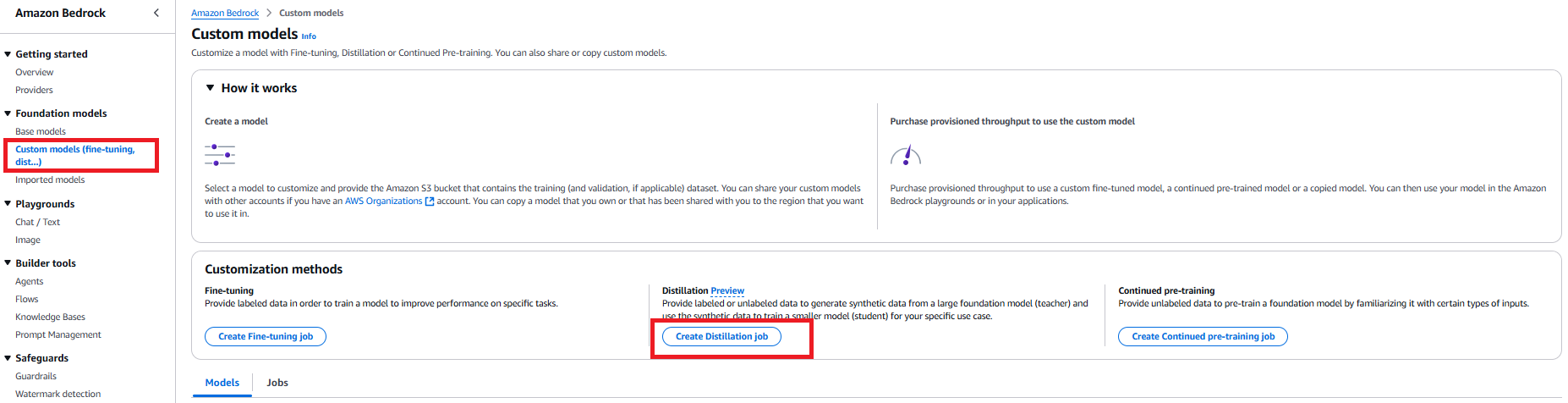
- Go to the Amazon Bedrock console. Choose Foundation models in the navigation pane, then choose Custom models. In the Customization methods section, choose Create Distillation job.
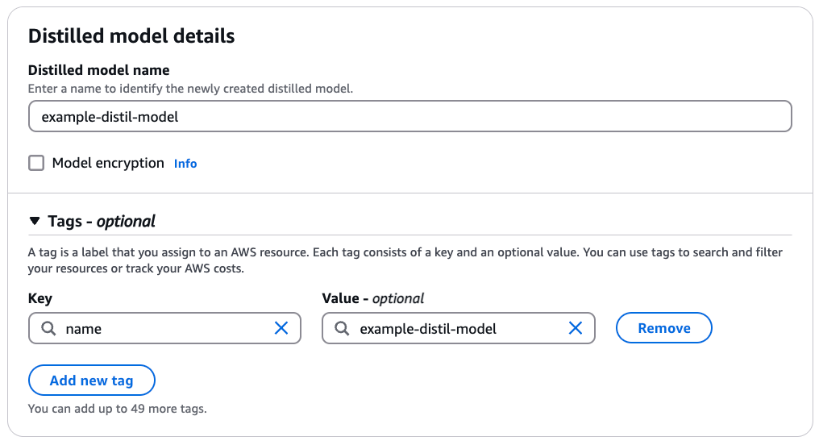
- For Distilled model name, enter a name for the model. Select Model encryption to add a KMS key. Optionally, expand the Tags section to add tags for tracking.
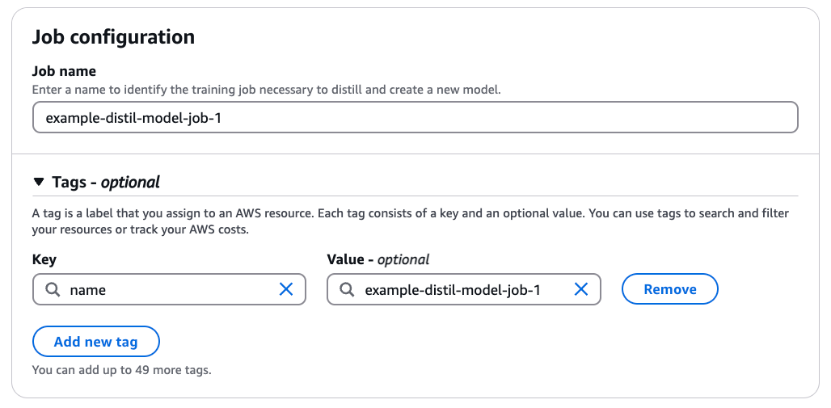
- For Job name, enter a name for the training job. Optionally, expand the Tags section to add tags for tracking.
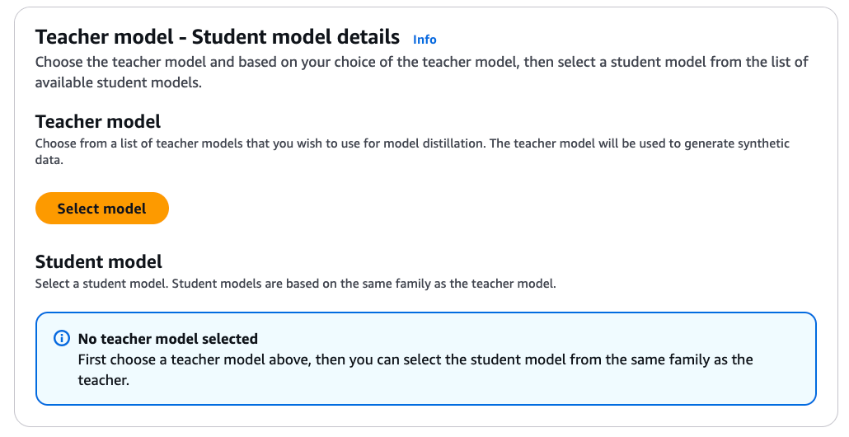
- Choose Select model to pick the teacher model of your choice.
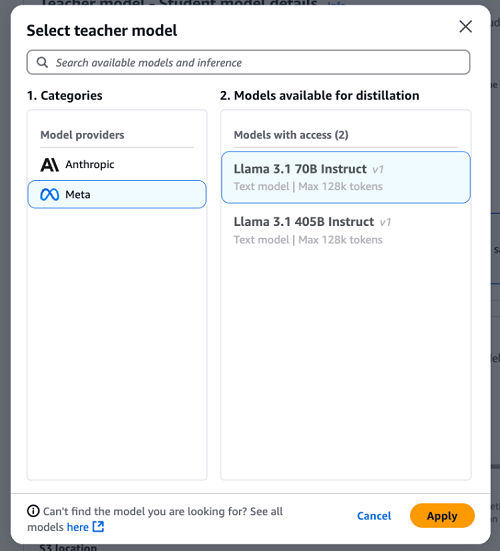
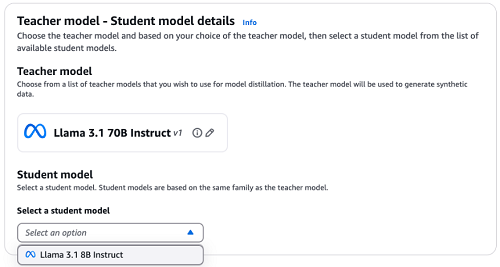
- For Categories, choose Meta model family. For Models available for distillation, select Llama 3.1 70B Instruct. Choose Apply.
- Open the drop down under Select a student model. For this example, select Llama 3.1 8B Instruct.
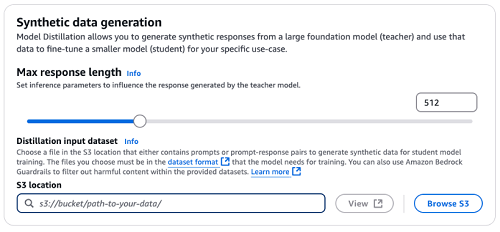
- Specify the Max response length through the slider or directly in the input field. This configuration will be used as an inference parameter for the synthetic data generation by the teacher model.
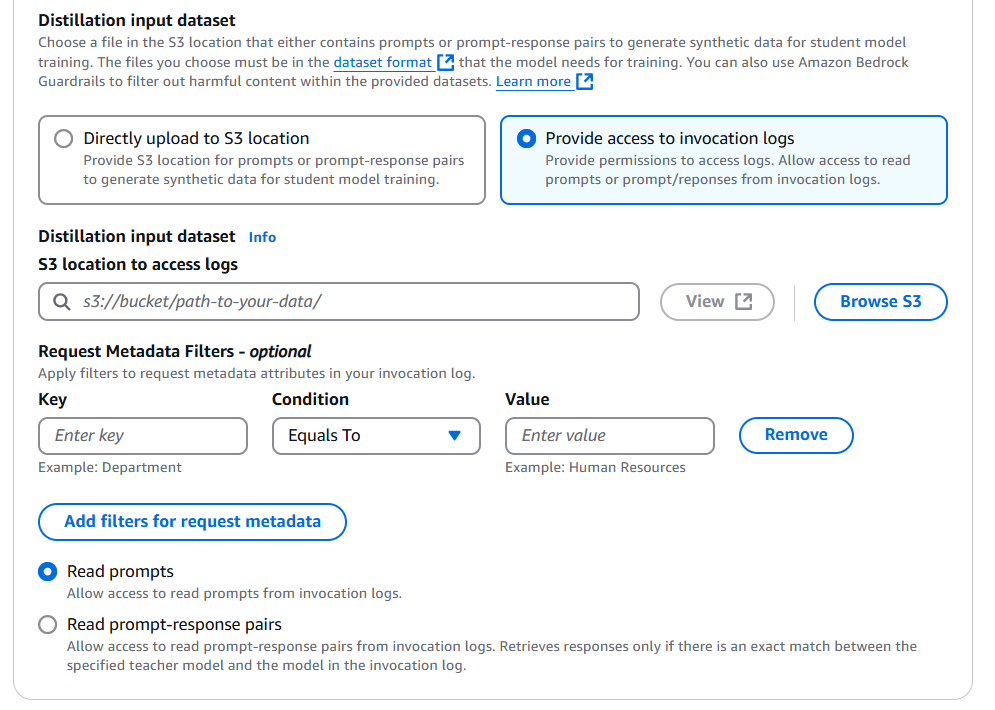
- As discussed in the prior section, there are two approaches to provide a distillation input dataset.

- If you plan to directly upload JSONL file to S3, upload your training dataset to the S3 bucket you prepared in prerequisite section. Under Distillation input dataset, specify the Amazon S3 location for your training dataset.
- If you plan to use historical invocation logs, select Provide access to invocation logs first, then specify the S3 location for your stored invocation logs. You can add different types of metadata filters to select only the invocation logs relevant to the use case.
You can also configure Amazon Bedrock to only read your prompts or use the prompt-response pairs. If you chose to only read the prompts, Amazon Bedrock will regenerate responses from the teacher model; or if you choose to use prompt-response pairs, Amazon Bedrock will use the available response in logs without regenerating it.
Make sure that the teacher model selected for distillation and the model used in the invocation logs is the same if you want Amazon Bedrock to re-use the responses from invocation logs.
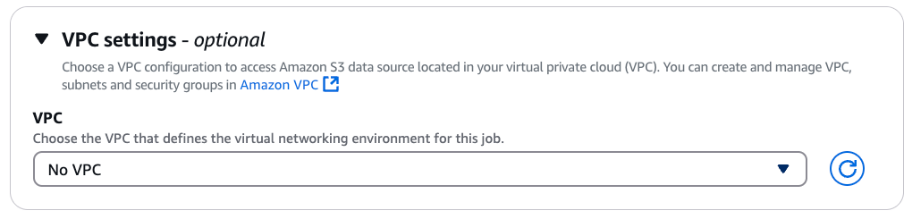
- Optionally, expand the VPC settings section to specify a VPC that defines the virtual networking environment for this distillation job.
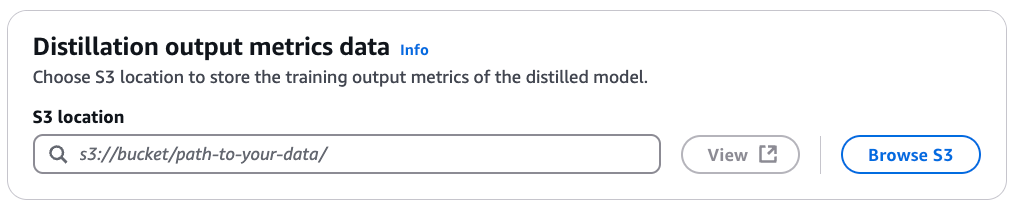
- Under Distillation output metrics data, for S3 location, enter the S3 path for the bucket where you want the training output metrics of the distilled model to be stored.
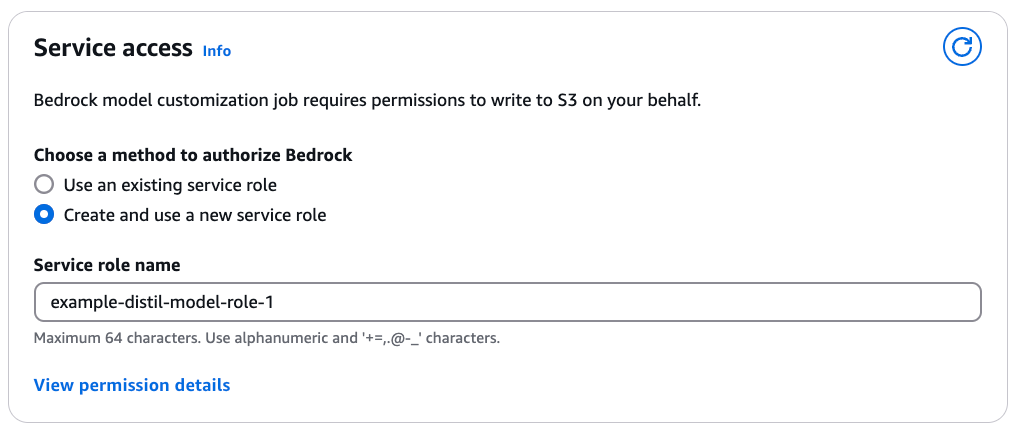
- Under Service access, select a method to provide Amazon Bedrock with the required IAM permissions to perform the distillation. This happens through assignment of a service role. You can select Use an existing service role if you have already defined a role with fine-grained IAM policies. If you want a new role to be created, select Create and use a new service role and specify a Service role name. View permission details provides you with a comprehensive overview of IAM permissions required.
- After you have added all the required configurations for the Amazon Bedrock Model Distillation job, choose Create Distillation job.

- When the distillation job starts, you can see the status of the job (Training, Complete, or e) under Jobs.
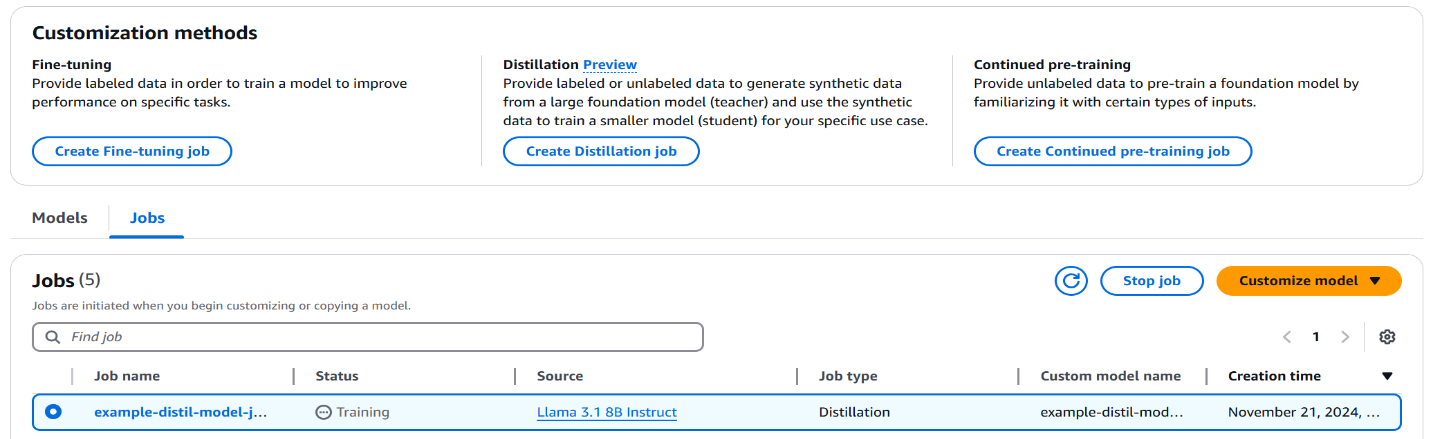
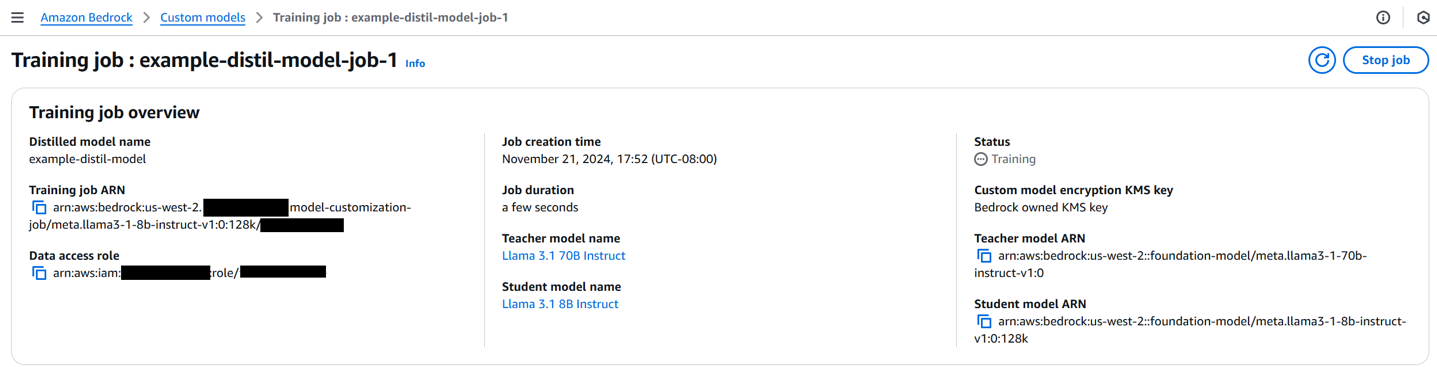
- Now select your distillation job. As the distillation job progresses, you can find more information about the job, including job creation time, status, job duration, teacher-student configuration and the distillation input dataset.
Start a distillation job with S3 JSONL data using an API
To use an API to start a distillation job using training data stored in an S3 bucket, follow these steps:
- First, create and configure an Amazon Bedrock client:
- Create the distillation job using
create_model_customization_job: - You can monitor the progress of distillation job by providing the
job_arnof your model distillation job:
Start a distillation job with an invocation log using an API
To use model invocation logs as training data, make sure that you have collected enough invocation logs in your S3 bucket. First, define the log filter based on the supporting logic referred to in the data preparation section:
The invocationLogsConfig allows you to specify the Amazon S3 location where your invocation logs are stored, whether to use prompt-response pairs from the logs or generate new responses from the teacher model, and filters to select specific logs based on request metadata.
Then, create the distillation job using the same create_model_customization_job API (configuration parameters are defined as was done in the prior section):
Deploy and evaluate the model distillation
After distilling the model, you can evaluate the distillation metrics recorded during the process. These metrics are stored in the specified S3 bucket for evaluation purposes, which includes step-wise training metrics with columns step_number, epoch_number and training_loss.
When you’re satisfied with the distillation metrics, you can purchase a Provisioned Throughput to deploy your fine-tuned model, allowing you to take advantage of the improved performance and specialized capabilities of the distilled model in your applications. Provisioned throughput refers to the number and rate of inputs and outputs that a model processes and returns. To use a distilled model, you must purchase a Provisioned Throughput, which is billed hourly. The pricing for a Provisioned Throughput depends on the following factors:
- The selected student model.
- The number of model units (MUs) specified for the Provisioned Throughput. An MU is a unit that specifies the throughput capacity for a given model; each MU defines the number of input tokens it can process and output tokens it can generate across all requests within 1 minute.
- The commitment duration, which can be no commitment, 1 month, or 6 months. Longer commitments offer more discounted hourly rates.
After the Provisioned Throughput is set up, you can use the InvokeModel or Converse API to invoke the distilled model, similar to how the base model is invoked. This provides a seamless transition and maintains compatibility with existing applications or workflows.
It’s crucial to evaluate the performance of the distilled model to make sure that it meets the desired criteria and outperforms in specific tasks. You can conduct various evaluations, including comparing the distilled model with the teacher model to validate its performance.
Deploy the distilled model using the Amazon Bedrock console
To deploy the distilled model using the Amazon Bedrock console, complete the following steps:
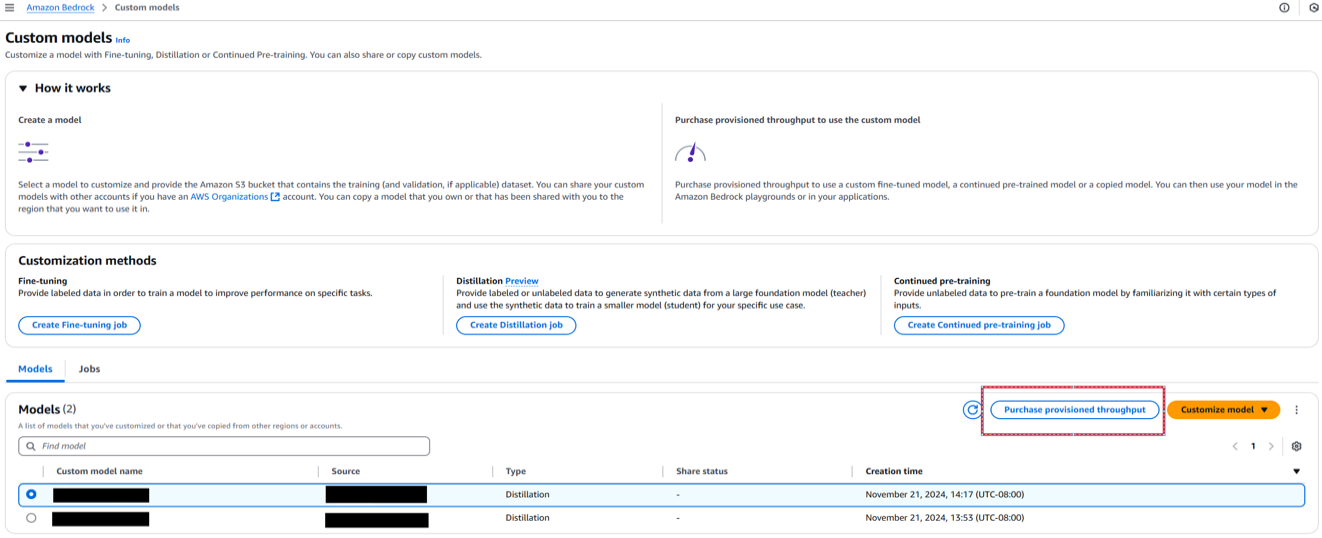
- On the Amazon Bedrock console, choose Custom models in the navigation pane.
- Select the distilled model and choose Purchase provisioned throughput.
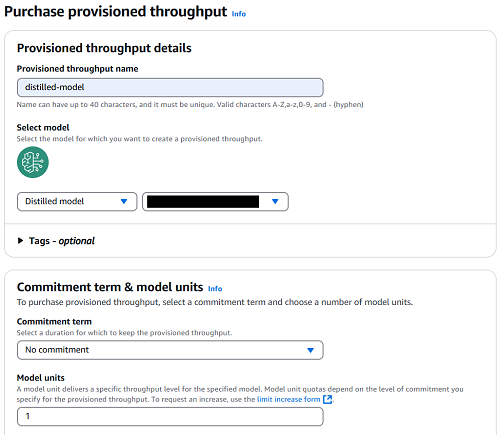
- For Provisioned throughput name, enter a name.
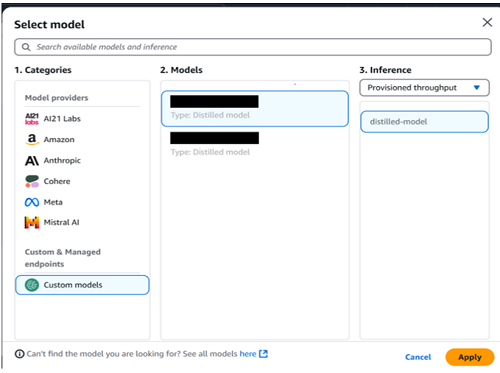
- Choose the model that you want to deploy.
- For Commitment term, select your level of commitment (for this post, we choose No commitment).
- Choose Purchase provisioned throughput.
After the distilled model has been deployed using a Provisioned Throughput, you can see the model status as In Service when you go to the Provisioned throughput page on the Amazon Bedrock console.

You can interact with this distilled model in Amazon Bedrock playground, select Chat/text, then select the distilled model in Custom & Managed endpoints.
Deploy the distilled model using the Amazon Bedrock API
To deploy the distilled model using the Amazon Bedrock API, complete the following steps:
- Retrieve the distilled model ID from the job’s output, and create a Provisioned Throughput model instance with the desired model units:
- Check the status of your Provisioned Throughput model by running:
- When the Provisioned Throughput model is ready, you can call the model by using the
InvokeModelorConverseAPI to generate text using the distilled model:
By following these steps, you can deploy and use your distilled model through Amazon Bedrock API, allowing you to generate an efficient and high-performing student model tailored to your use cases. After deploying the distilled model, you can use it for inference in various Amazon Bedrock services, including Knowledge Base inference, Playground, and any other service where custom models can be used for inference.
Conclusion
Amazon Bedrock Model Distillation enables you to create efficient, cost-optimized student models that closely match the performance of larger teacher models for specific use cases. By automating the complex process of knowledge transfer from advanced models to smaller models, Amazon Bedrock simplifies the deployment of faster and less expensive AI solutions without sacrificing accuracy. Customers can benefit from efficiency gains, ease of use, science innovation, and exclusive access to distill models across providers such as Anthropic and Amazon. With Amazon Bedrock Model Distillation, enterprises can use the power of foundation models while optimizing for latency, cost, and resource constraints to drive AI innovation across industries such as financial services, content moderation, healthcare, and customer service.
We encourage you to start your journey towards cost-effective AI innovation by visiting the Amazon Bedrock console and discovering how model distillation can transform your business.
For additional resources, see the following:
About the authors
 Yanyan Zhang is a Senior Generative AI Data Scientist at Amazon Web Services, where she has been working on cutting-edge AI/ML technologies as a Generative AI Specialist, helping customers use generative AI to achieve their desired outcomes. Yanyan graduated from Texas A&M University with a PhD in Electrical Engineering. Outside of work, she loves traveling, working out, and exploring new things.
 Ishan Singh is a Generative AI Data Scientist at Amazon Web Services, where he helps customers build innovative and responsible generative AI solutions and products. With a strong background in AI/ML, Ishan specializes in building Generative AI solutions that drive business value. Outside of work, he enjoys playing volleyball, exploring local bike trails, and spending time with his wife and dog, Beau.
 Aris Tsakpinis is a Specialist Solutions Architect for AI & Machine Learning with a special focus on natural language processing (NLP), large language models (LLMs), and generative AI. In his free time he is pursuing a PhD in ML Engineering at University of Regensburg, focussing on applied NLP in the science domain.
 Shreeya Sharma is a Senior Technical Product Manager at AWS, where she has been working on leveraging the power of Generative AI to deliver innovative and customer-centric products. Shreeya holds a master’s degree from Duke University. Outside of work, she loves traveling, dancing, and singing.
 Sovik Kumar Nath is an AI/ML and Generative AI Senior Solutions Architect with AWS. He has extensive experience designing end-to-end machine learning and business analytics solutions in finance, operations, marketing, healthcare, supply chain management, and IoT. He has double master’s degrees from the University of South Florida and University of Fribourg, Switzerland, and a bachelor’s degree from the Indian Institute of Technology, Kharagpur. Outside of work, Sovik enjoys traveling, and adventures.