Machine learning (ML) inference often requires processing sensitive data—medical records, proprietary business information, or personal communications. What if you could run ML inference in the cloud while hiding your data from the cloud itself? More specifically, what if you could enforce that your data stayed encrypted throughout the entire ML inference process? This post will show you how to use Amazon SageMaker AI with fully homomorphic encryption (FHE) to perform ML inference. Using FHE, we present an approach to ML inference that’s designed to keep queries, responses, and intermediate values encrypted and unreadable by observers—including SageMaker AI itself.
FHE is a form of encryption that allows encrypted data to be processed in encrypted form without decryption. In the ML inference setting, you can use it to apply a model to an encrypted query without decryption, producing an encrypted prediction. Consider these scenarios where such a capability would provide value:
- Healthcare: A health insurance company wants to provide doctors with an ML model that predicts medical procedure outcomes based on diagnostic data. Publishing the model in the cloud simplifies deployment, but doctors can’t expose patient medical information to third parties due to privacy regulations.
- Energy sector: An oil and gas corporation uses ML to evaluate satellite photos of potential drill sites and select photos for further expert evaluation. They want to host the model in the cloud for cost savings but can’t expose photographs of politically sensitive locations to third parties.
- Telecommunications: A telecom operator wants to process customer emails to detect spam and phishing. They need cloud-based ML for scalability, but data protection regulations require that customer messages remain encrypted at third parties.
This blog has previously discussed FHE for ML inference in the post Enable fully homomorphic encryption with Amazon SageMaker endpoints for secure, real-time inferencing, but this post goes a little further. That previous post showed how to implement FHE-based inference ‘from scratch’ by hand-crafting a linear-regression algorithm using a low-level library called SEAL. Instead, this post shows a much more flexible and higher-level approach based on concrete-ml, a high-level library built specifically for FHE-based inference. It supports several common types of models ‘out of the box’ and is even API compatible with the well-known ML library scikit-learn.
In this post, you will learn how to:
- Train a concrete-ml model in SageMaker AI using a custom container
- Deploy that model to a SageMaker AI inference endpoint
- Create a custom client for concrete-ml inference
- Use that client to make queries to your inference endpoint
When finished you will have a system that uses concrete-ml in SageMaker AI designed to perform end-to-end encrypted ML inference.
Solution overview
Using concrete-ml in SageMaker AI works as follows:
- The model owner prepares their data for training. Concrete-ml works well when all features have been normalized to the same scale, such as [-1, 1].
- The model owner uses this data to train an FHE-enabled version of their model. This model is designed to perform computations over encrypted data instead of plaintext.
- The model owner hosts this model in SageMaker AI.
- Clients encrypt their queries using the FHE scheme supported by the model.
- Clients send encrypted queries to the FHE-enabled model in the cloud.
- The model transforms the encrypted query into an encrypted prediction without decrypting values during the FHE computation.
- The model returns the encrypted response to the client, who decrypts it to retrieve the prediction.
This differs from, and complements, confidential computing environments like those provided by the Amazon Web Services (AWS) Nitro System in Amazon Elastic Compute Cloud (Amazon EC2). With AWS Nitro Enclaves, queries are decrypted and processed in plaintext within hardened, isolated environments that provide CPU and memory isolation. With FHE, queries remain encrypted throughout; security relies on mathematics rather than hardware or software.
Prerequisites
To implement this solution, you need:
- A local development environment with Python 3.12 installed, the ability to install packages using pip, and Docker or other container-building software installed locally. In addition, these instructions will recommend that you work in virtual environments, but this isn’t strictly necessary.
- An AWS account, containing:
- Repositories in Amazon Elastic Container Registry (Amazon ECR) to hold the images for training and inference containers,
- Locations in Amazon Simple Storage Service (Amazon S3) to hold:
- The model
- The training code (if you wish it to be stored in a separate bucket from the model)
- Keys and ciphertexts
We suggest you follow the security best practices for Amazon S3.
- Roles in AWS Identity and Access Management (IAM) for
- The model creator
- The inference endpoint creator
- The inference endpoint itself
- The clients
Find IAM policies for these roles, along with a worked example for the MNIST corpus of handwritten digits, in the repository of sample code.
Before starting, note that at the time of writing, concrete-ml is available from Zama for prototyping or non-commercial use without requiring a paid license. However, you may require a commercial license for commercial use.
Training

Build and deploy the training container
To build the training container:
- Assume the model-trainer role.
- Create a
Dockerfile.trainingfile locally. - Add the following content to
Dockerfile.training:Verify that the version numbers match across the entire system. The
concrete-mllibrary requires version parity across the entire system for Python, theconcrete-mlpackage, and theconcrete-pythonpackage. - Build the container image:
- Push the image to Amazon ECR:
- Run the authentication command to log in Docker to your Amazon ECR registry:
- Tag the image with your repository name:
- Push the tagged image:
Verify that the container is available
You should see JSON output containing your image with a non-empty imageDigest field and the latest tag.
Train the model
To train the model, complete the following.
Note: in these steps, concrete-ml is no different from any other ML framework and the training container is no different from any other custom training container. Note that training occurs over plaintext data. That is, concrete-ml doesn’t require pre-processing of this data beyond normalization. But if additional pre-processing is necessary for regular training, it remains necessary here (and must occur before, or as part of, the training job).
Create the training script
- Create a file named
training_script.py. - Add the following template code to
training_script.py: - Implement the data loading logic in the
do_trainingfunction. - Implement the model training logic in the
do_trainingfunction.
Create a custom framework
For convenience, we recommend that you create a custom framework to integrate your training container into SageMaker AI. To do so:
- Create a file named
framework.py. - Add the following content to
framework.py: - Update the
image_urivalue with your Amazon ECR training container location.
Launch the training job
This section will show how to launch the training job with a python script, but it can also be done using the console or the AWS Command Line Interface (AWS CLI). (Note: training jobs incur charges based on instance type and duration.)
- Create a virtual environment for Python 3.12.
- Activate the virtual environment.
- Install the following packages using pip:
- Create a file named
start_training.py. - Add the following content to
start_training.py: - Update the
instance_type,role,output_path,code_location, andinputsvalues with your specific configuration. - Execute this file:
- Verify that the training completed successfully by checking the training job status:
Look for
TrainingJobStatus: Completed. Then verify that the output files exist:Confirm
server.zipandclient.zipare present.
After training completes, the training container saves two files to the model bucket: server.zip (used by the inference endpoint) and client.zip (used by clients to encrypt queries).
Inference
Build and deploy the inference container
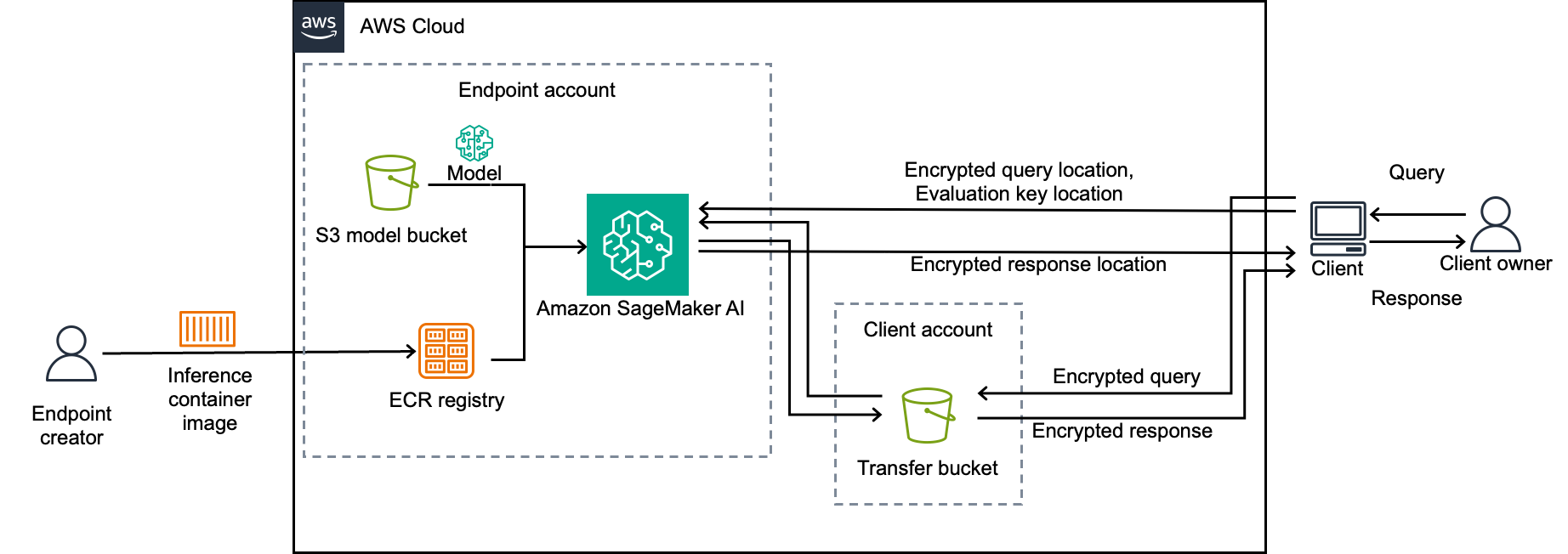
FHE-based ML inference will be more complex than standard ML inference because of some new technical constraints:
- Clients need model-specific information from
client.zipto generate cryptographic keys. - FHE ciphertexts can exceed SageMaker AI query size limits, so the client and service need to communicate them outside of SageMaker AI API calls.
- FHE evaluation might take longer than SageMaker AI timeouts, and so inference will use the SageMaker AI mechanisms for asynchronous inference.
- The endpoint needs an evaluation key (a type of public key) from the client to perform FHE evaluation.
To accommodate these new requirements and to streamline the user’s experience, we show you how to build a system in which
- A custom client encrypts queries and attaches evaluation keys to them
- A custom training endpoint retrieves client.zip when needed, and uses it to evaluate the FHE model
- The same custom client decrypts predictions from the training endpoint
- The client and endpoint communicate ciphertexts and keys to each other using Amazon S3
To deploy and use this system, complete the following sections.
Write your predictor
Create a file named predictor.py with the following content.
This predictor expects the ‘query’ to contain three Amazon S3 locations: two for where to find the encrypted query and the associated evaluation key, and one for where to write the prediction. It downloads the query and key, evaluates the FHE model on them, and writes the prediction back to Amazon S3.
Package the predictor into a container
To package this predictor into a container:
- Assume the endpoint-creator role.
- Create a new directory for the container files.
- Copy
predictor.pyinto the new directory. - Obtain the required boilerplate files (
nginx.conf,serve, andwsgi.py) by downloading them from the sample repository or copying them from the SageMaker AI documentation for custom inference containers. (Note: the latter, increase the timeout value innginx.confto allow FHE evaluation to complete.) - Create a
Dockerfile.inferencein that directory. - Add the following content to the
Dockerfile.inferencefile: - Build the container image:
- Push the image to Amazon ECR.
- Run the authentication command to log in Docker to your Amazon ECR registry:
- Tag the image with your repository name:
- Push the tagged image:
- Verify the container is available:
You should see JSON output containing your image with a non-empty
imageDigestfield and thelatesttag.
Deploy the inference endpoint
(Important: endpoints incur ongoing charges until deleted, and costs will vary based on instance type, training duration, and endpoint uptime. For detailed pricing information, see Amazon SageMaker AI Pricing. Remember to delete the endpoint when finished to avoid unnecessary costs.) Continuing to use the endpoint-creator role:
- Create a virtual environment.
- Activate this virtual environment.
- Use pip to install the following packages:
- Create a file
start_inference_endpoint.pywith the following content: - Execute the script:
- Verify the endpoint is in service:
Wait until
EndpointStatusshowsInServicebefore proceeding. This might take several minutes.
The script will print out the name of the endpoint. Record this name for the client.
Create the client
The user shouldn’t need to know anything about FHE to use your system. Therefore, the client will hide all FHE details. Specifically, the client will:
- Retrieve
client.zipfrom Amazon S3. - Use
client.zipto generate keys. - Encrypt the query with those keys.
- Write the encrypted query and associated evaluation key to Amazon S3.
- Send these locations to the inference endpoint and receive back the Amazon S3 location of the encrypted prediction.
- Retrieve the encrypted prediction and decrypt it.
To create this client:
- Create a file named
client.py. - Add the following template code to
client.py: - Implement the
get_query()function to retrieve your plaintext query. - Update the placeholder values for Amazon S3 locations, endpoint name, and model location.
- Add exception handling code for the placeholder
<handle exception>blocks to manageTimeoutError,FileNotFoundError, andTarErroraccording to your application requirements.
(You might have noticed that the client and endpoint treat encrypted queries and responses differently. Clients send encrypted queries to endpoints by manually writing them to Amazon S3 and submitting the Amazon S3 location as the actual query. Endpoints submit encrypted results directly, allowing SageMaker AI to handle the write to / read from Amazon S3. Why the difference? The encrypted response is a single byte-string, which SageMaker AI can handle naturally. The client’s query, however, is a JSON structure that must contain the location of the evaluation keys. The encrypted query would need to be encoded (such as with Base64) to be embedded in the same JSON, which add unnecessary processing and network time. Hence, the sample code bypasses this encoding step by handling the encrypted queries itself.)
Then:
- Create a virtual environment.
- Activate the virtual environment.
- Install the required packages:
Finally:
- Assume the client role.
- Execute this script:
python client.py - Verify that the FHE encryption is working correctly by comparing the prediction output to expected results.
Clean up resources
To avoid incurring future charges, delete the resources that you created:
- Delete the inference endpoint through the SageMaker AI console or SDK.
- Verify that the endpoint was deleted:
This should return an error indicating that the endpoint doesn’t exist.
- Delete the endpoint configuration through the SageMaker AI console or SDK.
- Verify that the endpoint configuration has been deleted:
This should show no matching endpoint configuration.
- Delete the SageMaker AI model through the SageMaker AI console or SDK.
- Verify that the model has been deleted:
This should show no matching models.
- Delete the model artifacts, encrypted queries, encrypted responses, and evaluation keys from Amazon S3 through the Amazon S3 console or AWS CLI.
- Verify that Amazon S3 objects were deleted:
This should show empty or no matching objects.
- Delete the container images from Amazon ECR through the Amazon ECR console or AWS CLI.
- Verify that the container images were deleted:
This should show no matching images.
Common issues
- TimeoutError during inference: Increase WaiterConfig max_attempts or use larger instance type.
- AccessDenied errors: Verify IAM roles have correct S3 and SageMaker AI permissions.
- Container build failures: Verify Docker has sufficient memory (over 8 GB).
- Server errors during inference: Verify version parity across concrete-ml packages.
Performance and security considerations
FHE provides cryptographic protection but comes with performance tradeoffs. The overhead depends on the model, but you can typically expect slowdowns of up to 100,000X compared to plaintext inference. You can reduce this slowdown in a few ways. The first is to increase the number of vCPUs in the instance. Another is to use a standard ML technique called ‘quantization’ which reduces the numeric precision used in model inference. Because the running time of concrete-ml increases with numeric precision, quantization might assist performance here even more than it would in normal ML inference. Quantization can reduce model accuracy, which isn’t otherwise affected by the conversion to FHE. However, quantization in the model code reduced overhead to 2800X (67ms to 187s on a ml.m5.xlarge instance) with no observable loss in accuracy. By increasing the number of vCPUs, you can reduce that further to 500X (46s on a ml.m5.24xlarge instance).
This is still a significant slowdown for some applications. Because of this overhead, FHE isn’t yet suitable for interactive, latency-sensitive applications. However, it can be practical for asynchronous or batch processing workloads where privacy requirements outweigh latency concerns. For example, consider the use cases from the start of this post:
- Providing doctors with an ML model that predicts medical procedure outcomes based on diagnostic data.
- Evaluating satellite photos of potential oil/gas drill sites to select photos for further expert evaluation.
- Detecting spam and phishing in email messages.
Each of these use cases can tolerate a few additional seconds of latency.
It’s important that clients keep decrypted queries and predictions secret, as a concrete-ml encryption and its plaintext decryption (when combined) could reveal information about the secret encryption key. Also, it’s important to know that this system doesn’t protect the secrecy of the model. The queries and responses will be encrypted and opaque to SageMaker AI, but concrete-ml doesn’t encrypt the model itself. The model might still be visible to Sagemaker AI. It also might be susceptible to ‘model stealing’ attacks by those who can see plaintext queries and responses. Lastly, concrete-ml doesn’t provide circuit privacy: it’s possible that information about the model can be revealed by cipertexts. However, customers can still protect model and ciphertexts with the standard security mechanisms that AWS provides for Amazon S3 and SageMaker AI. Remember: security is a shared responsibility between AWS and each customer. In keeping with best practices, customers should:
- Follow the principle of least privilege when creating IAM roles. Grant only the minimum permissions required for each role to perform its function. Review the sample IAM policies in the repository and adjust resource ARNs and actions to match your specific use case.
- Enable Amazon S3 bucket encryption for values which are not FHE ciphertexts. This includes enabling default encryption on all Amazon S3 buckets that store models, data, and evaluation keys to protect data at rest.
- Reduce Amazon S3 bucket permissions to the minimum required by the system.
Conclusion
You can use FHE-based tools in SageMaker AI to perform inference on encrypted data designed to remain unreadable throughout the entire process. This approach can give you the benefits of SageMaker AI—agility, scale, and managed infrastructure—while helping you maintain cryptographic protection from query all the way through response.
To learn more about security and encryption in AWS, refer to the following resources:
- What cryptographic services does AWS provide to customers?
- AWS Crypto Tools Documentation
- Cryptographic computing at AWS
- An overview of fully homomorphic encryption
- Enable fully homomorphic encryption with Amazon SageMaker endpoints for secure, real-time inferencing
- Security in Amazon S3
- Security in Amazon Elastic Container Service
- Configure security in Amazon SageMaker AI
- Security best practices in IAM
If you have questions or comments, contact us at [email protected].