Programmatic tool calling (PTC) is a paradigm shift in how large language models (LLMs) interact with external tools. In a traditional tool-calling workflow, each tool invocation requires a full round trip back to the model. The model calls a tool, receives the result, reasons about it, calls the next tool, and so on. For workflows that involve multiple tool calls, this creates compounding latency and token consumption because every intermediate result must pass through the model’s context window.
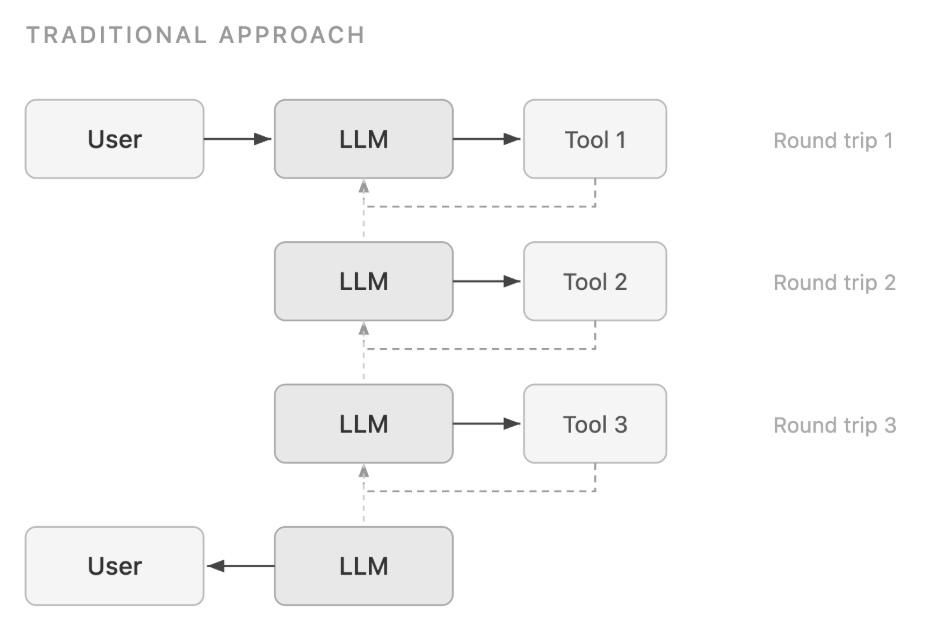
PTC takes a different approach. Instead of orchestrating tool calls one at a time, the model writes code, typically Python, that invokes multiple tools programmatically within a sandboxed execution environment. The code can include loops, conditionals, filtering, and aggregation logic. The model is only sampled once to produce the code. The execution environment then handles tool invocations, and only the final processed result is returned to the model’s context. This dramatically reduces both latency and token usage for multi-tool workflows. PTC is particularly effective for large data processing, precise numerical calculations, multi-step process orchestration, and privacy-sensitive scenarios where raw data shouldn’t enter the model’s context.
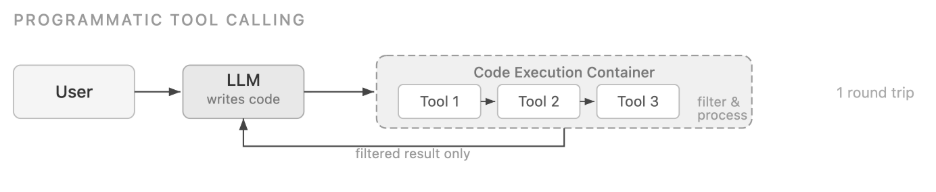
PTC originated as a provider-specific feature, but the underlying pattern—model generates code, sandbox executes it, only final output returns to context—is model-agnostic. In this post, we show three ways to implement PTC on Amazon Bedrock: a self-hosted Docker sandbox on ECS for maximum control, a managed solution using Amazon Bedrock AgentCore Code Interpreter, and an Anthropic SDK-compatible path through a proxy for teams that prefer that developer experience.
Bottlenecks in traditional tool calling
Consider this example: “Which engineering team members exceeded their Q3 travel budget?”With traditional tool calling (assuming no parallel function calling), the model must:
- Call a tool to get the team member list – 20 people.
- Call a tool to get expense records for each person – 20 separate tool calls, each returning 50–100 line items.
- Call additional tools to retrieve budget thresholds.
- Receive over 2,000 expense records into its context window.
- Reason over the full dataset in natural language to filter, compare, and summarize.
Each of those tool calls requires a full round trip through the model. The model generates a tool call, pauses, receives the result, reasons about it, generates the next tool call, and so on. This creates three compounding problems:
- Token consumption: Every intermediate result, including thousands of expense line items the model will ultimately discard, passes through the context window.
- Latency: Each tool invocation requires a full model inference cycle. 20 sequential tool calls means 20 inference round trips.
- Accuracy: Asking a language model to filter, aggregate, and compare thousands of records in natural language is error-prone. These are operations that a few lines of Python would handle precisely.
How PTC solves this
PTC flips the pattern. The model writes a single Python code block that orchestrates the tool calls, processes the results, and returns only the final output.
Using the same expense audit example, here’s what the model generates when PTC is enabled:
There are two things to notice here. First, asyncio.gather() issues all 20 expense lookups in parallel rather than sequentially, the tool calls happen almost simultaneously. Second, the filtering, aggregation, and budget comparison happens in Python, not in natural language. Only the final print() output is returned to the model’s context window. The over 2,000 raw expense records don’t touch it.The model is sampled only twice: once to generate the code, and once to interpret the final output. Everything in between (the tool calls, the data processing, the filtering) happens inside the container without additional model inference.
Part 1: Self-hosted PTC with Amazon Bedrock and Amazon ECS
Why self-host
The managed PTC implementations rely on a provider-managed sandbox environment. But there are good reasons to self-host:
- Model-agnostic: Supports models available on Amazon Bedrock (for example, Claude, Qwen, MiniMax, Llama, Nova, and more.).
- Full control: Customize the sandbox environment, install domain-specific Python packages, and configure security policies to match your requirements.
- Private deployment: Keep code execution and intermediate data within your own AWS account.
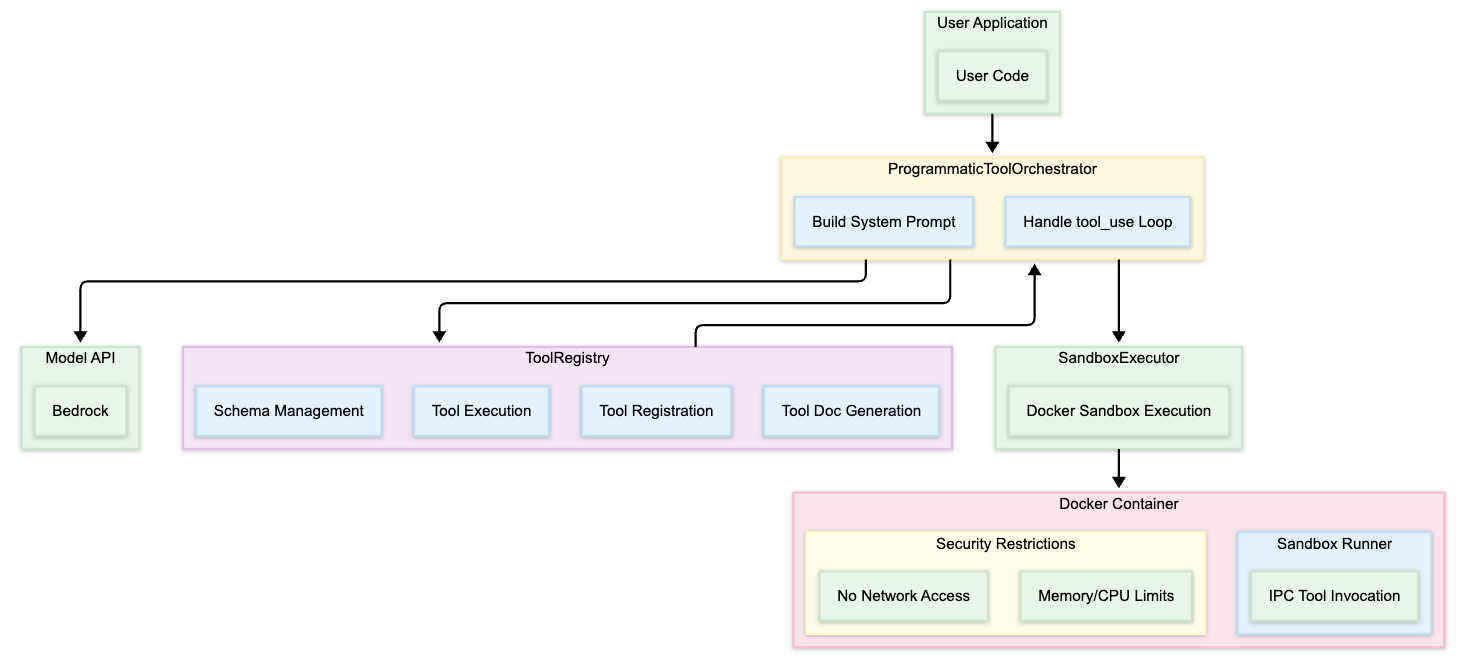
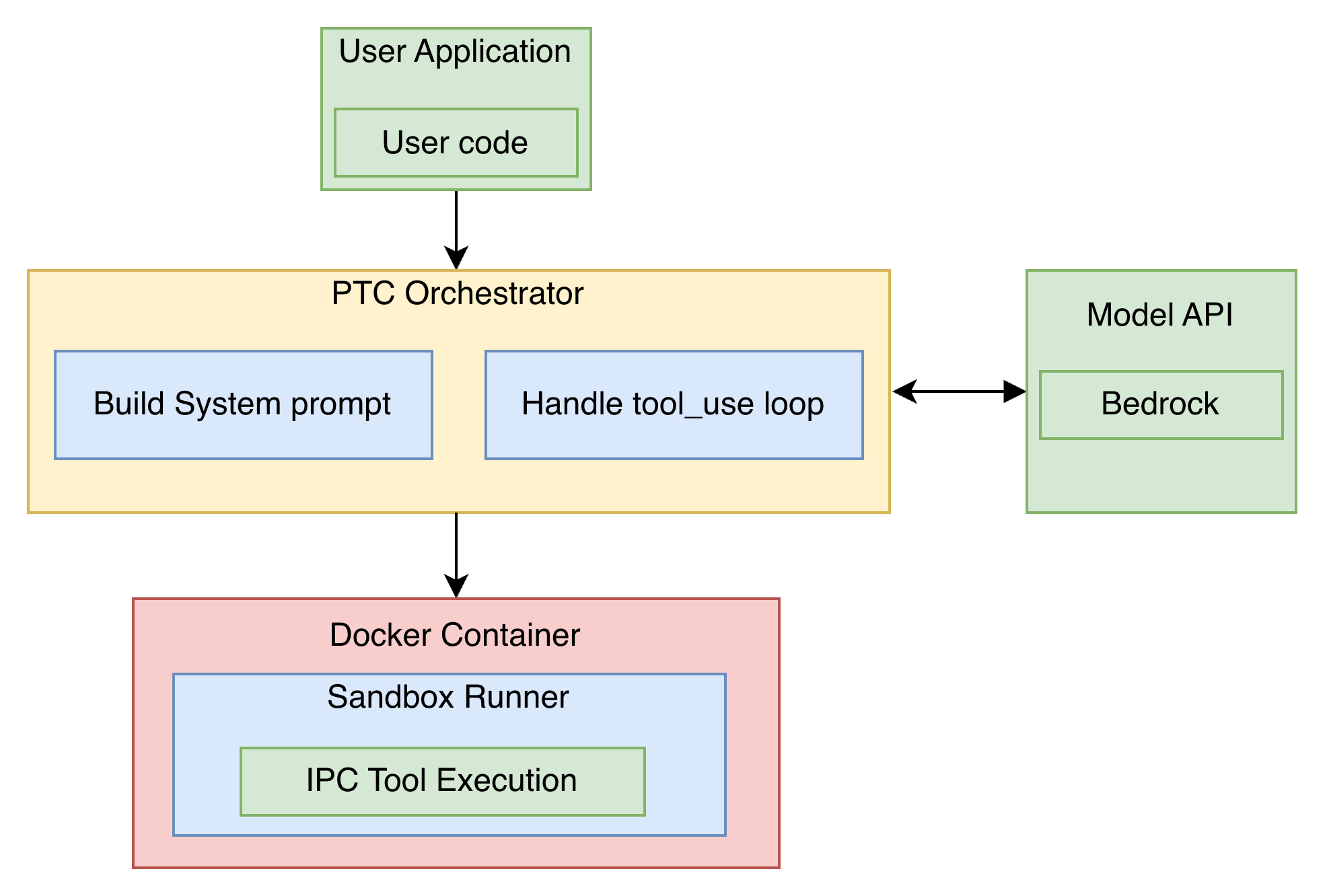
Architecture
The self-hosted solution has two components:
- Orchestrator – Your application (Amazon Elastic Container Service (Amazon ECS) task, AWS Lambda, or a compute) that calls the InvokeModel API using Boto3, manages the Docker sandbox lifecycle, and handles the tool call loop.
- Docker sandbox – An isolated container that executes model-generated Python code. Communicates with the orchestrator through IPC over stdin/stderr.
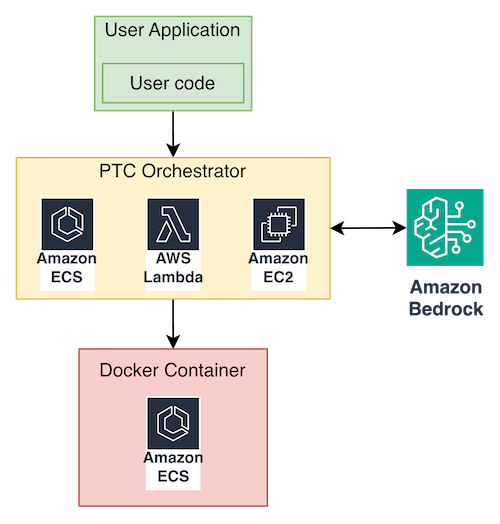
The core idea is straightforward: take the tool definitions that normally go in tool_config, inject them into the system prompt instead, and instruct the model to write Python code that orchestrates those tools. The generated code runs in the Docker sandbox. The orchestrator acts as a control plane, intercepting tool calls through IPC, executing them externally, and injecting results back into the sandbox.
The system prompt
The system prompt is the critical piece that makes a model behave like it supports PTC natively. It describes the execution environment, the available tools, and the rules for generating code.A streamlined version is provided:
This prompt guides the model to produce well-structured Python code that follows the same patterns as the native PTC implementation, single code blocks, async tool calls, and print() for output.
Core components
SandboxExecutor – the Docker sandbox executor
SandboxExecutor is the central component. It manages the lifecycle of isolated Docker containers, executes model-generated code safely, and handles the IPC protocol for tool calls.The system uses a dual-process architecture. The orchestrator (running in your ECS task) launches a Docker container for each code execution request. Communication happens through standard I/O streams, the container writes tool call requests to stderr, and the orchestrator injects tool results through stdin.
The runner script
The runner script is dynamically generated by the orchestrator and injected into each Docker container at startup. It handles:
- Code execution – Wrapping the model-generated code in an async context, capturing output, and handling exceptions.
- IPC protocol – Using structured message markers (for example,
__PTC_TOOL_CALL__,__PTC_END_CALL__,__PTC_OUTPUT__) to separate tool call requests, results, and final output in the text stream. - Tool function generation – Dynamically creating async Python functions for each tool defined in the configuration. When the model’s code calls await get_team_members(department=”engineering”), the generated function serializes the arguments, writes a tool call request to stderr, blocks until the orchestrator injects the result using stdin, and returns the deserialized result.
The runner script supports two execution modes:
- Single mode – Executes the code once and exits. Suitable for stateless, one-shot tasks.
- Loop mode – Keeps the container running to accept multiple code executions, supporting session reuse and state retention between calls.
IPC protocol
To reliably separate different message types in a text stream, the system defines boundary markers:
__PTC_TOOL_CALL__/__PTC_END_CALL__– Wraps a tool call request (tool name + arguments as JSON).__PTC_OUTPUT__– Marks the final output of the code execution.
When the runner script encounters a tool call in the executing code, it serializes the call as JSON, writes it to stderr between the marker boundaries, and blocks on stdin waiting for the result. The orchestrator reads stderr, parses the tool call, executes the tool, and writes the result back to stdin. The runner script unblocks and continues execution.
The orchestrator loop
Enabling PTC on Amazon Bedrock requires three elements:
- A system prompt that instructs the model to write Python code for tool orchestration.
- An execute_code tool definition that the model uses to submit code to the sandbox.
- Business tool descriptions embedded in the system prompt (not as separate Amazon Bedrock tools).
The orchestrator ties together Amazon Bedrock and the Docker sandbox. Here is the core loop:import boto3import json
The orchestrator sends the user query to Amazon Bedrock, extracts the model-generated code from the tool_use response, runs it in the Docker sandbox, and feeds the output back as a tool_result. The model then produces its final human-readable answer, sampled only twice total.
Docker sandbox security
The sandbox container runs with strict isolation. Here is an example docker run command that enforces the security layers:
This facilitates: no network access, a read-only filesystem (with a small tmpfs for scratch space), a non-root user, Linux capabilities dropped, and hard memory/CPU limits. Model-generated code can’t escape the sandbox, persist data, or consume excessive resources.
Part 2: Managed PTC with Amazon Bedrock AgentCore Code Interpreter
For teams that don’t want to manage Docker containers and ECS infrastructure, Amazon Bedrock AgentCore provides a managed Code Interpreter that implements the same PTC pattern. The model writes code, a managed sandbox executes it, and only the final output returns to the model context. Here is the same architecture modified with the use of AgentCore Code Interpreter for code execution:
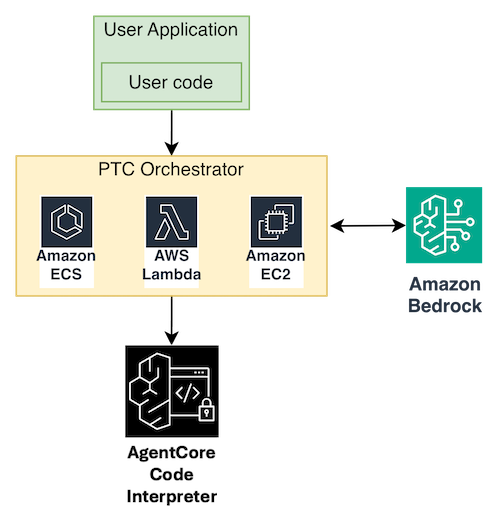
The key difference from the self-hosted approach is that tools are pre-loaded into the sandbox session rather than dispatched back to the client through IPC. You start a Code Interpreter session, inject your tool function definitions as Python code, and then let the model generate code that calls those pre-loaded functions directly.
AgentCore uses the bedrock-agentcore boto3 client:
Self-hosted vs. managed comparison
| Aspect | Self-hosted (Part 1) | AgentCore (Part 2) |
| Infrastructure | You manage ECS + Docker | Fully managed |
| Customization | Full control over sandbox | Standard runtime |
| Tool execution | Client-side (IPC) | Inside sandbox |
| Network access | Configurable | Default off, PUBLIC mode available |
The managed approach is recommended for teams that want the token savings and accuracy benefits of PTC without the operational overhead of running Docker containers. The self-hosted approach is better when you need custom Python packages, specific security configurations, or full control over the execution environment.
Part 3: Anthropic SDK compatibility through proxy
If your team prefers the Anthropic SDK developer experience and wants to use it with Amazon Bedrock as the backend, you can build a lightweight API translation proxy that sits between the Anthropic SDK and Amazon Bedrock.
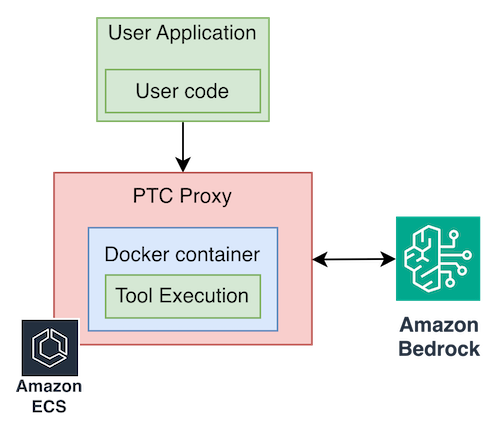
The proxy deploys on Amazon ECS and translates Anthropic API calls to Amazon Bedrock InvokeModel calls. It also manages the Docker sandbox lifecycle and the full PTC protocol transparently. To migrate, change base_url to point at the proxy:
This approach is recommended for teams that prefer the Anthropic SDK interface while using Amazon Bedrock for model inference and the benefits of running within their AWS account. The proxy handles model translation, sandbox management, and the full PTC protocol transparently.
Experimental results
To validate the self-hosted PTC solution, we ran the same expense audit task across multiple models available on Amazon Bedrock.
Business setup:
- Team data: eight engineering team members at various levels.
- Expense data: 20–50 records per person per quarter, each with 15+ fields (expense_id, date, amount, category, status).
- Budget rules: Standard quarterly travel budget of $5,000, with custom exceptions for senior roles. Only approved expenses count.
Task prompt: “Which engineering team members exceeded their Q3 travel budget? Standard quarterly travel budget is $5,000. However, some employees have custom budget limits. For anyone who exceeded the $5,000 standard budget, check if they have a custom budget exception.”
Expected correct answer:
| Name | Budget | Actual | Over by |
| Alice Chen | $5,000.00 | $9,876.54 | +$4,876.54 |
| Emma Johnson | $5,000.00 | $5,266.02 | +$266.02 |
| Grace Taylor | $5,000.00 | $6,474.46 | +$1,474.46 |
PTC vs. non-PTC comparison
| Model | PTC tokens | Non-PTC tokens | Token reduction | PTC accurate | Non-PTC accurate |
| Claude Sonnet 4.6 (adaptive thinking) | 12,739 | 128,043 | 90.1% | Yes | Yes |
| Claude Opus 4.6 (adaptive thinking) | 13,043 | 126,152 | 89.7% | Yes | Yes |
| Qwen3-Coder-480B | 34,159 | 305,114 | 88.8% | Yes | No |
| Qwen3-Next-80B | 28,878 | 233,332 | 87.6% | Yes | No |
| deepseek.v3.2 (thinking) | 19,543 | 245,967 | 92.1% | Yes | No |
| MiniMax M2.1 (thinking) | 11,787 | 101,990 | 88.4% | Yes | No |
| Kimi 2.5 (thinking) | 10,875 | 148,085 | 92.7% | Yes | No |
| GLM 4.7(thinking) | 11,550 | 115,829 | 90.0% | Yes | No |
Note: Models marked with thinking or adaptive thinking used their respective reasoning modes during code generation.
Key findings
- Token consumption dropped 87–92% across all models in PTC mode. Instead of hundreds of thousands of tokens flowing through the context window, only the code and final summary reach the model.
- Accuracy improved significantly. In PTC mode, all eight models produced the correct answer (names and amounts matching exactly). In non-PTC mode, only the Claude models (Sonnet 4.6 and Opus 4.6) produced fully correct answers. The other models’ natural language processing of large tabular data introduced errors in filtering, aggregation, or both.
- Cross-model compatibility confirmed. Claude, Qwen, DeepSeek, MiniMax, Kimi, GLM models all achieved correct results in PTC mode, demonstrating that this paradigm works effectively across diverse model families. Token savings ranged from 87% to 92%.
- The self-hosted solution worked identically across models. The same Docker sandbox, the same IPC protocol, and the same orchestrator, only the model_id parameter changed between tests.
The key takeaway: PTC as a paradigm isn’t tied to any single model. Through the self-hosted sandbox approach, a model that supports tool use can benefit from code-orchestrated tool calling.
Cost and value analysis
Token savings at scale
Taking Claude Sonnet 4.6 as an example, the expense audit task showed approximately 90% reduction in token consumption between PTC and non-PTC modes. The reason is straightforward: in non-PTC mode, every intermediate tool result enters the context window. In PTC mode, only the code and the final summary do.
Cost projection (based on Claude Sonnet pricing of $3/$15 per 1M input/output tokens):
If this task is executed 1,000 times per day in a production environment:
| Metric | Non-PTC mode | PTC mode |
| Estimated daily cost | ~$520 | ~$52 |
| Estimated monthly cost | ~$15,600 | ~$1,560 |
| Monthly savings | ~$14,040 (90%) |
These numbers will vary by task complexity and data volume, but the pattern is consistent: PTC reduces cost roughly in proportion to how much intermediate data it keeps out of the context window.
Conclusion
Programmatic tool calling represents a shift in how AI agents interact with tools, from conversational, one-at-a-time invocations to code-orchestrated, parallel, filtered execution. The results from our testing confirm the core value proposition:
- Token consumption drops 87–92% by keeping intermediate data out of the model context.
- Accuracy improves because data processing happens in Python, not natural language.
- Latency decreases because tool calls can run in parallel and the model is sampled only twice.
We presented three ways to implement PTC on Amazon Bedrock:
- Self-hosted on ECS – Full control with Boto3 and a Docker sandbox, recommended for teams that need custom environments and maximum flexibility.
- Managed through AgentCore Code Interpreter – A fully managed sandbox for teams that prefer less operational overhead.
- Anthropic SDK compatible – A proxy-based path for teams that prefer the Anthropic SDK interface while running on Amazon Bedrock.
All three approaches are model-agnostic, privately deployed within your AWS account, and extensible to new models as they become available on Amazon Bedrock. Amazon Bedrock provides the model inference backend with pay-as-you-go pricing, data sovereignty within your AWS account, and access to a diverse set of models through a single API.
References
- Anthropic — Programmatic Tool Calling Documentation
- Anthropic — Introducing Advanced Tool Use
- Amazon Bedrock AgentCore Code Interpreter Documentation
- AWS sample-ai-possibilities — Programmatic Tool Calling Pattern
- Amazon Bedrock — Fully Managed Foundation Model Service
- AWS Samples – Anthropic-Bedrock API Proxy