This post was co-authored with Neevash Ramdial, Technical Marketing leader at Stream
Building production-grade voice agents that feel natural and responsive is a complex engineering challenge. You must orchestrate speech-to-speech models, manage low-latency audio streaming, and handle connection lifecycle. You also need to deliver consistent experiences across web, mobile, and desktop applications.
In this post, you learn how to combine Stream’s Vision Agents open-source framework with Amazon Bedrock and Amazon Nova 2 Sonic to build real-time voice agents that can be production-ready in minutes. You’ll learn how the integration works under the hood, walk through code examples, and explore advanced capabilities like function calling, automatic reconnection, and multilingual voice support.
The challenge
Building voice-enabled AI applications requires orchestrating multiple complex systems that must work together reliably. You face the challenge of managing real-time audio streaming infrastructure while simultaneously integrating speech recognition, language models, and text-to-speech services. Each of these has its own latency characteristics and failure modes. A typical voice interaction involves capturing audio from the user’s microphone, streaming it to a speech-to-text service, processing the transcript through a language model, generating a response, converting that response back to speech, and delivering it to the user. All of this must happen within a window of a few hundred milliseconds to feel natural. Delays in this pipeline can break the conversational flow and frustrate users.Beyond the core AI pipeline, production voice applications must handle the messy realities of real-world deployment: unreliable network connections, browser compatibility issues, session timeouts, and graceful degradation when services become unavailable. You often spend more time building reconnection logic, managing WebRTC connections, and handling edge cases than on the actual AI capabilities. This infrastructure burden means teams either invest months building custom solutions or settle for limited off-the-shelf products that don’t meet their specific needs. Vision Agents abstracts the infrastructure complexity while providing the flexibility to customize the AI experience.
Solution overview
The solution brings together three key components:
- Amazon Nova 2 Sonic a speech-to-speech foundation model available through Amazon Bedrock that provides real-time bidirectional audio streaming, native turn detection, and function calling capabilities. Nova 2 Sonic handles the full speech-to-speech pipeline, accepting audio input and producing audio output. This avoids the need for separate STT and TTS services.
- Stream’s Vision Agents an open-source Python framework for building real-time voice and video AI agents. It provides a plugin-based architecture with 25+ integrations, production deployment tooling, and client SDKs for React, iOS, Android, Flutter, and React Native. The system is designed with flexibility at its core. You can use Stream’s global edge network for efficient performance or integrate your preferred real-time communication (RTC) provider. Vision Agents handles provider-specific specifications through a clean decorator-based interface, enabling use cases like customer support agents, workflow automation, and API-driven actions with minimal boilerplate code. With Vision Agents, you can build AI applications using an open-source framework, third-party model providers, and telephony services.
- Stream’s Edge Network a globally distributed edge network that typically delivers sub-500ms join times and under 30ms audio latency, providing the real-time transport layer between clients and your agent backend.
Together, these components create a complete stack: Stream handles the real-time media transport and client-side experience, Amazon Nova 2 Sonic provides the AI intelligence, and Vision Agents provides the glue code that ties them together.
Architecture overview
The system is designed around a clean separation of concerns: Stream’s infrastructure handles the real-time media transport and client connectivity, while Amazon Nova Sonic runs in the customer’s own AWS account and provides the AI intelligence. This separation helps keep sensitive data and business logic remain within the customer’s control, while Stream’s globally distributed edge network delivers the low-latency media experience users expect.Stream’s edge network acts as the media broker between end-user devices and the Vision Agent worker processes. When a user speaks, audio is captured, encrypted, and transmitted as RTP over UDP to the nearest Stream SFU (Selective Forwarding Unit). The SFU terminates the WebRTC connection, handles NAT traversal and bandwidth estimation, and forwards audio tracks to the Vision Agent worker as if it were another call participant. This means the agent integrates naturally into the call model. The agent is another peer, receiving and sending audio through the same infrastructure used by human participants.
Audio data flows bidirectionally through the system: incoming speech from the user is decoded to raw PCM by the Vision Agent worker, streamed to Amazon Nova Sonic via the Bedrock real-time API, and response audio frames from Nova Sonic are re-encoded, packetized as RTP, and delivered back through the SFU to the client device. End-to-end latency is typically under 500 milliseconds. Voice activity detection (VAD) runs in the worker to detect speech boundaries and barge-in events, while echo cancellation in the browser helps prevent the agent’s own output from re-triggering the VAD loop.
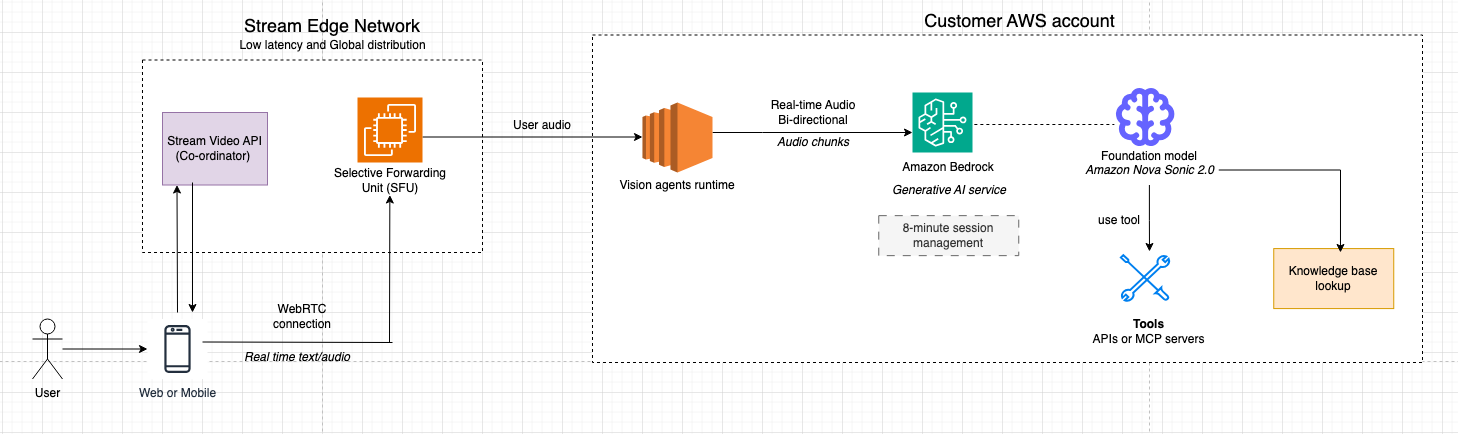
Account boundaries
- Customer AWS account
- Business logic and orchestration (agent policies, tools, data access).
- Amazon Bedrock integration to access Amazon Nova models.
- Stream AWS account
- Global WebRTC/SFU media plane, TURN/STUN, and signaling.
- Vision Agent runtime (worker processes) that terminate WebRTC as robot peers and bridge the customer’s Amazon Bedrock integration.
End-to-end media flow
- User joins from web or mobile.
- The app embeds Stream’s audio client SDK, requests mic (and optionally camera), and joins a call type configured for AI participation.
- Media is sent as RTP over UDP for predictable low latency and head‑of‑line–free delivery. 2. Regional SFU termination
- Regional SFU termination
- A Stream SFU node in the closest region terminates the user’s WebRTC connection, handling bandwidth estimation, simulcast, and NAT traversal.
- The SFU forwards the relevant audio tracks to the Vision Agent worker as if it were another participant.
- Vision Agent worker
- A dedicated Vision Agent worker process holds the PeerConnection state for that session.
- It decodes audio to raw PCM and the worker streams PCM frames to Amazon Bedrock service forwarding to Amazon Nova 2 Sonic as a real-time session in the customer’s AWS account.
- Amazon Nova 2 Sonic integration with Vision agents through Amazon Bedrock
- Amazon Nova 2 Sonic detects speech boundaries and performs speech-to-speech modeling (understanding, reasoning, and TTS) with optional tool calls into customer systems (RDS, APIs, knowledge bases).
- It gracefully handles barge-in and maintains full conversational context so that the conversation remains natural and coherent.
- Streaming response back to the user
- As Amazon Nova Sonic produces response audio frames, the Vision Agent worker:
- Slices and wraps them in RTP with monotonically increasing timestamps to avoid gaps/drifts
- Sends RTP packets through the same WebRTC session via the SFU. The browser’s WebRTC stack decodes and plays audio with sub-500 ms latency.
- As Amazon Nova Sonic produces response audio frames, the Vision Agent worker:
- Barge-in, transcripts, and side data
- Echo cancellation in the browser helps prevent the agent’s own output from retriggering VAD.
- When the user interrupts, new speech triggers an interrupt signal over an RTCDataChannel, causing the worker to stop forwarding Amazon Nova Sonic output and reset its local buffer.
This architecture might seem complex, but Vision Agents abstracts much of this complexity. Let’s see what the actual code looks like:
Prerequisites
Before getting started, make sure you have the following:
- AWS credentials configured via environment variables, IAM role, or AWS Command Line Interface (AWS CLI) profile. For production environments, use IAM roles attached to your compute resources instead of long-term credentials. For local development, use AWS CLI profiles (aws configure) or AWS SSO. Do not commit .env files containing credentials to version control.
- Stream account with an Audio API key and secret (you are expected to receive 333,000 participant minutes per month at no additional cost).
- Python 3.12 or later installed.
- uv package manager installed (
pip install uv). - Vision Agents installed (
uv add vision-agents)
Getting started
Step 1: Create a new project directory and install Vision Agents with the AWS plugin
mkdir voice-agent
cd voice-agentuv inituv add "vision-agents[getstream,aws]"
python-dotenv
The vision-agents[aws] extra installs the Amazon Bedrock plugin along with its dependencies, including boto3, aws-sdk-bedrock-runtime, and Silero VAD for voice activity detection.
Step 2: Configure environment variables
Create a “.env” file in your project root to manage your configuration. For AWS credentials, we recommend pointing to your AWS_PROFILE in this file so the application can access your credentials when interacting with AWS resources. We do not recommend storing your AWS access keys directly in this file.
For Stream API credentials, you can use a third-party library like HashiCorp Vault or AWS Secrets Manager, but security considerations are not in the scope of this post.
# Stream API credentials
STREAM_API_KEY=test/geststream/api_key
STREAM_API_SECRET=test/getstream/api_secret
# AWS credentials
AWS_PROFILE=your_aws_profile_name
AWS_REGION=us-east-1
Vision Agents automatically discovers these environment variables at startup, so you don’t need to pass them explicitly to each client.
Step 3: Build your first voice agent
Create a main.py file with the following code:
import asyncio
from dotenv import load_dotenv

from vision_agents.core import Agent, User, Runner
from vision_agents.core.agents import AgentLauncher
from vision_agents.plugins import aws, getstream

load_dotenv()

async def create_agent(**kwargs) -> Agent:
    agent = Agent(
        edge=getstream.Edge(),
        agent_user=User(name="Helpful Assistant", id="agent"),
        instructions="You are a helpful voice assistant. Be concise and friendly.",
        llm=aws.Realtime(
            model="amazon.nova-2-sonic-v1:0",
            region_name="us-east-1",
            voice_id="matthew",
        ),
    )
    return agent

async def join_call(agent: Agent, call_type: str, call_id: str, **kwargs) -> None:
    call = await agent.create_call(call_type, call_id)

    async with agent.join(call):
        await asyncio.sleep(2)
        await agent.llm.simple_response(
            text="Greet the user warmly and ask how you can help."
        )
        await agent.finish()  # Run until the call ends

if __name__ == "__main__":
    Runner(AgentLauncher(create_agent=create_agent, join_call=join_call)).cli()
Step 4: Run the voice agent
Run the agent:
uv run main.py runIn fewer than 30 lines of code, you have a fully functional, real-time voice agent powered by Amazon Nova Sonic, accessible from a Stream client SDK.
Understanding the Amazon Bedrock integration
Let’s take a closer look at how the aws.Realtime plugin works under the hood.
Bidirectional streaming with Amazon Nova 2 Sonic
Amazon Nova 2 Sonic uses an event-driven bidirectional streaming API. Instead of using a request-response pattern, this approach allows nearly continuous audio to flow in both directions simultaneously. The Vision Agents AWS plugin manages this complexity through a structured event sequence:
- Session initialization – A
sessionStartevent is sent with inference configuration (temperature, max tokens, top-p). - Prompt setup – A
promptStartevent configures the audio output format (24kHz PCM), voice selection, and tool definitions. - System instructions – System instructions are sent as a text content block with the
SYSTEMrole. - Audio streaming – Microphone audio frames (~32ms each) are streamed as
audioInputevents. - Response streaming – Nova Sonic streams back
audioOutputevents with the generated speech. - Session teardown –
promptEndandsessionEndevents cleanly close the connection.
Each content block follows a three-part pattern: contentStart → content payload → contentEnd. This hierarchical structure allows the model to maintain proper context throughout the interaction.
Here is what the session start event looks like in the plugin:
def _create_session_start_event(self) -> Dict[str, Any]:
    return {
        "event": {
            "sessionStart": {
                "inferenceConfiguration": {
                    "maxTokens": 1024,
                    "topP": 0.9,
                    "temperature": 0.7,
                }
            },
            "turnDetectionConfiguration": {
                "endpointingSensitivity": "MEDIUM"
            },
        }
    }
Adding function calling
One of the key capabilities of Amazon Nova 2 Sonic is native function calling during real-time conversations. This allows your voice agent to perform actions like querying databases, calling APIs, and triggering workflows while maintaining a natural spoken conversation.Use the @llm.register_function decorator to define functions the model can call:
import asyncio
from dotenv import load_dotenv
from typing import Dict, Any

from vision_agents.core import Agent, User, Runner
from vision_agents.core.agents import AgentLauncher
from vision_agents.plugins import aws, getstream

load_dotenv()

async def create_agent(**kwargs) -> Agent:
    agent = Agent(
        edge=getstream.Edge(),
        agent_user=User(name="Weather Assistant", id="agent"),
        instructions="""You are a helpful weather assistant. When users ask
        about weather, use the get_weather function to fetch current conditions.
        You can also help with simple calculations.""",
        llm=aws.Realtime(
            model="amazon.nova-2-sonic-v1:0",
            region_name="us-east-1",
        ),
    )

    @agent.llm.register_function(
        name="get_weather",
        description="Get the current weather for a given city"
    )
    async def get_weather(location: str) -> Dict[str, Any]:
        # In production, call a real weather API
        return {
            "city": location,
            "temperature": 72,
            "condition": "Sunny",
            "humidity": "45%"
        }

    @agent.llm.register_function(
        name="calculate",
        description="Perform a mathematical calculation"
    )
    def calculate(operation: str, a: float, b: float) -> dict:
        operations = {
            "add": lambda x, y: x + y,
            "subtract": lambda x, y: x - y,
            "multiply": lambda x, y: x * y,
            "divide": lambda x, y: x / y if y != 0 else None,
        }
        result = operations.get(operation, lambda x, y: None)(a, b)
        return {"operation": operation, "a": a, "b": b, "result": result}

    return agent

async def join_call(agent: Agent, call_type: str, call_id: str, **kwargs) -> None:
    await agent.create_user()
    call = await agent.create_call(call_type, call_id)

    async with agent.join(call):
        await asyncio.sleep(2)
        await agent.llm.simple_response(
            text="Greet the user and let them know you can check the weather."
        )
        await agent.finish()

if __name__ == "__main__":
    Runner(AgentLauncher(create_agent=create_agent, join_call=join_call)).cli()
How function calling works with Amazon Nova 2 Sonic
When the model decides to invoke a function, the following sequence occurs:
- Nova 2 Sonic emits a
toolUseevent containing the function name and arguments. - The Vision Agents plugin intercepts this event, deserializes the arguments, and runs the registered Python function.
- The result is sent back to Nova via a
toolResultevent, wrapped in the standardcontentStart→toolResult→contentEndpattern. - Nova 2 Sonic incorporates the function result into its response and continues the spoken conversation naturally.
You can build complex, multi-step workflows with this approach. For example, a voice agent could look up a customer record, check inventory, and place an order, all within a single natural conversation.
Using the standard LLM with Amazon Bedrock
Beyond real-time speech-to-speech, the AWS plugin also provides a standard LLM integration via aws.LLM. This is useful for custom pipeline architectures where you want to pair an Amazon Bedrock model with separate STT and TTS providers:
from vision_agents.core import Agent, User
from vision_agents.plugins import aws, getstream, cartesia, deepgram, smart_turn

agent = Agent(
    edge=getstream.Edge(),
    agent_user=User(name="Custom Pipeline Agent"),
    instructions="Be helpful and concise.",
    llm=aws.LLM(
        model="anthropic.claude-3-haiku-20240307-v1:0",
        region_name="us-east-1"
    ),
    tts=cartesia.TTS(),
    stt=deepgram.STT(),
    turn_detection=smart_turn.TurnDetection(
        buffer_duration=2.0,
        confidence_threshold=0.5
    ),
)
The standard LLM supports streaming responses via converse_stream(), full conversation history management, vision inputs for models like Claude, and multi-round tool calling with up to 3 rounds of function execution per request.
Text-to-speech with Amazon Polly
For custom pipeline architectures, the AWS plugin also includes an Amazon Polly TTS integration. This is useful when you’re using a non-realtime LLM (like Claude on Amazon Bedrock or another provider) and need high-quality voice synthesis:
from vision_agents.plugins import aws

tts = aws.TTS(
    region_name="us-east-1",
    voice_id="Joanna",
    engine="neural",        # 'standard' or 'neural'
    language_code="en-US"
)
Amazon Polly TTS supports both standard and neural engines, SSML input for fine-grained speech control, and multiple languages and voices. The neural engine produces more natural-sounding speech, making it a strong choice when you’re building a custom STT → LLM → TTS pipeline on AWS infrastructure.
Clean up resources
To delete the Stream call and terminate running Vision Agent processes:
uv run main.py stopImportant: Amazon Bedrock charges apply for all API calls to Amazon Nova 2 Sonic. You can run the cleanup command to terminate sessions and avoid ongoing charges. Active sessions may continue to incur costs until explicitly terminated.
Use cases
With the technical foundation in place, it’s worth exploring where these capabilities translate into meaningful real-world impact. The combination of low-latency voice, conversation management, and tool integration opens up a wide range of applications across industries where natural spoken interaction can replace or augment traditional interfaces.
Use case 1: Voice interfaces for no-screen and low-attention environments
Vision Agents combined with Amazon Nova 2 Sonic is well suited for environments where users cannot reliably interact with a screen, such as driving, field service, logistics, healthcare, or on-site operations.In these contexts, voice becomes the primary interface, not a convenience feature.
- With Amazon Nova 2 Sonic, you get real-time, speech-to-speech interactions with low latency and natural turn-taking, allowing users to speak freely, interrupt responses, and correct themselves without breaking the flow.
- Vision Agents manages conversation state and task logic across turns, translating spoken input into structured actions like retrieving the next job assignment, updating task status, logging notes, or requesting human assistance.
Because the agent maintains context throughout the interaction, users can issue follow-up commands or clarifications without repeating information.For example, a delivery driver can ask, “What’s my next stop?” receive spoken directions, say “Mark the last delivery as complete,” and then follow up with “Call dispatch,” all without touching a screen, while the agent updates backend systems in real time.
Use case 2: High-volume inbound phone support at scale
Vision Agents combined with Amazon Nova 2 Sonic is designed for handling large volumes of inbound support calls where human agents become a bottleneck. This use case is fundamentally about scale: reducing queue times, deflecting repetitive requests, and reserving human agents for cases that require their involvement.
- With Amazon Nova 2 Sonic, callers can have low-latency, real-time speech-to-speech conversations that allow callers to explain issues naturally instead of navigating scripted IVR trees.
- Vision Agents orchestrates intent detection, conversation state, and backend integrations, such as order systems, account records, or ticketing services, so common requests can be resolved automatically within the call.
When an issue exceeds predefined confidence thresholds or requires manual intervention, the agent escalates to a human with structured context attached, alleviating the need for callers to repeat themselves.During peak hours, hundreds of customers might call asking about delivery delays. Instead of waiting in a queue, callers are immediately answered by a voice agent that checks order status, explains the delay, offers next steps, and only routes to a live agent if an exception is detected.This turns the phone system from a queue-based cost center into a continuous, first-line resolution layer.
Conclusion
This post walked through how to build real-time voice agents using Stream’s Vision Agents framework and Amazon Bedrock with Amazon Nova 2 Sonic. We covered the architecture, the bidirectional streaming protocol, automatic reconnection handling, function calling, multilingual support, and production deployment.The combination of Stream’s low-latency edge network and Amazon Nova Sonic’s native speech-to-speech capabilities provides a solid foundation for building voice AI applications. The Vision Agents framework abstracts the complex orchestration of connection lifecycle management, audio encoding, VAD-aware reconnection, and tool execution, so you can focus on your agent’s logic and user experience.
If you’re ready to explore further, we encourage you to try extending your agent with custom functions for your specific use case or explore the multilingual capabilities for global applications. The Vision Agents repository at https://github.com/GetStream/Vision-Agents is a good place to start. You’ll find additional examples, plugin documentation, and community discussions. For deeper integration details, the AWS plugin documentation is available at https://visionagents.ai/integrations/aws-bedrock, and the Amazon Nova 2 Sonic documentation in the AWS Nova User Guide provides a comprehensive reference for the bidirectional streaming API. You can sign up for a Stream developer account at https://getstream.io/ and start building for today at no additional cost.