Organizations today are increasingly looking to combine analytics and AI to accelerate insights and decision-making. Amazon Quick, a unified agentic AI-powered analytics and decision intelligence service, brings together data visualization, natural language interaction, and agent-driven automation in a single, governed experience. With this, business users can explore data, generate insights, and take action without requiring specialized machine learning (ML) expertise.
At the same time, modern data architectures are evolving toward scalable data lakes built on open table formats such as Apache Iceberg, which offer improved performance, cost efficiency, and governance. However, analyzing large-scale data often requires moving it into data warehouses or OLAP systems, introducing latency, added cost, and operational complexity. Although existing query modes—such as Direct Query and SPICE (Super-fast, Parallel, In-memory Calculation Engine) with data warehouses —address most analytics needs, customers continue to seek a more seamless way to analyze large, real-time datasets directly from their data lakes.
To address this, Amazon Quick introduces Amazon S3 Tables (Apache Iceberg tables) as a new data source. With this feature, customers can directly query and visualize Apache Iceberg tables stored in an Amazon S3 table bucket without the need for intermediate data layers. This approach provides additional architectural choice especially when customers are requiring to reduce data movement, improve performance, and maintain a secure, governed single source of truth.
In this post, we explore how Amazon Quick and S3 Tables work together to enable near real-time analytics and streamline modern data architectures.
Benefits of directly connecting with S3 Tables:
Direct Query and SPICE modes for S3 Tables, a new Amazon Quick feature, enables direct consumption of Apache Iceberg tables in Amazon S3 table bucket without requiring intermediate query layers. This feature is beneficial for enterprise looking to implement modern data architecture using Apache Iceberg open table format to treat their data lake as a “central source of truth,” enabling high-performance analytics without complex data pipeline and the overhead of moving data between disparate systems.
Key benefits include:
- Streamlined architecture
Removes the need for separate data warehouses or OLAP layers by enabling direct querying of data in the data lake, reducing operational complexity and infrastructure overhead. - Near real-time insights
Minimizes data movement and pipeline dependencies, ensuring dashboards and analytics reflect the most current data available. - Scalable performance
Supports querying large-scale datasets stored in Amazon S3 table bucket without requiring data curation, replication, or size constraints—enabling seamless scalability.
Solution overview
With this new launch, Amazon Quick now supports querying data lakes using either SPICE or Direct Query mode. In this post, we focus on Direct Query mode, though you can choose SPICE mode when creating your dataset.
This solution enables near real-time analytics and decision-making for AnyCompany Corp., a global financial services organization handling card transactions across multiple regions. Transaction data is generated from diverse sources, including point-of-sale systems, mobile banking apps, IoT-enabled payment devices, and online gateways. To address the need for fraud detection, approval rate monitoring, and fast access to actionable insights, the solution uses a combination of streaming data ingestion, open table format data lakes, and AI-powered analytics.
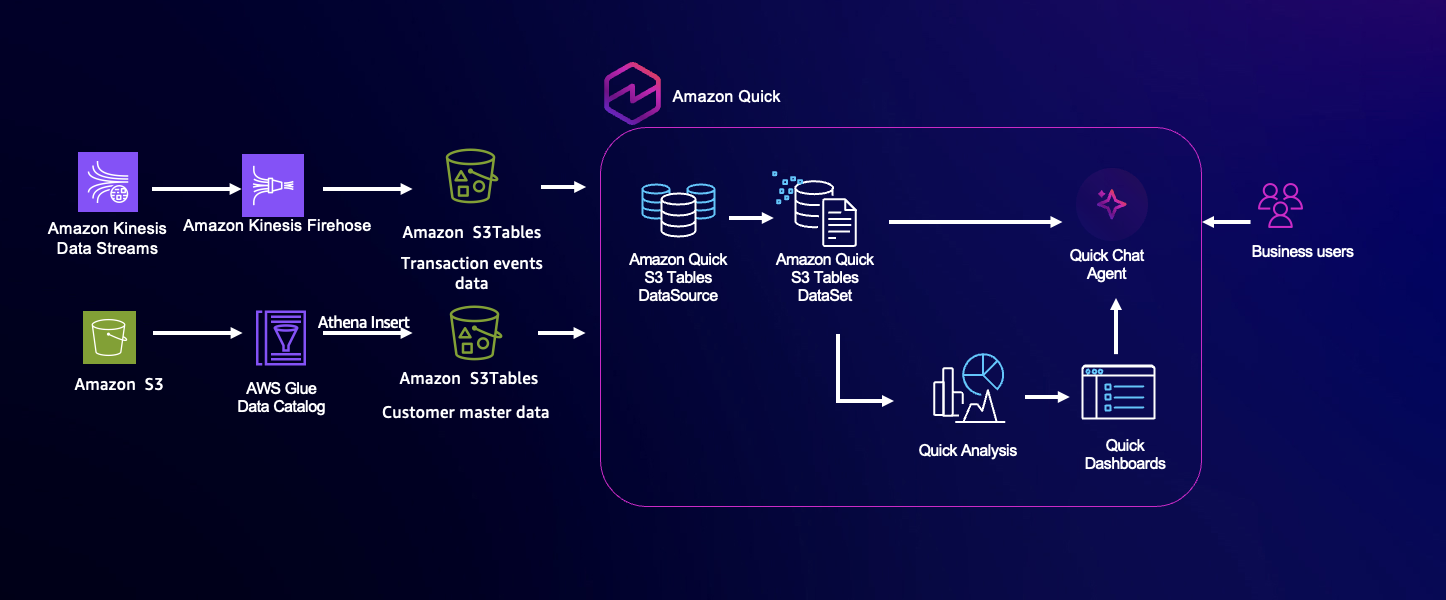
Transaction events are streamed into Amazon Kinesis Data Streams and delivered using Amazon Data Firehose into an Amazon S3 table bucket. With the native S3 Tables connector of Quick, business users can query the data lake in near real-time and analyze data using natural language interactions, removing dependency on batch processing. You can use this unified approach to uncover insights such as regional fraud trends and approval rates instantly, improving operational visibility and supporting faster, data-driven decisions.
Architecture overview
The architecture is composed of four core layers: data ingestion, storage, querying, and analytics. For this post, we focus on the query and analytics layer. Transaction events from distributed payment systems are ingested in real-time using Amazon Kinesis Data Streams, providing a scalable, low-latency streaming layer. These events are continuously delivered to an Amazon S3 table bucket in Apache Iceberg format, forming a high-performance data lake that supports both streaming and analytical workloads. While data could traditionally be queried through Amazon Athena, Amazon Quick allows direct, near real-time querying of S3 Tables and enables AI-powered, natural language analysis. Business users can explore live datasets, generate visualizations, and obtain insights—such as identifying regions with high fraud rates in the last hour—without technical expertise. This architecture keeps decisions informed by the most current data, supporting rapid and accurate business actions.
Prerequisites
To follow along with this post, ensure that you have the following in place:
- Your steaming pipeline including data ingestion and storage layers are already set up and your data is available in an Amazon S3 table bucket.
- An Amazon Quick Enterprise subscription.
Implementation steps
Here are the steps to give your business users access to your Apache Iceberg tables using Amazon Quick analytical and conversational workloads:
Step 1: Enable S3 Tables data access for Amazon Quick
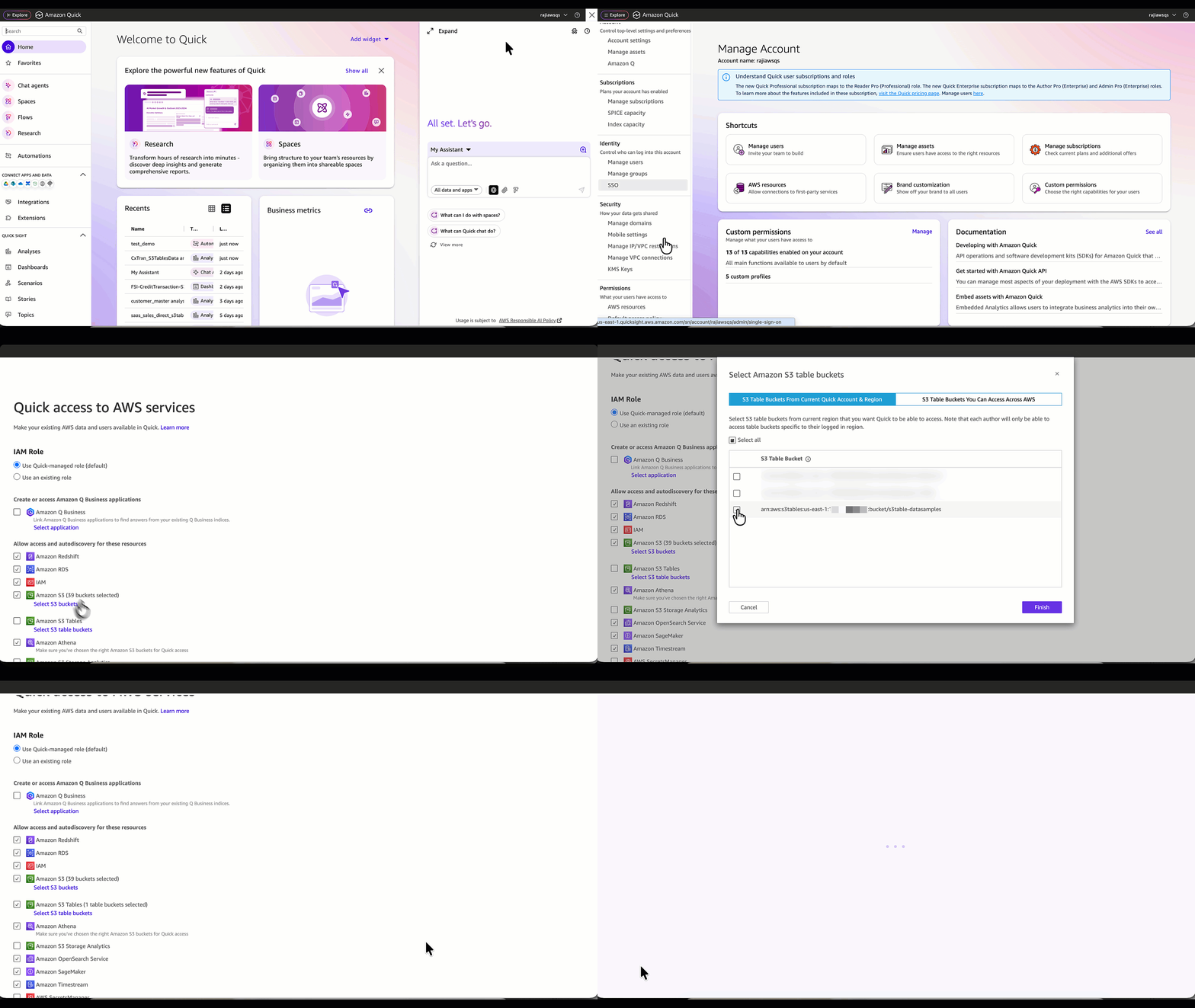
Let’s start by configuring Amazon Quick to access S3 Tables, so they can be automatically discovered when building the data source.
- Select your account name in the top-right corner and select Manage account.
- In the left navigation menu, under Permissions, choose AWS Resources.
- In the Allow access and auto discovery for these resources section, select Amazon S3 Tables.
- Choose Select S3 table buckets, then choose the relevant S3 table bucket containing the sample data for this blog and click Finish. (For this post, we use the s3table-datasamples bucket.)
- Ensure that the Amazon S3 bucket option is selected, then choose Save.
This step adds required permission to your Amazon Quick role and allows your Amazon Quick instances to successfully discover the specific S3 table bucket data while creating a data source.
Step 2: Create an Amazon Quick data source using S3 Tables
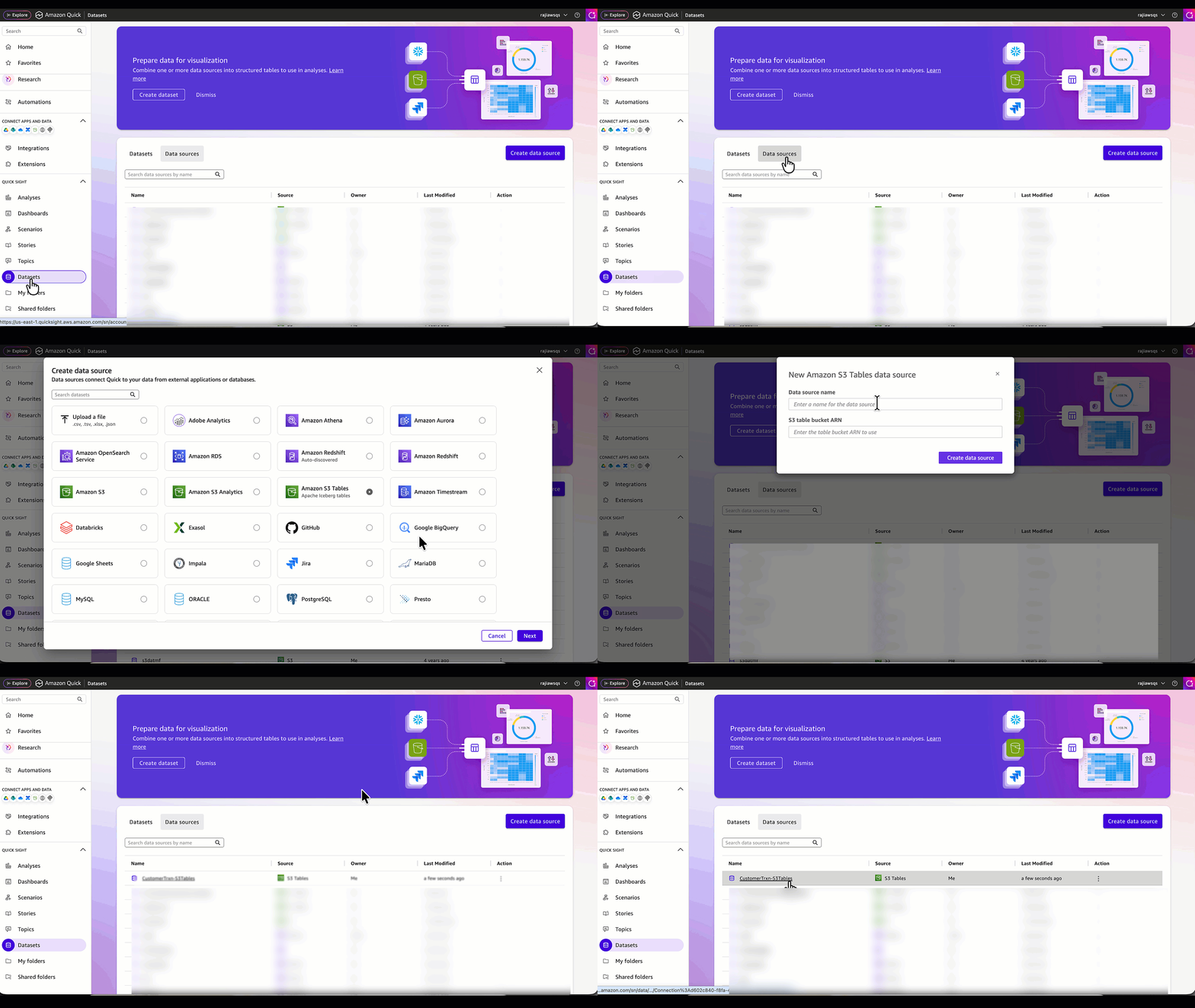
Now, let’s create an Amazon Quick data source pointing to the s3table-datasamples bucket. This bucket contains two tables: customer dimension and transaction_events. The customer dimension table is file-based and includes fictional bank customer information, while transaction_events represents fictional streaming credit card transaction data associated with those customers.
- Choose Amazon Quick in the top-left corner to navigate to the Quick home page.
- From the menu, select Datasets, then go to the Data sources tab and choose Create data source.
- On the next screen, select Amazon S3 Tables (Apache Iceberg tables) as the data source type, then choose Next.
- Enter a data source name (for example, CustomerTrxn-S3Tables) and provide the S3 table bucket ARN. In this example, it’s the ARN for the s3table-datasamples bucket.
- Choose Create data source.
Verify that the data source has been created successfully.
Step 3: Build a dataset in Amazon Quick
In this step, we use the data source created earlier to build a dataset.
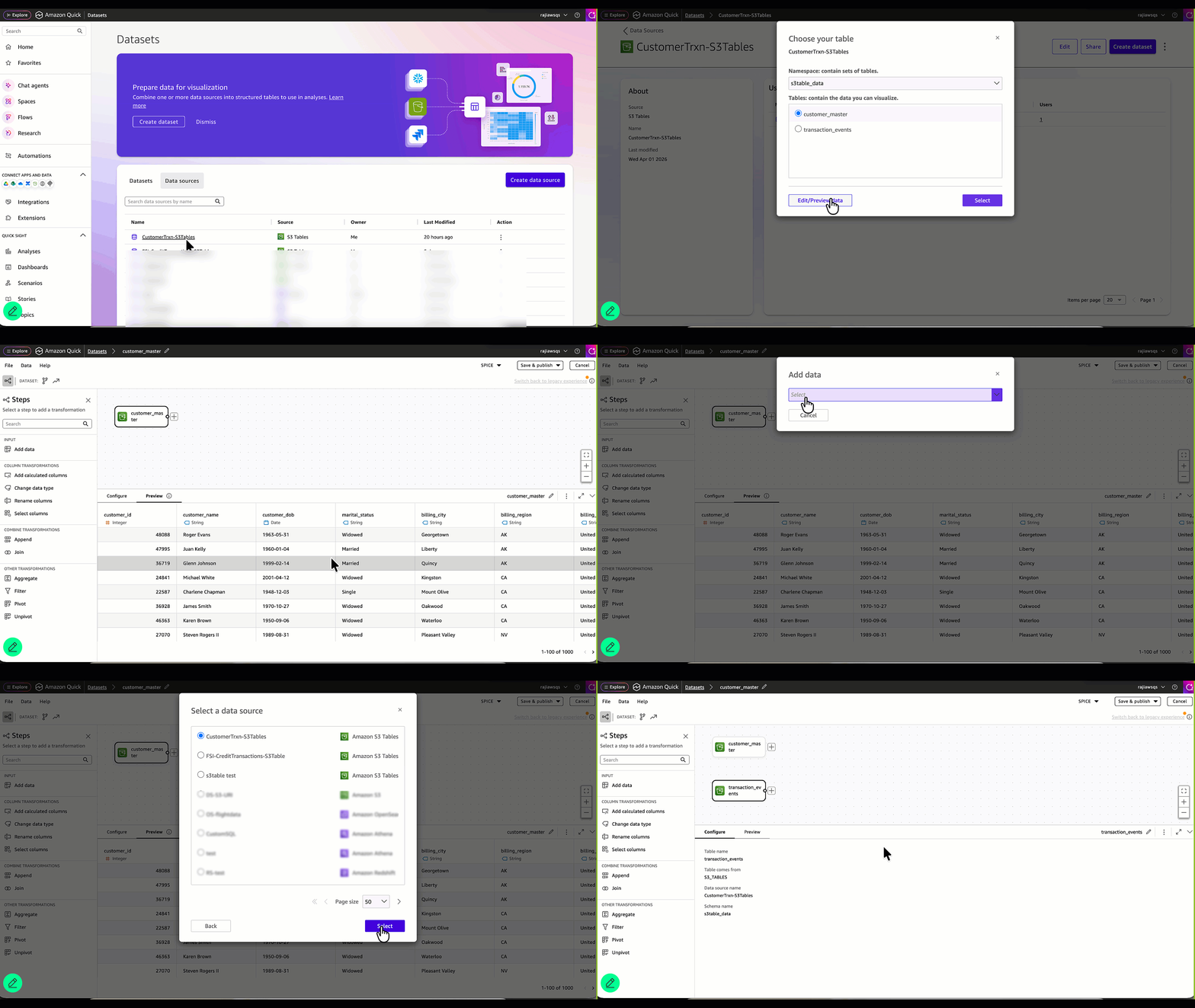
- Select the data source (CustomerTrxn-S3Tables) created in the previous step and choose Create dataset.
- Choose the namespace automatically populated for your data source, then select a table from the list and click Edit/Preview data.
In this example, the s3table-data namespace contains two tables. We begin with the customer dimension table. - In the Preview tab, review the data pulled from S3 Tables.
- To add another table, select Add data from the menu. In this example, we will add the
transaction_eventstable. - In the Add data screen, select Data source from the dropdown list.
- Choose
CustomerTrxn-S3Tablesfrom the Select a data source list, and then choose Select. - From the list of tables, select
transaction_eventsand choose Select.
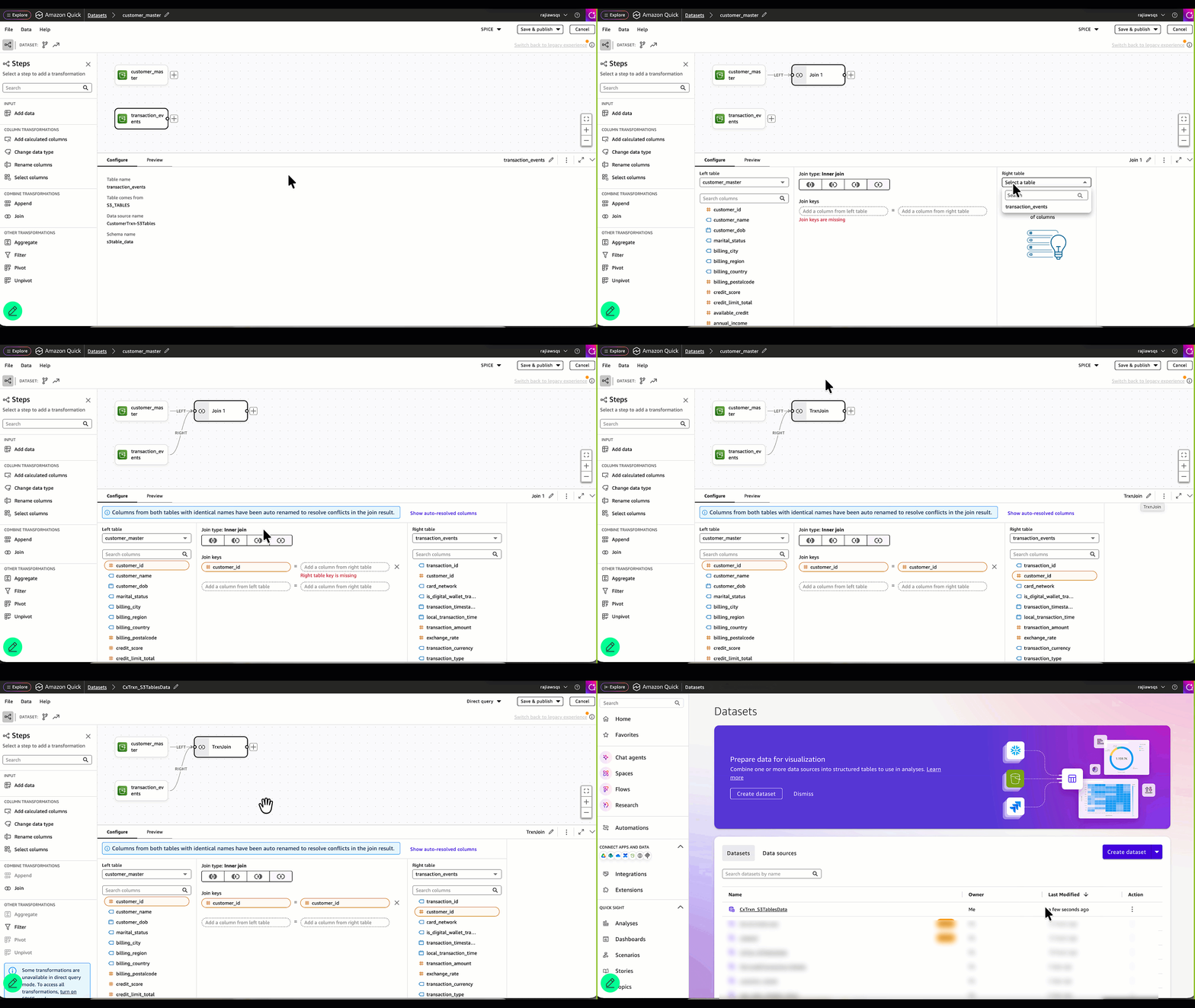
- Join the two tables by selecting the plus (+) icon next to the customer_master table and selecting Join.
- Configure the join using the customer_id column:
- Select the Inner Join option.
- Choose transaction_events as the right table.
- Select customer_id from both the left and right tables as the join keys.
- Provide a name for the join (for example, TrxnJoin) to help identify it when working with multiple tables.
- Name the dataset in the top-left corner (for example, CxTrxn_S3TableData).
- Ensure that Direct Query mode is selected in the top-right corner. This is important to fully use near real-time data access from S3 Tables. Alternatively, you can choose SPICE mode if you prefer scheduled data refreshes rather than near real-time access.
- Choose Save & Publish.
Step 4: Interact with the dataset using Amazon Quick chat
Now let’s start chatting with this dataset to gather insights using natural language. For this, we use the default chat named, “My Assistant.”
- In the Amazon Quick home page, choose Chat agents on the left navigation panel and then My Assistant.
- Choose Chat next to the My Assistant.
- From All data and apps, choose Add and select Datasets. Then select the CxTrxn_S3TableData dataset. Choose Save.
- In the chat panel, enter “Show the total number of transactions occurred so far in this month” and press Send.
- Notice the chat response showing the total transaction count for the current month. Next, let’s ask the agent to break it down by day.
- In the chat panel, enter “break it down by day using ingestion timestamp” and press Send.
- Review the daily breakdown provided by the agent. In our example, from April 1–April 17.

Step 5: Demonstrate real-time user interaction with streaming data
Next, we test the near real-time responsiveness of the chat by streaming new transaction data. In this demo, we use AWS Lambda as a producer for a Kinesis Data Stream and then store the incoming data in an S3 table bucket as S3 Tables – in Apache Iceberg format using Firehose. As new data is streamed in, the transaction counts will automatically update within the chat without the end user needing to take any action. This demonstrates seamless near real-time data access without manual intervention or complex architecture. We run this Lambda function a few times to stream new transactional events data.
If you’re interested in creating your own streaming source for this demo, you can refer to the official AWS documentation or relevant AWS posts for detailed guidance.
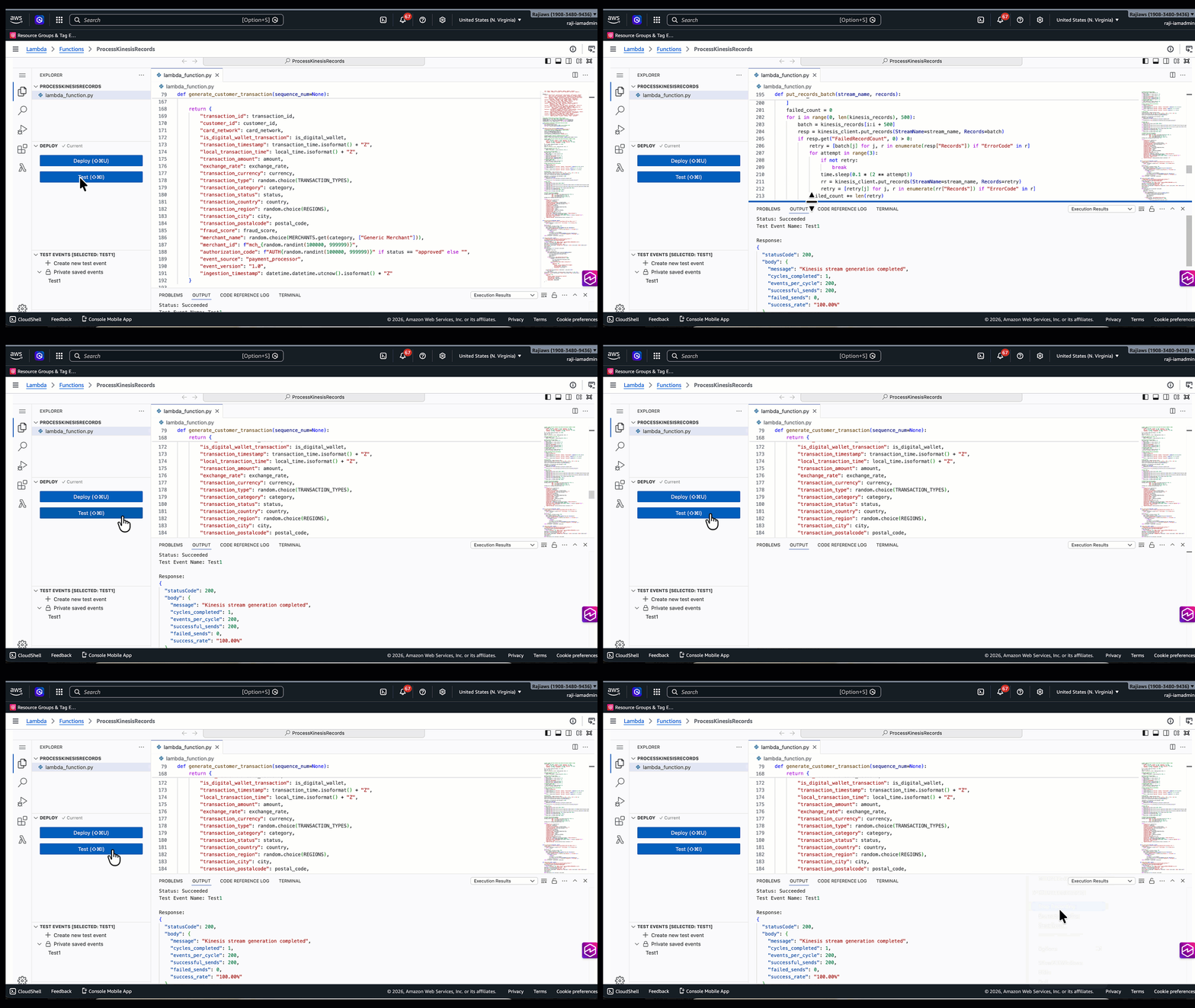
Now let’s check the recently streamed data in our chat agent.
- Navigate back to My Assistant in the same chat session, enter a new prompt “Show the total number of transactions occurred so far in this month, include all recent streaming data and break it down by ingestion timestamp.” and press Send.
- My Assistant queries the CxTrxn_S3TableData dataset via Direct Query and returns the newly ingested records for April 18. This demonstrates that the recently streamed data is available without requiring a manual dataset refresh.

Cleanup
If you no longer need the resources deployed as part of this solution and want to avoid ongoing costs, we recommend that you clean up and remove the relevant components by deleting all Amazon Quick–related resources and unsubscribing from your Amazon Quick account.
Conclusion
In this post, we explored how Amazon Quick’s new Amazon S3 Tables data source enables near real-time analytics while streamlining modern data architectures. By querying Apache Iceberg tables directly in Amazon S3, it removes intermediate layers, reduces data movement, and preserves a single, governed source of truth. Additionally, you can use natural language chat experiences, like My Assistant, to access up-to-date insights effortlessly, without manual refreshes or technical overhead.
The result is a unified, AI-powered analytics experience where data, insights, and actions come together seamlessly in near real-time. Organizations can move faster, make better decisions, and unlock the full value of their data—while keeping architectures simpler, more scalable, and cost-efficient. If your use case is a typical analytical scenario sourced from scheduled data refreshes and does not require near real-time access, SPICE mode remains a suitable option. For more details on this feature, see Creating a dataset using Amazon S3 Tables.
For additional discussions and help getting answers to your questions, check out the Amazon Quick Community.