In 2025, generative AI has evolved from text generation to multi-modal use cases ranging from audio transcription and translation to voice agents that require real-time data streaming. Today’s applications demand something more: continuous, real-time dialogue between users and models—the ability for data to flow both ways, simultaneously, over a single persistent connection. Imagine a speech to text use-case, where you will need to stream the audio stream as input and receive the transcripted text as a continuous stream. Such use-cases will require bi-directional streaming capability.
We’re introducing bidirectional streaming for Amazon SageMaker AI Inference, which transforms inference from a transactional exchange into a continuous conversation. Speech works best with real-time AI when conversations flow naturally without interruptions. With bidirectional streaming, speech to text becomes immediate. The model listens and transcribes at the same time, so words appear the moment they are spoken. Picture a caller describing an issue to a support line. As they speak, the live transcript appears in front of the call center agent, giving the agent instant context and letting them respond without waiting for the caller to finish. This kind of continuous exchange makes voice experiences feel fluid, responsive and human.
This post shows you how to build and deploy a container with bidirectional streaming capability to a SageMaker AI endpoint. We also demonstrate how you can bring your own container or use our partner Deepgram’s pre-built models and containers on SageMaker AI to enable bi-directional streaming feature for real-time inference.
Bidirectional streaming: Deep dive
With bidirectional streaming, data flows both ways at once through a single, persistent connection.
In the traditional approach to inference requests, the client sends a complete question and waits, while the model processes the request and returns a complete answer before the client can send the next question.
In bidirectional streaming, the client’s speech starts flowing while the model simultaneously begins processing and transcribing the answer immediately.
Users see results as soon as the model starts generating them. Maintaining one persistent connection replaces hundreds of short-lived connections. This reduces overhead on networking infrastructure, TLS handshakes, and connection management. Models can maintain context across a continuous stream, enabling multi-turn interactions without resending conversation history each time.
SageMaker AI Inference bidirectional streaming capability
SageMaker AI Inference combines HTTP/2 and WebSocket protocols for real-time, two-way communication between clients and models. When you invoke a SageMaker AI Inference endpoint with bidirectional streaming, your request travels through the three-layer infrastructure in SageMaker AI:
- Client to SageMaker AI router: Your application connects to the Amazon SageMaker AI runtime endpoint using HTTP/2, establishing an efficient, multiplexed connection that supports bidirectional streaming.
- SageMaker AI router to model container: The router forwards your request to a Sidecar (a lightweight proxy running alongside your model container), which then establishes a WebSocket connection to your model container at
ws://localhost:8080/invocations-bidirectional-stream.
Once the connection is established, data flows freely in both directions:
- Request stream: Your application sends input as a series of payload chunks over HTTP/2. The SageMaker AI infrastructure converts these into WebSocket data frames—either text (for UTF-8 data) or binary—and forwards them to your model container. The model receives these frames in real-time and can begin processing immediately, even before the complete input arrives such as for transcribing use cases.
- Response stream: Your model generates output and sends it back as WebSocket frames. SageMaker AI wraps each frame into a response payload and streams it directly to your application over HTTP/2. Users see results as soon as the model produces them—word by word for text, frame by frame for video, or sample by sample for audio.
The WebSocket connection between the Sidecar and model container remains open for the duration of your session, with built-in health monitoring. To maintain connection health, SageMaker AI sends WebSocket ping frames every 60 seconds to verify the connection is active, and your model container responds with pong frames to confirm it’s healthy. If 5 consecutive pings go unanswered, the connection is gracefully closed.
Building your own container for implementing bidirectional streaming
If you would like to use open source or your own models, you can customize your container to support bidirectional streaming. Your container must implement the WebSocket protocol to handle incoming data frames and send response frames back to SageMaker AI.
To get started, let us build an example bi-directional streaming application with bring-your-own container use case. With this example we will:
- Build a docker container with bi-directional streaming capability – a simple echo container that streams the same bytes as received as an input to the container
- Deploy the container to a SageMaker AI endpoint
- Invoke the SageMaker AI endpoint with the new bidirectional streaming API
Prerequisites
- AWS Account with SageMaker AI permissions
- AmazonSageMakerFullAccess IAM Managed Policy to allow endpoint creation
- IAM permissions that explicitly allow the
sagemaker:InvokeEndpoint*action for endpoint invocation.
- Docker installed locally
- Python 3.12+
- Install aws-sdk-python for SageMaker AI Runtime
InvokeEndpointWithBidirectionalStreamAPI
Build docker container with bi-directional streaming capability
First, clone our demo repository and set up your environment as defined in the README.md. The steps below will create a simple demo docker image and push it Amazon ECR repository in your account.
This creates a container with a Docker label indicating to SageMaker AI that bidirectional streaming capability is supported on this container.
Deploy the demo bi-directional streaming container to the SageMaker AI endpoint
The following example script creates the SageMaker AI endpoint with the created container:
Invoke the SageMaker AI endpoint with the new bidirectional streaming API
Once the SageMaker AI endpoint is InService, we can proceed to invoke the endpoint to test the bidirectional streaming functionality of the test container.
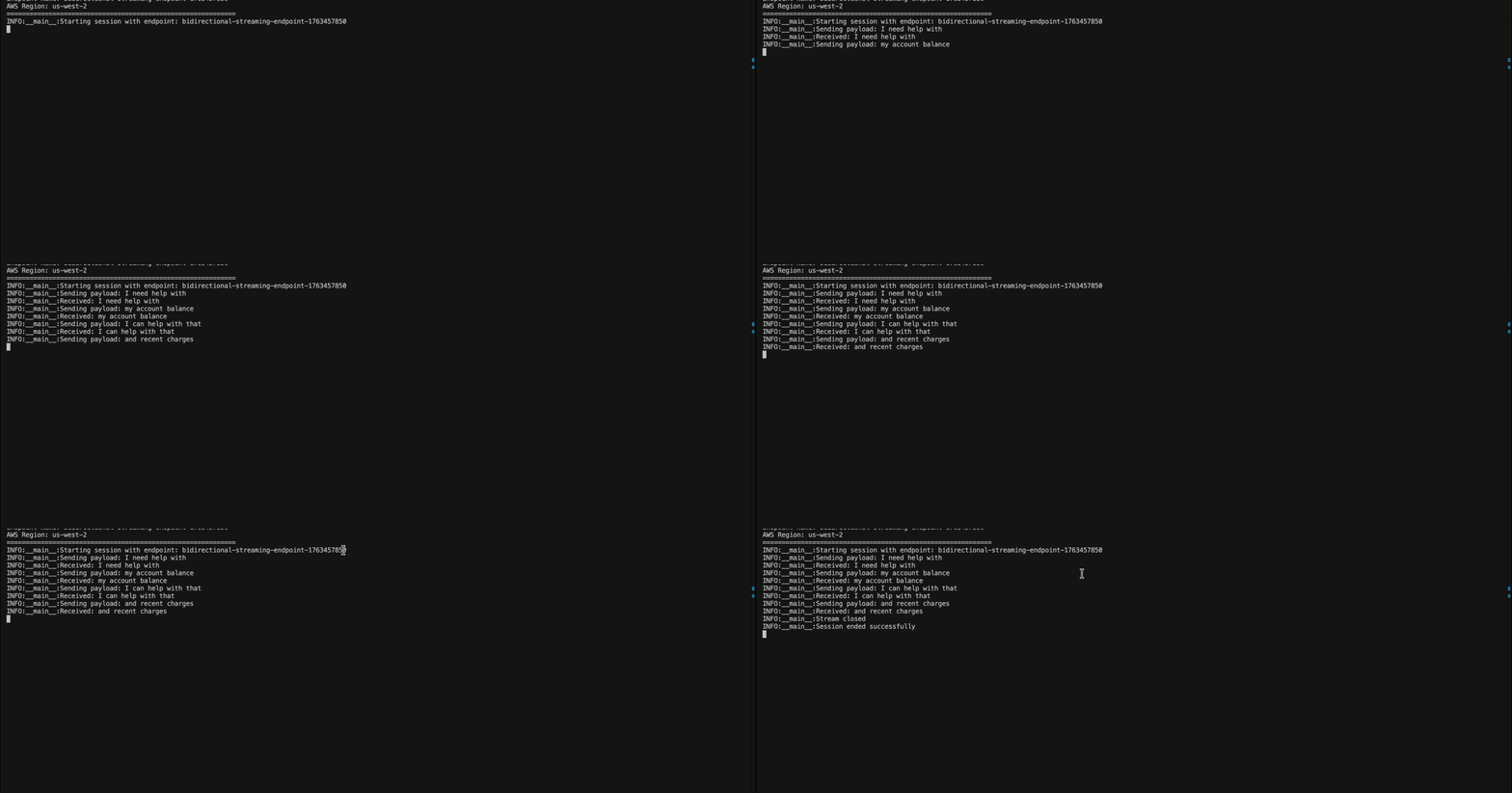
The following is sample output displaying the input and output streams generated by the previous script. The container echoes incoming data to the output stream, demonstrating bidirectional streaming capability.
SageMaker AI integration with Deepgram models
SageMaker AI and Deepgram have collaborated to build bidirectional streaming support for SageMaker AI endpoints. Deepgram, an AWS Advanced Tier Partner, delivers enterprise-grade voice AI models with industry-leading accuracy and speed. Their models power real-time transcription, text-to-speech and voice agents for contact centers, media platforms, and conversational AI applications.
For customers with strict compliance requirements that require audio processing to never leave their AWS VPC, traditional self-hosted options have required significant operational overhead to setup and maintain. Amazon SageMaker bidirectional streaming transforms this experience so customers can deploy and scale real-time AI applications with just a few actions in the AWS Management Console.
Deepgram Nova-3 speech-to-text model is available today in the AWS Marketplace for deployment as a SageMaker AI endpoint with additional models coming soon. Capabilities of Deepgram Nova-3 include multi-lingual transcription, enterprise scale performance and domain specific recognition. Deepgram is offering a 14 day free trial on Amazon SageMaker AI for developers to prototype applications without incurring software license fees. Infrastructure charges of the chosen machine type will still be incurred during this time. For more details, see the Amazon SageMaker AI Pricing documentation.
A high-level overview and sample code is provided in the following section. Refer to the detailed quick start guide on the Deepgram documentation page for additional information and examples. Connect with the Deepgram Developer Community if you need additional help with set up.
Set up a Deepgram SageMaker AI real-time inference endpoint
To set up a Deepgram SageMaker AI endpoint:
- Navigate to the AWS Marketplace Model packages section within the Amazon SageMaker AI console and search for Deepgram.
- Subscribe to the product and proceed to the launch wizard on the product page.
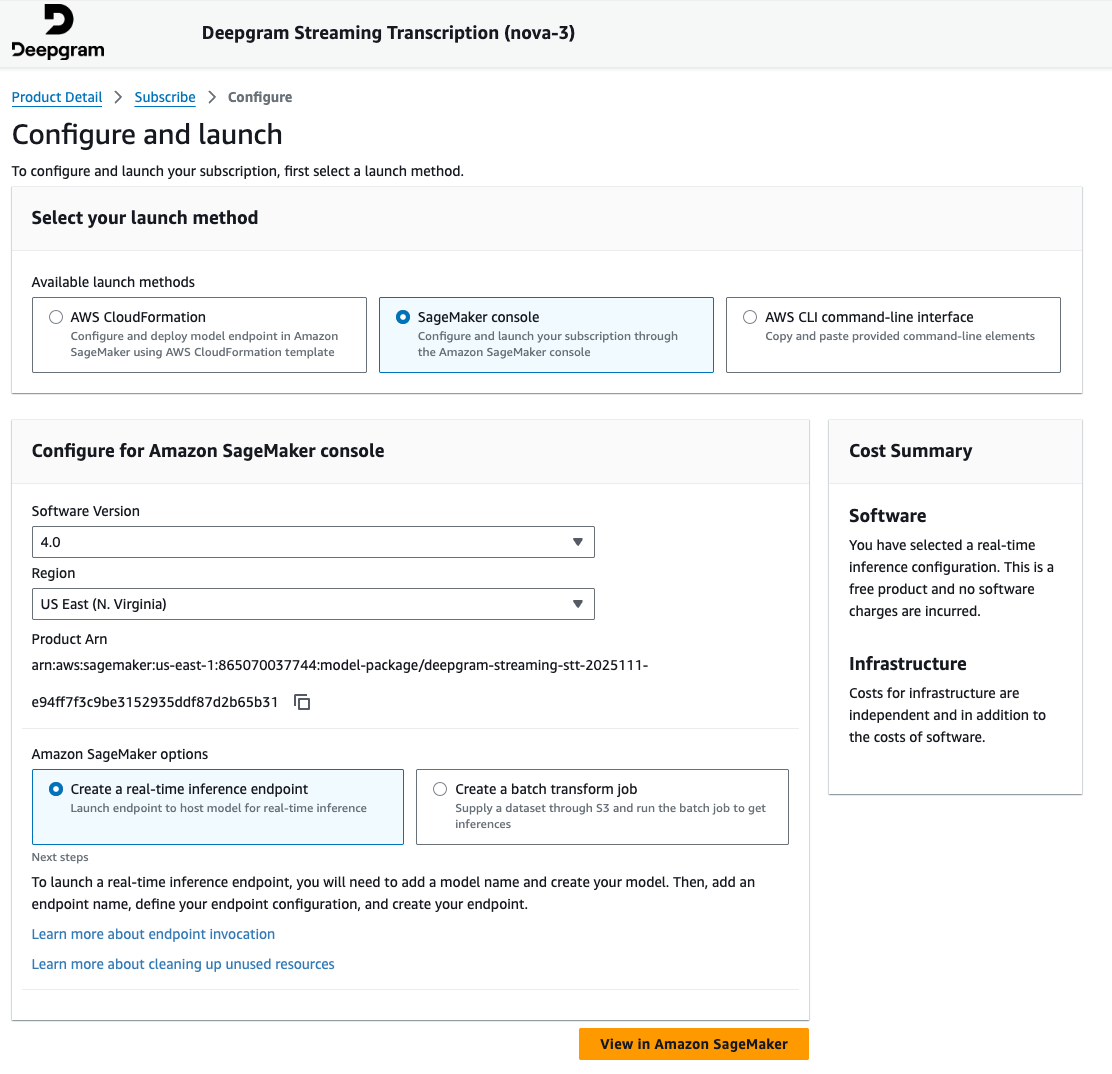
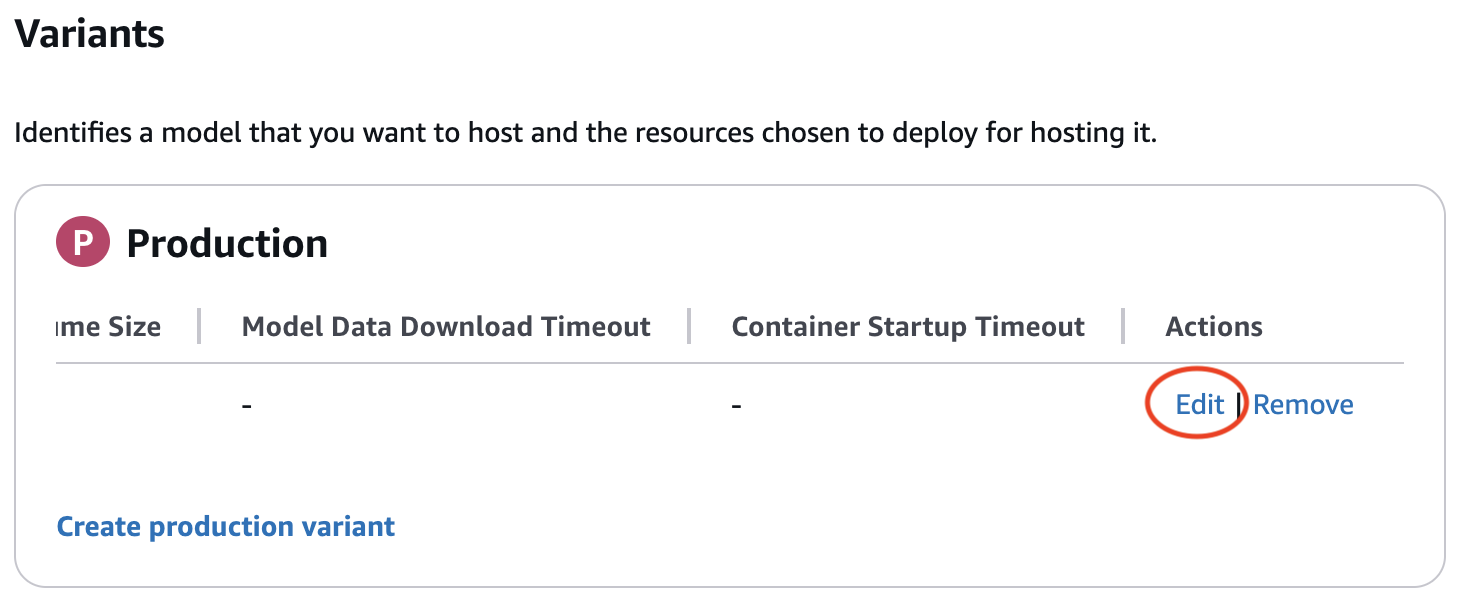
- Continue by providing details in the Amazon SageMaker AI real-time endpoint creation wizard. Verify that you edit the production variant to include a valid instance type when creating your endpoint configuration. The edit button may be hidden until scrolling right in the production variant table.
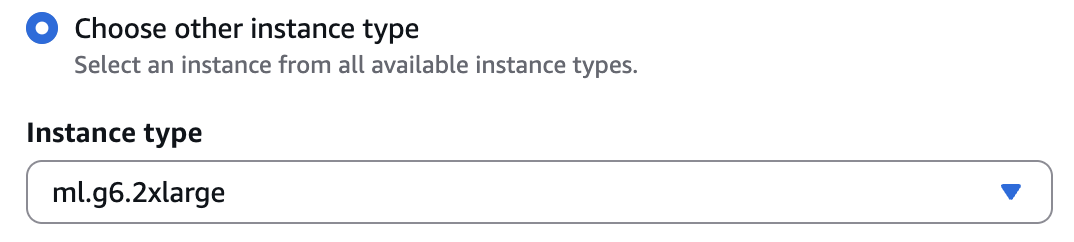
ml.g6.2xlargeis a preferred instance type for initial testing. Refer to the Deepgram documentation for specific hardware requirements and selection guidance.
- In the endpoint summary page, take note of the endpoint name you provided as this will be needed in the following section.
Using the Deepgram SageMaker AI real-time inference endpoint
We’ll now walk through a sample typescript application that streams an audio file to the Deepgram model hosted on a SageMaker AI real-time inference endpoint and prints a transcription streamed back in real-time.
- Create a simple function to stream the WAV file
- This function opens a local audio file and sends it to Amazon SageMaker AI Inference in small binary chunks.
- Configure the Amazon SageMaker AI runtime client
- This section configures the AWS Region, the SageMaker AI endpoint name, and the Deepgram model route inside the container. Update the following values as necessary:
regionif not using us-east-1endpointNamenoted from the endpoint setup abovetest.wavif using a different name for the locally stored audio file
- This section configures the AWS Region, the SageMaker AI endpoint name, and the Deepgram model route inside the container. Update the following values as necessary:
- Invoke the endpoint and print the streaming transcription
- This final snippet sends the audio stream to the SageMaker AI endpoint and prints Deepgram’s streaming JSON events as they arrive. The application will show live speech-to-text output being generated.
Conclusion
In this post, we provided an overview of building real time agents with generative AI, the challenges, and how SageMaker AI bidirectional streaming helps you address these challenges. We also provided details on how to build your own container to leverage bidirectional streaming feature. We then walked you through the steps to build a sample chatbot container and the real-time speech-to-text model offered by our partner Deepgram which is a core component in a real-time voice AI agent application.
Start building bidirectional streaming applications with LLMs and SageMaker AI today.
About the authors
 Lingran Xia is a software development engineer at AWS. He currently focuses on improving inference performance of machine learning models. In his free time, he enjoys traveling and skiing.
 Vivek Gangasani is a Worldwide Lead GenAI Specialist Solutions Architect for SageMaker Inference. He drives Go-to-Market (GTM) and Outbound Product strategy for SageMaker Inference. He also helps enterprises and startups deploy, manage, and scale their GenAI models with SageMaker and GPUs. Currently, he is focused on developing strategies and solutions for optimizing inference performance and GPU efficiency for hosting Large Language Models. In his free time, Vivek enjoys hiking, watching movies, and trying different cuisines.
 Victor Wang is a Sr. Solutions Architect at Amazon Web Services, based in San Francisco, CA, supporting GenAI Startups including Deepgram. Victor has spent 7 years at Amazon; previous roles include software developer for AWS Site-to-Site VPN, AWS ProServe Consultant for Public Sector Partners, and Technical Program Manager for Amazon Aurora MySQL. His passion is learning new technologies and traveling the world. Victor has flown over two million miles and plans to continue his eternal journey of exploration.
 Chinmay Bapat is an Engineering Manager in the Amazon SageMaker AI Inference team at AWS, where he leads engineering efforts focused on building scalable infrastructure for generative AI inference. His work enables customers to deploy and serve large language models and other AI models efficiently at scale. Outside of work, he enjoys playing board games and is learning to ski.
 Deepti Ragha is a Senior Software Development Engineer on the Amazon SageMaker AI team, specializing in ML inference infrastructure and model hosting optimization. She builds features that improve deployment performance, reduce inference costs, and make ML accessible to organizations of all sizes. Outside of work, she enjoys traveling, hiking, and gardening.
 Kareem Syed-Mohammed is a Product Manager at AWS. He is focuses on enabling Gen AI model development and governance on SageMaker HyperPod. Prior to this, at Amazon QuickSight, he led embedded analytics, and developer experience. In addition to QuickSight, he has been with AWS Marketplace and Amazon retail as a Product Manager. Kareem started his career as a developer for call center technologies, Local Expert and Ads for Expedia, and management consultant at McKinsey.
 Xu Deng is a Software Engineer Manager with the SageMaker team. He focuses on helping customers build and optimize their AI/ML inference experience on Amazon SageMaker. In his spare time, he loves traveling and snowboarding.