Air pollution remains one of Africa’s most pressing environmental health crises, causing widespread illness across the continent. Organizations like sensors.AFRICA have deployed hundreds of air quality sensors to address this challenge, but face a critical data problem: significant gaps in PM2.5 (particulate matter with diameter less than or equal to 2.5 micrometers) measurement records because of power instability and connectivity issues in high-risk regions where physical maintenance is limited. Missing data in PM2.5 datasets reduces statistical power and introduces bias into parameter estimates, leading to unreliable trend detection and flawed conclusions about air quality patterns. These data gaps ultimately compromise evidence-based decision-making for pollution control strategies, health impact assessments, and regulatory compliance.
In this post, we demonstrate the time-series forecasting capability of Amazon SageMaker Canvas, a low-code no-code (LCNC) machine learning (ML) platform to predict PM2.5 from incomplete datasets. PM2.5 exposure contributes to millions of premature deaths globally through cardiovascular disease, respiratory illness, and systemic health effects, making accurate air quality forecasting a critical public health tool. A key advantage of the forecasting capability of SageMaker Canvas is its robust handling of incomplete data. Traditional air quality monitoring systems often require complete datasets to function properly, meaning they can’t be relied on when sensors malfunction or require maintenance. In contrast, SageMaker Canvas can generate reliable predictions even when faced with gaps in sensor data. This resilience enables continuous operation of air quality monitoring networks despite inevitable sensor failures or maintenance periods, eliminating costly downtime and data gaps. Environmental agencies and public health officials benefit from uninterrupted access to critical air quality information, enabling timely pollution alerts and more comprehensive long-term analysis of air quality trends. By maintaining operational continuity even with imperfect data inputs, SageMaker Canvas significantly enhances the reliability and practical utility of environmental monitoring systems.
In this post, we provide a data imputation solution using Amazon SageMaker AI, AWS Lambda, and AWS Step Functions. This solution is designed for environmental analysts, public health officials, and business intelligence professionals who need reliable PM2.5 data for trend analysis, reporting, and decision-making. We sourced our sample training dataset from openAFRICA. Our solution predicts PM2.5 values using time-series forecasting. The sample training dataset contained over 15 million records from March 2022 to Oct 2022 in various parts of Kenya and Nigeria—data coming from 23 sensor devices from 15 unique locations. The sample code and workflows can be adapted to create prediction models for your PM2.5 datasets. See our solution’s README for detailed instructions.
Solution overview
The solution consists of two main ML components: a training workflow and an inference workflow. These workflows are built using the following services:
- SageMaker Canvas is used to prepare data and train the prediction model through its no-code interface
- Batch Transform for inference with Amazon SageMaker AI is used for inference, processing the dataset in bulk to generate predictions
- Step Functions orchestrates the inferencing process by coordinating the workflow between data retrieval, batch transforming, and database updates, managing workflow state transitions, and making sure that data flows properly through each processing stage
- Lambda functions perform critical operations at each workflow step: retrieving sensor data from the database in required format, transforming data for model input, sending batches to SageMaker for inferencing, and updating the database with prediction results after processing is complete
At a high level, the solution works by taking a set of PM2.5 data with gaps and predicts the missing values within the range of plus or minus 4.875 micrograms per cubic meter of the actual PM2.5 concentration. It does this by first training a model on the data using inputs for the specific schema and a historical set of values from the user to guide the training process, which is completed with SageMaker Canvas. After the model is trained on a representative dataset and schema, SageMaker Canvas exports the model for use with batch processing. The Step Functions orchestration calls a Lambda function every 24 hours that takes a dataset of new sensor data that has gaps and initiates a SageMaker batch transform job to predict the missing values. The batch transform job processes the entire dataset at once, and the Lambda function then updates the existing dataset with the results. The new completed dataset with predicted values can now be distributed to public health decision-makers who need complete datasets to effectively analyze the patterns of PM2.5 data.
We dive into each of these steps in later sections of this post.
Solution walkthrough
The following diagram shows our solution architecture:
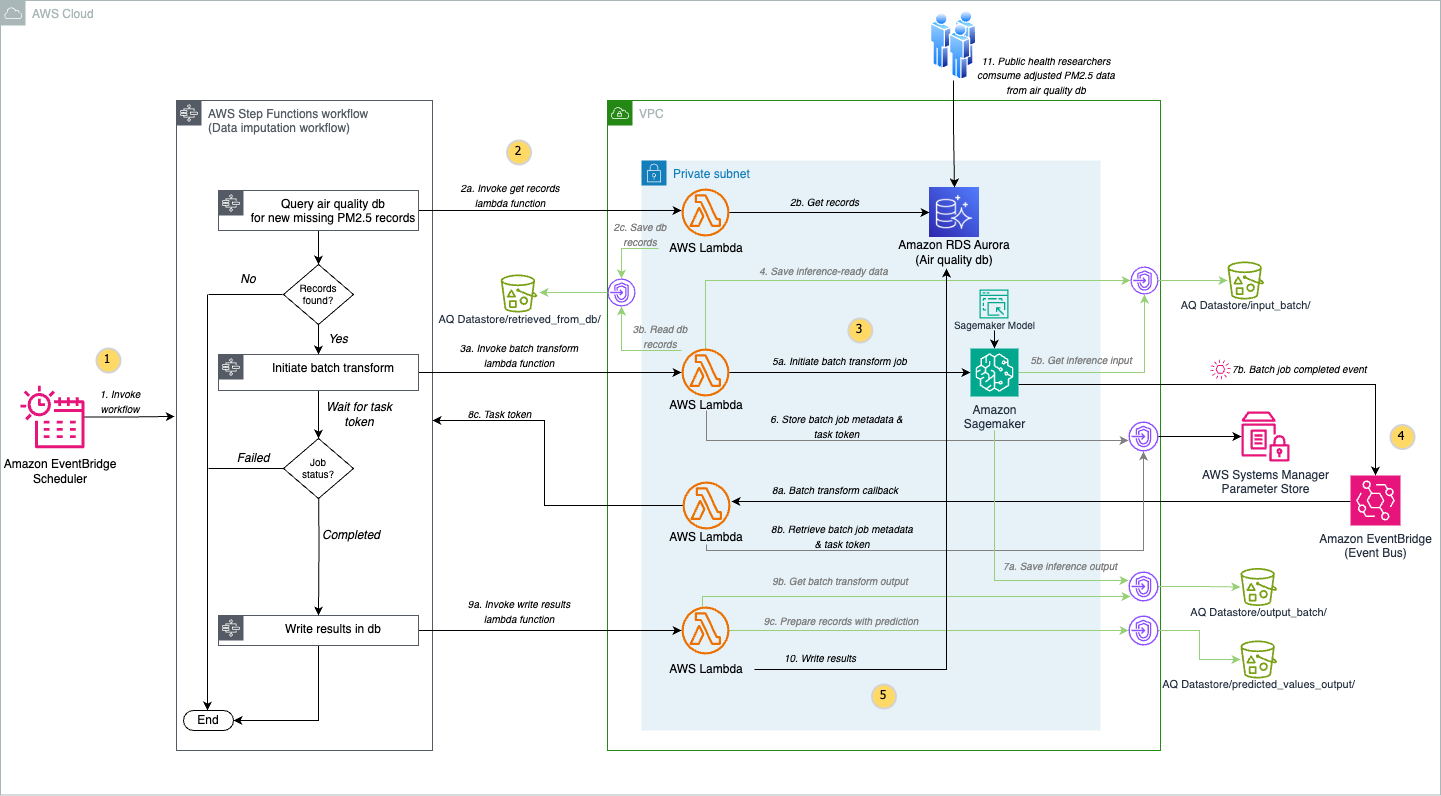
Let’s explore the architecture step by step:
- To systematically collect, identify, and fill PM2.5 data gaps caused by sensor limitations and connectivity issues, Amazon EventBridge Scheduler invokes a Step Functions state machine every 24 hours. Step Functions orchestrates the calling of various Lambda functions to perform different steps without handling the complexities of error handling, retries, and state management, providing a serverless workflow that seamlessly coordinates the PM2.5 data imputation process.
- The State Machine invokes a Lambda function in your Amazon Virtual Private Cloud (Amazon VPC) that retrieves records containing missing air quality values from the user’s air quality database on Amazon Aurora PostgreSQL-Compatible Edition and stores the records in a CSV file in an Amazon Simple Storage Service (Amazon S3) bucket.
- The State Machine then runs a Lambda function that retrieves the records from Amazon S3 and initiates the SageMaker batch transform job in your VPC using your SageMaker model created from your SageMaker Canvas predictive model trained on historical PM2.5 data.
- To streamline the batch transform workflow, this solution uses an event-driven approach with EventBridge and Step Functions. EventBridge captures completion events from SageMaker batch transform jobs, while the task token functionality of Step Functions enables extended waiting periods beyond the time limits of Lambda. After processing completes, SageMaker writes the prediction results directly to an S3 bucket.
- The final step in the state machine retrieves the predicted values from the S3 bucket and then updates the database in Aurora PostgreSQL-Compatible with the values including a
predictedlabel set totrue.
Prerequisites
To implement the PM2.5 data imputation solution, you must have the following:
- An AWS account with AWS Identity and Access Management (IAM) permissions sufficient to deploy the solution and interact with the database.
- The following AWS services:
- Amazon SageMaker AI
- AWS Lambda
- AWS Step Functions
- Amazon S3
- Aurora PostgreSQL-Compatible
- Amazon CloudWatch
- AWS CloudFormation
- Amazon Virtual Private Cloud (VPC)
- Amazon EventBridge
- IAM for authentication to Aurora PostgreSQL-Compatible
- AWS Systems Manager Parameter Store
- A local desktop set up with AWS Command Line Interface (AWS CLI) version 2, Python 3.10, AWS Cloud Development Kit (AWS CDK) v2.x, and Git version 2.x.
- The AWS CLI set up with the necessary credentials in the desired AWS Region.
- Historical air quality sensor data. Note that our solution requires a fixed schema described in the GitHub repo’s README.
Deploy the solution
You will run the following steps to complete the deployment:
- Prepare your environment by building Python modules locally for Lambda layers, deploying infrastructure using the AWS CDK, and initializing your Aurora PostgreSQL database with sensor data.
- Perform steps in the Build your air quality prediction model section to configure a SageMaker Canvas application, followed by training and registering your model in Amazon SageMaker Model Registry.
- Create SageMaker model using your registered SageMaker Canvas model by updating infrastructure using the AWS CDK.
- Manage future configuration changes using the AWS CDK.
Step 1: Deploy AWS infrastructure and upload air quality sensor data
Complete the following steps to deploy the PM2.5 data imputation solution AWS Infrastructure and upload air quality sensor data to Amazon Aurora RDS:
- Clone the repository to your local desktop environment using the following command:
- Change to the project directory:
cd <BASE_PROJECT_FOLDER>
- Follow the deployment steps in the README file up to Model Setup for Batch Transform Inference.
Step 2: Build your air quality prediction model
After you create the SageMaker AI domain and the SageMaker AI user profile as part of the CDK deployment steps, follow these steps to build your air quality prediction model
Configure your SageMaker Canvas application
- On the AWS Management Console, go to the SageMaker AI console and select the domain and the user profile that was created under Admin, Configurations, and Domains.
- Choose the App Configurations tab, scroll down to the Canvas section, and select Edit.
- In Canvas storage configuration, select Encryption and select the dropdown for aws/s3.
- In the ML Ops Configuration, turn on the option to Enable Model Registry registration permissions for this user profile.
- Optionally, in the Local file upload configuration section in your domain’s Canvas App Configuration, you can turn on Enable local file upload.
- Choose Submit to save your configuration choices.
- In your Amazon SageMaker AI home page, go to the Applications and IDEs section and select Canvas.
- Select the SageMaker AI user profile that was created for you by the CDK deployment and choose Open Canvas.
- In a new tab, SageMaker Canvas will start creating your application. This takes a few minutes.
Create and register your prediction model
In this phase, you develop a prediction model using your historical air quality sensor data.

The preceding architecture diagram illustrates the end-to-end process for training the SageMaker Canvas prediction model, registering that model and creating a SageMaker model for running inference on newly found PM2.5 data gaps. The training process starts by extracting air quality sensor dataset from the database. The dataset is imported into SageMaker Canvas for predictive analysis. This training dataset is transformed and prepared through data wrangling steps implemented by SageMaker Canvas for building and training ML models.
Prepare data
Our solution supports a SageMaker Canvas model trained for a single-target variable prediction based on historical data and performs corresponding data imputation for PM2.5 data gaps. To train your model for predictive analysis, follow the comprehensive End to End Machine Learning workflow in the AWS Canvas Immersion Day workshop, adapting each step to prepare your air quality sensor dataset. Begin with the standard workflow until you reach the data preparation section. Here, you can make several customizations:
- Filter dataset for single-target value prediction: Your air quality dataset might contain multiple sensor parameters. For single-target value prediction using this solution, filter the dataset to include only
PM2.5measurements. - Clean sensor data: Remove records containing sensor fault values. For example, we filtered out values that equal 65535, because 65535 is a common error code for malfunctioning sensors. Adjust this filtering based on the specific error codes your air quality monitoring equipment produces.
The following image shows our data wrangling Data Flow implemented using above guidance:
Data Wrangler > Data Flow
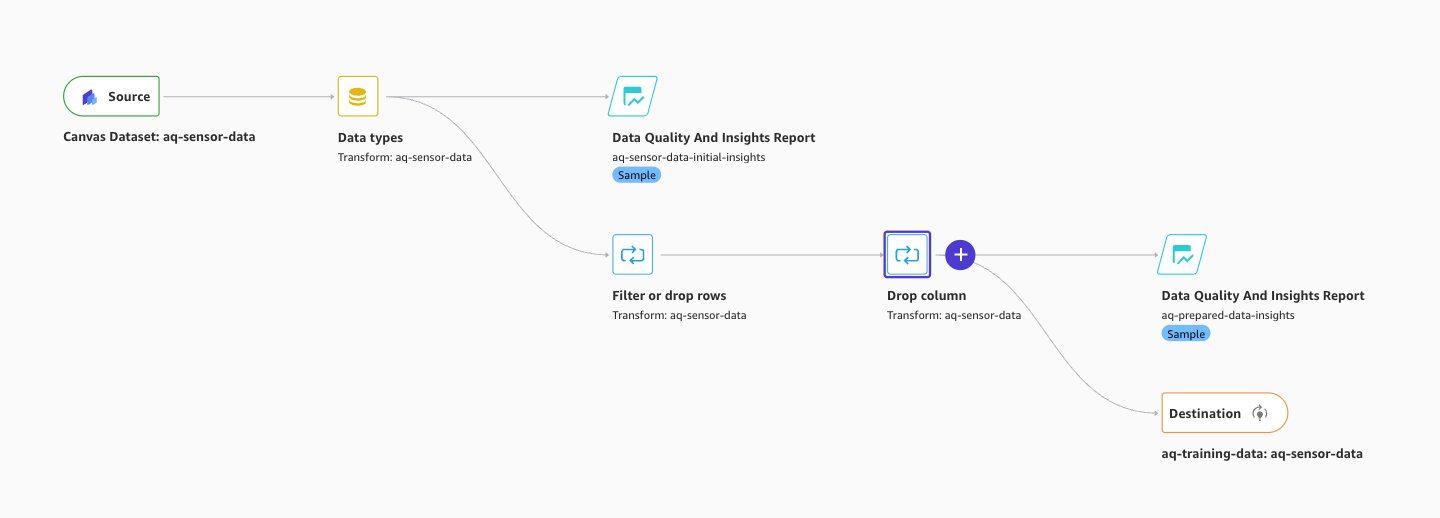
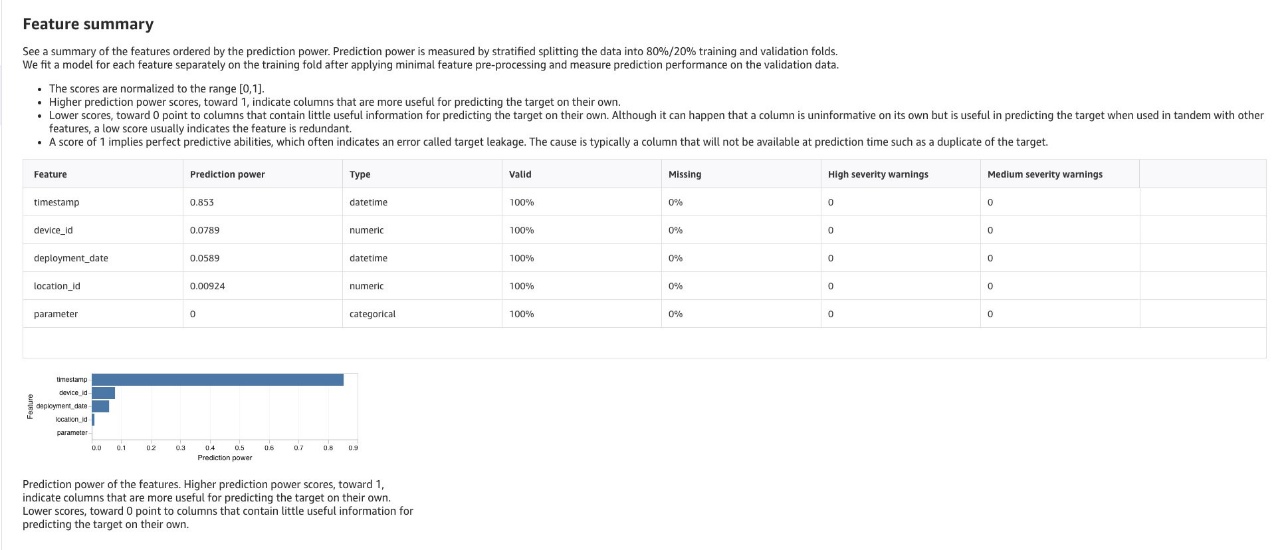
- Review generated insights and remove irrelevant data: Review the SageMaker Canvas generated insights and analyses. Evaluate them based on time-series forecasting and geospatial temporal data for air quality patterns and relationships between other columns of impact. See chosen columns of impact in GitHub for guidance. Analyze your dataset to identify rows and columns that impact the prediction and remove data that can reduce prediction accuracy.
The following image shows our data wrangling Analyses obtained with implementing the above guidance:
Data Wrangler > Analyses
Training your prediction model
After completing your data preparation, proceed to the Train the Model section of the workshop and continue with these specifications:
- Select problem type: Select Predictive Analysis as your ML approach. Because our dataset is tabular and contains a timestamp, a target column that has values we’re using to forecast future values, and a device ID column, SageMaker Canvas will choose time series forecasting.
- Define target column: Set Value as your target column for predicting PM2.5 values.
- Build configuration: Use the Standard Build option for model training because it generally has a higher accuracy. See What happens when you build a model in How custom models work for more information.
By following these steps, you can create a model optimized for PM2.5 dataset predictive analysis, capable of generating valuable insights. Note that SageMaker Canvas supports retraining the ML model for updated PM2.5 datasets.
Evaluate the model
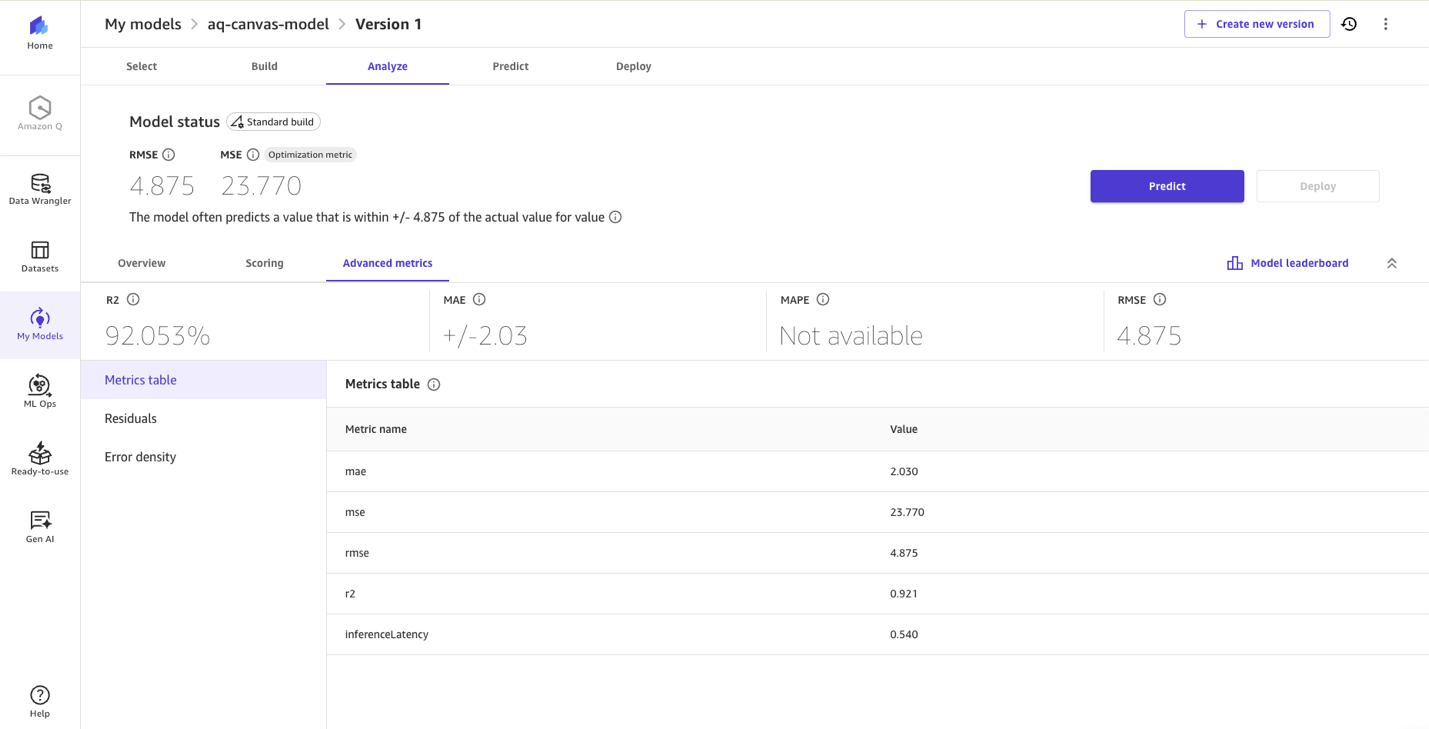
After training your model, proceed to Evaluate the model and review column impact, root mean square error (RMSE) score and other advanced metrics to understand your model’s performance for generating predictions for PM2.5.
The following image shows our model evaluation statistics achieved.
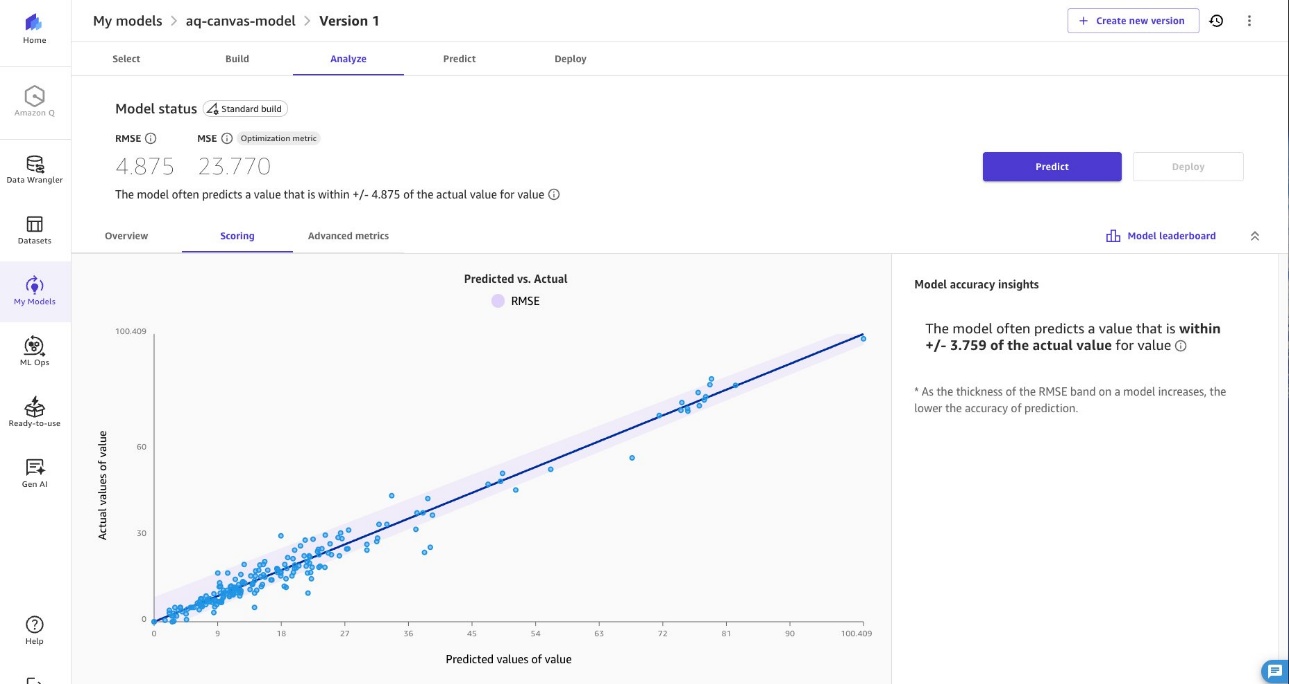
Add the model to the registry
Once you are satisfied with your model performance, follow the steps in Register a model version to the SageMaker AI model registry. Make sure to change the approval status to Approved before continuing to run this solution. At the time of this post’s publication, the approval must be updated in Amazon SageMaker Studio.
Log out of SageMaker Canvas
After completing your work in SageMaker Canvas, you can log out or configure your application to automatically terminate the workspace instance. A workspace instance is dedicated for your use every time you launch a Canvas application, and you are billed for as long as the instance runs. Logging out or terminating the workspace instance stops the workspace instance billing. For more information, see billing and cost in SageMaker Canvas.
Step 3: Create a SageMaker model using your registered SageMaker Canvas model
In the previous steps, you created a SageMaker domain and user profile through CDK deployment (Step 1) and successfully registered your model (Step 2). Now, it’s time to create the SageMaker model in your VPC using the SageMaker Canvas model you registered. Follow Model Setup for Batch Inference and Re-Deploy with Updated Configuration sections in the code README for creating SageMaker model.
Step 4: Manage future configuration changes
The same deployment pattern applies to any future configuration modifications you might require, including:
- Batch transform instance type optimizations
- Transform job scheduling changes
Update the relevant parameters in your configuration and run cdk deploy to propagate these changes throughout your solution architecture.
For a comprehensive list of configurable parameters and their default values, see the configuration file in the repository.
Execute cdk deploy again to update your infrastructure stack with the your model ID for batch transform operations, replacing the placeholder value initially deployed. This infrastructure-as-code approach helps ensure consistent, version-controlled updates to your data imputation workflow.
Security best practices
Security and compliance is a shared responsibility between AWS and the customer, as outlined in the Shared Responsibility Model. We encourage you to review this model for a comprehensive understanding of the respective responsibilities.
In this solution, we enhanced security by implementing encryption at rest for Amazon S3, Aurora PostgreSQL-Compatible database, and the SageMaker Canvas application. We also enabled encryption in transit by requiring SSL/TLS for all connections from the Lambda functions. We implemented secure database access by providing temporary dynamic credentials through IAM authentication for Amazon RDS, eliminating the need for static passwords. Each Lambda function operates with least privilege access, receiving only the minimal permissions required for its specific function. Finally, we deployed the Lambda functions, Aurora PostgreSQL-Compatible instance, and SageMaker Batch Transform jobs in private subnets of the VPC that do not traverse the public internet. This private network architecture is enabled through VPC endpoints for Amazon S3, SageMaker AI, and AWS Secrets Manager.
Results
As shown in the following image, our model, developed using SageMaker Canvas, predicts PM2.5 values with an R-squared of 0.921. Because ML models for PM2.5 prediction frequently achieve R-squared values between 0.80 and 0.98 (see this example from ScienceDirect), our solution is within the range of higher-performing PM2.5 prediction models available today. SageMaker Canvas delivers this performance through its no-code experience, automatically handling model training and optimization without requiring ML expertise from users.
Clean up
Complete the following steps to clean up your resources:
- SageMaker Canvas application cleanup:
- On the go to the SageMaker AI console and select the domain that was created under Admin Configurations, and Domains.
- Select the user created under User Profiles for that domain.
- On the User Details page, navigate to Spaces and Apps, and choose Delete to manually delete your SageMaker AI canvas application and clean up resources.
- SageMaker Domain EFS storage cleanup:
- Open Amazon EFS and in File systems, delete filesystem tagged as
ManagedByAmazonSageMakerResource. - Open VPC and under Security, navigate to Security groups.
- On Security groups, select security-group-for-inbound-nfs-<your-sagemaker-domain-id> and delete all Inbound rules associated with that group.
- On Security groups, select security-group-for-outbound-nfs-<your-sagemaker-domain-id> and delete all associated Outbound rules.
- Finally, delete both the security groups: security-group-for-inbound-nfs-<your-sagemaker-domain-id> and security-group-for-outbound-nfs-<your-sagemaker-domain-id>.
- Open Amazon EFS and in File systems, delete filesystem tagged as
- Use the AWS CDK to clean up the remaining AWS resources:
- After the preceding steps are complete, return to your local desktop environment where the GitHub repo was cloned, and change to the project’s infra directory:
cd <BASE_PROJECT_FOLDER>/infra - Destroy the resources created with AWS CloudFormation using the AWS CDK:
cdk destroy - Monitor the AWS CDK process deleting resources created by the solution. If there are any errors, troubleshoot using the CloudFormation console and then retry deletion.
- After the preceding steps are complete, return to your local desktop environment where the GitHub repo was cloned, and change to the project’s infra directory:
Conclusion
The development of accurate PM2.5 prediction models has traditionally required extensive technical expertise, presenting significant challenges for public health researchers studying air pollution’s impact on disease outcomes. From data preprocessing and feature engineering to model selection and hyperparameter tuning, these technical requirements diverted substantial time and effort away from researchers’ core work of analyzing health outcomes and developing evidence-based interventions.SageMaker Canvas transforms this landscape by dramatically reducing the effort required to develop high-performing PM2.5 prediction models. Public health researchers can now generate accurate predictions without mastering complex ML algorithms, iterate quickly through an intuitive interface, and validate models across regions without manual hyperparameter tuning. With this shift to streamlined, accessible prediction capabilities, researchers can dedicate more time to interpreting results, understanding air pollution’s impact on community health, and developing protective interventions for vulnerable populations. The result is more efficient research that responds quickly to emerging air quality challenges and informs timely public health decisions. We invite you to implement this solution for your air quality research or ML-based predictive analytics projects. Our comprehensive deployment steps and customization guidance will help you launch quickly and efficiently. As we continue enhancing this solution, your feedback is invaluable for improving its capabilities and maximizing its impact.
About the authors
 Nehal Sangoi is a Senior Technical Account Manager at Amazon Web Services. She provides strategic technical guidance to help independent software vendors plan and build solutions using AWS best practices. Connect with Nehal on LinkedIn.
 Ben Peterson is a Senior Technical Account Manager with AWS. He is passionate about enhancing the developer experience and driving customer success. In his role, he provides strategic guidance on using the comprehensive AWS suite of services to modernize legacy systems, optimize performance, and unlock new capabilities. Connect with Ben on LinkedIn.
 Shashank Shrivastava is a Senior Delivery Consultant and Serverless TFC member at AWS. He is passionate about helping customers and developers build modern applications on serverless architecture. As a pragmatic developer and blogger, he promotes community-driven learning and sharing of technology. His interests are software architecture, developer tools, GenAI, and serverless computing. Connect with Shashank on LinkedIn.
 Akshay Singhal is a Senior Technical Account Manager at Amazon Web Services supporting Enterprise Support customers focusing on the Security ISV segment. He provides technical guidance for customers to implement AWS solutions, with expertise spanning serverless architectures and cost optimization. Outside of work, Akshay enjoys traveling, Formula 1, making short movies, and exploring new cuisines. Connect with Akshay on LinkedIn.