Amazon SageMaker Unified Studio represents the evolution towards unifying the entire data, analytics, and artificial intelligence and machine learning (AI/ML) lifecycle within a single, governed environment. As organizations adopt SageMaker Unified Studio to unify their data, analytics, and AI workflows, they encounter new challenges around scaling, automation, isolation, multi-tenancy, and continuous integration and delivery (CI/CD). Scaling AI initiatives across teams and accounts introduces operational overhead, and proper isolation and multi-tenancy is essential for security and governance. Automating workflows and embedding CI/CD practices can be challenging in a unified environment, especially when balancing collaboration with strict resource boundaries.
This post presents architectural strategies and a scalable framework that helps organizations manage multi-tenant environments, automate consistently, and embed governance controls as they scale their AI initiatives with SageMaker Unified Studio.
This is a multi-part series, where we guide you through automation and artificial itelligence operations (AIOps) in SageMaker Unified Studio:
- Part 1: Solution architecture – We explain the foundational building blocks of SageMaker Unified Studio, including account and project structuring, multi-tenancy, and shared services. These strategies can help organizations take their SageMaker Unified Studio projects from development to production following well-architected best practices.
- Part 2: Technical automation – We present a practical, scalable framework for automating AIOps within SageMaker Unified Studio. We cover SageMaker Unified Studio project setup with automation CI/CD pipelines, Amazon SageMaker Catalog integration for data discovery, approval workflows, and environment consistency. We include a well-architected design for companies to offer SageMaker Unified Studio as a solution for their teams (data scientists, business analysts) while abstracting the end-users from the underlying infrastructure.
For a comprehensive overview of the capabilities of SageMaker Unified Studio and its user experience, refer to An integrated experience for all your data and AI with Amazon SageMaker Unified Studio.
Solution overview
Scaling AIOps automation across the enterprise requires a robust, multi-account AWS architecture. This approach enhances security, enables effective resource isolation, and supports the scalability needs of modern organizations. Our solution uses shared services—such as project templating, integrated CI/CD, data governance, ML pipeline automation, model promotion, and approval workflows—to streamline end-to-end AI/ML operations.
In this section, we introduce the high-level architecture and outline the workflow steps for implementing this solution. Subsequent sections will dive deeper into each architectural concept and component. This architecture is supported with practical code samples for building a reference implementation, which we discuss in Part 2.
The multi-account architecture involves several key user roles, each contributing to different stages of the AI/ML workflow. The following generic personas are commonly found in such environments; actual titles and responsibilities might differ in your organization.
- Data scientist – Develops, experiments with, and trains ML models; collaborates within projects to build solutions using available data and tools
- AI/ML engineer – Designs, implements, and manages deployment pipelines; configures model endpoints and facilitates robust integration and testing
- Administrator – Sets up and manages the infrastructure, user access, project profiles, and governance controls to provide secure and scalable operations
- Governance officer – Oversees compliance, risk management, and approval workflows; reviews and approves models for promotion to test and production environments
The following figure illustrates the multi-account architecture spanning AI shared services, enterprise line of business (LOB) accounts, and the governance account.
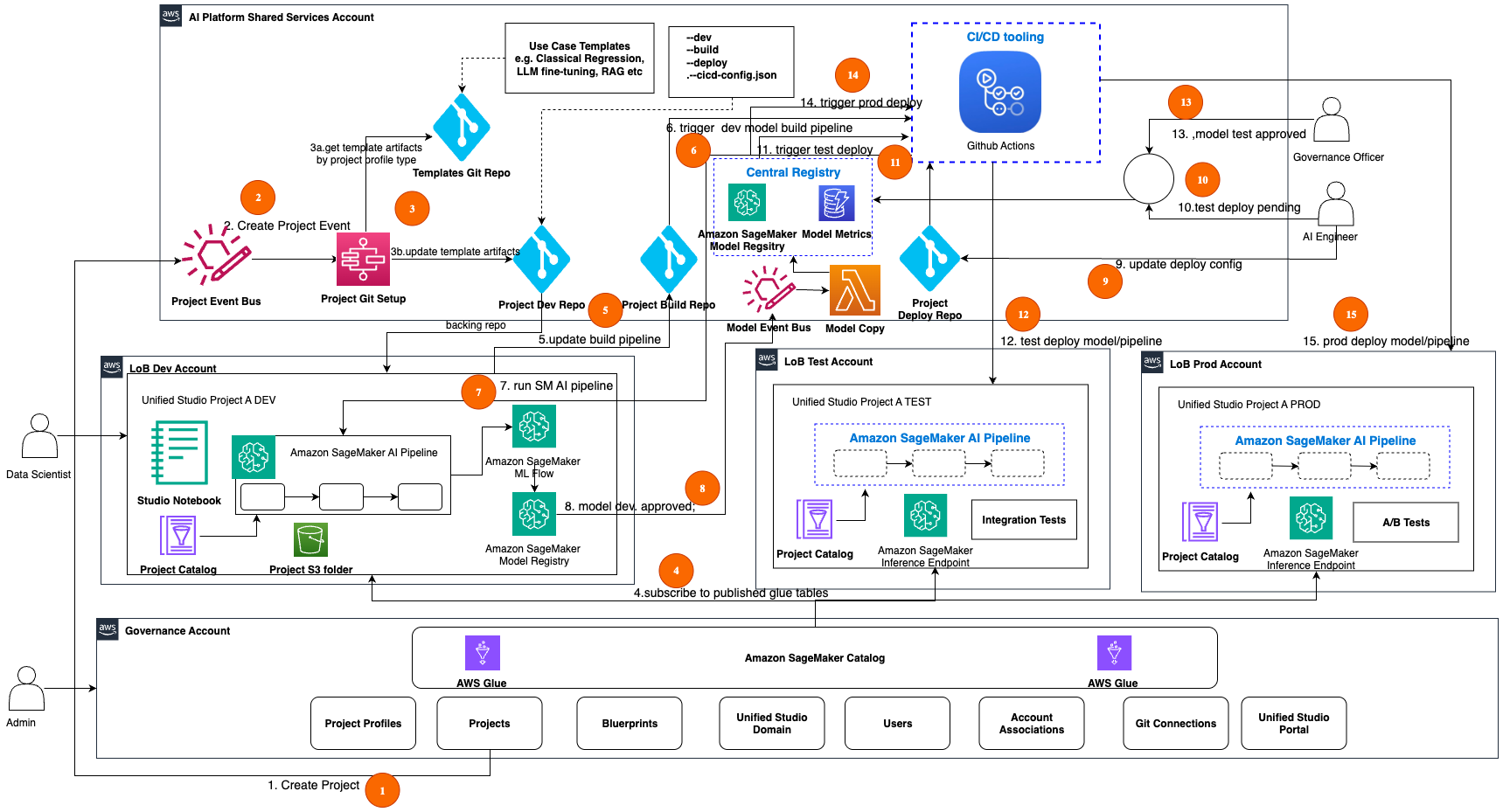
The following workflow walks you through the end-to-end ML operations across a multi-account architecture, starting from initial project creation through development, testing, and production deployment, with built-in governance controls at each stage. We recommend using Amazon EventBridge for the events mentioned in this workflow.
- The data scientist creates Project A DEV in the SageMaker Unified Studio portal. This action publishes a CreateProject AWS CloudTrail event that is bridged to a custom EventBridge bus CreateProject event in the AI shared services account. The event includes key information about the created project. Using the specified Git connection, a project Git repo is created.
- The CreateProject event triggers the Project Git Setup AWS Lambda function for seeding the build and deploy templates into the project.
- An AWS Step Functions workflow performs the following steps:
- Use Project APIs to get the project profile type and retrieve the appropriate template or seed code from the Git repo for the project profile type.
- Update the project’s Git repo build and deploy folders with the seed code, which includes templates for model build and deployment pipelines. Alternatively, you can create separate build and deploy repos for this project and track those repos in the project’s cicd-config.json file.
- The data scientist subscribes to an asset (AWS Glue table) in SageMaker Catalog from their projects. When the producer of that asset approves the subscription, this action makes that asset accessible through the project catalog within their project scope.
- The data scientist updates the project build pipeline code (for example, MLflow tracking) in the build folder and checks it into the project Git repo.
- A CI/CD pipeline is triggered based on the path filter Git action on the project’s build folder.
- The CI/CD pipeline builds the assets (model build pipeline) and runs the Amazon SageMaker AI pipeline in the Project A DEV account. Pipelines experiment metrics are tracked in MLflow, the model is evaluated, and when conditions are met, the model is automatically registered into Amazon SageMaker Model Registry in the same account.
- The lead data scientist approves the model (with stage as Dev and status as Approved) in the model registry. This triggers an EventBridge event in a custom EventBridge bus in the shared services account, and a Lambda function copies the model artifacts from the dev registry into the central registry.
- An AI engineer validates and configures the deployment information for the model in the project’s deploy folder.
- The AI engineer approves the model with stage as Test and status as Pending in the central model registry.
- A CI/CD pipeline for test deployment is triggered based on the central model registry approval event.
- The CI/CD pipeline builds the assets and deploys the model endpoint in the Project A TEST account. The model is integration tested and results are updated in the central model registry.
- The governance officer validates the model results, and when conditions are met, approves the model (with stage as Test and status as Approved) for deployment into production.
- A CI/CD pipeline for production deployment is triggered based on the central model registry approval event.
- The CI/CD pipeline builds the assets and deploys the model endpoint in the Project A PROD account. The model is A/B tested and results are updated in the central model registry. A/B testing in inference refers to the process of comparing the performance of different model versions by routing a portion of inference traffic to each variant to evaluate their relative performance in a controlled manner.
In the following sections, we discuss the account structure and key components of the architecture in more detail.
Account structure
Based on AWS Well-Architected best practices, we recommend implementing a multi-account architecture for your AIOps solution. This approach is aligned with the guidance in the whitepaper Organizing Your AWS Environment Using Multiple Accounts. Our architecture consists of the following specialized accounts:
- AI shared services account – This account hosts common shared services that will be shared across accounts and projects. We host services such as the project Git setup, project repos, central model registry, CI/CD tooling, and more.
- LOB dev account – This account hosts the development AI projects for a given LOB. Users such as data scientists use SageMaker Unified Studio tools to experiment and build and unit test AI project pipelines and models. Unit tested AI project pipelines and models are then promoted using CI/CD to corresponding AI project’s test environment. During this promotion process, the models are also made available in the central model registry in the shared services account for facilitating central model governance and approval workflows.
- LOB test account – This account hosts the test AI projects for a given LOB. Users such as data scientists and AI engineers use SageMaker Unified Studio tools to validate and integration test pipelines and models. After the AI engineer sets up the deployment configuration and approves the model in the central model registry, the CI/CD pipelines will be triggered to deploy the model into the AI project’s test environment.
- LOB prod account – This account hosts the production AI projects for a given LOB. Governance and business stakeholders can validate the model results in the central model registry and approve the models for deployment into the production environment.
- Governance account – This account hosts the SageMaker Unified Studio domain and its associated setup components, such as users, account associations, project profiles, projects, Git connections, and SageMaker Catalog.
Prerequisites
The workflow steps described along with the architecture diagram in the preceding section assume the governance account is implemented. Before proceeding, an administrator must establish the SageMaker Unified Studio domain within the governance account. This initial setup configures the foundational components required to support the solution and its users. For setting up the SageMaker Unified Studio domain in the governance account, and configuring the necessary components, refer to Foundational blocks of Amazon SageMaker Unified Studio: An admin’s guide to implement unified access to all your data, analytics, and AI.
SageMaker Catalog
SageMaker Catalog is an enterprise-wide business catalog for publishing and consuming assets used in data and AI pipelines. With Amazon SageMaker Catalog, you can securely discover and access approved data and models using semantic search with generative AI–created metadata. We use structured AWS Glue tables to demonstrate the AI pipelines. If you need access to unstructured data, you can leverage the S3 Object collections feature supported in SageMaker Catalog as described in the documentation.
Project structure
In SageMaker Unified Studio, a project creates a collaborative boundary within a domain where teams can work together on specific business use cases. Users can use projects to create, manage, and share data and resources in an isolated environment. When establishing a project, users can select from preconfigured project profiles (such as classical regression, LLM fine-tuning, or Retrieval Augmented Generation (RAG) applications) that align with their specific use case. These profiles must be configured in advance by administrators based on user requirements.
Projects function as workspaces with isolation boundaries enforced through AWS Identity and Access Management (IAM) resource tagging. However, there are important design considerations when implementing project isolation:
- Not all IAM resources support tagging. For a current list of compatible resources, refer to AWS services that work with IAM.
- AWS List API calls can’t automatically filter results using tags, which might impact resource discovery and management at scale.
Our AIOps architecture illustrates SageMaker Unified Studio Project A spanning across three lines of business (DEV, TEST, and PROD), representing the different software development lifecycle (SDLC) stages. Although it might be technically possible to consolidate all SDLC stages within a single account, we strongly recommend maintaining account-level separation between non-prod (dev, test) and prod environments. This separation enhances security, improves scalability, and increases reliability for your AI workloads.
For test and production environments, creating SageMaker Unified Studio projects is optional if you don’t require access to deployed artifacts through the SageMaker Unified Studio portal. As an alternative, you can use AWS APIs to provision access for your IAM principals in these environments and use observability tools for visualization and monitoring.
In the next section, we explore strategies for effectively mapping projects with multi-tenancy to accounts while considering SDLC stages and isolation requirements.
Multi-tenancy
Multi-tenancy refers to the architecture where a single environment serves multiple, isolated teams, LOBs, or organizations (tenants), making sure each tenant’s data and resources are securely separated while using shared resources for efficiency. This approach enhances scalability, cost-effectiveness, and resource utilization while maintaining data privacy and security for each tenant.
In the AIOps architecture described earlier, we chose to segment the SDLC environment at LOB level for facilitating multiple tenancy for AI projects. However, you can choose the granularity that best fits your solution’s multi-tenancy requirements. At the minimum, we recommend separating development and production projects by AWS accounts to enforce a high security bar for your AI workloads. Also, we recommend hosting your services shared across projects in a shared account such as the AI shared services account.
Multi-tenancy with multiple accounts and a single project
In the following diagram, we depict how to implement multi-tenancy for data producer use cases across multiple SDLC accounts with a single project workspace per use case. For each use case project (for example, Project D), we create only one Project D-Dev workspace. After promotion of those project resources from dev into test or prod, they are deployed and executed in those environments. Those deployed project resources can be accessed through observability tools from the shared services account for troubleshooting.
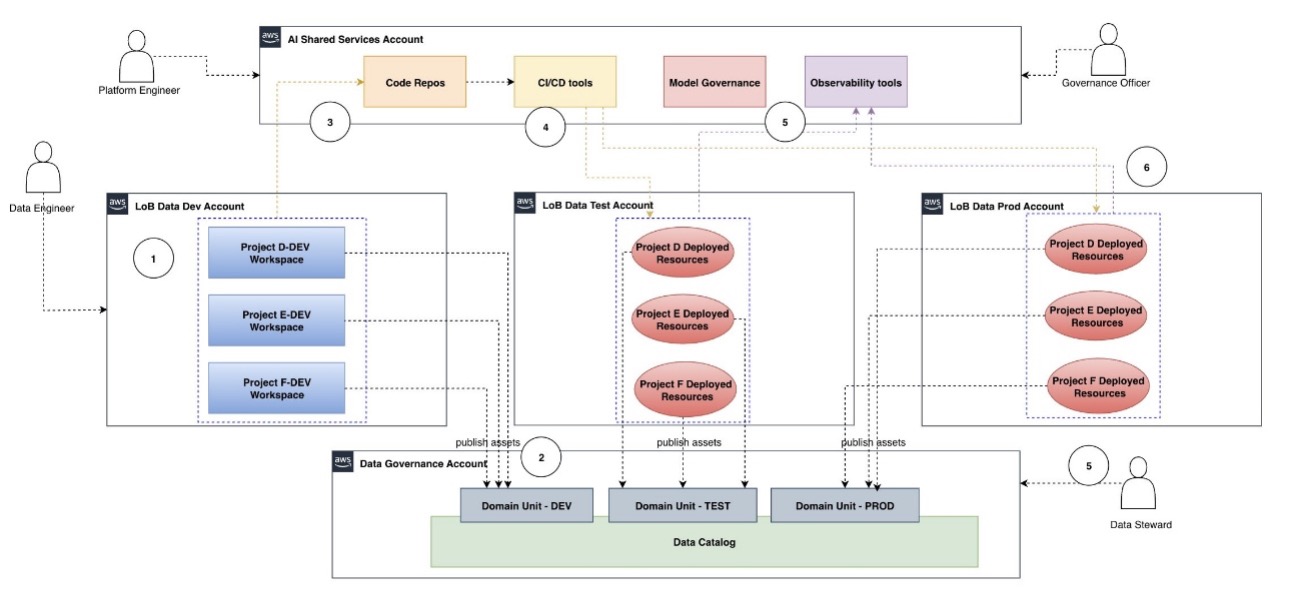
The high-level workflow steps for the preceding architecture are as follows:
- The data engineer logs in to their authorized LOB dev project workspace. Internally, this is mapped to the LOB data dev account.
- From the project workspace, they use project tools to build the data pipeline code, unit test, and publish data assets into the AWS Glue Data Catalog’s DEV domain unit.
- After building and unit testing the data pipeline, the data engineer checks the code into the code repository.
- CI/CD tools listen for code repo change events and deploy the data pipeline into the LOB data test account, where it is integration tested. This data pipeline execution produces the asset in the Data Catalog’s TEST domain unit. Optionally, the project workspace can also be deployed to this account if access to deployed resources is needed locally in that account.
- The deployed project resources (data pipelines) are validated and approved for deployment using centralized tools, such as observability and Data Catalog tools.
- The approved data pipeline is deployed to the LOB ML prod account using CI/CD tools. Optionally, the project workspace can also be deployed to this account if access to deployed resources is needed locally in that account.
Multi-tenancy with multiple accounts and multiple projects
In the following diagram, we depict how to implement multi-tenancy for data consumer ML use cases across multiple SDLC accounts with multiple projects. Typically, data scientists need production-grade data to build and train models. Therefore, in the following diagram, we depict only access to production data using the PROD domain unit of the Data Catalog. For each use case project (for example, Project A), we create three SDLC project workspaces using SDLC stage qualifiers (dev, test, prod). After promotion of those project resources from dev into test or prod, they are deployed and executed in those environments. Those deployed project resources are accessible from their connected project stage workspaces.
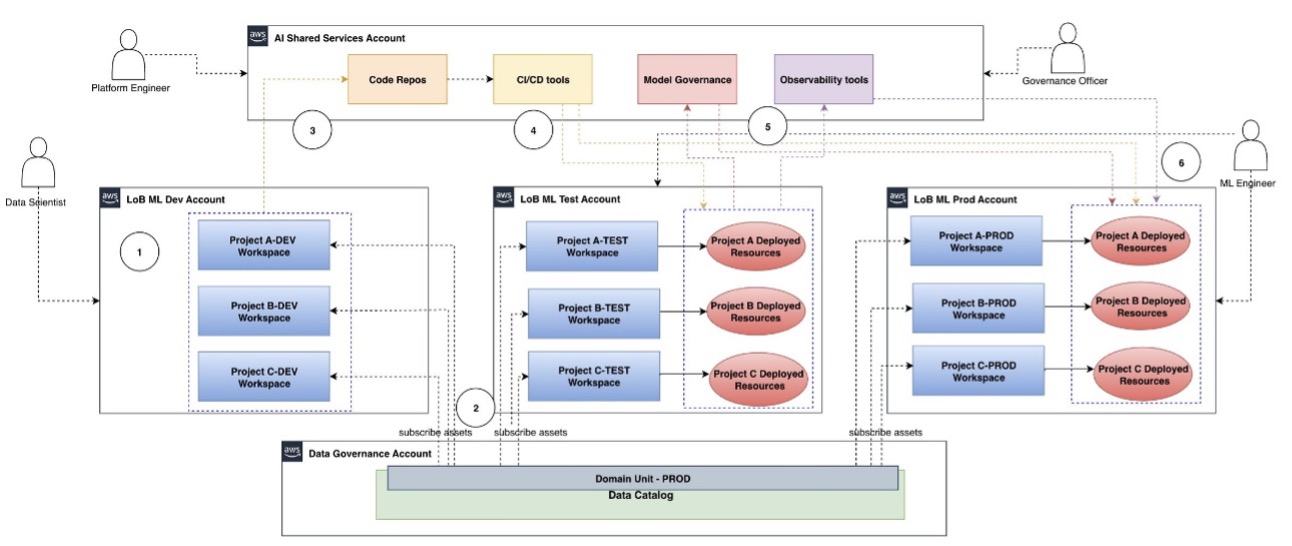
The high-level workflow steps for the architecture are as follows:
- The data scientist logs in to their authorized LOB dev project workspace. Internally, this is mapped to the LOB ML dev account.
- From the project workspace, they search, discover, and subscribe to their data asset from the Data Catalog. The data owner is notified and approves the request for access, and the data scientist gains access to that dataset in that project workspace.
- After building the model pipeline, the data scientist checks the code into the code repository.
- CI/CD tools listen for code repo change events and deploy the model pipeline into the LOB ML test account, where it is integration tested. Optionally, the project workspace can also be deployed to this account if access to deployed resources is needed locally in that account.
- Model governance and observability for deployed project resources are managed using centralized tools in the shared services account. For example, the governance officer reviews the model metrics and documentation and approves it for deployment.
- The approved model is deployed to the LOB ML prod account using CI/CD tools. Optionally, the project workspace can also be deployed to this account if access to deployed resources is needed locally in that account. The ML engineer might need access to the test and prod account resources for troubleshooting purposes.
Organizing the project template and code repos with CI/CD
SageMaker Unified Studio supports seamless integration with external Git repositories, such as GitHub and GitLab, through its Git connections feature. When a new project is created, the selected Git connection is used to automatically set up a corresponding project repository, so users can manage code, collaborate, and perform Git operations directly within the SageMaker Unified Studio environment. As a best practice, we recommend providing a template or seed code tailored to the specific use case (such as classical regression, LLM fine-tuning, or RAG applications) during project setup to accelerate development and drive standardization.
For organizing CI/CD workflows, there are two primary approaches: using dedicated build and deploy folders within a single project repository, or adopting a separate repository for each stage. The separate repository approach, which offers clearer change controls and straightforward management of promotion workflows, will be covered in detail in Part 2 of this series.
Conclusion
In this first part of our series, we laid the groundwork for scaling AI and analytics with SageMaker Unified Studio by addressing architectural strategies for automation, multi-account promotion, and multi-tenant isolation. These foundational elements help organizations balance innovation with robust security and governance, so teams can collaborate efficiently while maintaining clear boundaries and compliance.
Although security, governance, scale, and performance are key considerations for an AIOps architecture, you must also balance that with cost considerations. We shared strategies for addressing these key considerations using best practices for multi-account, multi-tenancy, and project-based governance to move your project from development to production.
We discussed how you can modernize data pipelines, accelerate AI development, and enforce regulatory compliance, across these personas:
- Administrators and platform engineers – Establish secure domains, configure project profiles, and set up governance controls that enable safe, scalable collaboration
- Data scientists and AI engineers – Use project workspaces to rapidly build, test, and deploy models using familiar AWS tools—all within a governed, collaborative environment
- Business and governance leaders – Gain confidence that data, models, and analytics are managed with best-in-class security, transparency, and compliance, supporting business agility and risk management
In Part 2, we guide you through hands-on implementation, demonstrating how each persona can collaborate seamlessly, from project creation to production deployment. Dive in and discover how your teams can unlock the full potential of SageMaker Unified Studio.
About the Authors
 Ram Vittal is a GenAI/ML Specialist SA at AWS. He has over 3 decades of experience architecting and building distributed, hybrid, and cloud applications. He is passionate about building secure, scalable, reliable GenAI/ML solutions to help customers with their cloud adoption and optimization journey to improve their business outcomes. In his spare time, he rides motorcycle and walks with his sheep-a-doodle!
 Sandeep Raveesh is a GenAI Specialist Solutions Architect at AWS. He works with customer through their AIOps journey across model training, GenAI applications like Agents, and scaling GenAI use-cases. He also focuses on Go-To-Market strategies helping AWS build and align products to solve industry challenges in the GenerativeAI space. You can find Sandeep on LinkedIn.
 Koushik Konjeti is a Senior Solutions Architect at Amazon Web Services. He has a passion for aligning architectural guidance with customer goals, ensuring solutions are tailored to their unique requirements. Outside of work, he enjoys playing cricket and tennis.
 Vaibhav Sabharwal is a Senior Solutions Architect with Amazon Web Services (AWS) based out of New York. He is passionate about learning new cloud technologies and assisting customers in building cloud adoption strategies, designing innovative solutions, and driving operational excellence. As a member of the Financial Services Technical Field Community at AWS, he actively contributes to the collaborative efforts within the industry.