Organizations are adopting large language models (LLMs), such as DeepSeek R1, to transform business processes, enhance customer experiences, and drive innovation at unprecedented speed. However, standalone LLMs have key limitations such as hallucinations, outdated knowledge, and no access to proprietary data. Retrieval Augmented Generation (RAG) addresses these gaps by combining semantic search with generative AI, enabling models to retrieve relevant information from enterprise knowledge bases before responding. This approach grounds outputs in accurate, up-to-date context, making applications more reliable, transparent, and capable of using domain expertise without retraining. Yet, as the usage of RAG solutions grows, so do the operational and technical hurdles associated with scaling these solutions in production. Such hurdles include the costs and infrastructure complexities that come with vector databases that enterprises need to seamlessly store, search, and manage high-dimensional embeddings at scale.
Although RAG unlocks remarkable capabilities, organizations building production-grade applications often encounter four major obstacles with existing vector databases:
- Unpredictable costs – Conventional solutions often require over-provisioning, resulting in ballooning expenses as your data grows.
- Operational complexity – Teams are forced to divert valuable engineering resources toward managing and tuning dedicated vector database clusters.
- Scaling limitations – As vector collections expand and diversify, capacity planning becomes increasingly difficult and time-consuming.
- Integration overhead – Connecting vector stores to existing data pipelines, security frameworks, and analytics tools can introduce friction and slow time-to-market.
With the launch of Amazon Simple Storage Service (Amazon S3) Vectors, the first cloud object storage service with native support to store and query vectors, we have a new approach to cost-effectively manage vector data at scale. In this post, we explore how combining S3 Vectors and Amazon SageMaker AI redefines the developer experience for RAG, making it easier than ever to experiment, build, and scale AI-powered applications without the traditional trade-offs.
Amazon SageMaker AI: Streamlining LLM experimentation and governance
Enterprise-scale RAG applications involve high data volumes (often multimillion document knowledge bases, including unstructured data), high query throughput, mission-critical reliability, complex integration, and continuous evaluation and improvement. To realize these enterprise-scale RAG applications, you need more than powerful LLM model deployment. These applications also demand rigorous experimentation, governance, and performance tracking. Amazon SageMaker AI, with its native integration with managed MLflow, offers a unified system for deploying, monitoring, and optimizing LLMs at scale.
Amazon SageMaker JumpStart accelerates embedding and text generation deployment, helping teams rapidly prototype and deliver value. SageMaker JumpStart accelerates the development of RAG solutions with:
- One-click deployment – Quickly deploy models such as GTE-Qwen2-7B for embeddings or DeepSeek R1 Distill Qwen 7B for generation.
- Optimized infrastructure – Get automatic recommendations for the best instance types to balance performance and cost.
- Scalable endpoints – Launch high-performance inference endpoints with built-in monitoring for reliable, low-latency service.
Developing effective RAG systems requires evaluating prompts, chunking strategies, retrieval methods, and model settings. SageMaker managed MLflow supports this in several ways. You can track experiments by logging and comparing chunking, retrieval, and generation configurations. Use built-in LLM-based generative AI metrics such as correctness and relevance to assess output quality. To monitor performance, you can track latency and throughput alongside output quality to verify production-readiness. Improve reproducibility of experiments by capturing parameters for reliable auditing and experiment replication. And by using the governance dashboards, you can visualize results, manage model versions, and control approvals through an intuitive interface.
As enterprises scale their RAG implementations, they face significant challenges for managing their vector stores. Traditional vector databases have unpredictable and rising costs because they incur charges based on compute, storage, and API usage, which scale with data volume. Teams spend significant time on the operational complexity that results from having to manage separate vector database infrastructure instead of focusing on application development. Capacity planning becomes increasingly complex as vector collections grow and diversify, making scaling challenging. Connecting vector stores with existing data infrastructure and security frameworks adds additional complexity.
Introducing Amazon S3 Vectors
Amazon S3 Vectors delivers purpose-built vector storage so you can harness the semantic power of your organization’s unstructured data at scale. Designed for the cost-optimized and durable storage of large vector datasets with sub-second query performance, S3 Vectors is ideal for infrequent query workloads and can help you reduce the overall cost of uploading, storing, and querying vectors by up to 90% compared to alternative solutions. With S3 Vectors, you only pay for what you use without the need for infrastructure provisioning and management. Whether you’re developing semantic search engines, RAG systems, or recommendation services, you can focus on innovation rather than cost constraints and data management complexities.
Amazon S3 Vectors brings the proven economics and simplicity of Amazon S3 to vectors. S3 Vectors is ideal for RAG applications where slightly higher latency than millisecond-level vector databases is acceptable, in exchange for substantial cost savings and simplified operations. You also have elasticity because you can scale vector search applications seamlessly from gigabytes to petabytes, and scale down to zero when these resources are not in use. Moreover, data management becomes more flexible. You can store vectors alongside metadata, minimizing the need for separate databases while enhancing retrieval performance through consolidated data access. S3 Vectors supports up to 40 KB of (filterable and nonfilterable) metadata per vector with schema-less filtering capabilities, using separate vector indexes for streamlined organization.
Solution overview
In this post, we show how to build a cost-effective, enterprise-scale RAG application using Amazon S3 Vectors, SageMaker AI for scalable inference, and SageMaker managed MLflow for experiment tracking and evaluation, making sure the responses meet enterprise standards. We demonstrate this by building a RAG system that answers questions about Amazon financials using annual reports, shareholder letters, and 10-K filings as the knowledge base. Our solution consists of the following components:
- Document ingestion – Process PDF documents using LangChain’s document loaders.
- Text chunking – Experiment with different chunking strategies (for example, fixed-size or recursive) and configurations (such as chunk size and overlap).
- Vector embedding – Generate embeddings using SageMaker deployed embedding LLM models.
- Vector storage – Store vectors in Amazon S3 Vectors with associated metadata (such as the type of document). You can also store the entire text chunk in the vector metadata for simple retrieval.
- Retrieval logic – Implement semantic search using vector similarity.
- Response generation – Create responses using retrieved context and a SageMaker deployed LLM.
- Evaluation – Assess performance using ground truth datasets and SageMaker managed MLflow metrics.
The following diagram is the solution architecture.
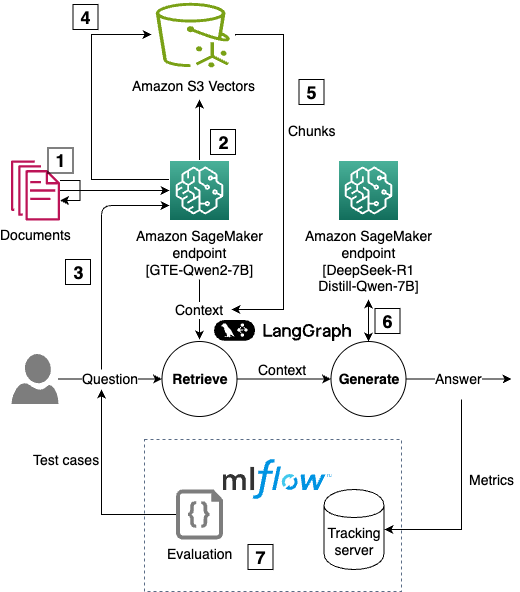
You can follow and execute the full example code from the repository. We use code snippets from this GitHub repository to illustrate RAG solution using S3 Vectors and tracking approaches in the rest of this post.
Prerequisites
To perform the solution, you need to have these prerequisites:
- An AWS account with billing enabled.
- A SageMaker AI Studio domain. For more information, refer to Use quick setup for Amazon SageMaker AI.
- Access to a running SageMaker AI managed MLflow tracking server in Amazon SageMaker Studio. For more information, refer to the instructions for setting up a new MLflow tracking server.
- Enable access to an Amazon Bedrock foundation model (FM) to use in LLM-as-a-judge. In this sample, we use Anthropic’s Claude 3 Sonnet.
Walkthrough
The following steps walk you through this solution:
- Deploy LLMs on SageMaker AI
- Create Amazon S3 Vectors buckets and indexes
- Process documents and generate embeddings
- Implement the RAG pipeline with LangGraph
- Evaluate RAG performance with MLflow
Step 1: Deploy LLMs on SageMaker AI
We use SageMaker JumpStart to deploy state-of-the-art models in minutes using a few lines of code. A RAG application requires:
- An embedding model to convert text into vector representations
- A text generation model to produce responses based on retrieved context
Use the following code:
In this post, we use Qwen2 7B instruct as the embedding model and DeepSeek R1 because they’re highly capable open source models that are among the top models in embedding leaderboards and LLM leaderboards. You can choose an embedding and text generation model from the more than 300 models available on SageMaker JumpStart.
Step 2: Create Amazon S3 Vectors buckets and indexes
Amazon S3 Vectors provide a seamless yet powerful way to store and search vector embeddings. Vectors are stored in vector indexes, which are used for logically grouping. Write and read operations are directed to a single vector index. To start using Amazon S3 Vectors, you need to:
- Create an S3 Vector bucket indicating its name:
- Create vector indexes by giving them a name and defining the number of dimensions and the distance metric to use. Vector indexes can store up to 50,000,000 vectors with a maximum dimension of 4,096 and use either
cosineoreuclideanas their distance metrics. Define your dimensions and distance metric:
Step 3: Process documents and generate embeddings
You can calculate the embedding vectors for each text chunk in the source documents and store them in your S3 vector bucket using the put_vectors API, which supports up to 500 vectors per call. When putting vectors in the vector index, you can include up to 10 fields in the vector metadata to facilitate the retrieval and generation stages of RAG. In the following example, we add the domain (such as a financial document or shareholder letter) and the year for targeted semantic queries, and the text chunk so we can use its content when generating an answer:
Step 4: Implement the RAG pipeline with LangGraph
LangGraph is a framework for building stateful, multi-step applications with LLMs using a graph-based architecture. The first step in the definition of a RAG application with LangGraph is to create Python functions for the retrieval and generation steps.
- The retrieval step runs a semantic query based on an input string and may apply metadata filters to narrow the results to a specific set of documents. The filter syntax in Amazon S3 Vectors supports various types of string and numerical comparison (for example,
$eqfor exact match or$gtfor greater than comparison) and combinations through logical operations (such as$andor$or). - The generation step uses the selected text chunks as context to generate a response.
You can use the query_vectors API in S3 Vectors to run a semantic search on a vector index. In this query, you have to define the query vector (that is, the vector that represents the query or question), search parameters (for example, topK for the number of similar vectors to retrieve), and possibly filter conditions for metadata filtering:
Metadata filters can be used to focus the search on a subset of documents. For example, if you’re asking about business and industry risks from an annual report, you can call the query_vectors function with metadata_filter being equal to “Amazon Annual Report” to only consider those documents: ({"domain": {"$eq": "Amazon Annual Report"}}). For greater specificity, we could add numerical operators to indicate the years of the annual reports to consult ({"year": {"$gt": 2023}}). The choice of operators and filters depends on the use case and on the logic that will allow that only the relevant documents are consulted.
You can automate the retrieval and generation steps of a RAG application using a LangGraph StateGraph. To define a LangGraph graph for RAG, we take the following steps:
- Define functions for retrieval and generation. A snippet of this implementation is shown in the following example. For a complete overview of these functions, visit our GitHub repository.
- Retrieve – Invoke the SageMaker AI embedding model to generate a query vector, then query a vector index to find relevant document chunks.
- Generate – Invoke the SageMaker AI text generation model with the retrieved chunks to generate a response.
- After the LangGraph graph has been built and compiled, it can be invoked with sample questions:
The response from the LangGraph graph is as follows:
The names of the people in Amazon’s board of directors are Jeffrey P. Bezos, Andrew R. Jassy, Keith B. Alexander, Edith W. Cooper, Jamie S. Gorelick, Daniel P. Huttenlocher, and Judith A. McGrath. There are seven members on the board, including Amazon’s CEO.
Step 5: Evaluate RAG performance with MLflow
To validate our RAG system performs well, we use MLflow to track experiments and evaluate performance using a ground truth dataset of questions and answers. You can set up an MLflow evaluation and run it using the following script. Notice that we can complement metrics from the evaluation (for example, latency and answer correctness using LLM as a judge) with parameters from the chunking and embedding stages to provide full visibility of the RAG application:
This evaluation tracks:
- Answer correctness – Using Anthropic’s Claude 3 Sonnet as a judge to provide a measure of answer quality as assessed by an LLM. High scores mean that the model output contains information that is semantically similar to the ground truth and that this information is correct, while low scores mean that outputs disagree with the ground truth or that the information is incorrect.
- Latency – Measuring the end-to-end response time of our RAG system to estimate the fitness for latency-critical applications (for example, chat assistants).
- Chunking parameters – Chunking parameters determine how source documents are split into the chunks that are selectively pulled into the context in a RAG application. Changing the chunking strategy (for example, fixed size chunking or hierarchical chunking), chunk size (the number of characters in the chunk), and the chunk overlap (number of characters repeated between subsequent chunks to aid in contextualization) can affect the performance of the retriever, and the optimal configuration is found through experimentation.
- Embedding parameters – The model ID and version used for embedding, time spent chunking and embedding the source documents. These parameters help with reproducibility and experiment tracking.
The following figure shows the metrics and parameters from one experiment. Using this view, a machine learning (ML) engineer can compare the performance of different RAG applications and pick the combination of retrieval and generation parameters that provide the best user experience. This could be, for example, finding the best combination between high answer correctness and low latency. The ML engineer can then learn the models and chunking parameters that resulted in that performance and implement them in the final application.
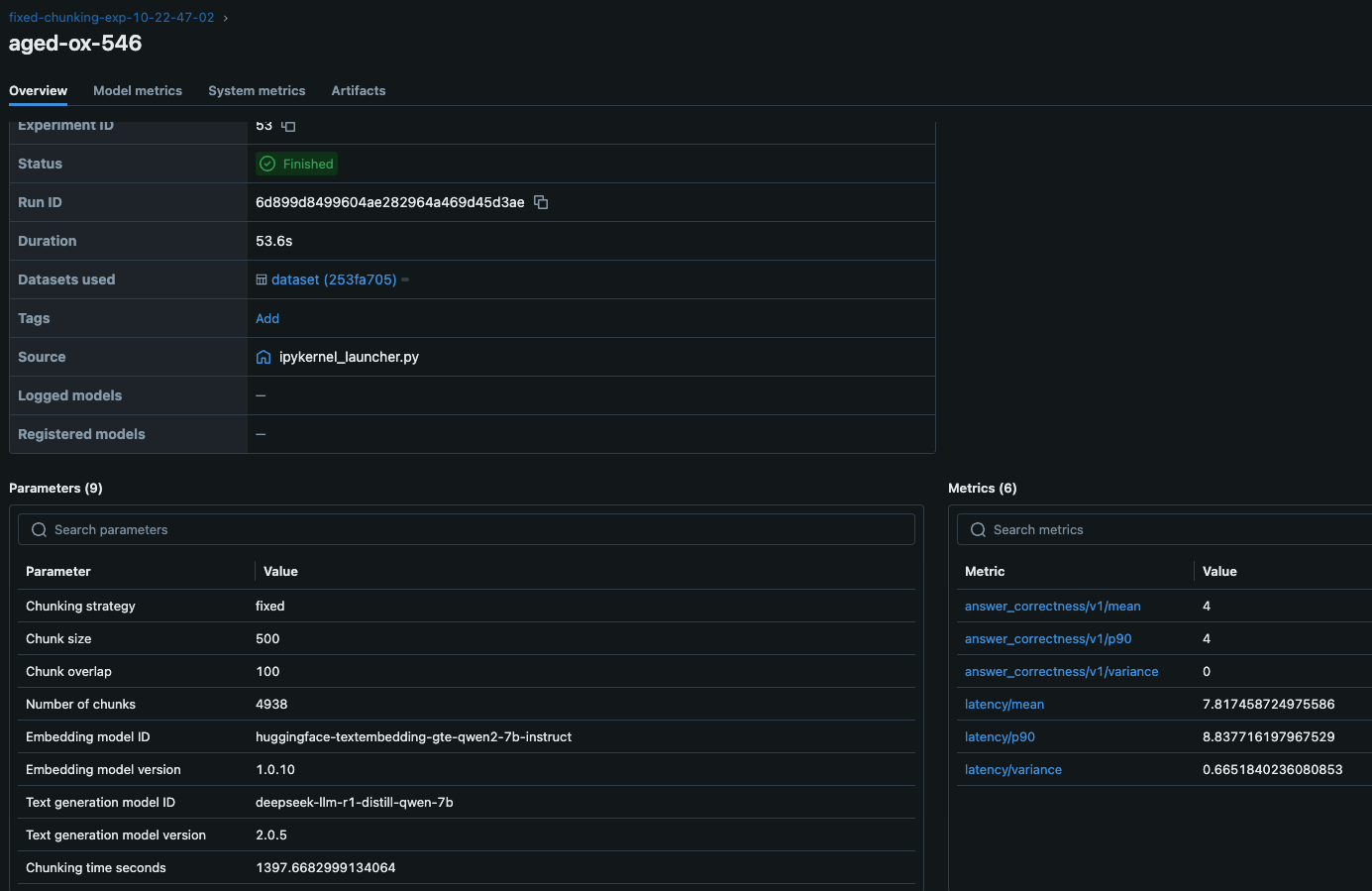
By running multiple experiments with different chunking strategies, embedding models, or retrieval configurations, you can identify the optimal setup for your use case.
Key benefits of Amazon S3 Vectors for RAG
Amazon S3 Vectors bring scalable, cost-effective vector search to your RAG applications with:
- Cost-effective pricing – Pay only for what you use, with no infrastructure to manage.
- Fast similarity search – Supports sub-second retrieval for efficient retrieval.
- Serverless scalability – Automatically scales without provisioning resources.
- Seamless integration – Works with familiar Amazon S3 APIs and AWS services.
- Flexible filtering – Supports metadata queries using a MongoDB-like syntax.
- Unified storage – Store vectors and text metadata together, enabling faster retrieval and reducing the need for separate databases.
Amazon S3 vector store is ideal for use cases where ultra-low latency isn’t required, such as batch processing, periodic reporting, and agent-based workflows. It offers the durability, scalability, and operational simplicity of Amazon S3. A few industry-specific use cases that can benefit from S3 vector store are:
- Healthcare – Searchable medical research databases, mine patterns in historical patient data, and organize diagnostic images for model training
- Financial services – Detect fraud patterns in past transactions, extract insights from financial documents, and manage searchable archives of market research
- Retail – Enrich product catalogs with embeddings, analyze customer reviews for sentiment trends, and study seasonal purchasing patterns
- Manufacturing – Manage technical manuals and documentation, identify trends in quality control data, and optimize supply chains with historical data
- Legal and compliance – Discover relevant legal documents and contracts, organize regulatory and compliance records, and analyze and compare patents
- Media and entertainment – Power non-real-time recommendation engines, organize media archives efficiently, and manage digital content licensing records
- Education – Create searchable academic research repositories, organize and retrieve educational content, and analyze historical student performance trends
Performance Considerations
When building RAG applications with Amazon S3 Vectors, consider these performance optimization strategies:
- Chunking strategy – Experiment with different chunking approaches (such as fixed-size or recursive) to find the optimal balance between context preservation and retrieval precision. Track those experiments using SageMaker managed MLflow.
- Vector dimensions – Higher-dimensional embeddings can capture more semantic information but require more storage.
- Distance metrics – Choose between cosine or Euclidean distance based on your embedding model’s characteristics.
- Metadata filtering – Use metadata filters to narrow down search results and improve relevance.
To summarize, the key advantages demonstrated in using S3 Vectors with SageMaker AI are:
- Cost-efficient scalability – The serverless storage of S3 Vectors adapts dynamically to workload demands, avoiding over-provisioning costs while maintaining low-latency retrieval.
- Integrated evaluation framework – The experiment tracking and generative AI–specific metrics in SageMaker managed MLflow enable systematic optimization of chunking strategies, retrieval parameters, and model configurations.
- Accelerated innovation cycle – Pre-trained models from SageMaker JumpStart and one-click deployments reduce prototyping time from weeks to hours while maintaining enterprise-grade security.
In this post, we’ve shown how to replace traditional vector database complexity with a streamlined AWS based approach that scales with your data and evolves with your generative AI strategy. The SageMaker managed MLflow integration means that every architectural decision is guided by quantifiable metrics, from answer correctness to latency profiles, turning experimentation into actionable insights. As you implement RAG solutions, use these tools to validate retrieval strategies against domain-specific datasets, benchmark embedding models for accuracy and storage tradeoffs, and enforce governance through version-controlled deployments.
Cleanup
To avoid unnecessary costs, delete resources such as the SageMaker-managed MLflow tracking server, S3 Vectors indexes and buckets, and SageMaker endpoints when your RAG experimentation is complete.
Conclusion
In this post, we’ve demonstrated how to build a complete RAG solution using Amazon S3 Vectors and SageMaker AI. The combination of S3 vector buckets, SageMaker AI LLM models, and SageMaker managed MLflow provides a transformative solution for organizations building enterprise-scale RAG applications. In this approach, we illustrate the use of S3 Vectors as a new approach to effectively manage vector data at scale, without the cost and scalability challenges that come with conventional vector databases.
We encourage you to explore Amazon S3 Vectors documentation and experiment with the SageMaker AI LLM models and SageMaker managed MLflow evaluation templates shown in this post. Now it’s your turn to build enterprise-scale AI solutions with serverless, observable, and relentlessly optimized generative AI strategies.
About the Authors
 Sandeep Raveesh is a GenAI Specialist Solutions Architect at AWS. He works with customer through their AIOps journey across model training, Retrieval-Augmented-Generation (RAG), GenAI Agents, and scaling GenAI use-cases. He also focuses on Go-To-Market strategies helping AWS build and align products to solve industry challenges in the Generative AI space. You can find Sandeep on LinkedIn.
 Felipe Lopez is a Senior AI/ML Specialist Solutions Architect at AWS. Prior to joining AWS, Felipe worked with GE Digital and SLB, where he focused on modeling and optimization products for industrial applications.
 Indrajit Ghosalkar is a Sr. Solutions Architect at Amazon Web Services based in Singapore. He loves helping customers achieve their business outcomes through cloud adoption and realize their data analytics and ML goals through adoption of DataOps / MLOps practices and solutions. In his spare time, he enjoys playing with his son, traveling and meeting new people.
 Biswanath Hore is a Sr. Solutions Architect at Amazon Web Services. He works with customers early in their AWS journey, helping them adopt cloud solutions to address their business needs. He is passionate about Machine Learning and, outside of work, loves spending time with his family.